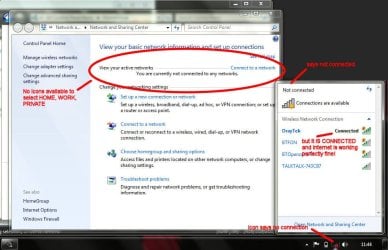
Win 7. Cannot connect to a network, no active network, but I'm online!

zoobaby

New member
Local time
12:54 PM
Messages
8
Hello, first post and hope that I might be able to get help here for a problem that is driving me crazy. Many thanks for taking the time to read below...

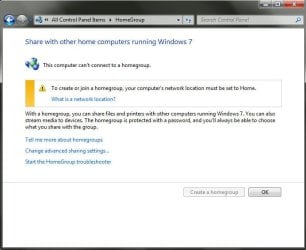
I wish to connect to my Homegroup. Win 7 says that I cannot as my location must be set to "Home". So I follow the link "What is a network location".

The next dialogue box says that I have no active networks so I click "Connect to a Network", which brings up the pop-up in the bottom right stating I'm not connected but there are connections available. The problem is - I AM CONNECTED and the internet is working perfectly fine in fact.

How can I get Windows to recognise my active connections, show me the icon for the network, and allow me to select home, work or private? As it stands, I just go on a merry round-about between these two dialogue boxes and never get any other options. Perhaps I need to go in to advanced options?

If it makes any difference, the Homegroup and the Network previously worked perfectly until I was asked to test another router by hooking it up to my laptop. Maybe I selected something other than Home at this point? I don't know. But since then it's been having this problem.

I'd really appreciate it if anyone could help.
Many thanks.
 

Attachments
  • 01.jpg
    01.jpg
    38 KB · Views: 29
  • 02a.jpg
    02a.jpg
    85.1 KB · Views: 78

My Computer My Computer

At a glance

Windows 7
OS
Windows 7
Hello,
Welcome to SevenForums. What you may want to try is disabling and then re-enabling your wireless network adapter. Do this by going to Control Panel--->Network and Internet--->Network and Sharing Center--->Change adapter Settings--->Right click your wireless network adapter and click disable, wait about 60 seconds and then enable it. Hope this helps
 

My Computer My Computer

At a glance

Windows 7 profesional4 Gigs
Computer Manufacturer/Model Number
HP
OS
Windows 7 profesional
Memory
4 Gigs
Monitor(s) Displays
Built in display
Hard Drives
1 280 gig
Case
N/A
Keyboard
Built in
Mouse
Built in
Internet Speed
100 mbps
Hello, first post and hope that I might be able to get help here for a problem that is driving me crazy. Many thanks for taking the time to read below...

I wish to connect to my Homegroup. Win 7 says that I cannot as my location must be set to "Home". So I follow the link "What is a network location".

The next dialogue box says that I have no active networks so I click "Connect to a Network", which brings up the pop-up in the bottom right stating I'm not connected but there are connections available. The problem is - I AM CONNECTED and the internet is working perfectly fine in fact.

How can I get Windows to recognise my active connections, show me the icon for the network, and allow me to select home, work or private? As it stands, I just go on a merry round-about between these two dialogue boxes and never get any other options. Perhaps I need to go in to advanced options?

If it makes any difference, the Homegroup and the Network previously worked perfectly until I was asked to test another router by hooking it up to my laptop. Maybe I selected something other than Home at this point? I don't know. But since then it's been having this problem.

I'd really appreciate it if anyone could help.
Many thanks.

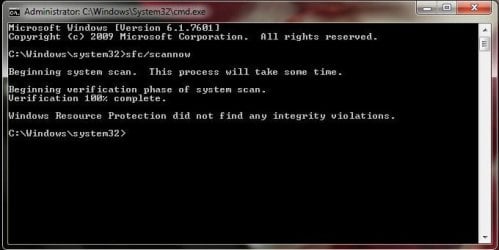
You might want to try using the sfc/scannow command because it looks like some files are missing.

Just type sfc/scannow into an elevated command prompt and let it run till complete.
 

My Computer My Computer

At a glance

Windows 7 Ult, Windows 8.1 Pro,Q9650-4.275GHz, E8600 4.5GHz, E6750-3.8GHzG.Skill PC2 9600 1200Mhz 5 5 5 15 2TGTX480
Computer type
PC/Desktop
Computer Manufacturer/Model Number
Home built
OS
Windows 7 Ult, Windows 8.1 Pro,
CPU
Q9650-4.275GHz, E8600 4.5GHz, E6750-3.8GHz
Motherboard
Evga 780i FTW
Memory
G.Skill PC2 9600 1200Mhz 5 5 5 15 2T
Graphics Card(s)
GTX480
Sound Card
Asus Xonar D2
Monitor(s) Displays
HannsG
Screen Resolution
1680X1050
Hard Drives
GSkill Phoenix Pro 120GB SSD
PSU
ThermalTake Toughpower 1000Watt modular
Case
ThermalTake XaserV
Cooling
Xigmatek S1283
Keyboard
Logitech G15
Mouse
Logitech G9
Internet Speed
T1
Many thanks to both jhansen965 and chev65.

Unfortunately, I was unable to resolve the issue. Disable and then enable didn't work (even with computer restart) and alas, the sfc/scannow command wasn't successful.

I think the idea that files are missing could be correct - Windows keeps wanting to install updates (practically every single day) which I just assumed was due to installing a new version of Norton. Is this looking like a Windows reinstallation?
 

Attachments

  • 03.jpg
    03.jpg
    25.9 KB · Views: 73

My Computer My Computer

At a glance

Windows 7
OS
Windows 7
Back
Top