Help with my laptop. Won't connect to a network.

GeekGirl637

New member
Local time
1:55 AM
Messages
10
OK, I need serious help. I downloaded Windows 7 Home Premium 64 bit to my computer to completey make over my computer. What I ended up getting was not being able to connect to a network; my computer didn't even show that there were networks available.

So I went and downloaded the appropriate drivers for my computer; it's a Gateway, NV57H50u.

Yay! My computer starts to show all the wireless networks around me. I go to connect to my school's, type in my username and password AND ..... It says it can't connect to the network. So I troubleshoot it. AND ... Windows Troubleshooter couldn't identify the problem. I tried typing in my log in again ... Didn't work. Tried lowering my firewall protection ... didn't work.

PLEASE HELP
And I know next to nothing about computer, so detailed instructions would probably be best for me. THANK YOU! :D
 

Attachments

My Computer My Computer

At a glance

Windows 7 Home Premium 64bit
Computer type
Laptop
Computer Manufacturer/Model Number
Gateway
OS
Windows 7 Home Premium 64bit
Hello please can you tell us what you WIFI card is??
 

My Computer My Computer

At a glance

Windows 7 Ultimate 64-bitIntel G3420 3.2GHZ Dual CoreKingson 8GB 1600mhzMSI R7970 TF 3GD5/OC BE
Computer type
PC/Desktop
Computer Manufacturer/Model Number
Custom Build
OS
Windows 7 Ultimate 64-bit
CPU
Intel G3420 3.2GHZ Dual Core
Motherboard
Gigabyte H87-HD3
Memory
Kingson 8GB 1600mhz
Graphics Card(s)
MSI R7970 TF 3GD5/OC BE
Monitor(s) Displays
21" LG & "19 Vertical Samsung
Hard Drives
120GB SSD - Boot
1TB WD
350GB External
2TB External (Wireless)
PSU
Corsair CX 500 modular
Case
Zalman Z11 Plus (modified)
Cooling
Corsair H55, 2x 120mm SP Corsair, 1x 140 Coolermaster
Keyboard
Corsair K50
Mouse
CSL Gaming
Internet Speed
164Mbps
Antivirus
Avast, Malwarebytes
Browser
Google Chrome, IE, Firefox
Sorry. I'm not sure what you mean by WiFi card...
 

My Computer My Computer

At a glance

Windows 7 Home Premium 64bit
Computer type
Laptop
Computer Manufacturer/Model Number
Gateway
OS
Windows 7 Home Premium 64bit
Normally you need the password of the router and not your username and password. Ask the IT guys at the school what the router access password is.

Alternatively try it at an open WiFi, e.g. at McDonalds. There you need no password.
 

My Computer My Computer

At a glance

Vista, Windows7, Mint Mate, Zorin, Windows 8from 1.6GHz Duo to i7
Computer Manufacturer/Model Number
HP, Dell, Gateway, Toshiba - 4 laptops and 2 desktops
OS
Vista, Windows7, Mint Mate, Zorin, Windows 8
CPU
from 1.6GHz Duo to i7
Monitor(s) Displays
2x HP w2207
Hard Drives
5x HDD, 7x SSD, 12x Externals
Keyboard
with trackball - no mices
Mouse
Trackball mice
Internet Speed
DSL 6000
That would be weird, I didn't need the router thing before this happened. But I'll try that.
 

My Computer My Computer

At a glance

Windows 7 Home Premium 64bit
Computer type
Laptop
Computer Manufacturer/Model Number
Gateway
OS
Windows 7 Home Premium 64bit
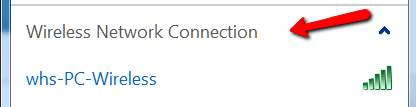
After you say 'connect', are you actually connected. When you click on the WiFi icon in the tasktray (bottom right) it should look something like this.
 

Attachments

  • 2014-03-24_2330.png
    2014-03-24_2330.png
    3.2 KB · Views: 6

My Computer My Computer

At a glance

Vista, Windows7, Mint Mate, Zorin, Windows 8from 1.6GHz Duo to i7
Computer Manufacturer/Model Number
HP, Dell, Gateway, Toshiba - 4 laptops and 2 desktops
OS
Vista, Windows7, Mint Mate, Zorin, Windows 8
CPU
from 1.6GHz Duo to i7
Monitor(s) Displays
2x HP w2207
Hard Drives
5x HDD, 7x SSD, 12x Externals
Keyboard
with trackball - no mices
Mouse
Trackball mice
Internet Speed
DSL 6000
On my tablet, I click connect. Then it asks for my username and password, and when I type those in and submit, it connects.

On my laptop, I click connect, type in the same info but then it says can't connect to network.
 

My Computer My Computer

At a glance

Windows 7 Home Premium 64bit
Computer type
Laptop
Computer Manufacturer/Model Number
Gateway
OS
Windows 7 Home Premium 64bit
Hmm, that is indeed strange. What is also strange is that you need a username to connect to a router. But that may be a special setup of the school.

Again, did you try to connect in a place with an open network - like McDonalds, Starbucks or the mall. If that would work, we would know at least that there is not a connectivity problem with your laptop.
 

My Computer My Computer

At a glance

Vista, Windows7, Mint Mate, Zorin, Windows 8from 1.6GHz Duo to i7
Computer Manufacturer/Model Number
HP, Dell, Gateway, Toshiba - 4 laptops and 2 desktops
OS
Vista, Windows7, Mint Mate, Zorin, Windows 8
CPU
from 1.6GHz Duo to i7
Monitor(s) Displays
2x HP w2207
Hard Drives
5x HDD, 7x SSD, 12x Externals
Keyboard
with trackball - no mices
Mouse
Trackball mice
Internet Speed
DSL 6000
I don't usually have much occasion to leave campus, but I will venture out tomorrow with my laptop and attempt to connect to the McDonald's near me.
 

My Computer My Computer

At a glance

Windows 7 Home Premium 64bit
Computer type
Laptop
Computer Manufacturer/Model Number
Gateway
OS
Windows 7 Home Premium 64bit
Back
Top