Win 7 cannot connect to Xp pro

win7use

New member
Local time
7:21 AM
Messages
26
Location
Maryland, Sir George Calvert founder
Trying to connect to xp pro from windows 7 hm pre. I can see the xp computer in network on windows 7. Keep getting prompt "enter network password", enter password but it does not work (using workgroup pw). I have shared folders on the xp computer and made sure "workgroup" is the group name in xp. I have no problems reaching the win 7 machine from the xp machine. I had no probs networking to the vista comp. If anyone has any suggestions that would be great. thanks
 

My Computer

OS
win 7 home premium
Welcome to the forum win7use,


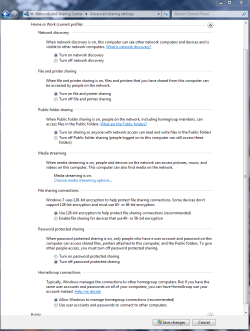
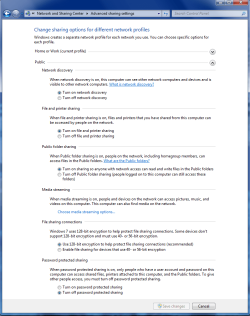
If you are getting a password prompt after setting up a Workgroup it may have to do with the Advanced settings window where it says "turn on password protected sharing"

You should go to the XP machine and run the network set up wizard which will make things much easier. Be sure and allow sharing permissions when setting up the XP machine.

After that it pays to make sure the Advanced Network Settings are all as they need to be to allow for sharing between your XP and Windows 7 machine. Make sure the settings look like the picture below.

Toggling between password protected sharing on or off in the Home and Work Advanced settings window may help turn off that password prompt.

If that doesn't turn off the password prompts it sometimes helps to use the same user name and password on all machines. Although the machine names still need to be different.
 

Attachments

  • Home or work homegroup enable.PNG
    Home or work homegroup enable.PNG
    45 KB · Views: 714
  • public sharing enabled all.PNG
    public sharing enabled all.PNG
    39.7 KB · Views: 511
Last edited:

My Computer

Computer type
PC/Desktop
Computer Manufacturer/Model Number
Home built
OS
Windows 7 Ult, Windows 8.1 Pro,
CPU
Q9650-4.275GHz, E8600 4.5GHz, E6750-3.8GHz
Motherboard
Evga 780i FTW
Memory
G.Skill PC2 9600 1200Mhz 5 5 5 15 2T
Graphics Card(s)
GTX480
Sound Card
Asus Xonar D2
Monitor(s) Displays
HannsG
Screen Resolution
1680X1050
Hard Drives
GSkill Phoenix Pro 120GB SSD
PSU
ThermalTake Toughpower 1000Watt modular
Case
ThermalTake XaserV
Cooling
Xigmatek S1283
Keyboard
Logitech G15
Mouse
Logitech G9
Internet Speed
T1
great suggestions, unfortunately win 7 still will not allow me to connect to xp pro (still get password prompt). any & all further suggestions appreciated. I'll keep trying..thanks
 

My Computer

OS
win 7 home premium
turn off simple file sharing on xp pro box.

add "everyone" group to the ACL on the shared folders.

win
 

My Computer

OS
7 Pro
What's in the Security Tab of the folder's Properties. Have you tried putting in the username which you have attempted to connect to the share with?
 

My Computer

Computer Manufacturer/Model Number
Lenovo ThinkPad T60
OS
Windows 7 Ultimate 64Bit
CPU
GenuineIntel Intel(R) Core(TM) DuoCore T2400 @ 1.83GHz
Motherboard
Intel(R) 82801G (ICH7 Family)
Memory
2.00 GB
Graphics Card(s)
Mobile Intel(R) 945 Express Chipset
Sound Card
SoundMAX Integrated Digital HD Audio
Monitor(s) Displays
ThinkPad Display
Screen Resolution
1400x1050
Hard Drives
100Gb SATA
Keyboard
Standard Keyboard
Mouse
HID-compliant Mouse
Internet Speed
Cable Broadband - 54Mbps
Other Info
Intel(R) PRO/1000 PL Network Connection
11a/b/g Wireless LAN Mini PCI Express Adapter
these are all good suggestions & i tried them all, including in xp: disabling simple folder, sharing folder, adding "everyone" to security policy, clicking 'share' in network setup, changing homergroup name..clearly see the xp computer on win7 "network", even disabling firewall, but still getting annoying pw prompt...
still accepting any suggestions..
it is possible that i need to edit the group policy on smb pw on the win 7 comp, but w/home premium you can't gpedit.msc..its not included in that case i'm sol unless i upgrade win 7 unless someone knows how to edit group policy on home premium
 

My Computer

OS
win 7 home premium
You added the Everyone group, what about actual user name and here's a good one.

Type in computername\username as the user id.
 

My Computer

Computer Manufacturer/Model Number
Lenovo ThinkPad T60
OS
Windows 7 Ultimate 64Bit
CPU
GenuineIntel Intel(R) Core(TM) DuoCore T2400 @ 1.83GHz
Motherboard
Intel(R) 82801G (ICH7 Family)
Memory
2.00 GB
Graphics Card(s)
Mobile Intel(R) 945 Express Chipset
Sound Card
SoundMAX Integrated Digital HD Audio
Monitor(s) Displays
ThinkPad Display
Screen Resolution
1400x1050
Hard Drives
100Gb SATA
Keyboard
Standard Keyboard
Mouse
HID-compliant Mouse
Internet Speed
Cable Broadband - 54Mbps
Other Info
Intel(R) PRO/1000 PL Network Connection
11a/b/g Wireless LAN Mini PCI Express Adapter
xp security won't accept it..says "not a recognized domain"..this is really frustrating b/c unlike most my win 7 has no problems recognizing the xp computer...i see it there...furthermore I can access all folders from win 7 comp on xp, I just can't access xp from win7 b/c the pw prompt..i would've given up but i seem so close..maybe i am delusional..seems odd xp would be better at mapping netwk dr
 

My Computer

OS
win 7 home premium
I meant when it asks you for the userid and password. Put that in as the userid. This is saying you are connecting to that computer (the left part of the backward slash) with that user name (the right part of the slash).
 

My Computer

Computer Manufacturer/Model Number
Lenovo ThinkPad T60
OS
Windows 7 Ultimate 64Bit
CPU
GenuineIntel Intel(R) Core(TM) DuoCore T2400 @ 1.83GHz
Motherboard
Intel(R) 82801G (ICH7 Family)
Memory
2.00 GB
Graphics Card(s)
Mobile Intel(R) 945 Express Chipset
Sound Card
SoundMAX Integrated Digital HD Audio
Monitor(s) Displays
ThinkPad Display
Screen Resolution
1400x1050
Hard Drives
100Gb SATA
Keyboard
Standard Keyboard
Mouse
HID-compliant Mouse
Internet Speed
Cable Broadband - 54Mbps
Other Info
Intel(R) PRO/1000 PL Network Connection
11a/b/g Wireless LAN Mini PCI Express Adapter
Is this a wired network or do you have some wireless computers? Does each computer have a unique computer name ? Try changing your WorkGroup to something different on all the computers like " winXP7Group " Then rebooting all computers.
 

My Computer

Computer type
PC/Desktop
Computer Manufacturer/Model Number
Built them myself, Science Experiments !
OS
Win7 Enterprise, Win7 x86 (Ult 7600), Win7 x64 Ult 7600, TechNet RTM on AMD x64 (2.8Ghz)
CPU
AMD fx8350 4ghz, AMD-32 2400mhz, AMD-64 3200mhz, AMDx64 2.8G
Motherboard
SIS 755, ECS-K8M890M-M (Ult 7600), GigaByte & others
Memory
2gb, 4gb on the Ult 7600, 4gb on Technet RTM, 32gb on FX8350
Graphics Card(s)
Draw my own Graphics, several nVidia cards
Sound Card
on motherboard
Monitor(s) Displays
19" flat scr, 28" I-Inc widescr,22" Emprex Widescr, 23" Acer
Screen Resolution
1280 x 1024, 1440 x 900, 1920 x 1080
Hard Drives
6 pata Ide HD's & 2 Sata HD's
added 80gb external on Ult 7600 computer,
numerous extra 1tb, 2TB, 3Tb SATA HD's
A collection of ext HD Docks w/ HDs
PSU
430w, 550w, 600w, 700, 800, etc
Case
All Generic Full Towers
Cooling
Open Air & a few fans, some w/ colored LEDs
Keyboard
Compaq & Dell recycled from GoodWill
Mouse
Made in China Optical Wired Mouse
Internet Speed
Fast Cable InterNet
Antivirus
AVG Free on 24 different Desktops, NO Problems!
Browser
IE 8 is preferred, but use FireFox sometimes
Other Info
Linksys Routers, switches, & Hubs
Too Many USB Flash Drives to count, Biggest is 64GB !
Eight computers in my home network.
Sixteen computers at my business network.
Linked via TeamViewer !
Lots of old used spare computer parts everywhere!
try this

on the windows 7 machine from run command type gpedit.msc

1. go to computer configuration
2. go to windows settings
3. go to security settings
4. go to local polices
5. go to security options
5. look for network security: LAN Manager authentacation Level" and change it to "Send LM & NTLM responses"
 

My Computer

Computer Manufacturer/Model Number
Custom Built
OS
Windows 7 Ultimate 32 bit
CPU
AMD Athlon 64 X2 4200+ Overclocked to 3.0Ghz
Motherboard
Biostar TF560 A2+
Memory
2 Gigs of G.Skill DDR2 800
Graphics Card(s)
HIS ATI Radeon HD 2600 Pro With IceQ cooler
Sound Card
6.1 Channel Sound Blaster Live 24 Bit
Monitor(s) Displays
Dual 20.5 " LG Flatrons W2052TO
Screen Resolution
1152x864
Hard Drives
Dual 36 Gig 10,000 RPM Raptors
PSU
430 watt Seasonic 80%+ Dual 12v Rails 2x80mm fans
Case
CHIEFMAX YA-5X
Cooling
4-80mm case fans 1-140mm case fan freezer 64 Pro CPU cooler
Keyboard
Saitek Eclipse II
Mouse
A4Tech wireless battery free optical scroll mouse
Internet Speed
1.5 meg down 384 up
Other Info
Logisys LED fan/light controller and dual 16" LED sticks mounted inside top of case all fans are LED all lighting is blue
DVD RW and CD RW both and Memory card reader
Wait, wait, I'm in and it worked:D:):D. Yes that was the issue, user name being "adminstrator" which I completely overlooked..very bad on my part..Hold on, I'm going re-create the problem and screen shot it so anyone in the future that comes across this problem will not make the same mistakes i did. The pw prompt is a little misleading....It asks for "network password" , and does not specify that it should be the user name of the xp computer..how, and i can't believe I am going to do this, do I disconnect the drive to make that pw prompt come up again?
thanks a million
 
Last edited:

My Computer

OS
win 7 home premium
It won't specify that you need to use the username/user account id from the remote machine to get into it. This is commensense i would think.

It probably won't come up again, but if you delete the share and redo it. It might.

Oh and it doesn't have to be the Administrator account, it can be any user account with remote access rights, meaning admin rights. Try creating another username, put it in Administrators group and see.
 

My Computer

Computer Manufacturer/Model Number
Lenovo ThinkPad T60
OS
Windows 7 Ultimate 64Bit
CPU
GenuineIntel Intel(R) Core(TM) DuoCore T2400 @ 1.83GHz
Motherboard
Intel(R) 82801G (ICH7 Family)
Memory
2.00 GB
Graphics Card(s)
Mobile Intel(R) 945 Express Chipset
Sound Card
SoundMAX Integrated Digital HD Audio
Monitor(s) Displays
ThinkPad Display
Screen Resolution
1400x1050
Hard Drives
100Gb SATA
Keyboard
Standard Keyboard
Mouse
HID-compliant Mouse
Internet Speed
Cable Broadband - 54Mbps
Other Info
Intel(R) PRO/1000 PL Network Connection
11a/b/g Wireless LAN Mini PCI Express Adapter
Working!!!:D

a few interesting things...i can fully access the files on the xp computer, read write etc..but win7 still excludes the xp comp from the map.."devices that cannot be mapped"...but still shows it? no commonsense to that..also a lot of posts in different forums say it is not possible to map to an xp comp from win 7 home premium (need ultimate/bus) , i can say for sure that is not true..also for kicks I changed the workgroup name on the xp computer to homegroup and left the name workgroup on the win7 computer...this did not harm the connection..so many posts claim this is the silver bullet solution to the problem..
a few things I did
on xp I not only marked all the folders for sharing and included "everyone" under security tab for all folders i wanted to access, but also the c drive, which I guess it considers a folder because it has 'share this folder', also on the drive I included "everyone" under the security tab
don't know if these will work for everyone but there seems to be a lot of folks having issues mapping from win7 to xp (the other way does not seem too problematic)

don't get me wrong I like ms and win7 in general, after trying ubuntu and mac u realize that ms despite its bad rep is still the best platform, though not without issues
 
Last edited:

My Computer

OS
win 7 home premium
Don't think about it too much. At the end of the day, everyone learn new things everyday. Best not to believe half the things you read on the net.

If you find this interesting, what till you learn things about domains which lends alot to the name Authenticated Users.
 

My Computer

Computer Manufacturer/Model Number
Lenovo ThinkPad T60
OS
Windows 7 Ultimate 64Bit
CPU
GenuineIntel Intel(R) Core(TM) DuoCore T2400 @ 1.83GHz
Motherboard
Intel(R) 82801G (ICH7 Family)
Memory
2.00 GB
Graphics Card(s)
Mobile Intel(R) 945 Express Chipset
Sound Card
SoundMAX Integrated Digital HD Audio
Monitor(s) Displays
ThinkPad Display
Screen Resolution
1400x1050
Hard Drives
100Gb SATA
Keyboard
Standard Keyboard
Mouse
HID-compliant Mouse
Internet Speed
Cable Broadband - 54Mbps
Other Info
Intel(R) PRO/1000 PL Network Connection
11a/b/g Wireless LAN Mini PCI Express Adapter
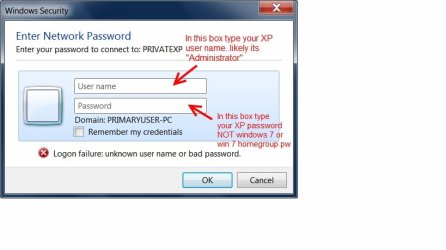
Note: this post is for those trying to map (connect) their win7 computer to an XP computer.
Here is the pw prompt you may get when trying to map drive from win7 to xp. Note it asks "Enter Network Password" (very misleading) which a lot of people are confusing with the win7 homegroup password. You can't even join a win7 homegroup with xp. What you enter in this prompt is your user name for your windows xp user account, most likely its "Administrator," and your logon password for logging onto winxp. Again: user name is going to be your Windows XP user name and password is your logon pw for winxp, Entering your win7 pw, homegroup pw, xp computer name, win7computer name don't work. Also make sure your xp is configured for sharing (covered elsewhere in this forum).

many thanks to all who helped me configure my xp computer to share the files so now I can see them from my win7 computer. this pw thing was just a bump in the road but in a lot of posts i see folks having issues
 

Attachments

  • pwprompt.jpg
    pwprompt.jpg
    33 KB · Views: 384

My Computer

OS
win 7 home premium
Hi win7use, it's not what you think it is, that Enter Network Password is just the userid/password of the account of the other machine which will enable you to get access. The fact that you are mapping "over a network", this is all that it means. You basically are not accessing the share locally.

Hope it's understandable.
 

My Computer

Computer Manufacturer/Model Number
Lenovo ThinkPad T60
OS
Windows 7 Ultimate 64Bit
CPU
GenuineIntel Intel(R) Core(TM) DuoCore T2400 @ 1.83GHz
Motherboard
Intel(R) 82801G (ICH7 Family)
Memory
2.00 GB
Graphics Card(s)
Mobile Intel(R) 945 Express Chipset
Sound Card
SoundMAX Integrated Digital HD Audio
Monitor(s) Displays
ThinkPad Display
Screen Resolution
1400x1050
Hard Drives
100Gb SATA
Keyboard
Standard Keyboard
Mouse
HID-compliant Mouse
Internet Speed
Cable Broadband - 54Mbps
Other Info
Intel(R) PRO/1000 PL Network Connection
11a/b/g Wireless LAN Mini PCI Express Adapter
There are plenty of ways around the password problem which I have already posted with pictures and explanation. Toggling the "turn password protected sharing on or off and also using the same user name and password also works.

It's not so hard as you think it is, I'm glad you got it figured out Win7use.
 

My Computer

Computer type
PC/Desktop
Computer Manufacturer/Model Number
Home built
OS
Windows 7 Ult, Windows 8.1 Pro,
CPU
Q9650-4.275GHz, E8600 4.5GHz, E6750-3.8GHz
Motherboard
Evga 780i FTW
Memory
G.Skill PC2 9600 1200Mhz 5 5 5 15 2T
Graphics Card(s)
GTX480
Sound Card
Asus Xonar D2
Monitor(s) Displays
HannsG
Screen Resolution
1680X1050
Hard Drives
GSkill Phoenix Pro 120GB SSD
PSU
ThermalTake Toughpower 1000Watt modular
Case
ThermalTake XaserV
Cooling
Xigmatek S1283
Keyboard
Logitech G15
Mouse
Logitech G9
Internet Speed
T1
Back
Top