Win 7 does not recognize my Canon 7D camera - driver not found

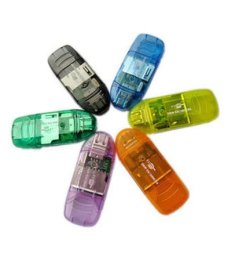
If the camera has SD cards, I really prefer these inexpensive USB card readers from eBay (China). They have worked every time with all my different size SD cards. ;)
 

Attachments

  • SD_Card_Readers.JPG
    SD_Card_Readers.JPG
    23.8 KB · Views: 1

My Computer My Computer

Computer type
PC/Desktop
Computer Manufacturer/Model Number
Built them myself, Science Experiments !
OS
Win7 Enterprise, Win7 x86 (Ult 7600), Win7 x64 Ult 7600, TechNet RTM on AMD x64 (2.8Ghz)
CPU
AMD fx8350 4ghz, AMD-32 2400mhz, AMD-64 3200mhz, AMDx64 2.8G
Motherboard
SIS 755, ECS-K8M890M-M (Ult 7600), GigaByte & others
Memory
2gb, 4gb on the Ult 7600, 4gb on Technet RTM, 32gb on FX8350
Graphics Card(s)
Draw my own Graphics, several nVidia cards
Sound Card
on motherboard
Monitor(s) Displays
19" flat scr, 28" I-Inc widescr,22" Emprex Widescr, 23" Acer
Screen Resolution
1280 x 1024, 1440 x 900, 1920 x 1080
Hard Drives
6 pata Ide HD's & 2 Sata HD's
added 80gb external on Ult 7600 computer,
numerous extra 1tb, 2TB, 3Tb SATA HD's
A collection of ext HD Docks w/ HDs
PSU
430w, 550w, 600w, 700, 800, etc
Case
All Generic Full Towers
Cooling
Open Air & a few fans, some w/ colored LEDs
Keyboard
Compaq & Dell recycled from GoodWill
Mouse
Made in China Optical Wired Mouse
Internet Speed
Fast Cable InterNet
Antivirus
AVG Free on 24 different Desktops, NO Problems!
Browser
IE 8 is preferred, but use FireFox sometimes
Other Info
Linksys Routers, switches, & Hubs
Too Many USB Flash Drives to count, Biggest is 64GB !
Eight computers in my home network.
Sixteen computers at my business network.
Linked via TeamViewer !
Lots of old used spare computer parts everywhere!
Ive tried that - but for some weird reason, the CF card isn't recognized by my PC either! :-(!

My preferred mode would be to connect the camera directly with the PC and download images!!!

Any help from anyone who has solved it, would be most appreciated!
 

My Computer My Computer

OS
Windows 7 Ultimate N x64
Any help from anyone who has solved it, would be most appreciated!
Take the flash card out of the camera, and put it in this card reader (Supports CompactFlash/Micro Drive, SD/SDHC/Mini SD/MMC, Olympus DC Card, T-Flash/Micro SD/ Micro SDHC, Memory Stick/MS Duo, Memory Stick Micro (M2), and in particular CF Type I, II):

Amazon.com: IOGEAR 56-in-1 USB 2.0 Pocket Flash Memory Card Reader/Writer GFR281 (Silver): Electronics

Spend $6 and try it out for yourself. It will work.
 

My Computer My Computer

Computer type
PC/Desktop
Computer Manufacturer/Model Number
Home-built, two systems (1) and (2)
OS
Windows 7 Pro x64 (1), Win7 Pro X64 (2)
CPU
i5-3350p 3.1Ghz/6MB-cache (1); E8400 3.0Ghz/6MB-cache (2)
Motherboard
ASUS P8Z77-V Pro (1); ASUS P5Q3 (2)
Memory
8GB PC3-12800 DDR3 (1); 4GB PC3-10600 DDR3 (2)
Graphics Card(s)
ATI HD7750 (1), (see TV cards); ATI R7 250 (2)
Sound Card
Realtek ALC892 HD Audio (1); Realtek ALC1200 HD Audio (2)
Monitor(s) Displays
Eizo HD2441W LCD, Eizo S2433W (1); Eizo 24" S2433W (2)
Screen Resolution
1920x1200, 1920x1200 (1); 1920x1200 (2)
Hard Drives
(1) 1TB SATA-II (7200RPM), 2x2TB SATA-III (7200RPM), 250GB SATA-III (10000RPM) for OS; 2x2TB external USB 3.0

(2) 320GB SATA-II (7200RPM), 750GB SATA-II (7200RPM), 150GB SATA-II (10000RPM) for OS; 2TB external USB 3.0
PSU
Nesteq ECS-6001 600W (1); Nesteq ECS-5001 500W (2)
Case
Acousti-Case 360 (1) and (2)
Cooling
Noctua NH-U12P SE2 for CPU, 2x120mm case fans (1) and (2)
Keyboard
IBM PS/2 (1) and (2)
Mouse
Logitech MX Revolution wireless (1); Microsoft wired (2)
Internet Speed
100mbps down / 10mbps up
Antivirus
Microsoft Security Essentials; Malwarebyte Anti-Malware Pro
Browser
Firefox
Other Info
Ceton InfiniTV 4-tuner cablecard-enabled TV card as well as Hauppauge HVR-2250 OTA/ATSC 2-tuner TV card in (1), running under Win7 WMC
I downloaded & installed "Windows Media Feature Pack" for "Windows Ultimate N x64" from Microsoft's website and now both my Canon Cameras (7D and PowerShot S100) are recognized by Win7.

Thanks everyone for your advice and help!
 

My Computer My Computer

OS
Windows 7 Ultimate N x64
I downloaded & installed "Windows Media Feature Pack" for "Windows Ultimate N x64" from Microsoft's website and now both my Canon Cameras (7D and PowerShot S100) are recognized by Win7.
AHA!!!
Windows 7 N and Windows 7 KN editions include the same functionality as Windows 7, except that these versions of Windows do not include Windows Media Player, and related technologies.

The Media Feature Pack for Windows 7 N or Windows 7 KN will install Media Player and related technologies on a computer running Windows 7 N or Windows 7 KN editions, or these editions with Service Pack 1

I had not even noticed this mention of "Windows 7 N" in your system specs, or your first post which mentioned it as well!

But then I also had no idea that "related technologies" would include support for cameras.

And I certainly don't understand why Microsoft issues a version of Win7 without WMP and related technologies (presumably for a reduced price??) and then turns around an makes this "Media Feature Pack" available for download (presumably for free). Very strange.


Anyway, this is obviously a very significant and useful discovery.

Glad you finally got your problem solved. (but can't hurt to have a 56-in-1 card reader for $6, just as one more tool in your arsenal of problem solutions)

 

My Computer My Computer

Computer type
PC/Desktop
Computer Manufacturer/Model Number
Home-built, two systems (1) and (2)
OS
Windows 7 Pro x64 (1), Win7 Pro X64 (2)
CPU
i5-3350p 3.1Ghz/6MB-cache (1); E8400 3.0Ghz/6MB-cache (2)
Motherboard
ASUS P8Z77-V Pro (1); ASUS P5Q3 (2)
Memory
8GB PC3-12800 DDR3 (1); 4GB PC3-10600 DDR3 (2)
Graphics Card(s)
ATI HD7750 (1), (see TV cards); ATI R7 250 (2)
Sound Card
Realtek ALC892 HD Audio (1); Realtek ALC1200 HD Audio (2)
Monitor(s) Displays
Eizo HD2441W LCD, Eizo S2433W (1); Eizo 24" S2433W (2)
Screen Resolution
1920x1200, 1920x1200 (1); 1920x1200 (2)
Hard Drives
(1) 1TB SATA-II (7200RPM), 2x2TB SATA-III (7200RPM), 250GB SATA-III (10000RPM) for OS; 2x2TB external USB 3.0

(2) 320GB SATA-II (7200RPM), 750GB SATA-II (7200RPM), 150GB SATA-II (10000RPM) for OS; 2TB external USB 3.0
PSU
Nesteq ECS-6001 600W (1); Nesteq ECS-5001 500W (2)
Case
Acousti-Case 360 (1) and (2)
Cooling
Noctua NH-U12P SE2 for CPU, 2x120mm case fans (1) and (2)
Keyboard
IBM PS/2 (1) and (2)
Mouse
Logitech MX Revolution wireless (1); Microsoft wired (2)
Internet Speed
100mbps down / 10mbps up
Antivirus
Microsoft Security Essentials; Malwarebyte Anti-Malware Pro
Browser
Firefox
Other Info
Ceton InfiniTV 4-tuner cablecard-enabled TV card as well as Hauppauge HVR-2250 OTA/ATSC 2-tuner TV card in (1), running under Win7 WMC
I had not even noticed this mention of "Windows 7 N" in your system specs, or your first post which mentioned it as well!

But then I also had no idea that "related technologies" would include support for cameras.

And I certainly don't understand why Microsoft issues a version of Win7 without WMP and related technologies (presumably for a reduced price??) and then turns around an makes this "Media Feature Pack" available for download (presumably for free). Very strange.

Anyway, this is obviously a very significant and useful discovery.

Glad you finally got your problem solved. (but can't hurt to have a 56-in-1 card reader for $6, just as one more tool in your arsenal of problem solutions)

Sure it is, I had spent hours trying to get it to work - downloading the Media Feature Pack was a random thing that I tried and it worked (as I needed to setup Windows Media Center as well on my desktop) - and yes it is free for "Windows 7 Ultimate N". I got the following response from Canon 7D support (much after I had solved it myself) - they are not even suggesting that I should be downloading the media feature pack - may be they are legally NOT supposed to say it too?

Also, I'll definitely try to get the card reader that you suggest. :) Thanks!

Response from Canaon 7D Support:
Dear Anand Nagarajan:
Thank you for contacting Canon product support regarding the connection between your EOS 7D and your computer.
The problem is with the fact that your desktop is using an "N" version of Windows. The "N" designation in "Windows 7 Ultimate N x64" indicates that this copy of Windows has been stripped of important media components in compliance with restrictions in place in the European Union and other regions as a result of anti-trust hearings against Microsoft several years ago. Because these components are missing, these "N" versions of Windows are not supported, and the Canon software cannot connect to the camera on this system. I sincerely apologize for any inconvenience this may cause.

Please let us know if we can be of any further assistance with your EOS 7D. Thank you for choosing Canon.

Sincerely,
Dirk
 

My Computer My Computer

OS
Windows 7 Ultimate N x64
Back
Top