
Solved Win 7 Doesn't "See" USB Drive That Was Old Computer C-Drive

pmillen

New member
Local time
11:02 AM
Messages
26
Quite some time ago my old computer (Windows XP Operating System) motherboard failed so I bought a new notebook with Windows 7. I now need one file from my od XP computer's Drive C; the e-mail AOL stored on my computer in a file called (my AOL screen name).abi in C:\Documents and Settings\All Users\Application Data\AOL\C_America Online 9.0\organize.

I mounted the drive in an external hard drive enclosure connected through a USB port. When I turn it on and watch Windows Explorer I see the external drive being recognized as drive G: but it goes away after about one second.

If I open a command prompt and ask for a directory of drive G:\ I receive a message, "The system cannot find the path specified."

If I attempt to change to the G Drive via CD G:\, I receive, "The system cannot find the drive specified."

I suspect that the problem stems from the Windows XP operating system trying to boot as the drive starts but I don't know if that's the case or how to stop it if it is.

How can I copy files from this old drive?
 

My Computer My Computer

At a glance

Windows 7 Home Premium (x64) Service Pack 1 (...2.10 gigahertz Intel Core i3-2310M4 BIntel(R) HD Graphics Family [Display adapter]
Computer Manufacturer/Model Number
ASUSTeK Computer Inc. K73E 1.0
OS
Windows 7 Home Premium (x64) Service Pack 1 (build 7601)
CPU
2.10 gigahertz Intel Core i3-2310M
Motherboard
ASUSTeK Computer Inc. K73E 1.0 (Notebook)
Memory
4 B
Graphics Card(s)
Intel(R) HD Graphics Family [Display adapter]
Sound Card
Intel(R) Display Audio & Realtek High Definition Audio
Monitor(s) Displays
Generic PnP Monitor (17.1"vis)
Hard Drives
WDC WD6400BPVT-80HXZT1 [Hard drive] (640.13 GB)
Look in Disk Management, see if the drive shows up there. If so, assign a drive letter (G: ???) and see what happens.

It's also possible the drive is defective.

Another possibility if that doesn't work. Mount the drive in the new notebook if it will go. May not as the new one is probably SATA and the old is IDE. If that does work, then you could boot Linux Live Mint from a flash drive and copy the data from the old installed hard drive to the flash drive. No need to try to boot the old XP drive at all. Swap drives again when done.
 

My Computer My Computer

At a glance

Windows 10 Pro X64Intel Quad Core i7-4770 @ 3.4Ghz16.0GB PC3-12800 DDR3 SDRAM 1600 MHzIntel Integrated HD Graphics
Computer type
PC/Desktop
Computer Manufacturer/Model Number
Lenovo IdeaCenter 450
OS
Windows 10 Pro X64
CPU
Intel Quad Core i7-4770 @ 3.4Ghz
Memory
16.0GB PC3-12800 DDR3 SDRAM 1600 MHz
Graphics Card(s)
Intel Integrated HD Graphics
Sound Card
Realtek HD Audio
Monitor(s) Displays
HP 22" LCD
Screen Resolution
1680 x 1050
Hard Drives
250GB Samsung EVO SATA-3 SSD
2TB Seagate ST2000DM001 SATA-2
1.5TB Seagate ST3150041AS SATA
Keyboard
Dell USB
Mouse
Lenovo USB
Internet Speed
Cable via Road Runner 3MB Upload, 30MB Download
Antivirus
Windows Defender, MBAM Pro, MBAE
Browser
Seamonkey
Other Info
UEFI/GPT
PLDS DVD-RW DH16AERSH
Mount the drive in the notebook: I don't see an easy way to crack the case and the old drive seems to be as thick or thicker than the case. So I'm going to take this step last.

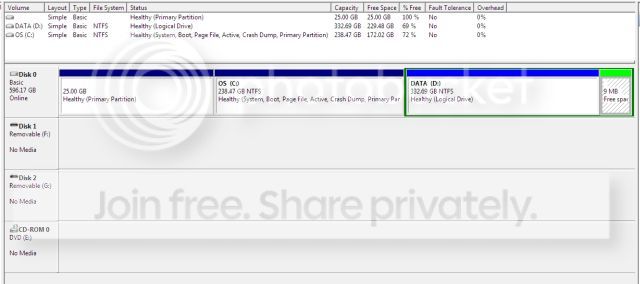
Look in disk management: Here's what I saw—not much.

DiskMgmnt.jpg


It didn't tell me anything useful. Does it indicate anything to you?

I think I caused the problem late in 2011 when I purchased the Win 7 notebook. I recall looking in the old drive at that time (and in fact, copying the file I require now). I think that I deleted Win XP at that time, too. When I did so I probably deleted something that is required to make the drive functional.

Any ideas? (I know that it's difficult to remediate stupidity.)
 

My Computer My Computer

At a glance

Windows 7 Home Premium (x64) Service Pack 1 (...2.10 gigahertz Intel Core i3-2310M4 BIntel(R) HD Graphics Family [Display adapter]
Computer Manufacturer/Model Number
ASUSTeK Computer Inc. K73E 1.0
OS
Windows 7 Home Premium (x64) Service Pack 1 (build 7601)
CPU
2.10 gigahertz Intel Core i3-2310M
Motherboard
ASUSTeK Computer Inc. K73E 1.0 (Notebook)
Memory
4 B
Graphics Card(s)
Intel(R) HD Graphics Family [Display adapter]
Sound Card
Intel(R) Display Audio & Realtek High Definition Audio
Monitor(s) Displays
Generic PnP Monitor (17.1"vis)
Hard Drives
WDC WD6400BPVT-80HXZT1 [Hard drive] (640.13 GB)
I see a Disk 1 and a Disk 2, both showing "No Media". That makes me think your drive enclosure was detected by Windows but the drive wasn't. There are no partitions or anything listed for those two drives. It's like there are two drive bays that are empty.
 

My Computer My Computer

At a glance

Windows 10 Education 64 bitAMD Phenom II X4 980 Black Edition Deneb 3.7GHz8GB 4GBx2 Kingston PC10600 DDR3 1333 MemoryZotac NVIDIA Geforce GT640 2 Gig DDR3 PCIe
Computer type
PC/Desktop
Computer Manufacturer/Model Number
Home Built
OS
Windows 10 Education 64 bit
CPU
AMD Phenom II X4 980 Black Edition Deneb 3.7GHz
Motherboard
Asus M4N68T-M V2 µATX Motherboard
Memory
8GB 4GBx2 Kingston PC10600 DDR3 1333 Memory
Graphics Card(s)
Zotac NVIDIA Geforce GT640 2 Gig DDR3 PCIe
Sound Card
VIA VT1708s High Definition Audio 8-channel Onboard
Monitor(s) Displays
22" LG E2242 1080p and 2 19" I-INC AG191D
Screen Resolution
1280x1024 - 1920x1080 - 1280x1024
Hard Drives
Crucial M100 256 GB SSD and 500 GB WD Blue SATA
PSU
Thermaltake TR 620
Case
Power Up Black ATX Mid-Tower Case
Cooling
Stock heatsink and fan
Keyboard
Logitech Wireless K350 Wave
Mouse
Logitech Wireless M570 Trackman Wheel
Internet Speed
80 Mbps Down 30 Mbps Up
Antivirus
Windows Defender
Browser
Internet Explorer 11
Other Info
HP DVD1040e Lightscribe - External USB2
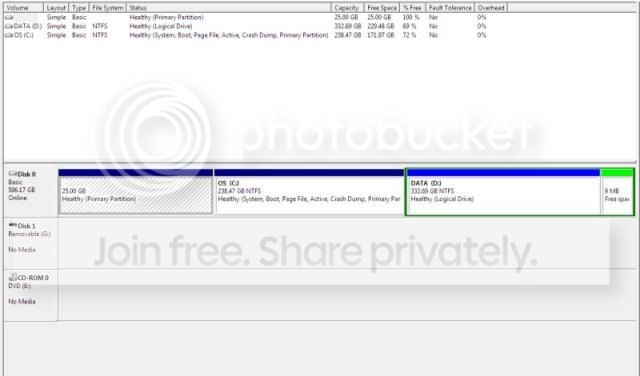
I unplugged my printer 'cause I thought that it was Drive F:. Yup. So the non-working drive is G:. Just like what I see when I watch Windows Explorer when I turn it on.

DiskMgmnt2.jpg


So Disk Management "sees" it (or just the enclosure). Is there anything I can do to resurrect it?
 

My Computer My Computer

At a glance

Windows 7 Home Premium (x64) Service Pack 1 (...2.10 gigahertz Intel Core i3-2310M4 BIntel(R) HD Graphics Family [Display adapter]
Computer Manufacturer/Model Number
ASUSTeK Computer Inc. K73E 1.0
OS
Windows 7 Home Premium (x64) Service Pack 1 (build 7601)
CPU
2.10 gigahertz Intel Core i3-2310M
Motherboard
ASUSTeK Computer Inc. K73E 1.0 (Notebook)
Memory
4 B
Graphics Card(s)
Intel(R) HD Graphics Family [Display adapter]
Sound Card
Intel(R) Display Audio & Realtek High Definition Audio
Monitor(s) Displays
Generic PnP Monitor (17.1"vis)
Hard Drives
WDC WD6400BPVT-80HXZT1 [Hard drive] (640.13 GB)
Open up the enclosure and double check all the cables are connected to the drive securely. Does that enclosure have its own external power supply/wall adapter? If no and it has two USB cords/plugs make sure you plug them both in. Try the enclosure on another PC if you can. If the drive in the enclosure is a 3.5 inch desktop drive it will not fit in your laptop. Your laptop drive will be a 2.5 inch form factor drive.
 

My Computer My Computer

At a glance

Windows 10 Education 64 bitAMD Phenom II X4 980 Black Edition Deneb 3.7GHz8GB 4GBx2 Kingston PC10600 DDR3 1333 MemoryZotac NVIDIA Geforce GT640 2 Gig DDR3 PCIe
Computer type
PC/Desktop
Computer Manufacturer/Model Number
Home Built
OS
Windows 10 Education 64 bit
CPU
AMD Phenom II X4 980 Black Edition Deneb 3.7GHz
Motherboard
Asus M4N68T-M V2 µATX Motherboard
Memory
8GB 4GBx2 Kingston PC10600 DDR3 1333 Memory
Graphics Card(s)
Zotac NVIDIA Geforce GT640 2 Gig DDR3 PCIe
Sound Card
VIA VT1708s High Definition Audio 8-channel Onboard
Monitor(s) Displays
22" LG E2242 1080p and 2 19" I-INC AG191D
Screen Resolution
1280x1024 - 1920x1080 - 1280x1024
Hard Drives
Crucial M100 256 GB SSD and 500 GB WD Blue SATA
PSU
Thermaltake TR 620
Case
Power Up Black ATX Mid-Tower Case
Cooling
Stock heatsink and fan
Keyboard
Logitech Wireless K350 Wave
Mouse
Logitech Wireless M570 Trackman Wheel
Internet Speed
80 Mbps Down 30 Mbps Up
Antivirus
Windows Defender
Browser
Internet Explorer 11
Other Info
HP DVD1040e Lightscribe - External USB2
Another thing you can try is to install Partition Wizard Home version to see if it detects the drive. Sometimes running PW Check File System can repair it enough to show up in Disk Mgmt, or at least copy out your files from boot.

How is the drive powered?

You'll not know for sure if the files are there until you install it internally if it won't show up via USB, and I've seen these external cases and adapters not work before.
 
Bingo! Oh, geez, I'm sorry. I took alphanumeric's advice and pushed hard on that two-inch ribbon connector. CLICK!

Then it opened right up!

Thanks Aphanumeric.
 
Last edited:

My Computer My Computer

At a glance

Windows 7 Home Premium (x64) Service Pack 1 (...2.10 gigahertz Intel Core i3-2310M4 BIntel(R) HD Graphics Family [Display adapter]
Computer Manufacturer/Model Number
ASUSTeK Computer Inc. K73E 1.0
OS
Windows 7 Home Premium (x64) Service Pack 1 (build 7601)
CPU
2.10 gigahertz Intel Core i3-2310M
Motherboard
ASUSTeK Computer Inc. K73E 1.0 (Notebook)
Memory
4 B
Graphics Card(s)
Intel(R) HD Graphics Family [Display adapter]
Sound Card
Intel(R) Display Audio & Realtek High Definition Audio
Monitor(s) Displays
Generic PnP Monitor (17.1"vis)
Hard Drives
WDC WD6400BPVT-80HXZT1 [Hard drive] (640.13 GB)
The connector must have been lose the whole time and worked its way off. It should be trouble free now. Knock on wood, ;).
 

My Computer My Computer

At a glance

Windows 10 Education 64 bitAMD Phenom II X4 980 Black Edition Deneb 3.7GHz8GB 4GBx2 Kingston PC10600 DDR3 1333 MemoryZotac NVIDIA Geforce GT640 2 Gig DDR3 PCIe
Computer type
PC/Desktop
Computer Manufacturer/Model Number
Home Built
OS
Windows 10 Education 64 bit
CPU
AMD Phenom II X4 980 Black Edition Deneb 3.7GHz
Motherboard
Asus M4N68T-M V2 µATX Motherboard
Memory
8GB 4GBx2 Kingston PC10600 DDR3 1333 Memory
Graphics Card(s)
Zotac NVIDIA Geforce GT640 2 Gig DDR3 PCIe
Sound Card
VIA VT1708s High Definition Audio 8-channel Onboard
Monitor(s) Displays
22" LG E2242 1080p and 2 19" I-INC AG191D
Screen Resolution
1280x1024 - 1920x1080 - 1280x1024
Hard Drives
Crucial M100 256 GB SSD and 500 GB WD Blue SATA
PSU
Thermaltake TR 620
Case
Power Up Black ATX Mid-Tower Case
Cooling
Stock heatsink and fan
Keyboard
Logitech Wireless K350 Wave
Mouse
Logitech Wireless M570 Trackman Wheel
Internet Speed
80 Mbps Down 30 Mbps Up
Antivirus
Windows Defender
Browser
Internet Explorer 11
Other Info
HP DVD1040e Lightscribe - External USB2
The connector must have been lose the whole time...

I have three drives that I shuffle in and out of the one enclosure. I don't see the advisability of buying three enclosures for a once-every-three-years look at an old drive. Obviously I didn't seat the connector properly when I pulled the previous occupant and installed this one a few days ago.
 

My Computer My Computer

At a glance

Windows 7 Home Premium (x64) Service Pack 1 (...2.10 gigahertz Intel Core i3-2310M4 BIntel(R) HD Graphics Family [Display adapter]
Computer Manufacturer/Model Number
ASUSTeK Computer Inc. K73E 1.0
OS
Windows 7 Home Premium (x64) Service Pack 1 (build 7601)
CPU
2.10 gigahertz Intel Core i3-2310M
Motherboard
ASUSTeK Computer Inc. K73E 1.0 (Notebook)
Memory
4 B
Graphics Card(s)
Intel(R) HD Graphics Family [Display adapter]
Sound Card
Intel(R) Display Audio & Realtek High Definition Audio
Monitor(s) Displays
Generic PnP Monitor (17.1"vis)
Hard Drives
WDC WD6400BPVT-80HXZT1 [Hard drive] (640.13 GB)
An enclosure is for constructing your own external HD for regular use, and can present problems that make it impractical for file rescue.

To merely connect to rescue files you only need something like this which has saved the day many times here: Amazon.com: SATA/PATA/IDE Drive to USB 2.0 Adapter Converter Cable for 2.5 / 3.5 Inch Hard Drive / Optical Drive with External AC Power Adapter: Computers & Accessories

I have one of those too. It has come in quit handy for file recovery from drives from dead systems.
 

My Computer My Computer

At a glance

Windows 10 Education 64 bitAMD Phenom II X4 980 Black Edition Deneb 3.7GHz8GB 4GBx2 Kingston PC10600 DDR3 1333 MemoryZotac NVIDIA Geforce GT640 2 Gig DDR3 PCIe
Computer type
PC/Desktop
Computer Manufacturer/Model Number
Home Built
OS
Windows 10 Education 64 bit
CPU
AMD Phenom II X4 980 Black Edition Deneb 3.7GHz
Motherboard
Asus M4N68T-M V2 µATX Motherboard
Memory
8GB 4GBx2 Kingston PC10600 DDR3 1333 Memory
Graphics Card(s)
Zotac NVIDIA Geforce GT640 2 Gig DDR3 PCIe
Sound Card
VIA VT1708s High Definition Audio 8-channel Onboard
Monitor(s) Displays
22" LG E2242 1080p and 2 19" I-INC AG191D
Screen Resolution
1280x1024 - 1920x1080 - 1280x1024
Hard Drives
Crucial M100 256 GB SSD and 500 GB WD Blue SATA
PSU
Thermaltake TR 620
Case
Power Up Black ATX Mid-Tower Case
Cooling
Stock heatsink and fan
Keyboard
Logitech Wireless K350 Wave
Mouse
Logitech Wireless M570 Trackman Wheel
Internet Speed
80 Mbps Down 30 Mbps Up
Antivirus
Windows Defender
Browser
Internet Explorer 11
Other Info
HP DVD1040e Lightscribe - External USB2
Thanks again. I didn't know anything like that was available. It's not advertised in anything I read. So one of those pieces has the two-inch ribbon connector female on one end and the USB connector on the other? Another has power—four prong female on one end and wall plug on the other?
 

My Computer My Computer

At a glance

Windows 7 Home Premium (x64) Service Pack 1 (...2.10 gigahertz Intel Core i3-2310M4 BIntel(R) HD Graphics Family [Display adapter]
Computer Manufacturer/Model Number
ASUSTeK Computer Inc. K73E 1.0
OS
Windows 7 Home Premium (x64) Service Pack 1 (build 7601)
CPU
2.10 gigahertz Intel Core i3-2310M
Motherboard
ASUSTeK Computer Inc. K73E 1.0 (Notebook)
Memory
4 B
Graphics Card(s)
Intel(R) HD Graphics Family [Display adapter]
Sound Card
Intel(R) Display Audio & Realtek High Definition Audio
Monitor(s) Displays
Generic PnP Monitor (17.1"vis)
Hard Drives
WDC WD6400BPVT-80HXZT1 [Hard drive] (640.13 GB)
Yes, it can adapt any drive to plug in by USB or internally - even provide external power to do this.

However in several instances I could not get the 2.5 adapter to be recognized by USB, but when I adapted it to SATA to plug internally into PC the data was read. So this is likely the best approach for a laptop HD.
 

My Computer My Computer

At a glance

Windows 10 Education 64 bitAMD Phenom II X4 980 Black Edition Deneb 3.7GHz8GB 4GBx2 Kingston PC10600 DDR3 1333 MemoryZotac NVIDIA Geforce GT640 2 Gig DDR3 PCIe
Computer type
PC/Desktop
Computer Manufacturer/Model Number
Home Built
OS
Windows 10 Education 64 bit
CPU
AMD Phenom II X4 980 Black Edition Deneb 3.7GHz
Motherboard
Asus M4N68T-M V2 µATX Motherboard
Memory
8GB 4GBx2 Kingston PC10600 DDR3 1333 Memory
Graphics Card(s)
Zotac NVIDIA Geforce GT640 2 Gig DDR3 PCIe
Sound Card
VIA VT1708s High Definition Audio 8-channel Onboard
Monitor(s) Displays
22" LG E2242 1080p and 2 19" I-INC AG191D
Screen Resolution
1280x1024 - 1920x1080 - 1280x1024
Hard Drives
Crucial M100 256 GB SSD and 500 GB WD Blue SATA
PSU
Thermaltake TR 620
Case
Power Up Black ATX Mid-Tower Case
Cooling
Stock heatsink and fan
Keyboard
Logitech Wireless K350 Wave
Mouse
Logitech Wireless M570 Trackman Wheel
Internet Speed
80 Mbps Down 30 Mbps Up
Antivirus
Windows Defender
Browser
Internet Explorer 11
Other Info
HP DVD1040e Lightscribe - External USB2
Hard to say, maybe you just got a defective one. I bought mine specifically to get some files off of a laptop IDE drive. Having it do all drive types was a bonus. If I had had a drive caddy on hand that would have worked I'd have used it in a pinch. This isn't something I use all that often but I have wanted one for a while so I bought it. I've been very happy with mine so far.
 

My Computer My Computer

At a glance

Windows 10 Education 64 bitAMD Phenom II X4 980 Black Edition Deneb 3.7GHz8GB 4GBx2 Kingston PC10600 DDR3 1333 MemoryZotac NVIDIA Geforce GT640 2 Gig DDR3 PCIe
Computer type
PC/Desktop
Computer Manufacturer/Model Number
Home Built
OS
Windows 10 Education 64 bit
CPU
AMD Phenom II X4 980 Black Edition Deneb 3.7GHz
Motherboard
Asus M4N68T-M V2 µATX Motherboard
Memory
8GB 4GBx2 Kingston PC10600 DDR3 1333 Memory
Graphics Card(s)
Zotac NVIDIA Geforce GT640 2 Gig DDR3 PCIe
Sound Card
VIA VT1708s High Definition Audio 8-channel Onboard
Monitor(s) Displays
22" LG E2242 1080p and 2 19" I-INC AG191D
Screen Resolution
1280x1024 - 1920x1080 - 1280x1024
Hard Drives
Crucial M100 256 GB SSD and 500 GB WD Blue SATA
PSU
Thermaltake TR 620
Case
Power Up Black ATX Mid-Tower Case
Cooling
Stock heatsink and fan
Keyboard
Logitech Wireless K350 Wave
Mouse
Logitech Wireless M570 Trackman Wheel
Internet Speed
80 Mbps Down 30 Mbps Up
Antivirus
Windows Defender
Browser
Internet Explorer 11
Other Info
HP DVD1040e Lightscribe - External USB2
Back
Top