Windows 7 doesn't see files on Vista external drive

Cydira

New member
Local time
3:31 AM
Messages
3
I'm running Windows 7 Professional. A friend of mine is visiting and wanted to share photos and videos of her family. She brought them on an external hard drive. She runs Vista at home.

When we plugged in the drive and went to "Computer", we were able to see that the E drive (her external drive) was half full with her files. But when we clicked into the drive, we were only able to see the folder names (and file names in one of the folders). When we selected all of the folders, my computer reported a much smaller total file size.

We could not open any of the files, even after setting the permissions to make everything possible for everyone. She said that she'd also set the permissions for the drive to open on her computer, before leaving home.

I tried copying the entire drive, but that didn't work.

She's upset now, since she doesn't know what will happen if she ever needs to upgrade from Vista to 7, since she keeps most of her family photos and videos on external drives.

I looked online, but "external drive" problems with Windows 7 seemed to be mostly about improper permissions. No one mentioned that they could see the space the files took up in some views (and the folder/file names), but that when they tried an action, they were informed that the file "wasn't on the drive" any longer.

Yes, we're sure the files are still on the drive. A computer running XP was able to view and copy the files from the same drive with no problem. She didn't change anything before she brought the drive here.

Your insights into this problem are welcome. Thank you in advance.
 

My Computer My Computer

At a glance

Windows 7 Professional
OS
Windows 7 Professional
I'm not exactly sure what this problem is but in order to share an entire drive on Windows 7 or Vista you not only need to enable the sharing using the permission settings but you also need to go into the Advanced Security settings of the drive.

Put a check mark to share the drive and allow the drive to be shared by "Everyone" read and write. You may need to put the drive back into the Vista machine in order to access the Advanced Security settings.

Open Computer tab -> right click Local Disk D -> select Properties -> select Security tab -> click Edit button -> click Add button -> enter "Everyone" will set the read permissions to every user which will attempt to connect to your shared drive) -> click OK -> select the desired permissions "put checks in the boxes" -> click OK -> wait while permissions are set -> and your Done.

You also need to use the "Sharing" tab> Advanced sharing, put a check mark to share the folder, click on permissions box, click on add box to add "Everyone" again, then click in the boxes to give full control then hit "Apply".

The other possiblity is that the A/V installed on the Win 7 machine is blocking the drive from being accessed.
 

My Computer My Computer

At a glance

Windows 7 Ult, Windows 8.1 Pro,Q9650-4.275GHz, E8600 4.5GHz, E6750-3.8GHzG.Skill PC2 9600 1200Mhz 5 5 5 15 2TGTX480
Computer type
PC/Desktop
Computer Manufacturer/Model Number
Home built
OS
Windows 7 Ult, Windows 8.1 Pro,
CPU
Q9650-4.275GHz, E8600 4.5GHz, E6750-3.8GHz
Motherboard
Evga 780i FTW
Memory
G.Skill PC2 9600 1200Mhz 5 5 5 15 2T
Graphics Card(s)
GTX480
Sound Card
Asus Xonar D2
Monitor(s) Displays
HannsG
Screen Resolution
1680X1050
Hard Drives
GSkill Phoenix Pro 120GB SSD
PSU
ThermalTake Toughpower 1000Watt modular
Case
ThermalTake XaserV
Cooling
Xigmatek S1283
Keyboard
Logitech G15
Mouse
Logitech G9
Internet Speed
T1
I would be very hesitant to edit any permissions on the drive. Those may cause issues when she takes the drive back home. How is the drive formatted? NTFS, FAT32, etc?
 

My Computer My Computer

At a glance

Windows 7 Ultimate x64 SP1Intel Core i7-260012 GB Patriot Extreme DDR3-1333Nvidia GTX 470
OS
Windows 7 Ultimate x64 SP1
CPU
Intel Core i7-2600
Motherboard
Gigabyte GA-P67A-UD3P-B3
Memory
12 GB Patriot Extreme DDR3-1333
Graphics Card(s)
Nvidia GTX 470
Monitor(s) Displays
Dell UltraSharp 2209WA
Hard Drives
OCZ Agility3 240 GB, WD5001AALS, WD7501AALS
PSU
OCZ ModStream 700W
Case
CoolerMaster HAF 912 Advanced
Cooling
CoolerMaster Hyper 212 Plus
Welcome to the Seven Forums! Cydira

The first thing you may want to do is go into the Disk Management tool and right click on the E volume and select the change drive letter option. This will be an attempt to see the drive fully initialized in Windows and available for use.

If you should the "add new volume" wizard appear don't be alarmed as well as a flashing icon on the Start taskbar as part of the autoplay feature in Windows when going to plug in any new external hard drive or flash drive. If your av or other protection program prompts to scan the drive let the scan run to be sure nothing else is passing along.

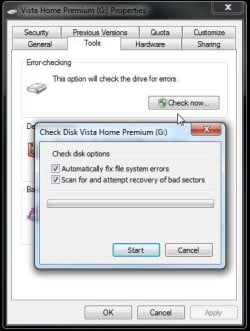
You may also have to right click on the drive's icon and open the "Tools" tab in the properties screen to have error checking performed. That will allow the checkdisk tool to scan and repair any volume errors found.
 

Attachments

  • CheckDIsk in W7.jpg
    CheckDIsk in W7.jpg
    35.3 KB · Views: 5

My Computers My Computers

  • At a glance

    W7 Ultimate x64/W10 Pro x64/W11 Pro Triple Bo...AMD Phenom II X4 975 Deneb 3.6ghz - 965 2nd r...Kingston Hyper X DDR3 1600 1.5v 16gb - Hyper ...MSI HD Radeon 5750 1gb - MSI HD Radeon 6450 o...
    Computer type
    PC/Desktop
    Computer Manufacturer/Model Number
    Custom builds = 2
    OS
    W7 Ultimate x64/W10 Pro x64/W11 Pro Triple Boot - Main PC W7 Remote PC Micro ATX W7 Pro x64/W11 Pro
    CPU
    AMD Phenom II X4 975 Deneb 3.6ghz - 965 2nd remote pc
    Motherboard
    Gigabyte GA-790XTA-UD4-Gigabyte GA-880GM-D2H remote pc
    Memory
    Kingston Hyper X DDR3 1600 1.5v 16gb - Hyper X Fury 8gb 2nd
    Graphics Card(s)
    MSI HD Radeon 5750 1gb - MSI HD Radeon 6450 on mini tower
    Sound Card
    Creative Labs X-Fi Xtreme Audio P - Realtek onooard 2nd case
    Monitor(s) Displays
    ASUS VW199T-P 19" HP 2082a Main-HP 2082a 20" remote pc
    Screen Resolution
    Asus 1440x900 - HP 1600x900
    Hard Drives
    WD Black 1TB HD per OS W7, W10, and pending W11 presently on 500gb OS Drive - Pending Triple 1TB HDs for Spanned Storage/backup volume
    Single 2TB external USB enclosure, single 1TB System 7 Host/Boot drive, Pending 8TB external HD for system image b
    PSU
    Corsair 750TX - primary / Corsair CX600 - second
    Case
    Antec 900-2 - SSD compatible / NZXT Vulcan mini tower
    Cooling
    Zalman CNPS9900A
    Keyboard
    AZIO L70 Backlit Letters Gaming - ONN Cordless/USB
    Mouse
    MSI DS200 Programmable, Logitech Cordless
    Internet Speed
    30mbps upgrade - primary hard wired - mini tower usb WiFi
    Antivirus
    GFI VIPRE Internet Security 2014 on W7 2016 beta on W10,
    Browser
    Cyberfox, WaterFox 64bit FF variants, FireFox x64, Pale Moon
    Other Info
    Accomdata fan cooled usb 2.0 PIDE/Sata II, III external enclosure.
    Sambient usb/eSata PATA/Sata II, III external enclosure.
  • At a glance

    W7 Pro x64/W11 ProAMD Deneb 3.6ghz - 965Kingston Hyper X Fury 8gbMSI HD Radeon 6450 DVI Output
    Computer type
    PC/Desktop
    System Manufacturer/Model Number
    CUSTOM ASSEMBLY
    OS
    W7 Pro x64/W11 Pro
    CPU
    AMD Deneb 3.6ghz - 965
    Motherboard
    Gigabyte GA-880GM-D2H remote pc
    Memory
    Kingston Hyper X Fury 8gb
    Graphics Card(s)
    MSI HD Radeon 6450 DVI Output
    Sound Card
    Realtek onooard Creative or Other separate PENDING
    Monitor(s) Displays
    VIZIO 32" LCD TV Separate LCD Pending
    Screen Resolution
    1600x1080
    Hard Drives
    WD 500GB OS Host/Boot WD Green 1TB Storage/Backup
    PSU
    Corsair 600W - THERMALTAKE 600W spare case
    Case
    NZXT Vulcan mini tower
    Cooling
    Twin 120mm Top Fans - 240mm Side Cover
    Keyboard
    ONN Cordless/USB Logitech Cordless
    Mouse
    ONN USB/Cordless - Logitech Cordless
    Internet Speed
    DSL 5G
    Browser
    MS Edge, FireFox, WaterFox x64, FireFox Nightly
    Other Info
    OS Testing-Remote Access to Main TeamViewer
To all the excellent advice already given I'd like to add that as far as I know external drives care little for the actual OS on your PC, i.e. it should not matter whether you're using Vista or 7 or XP for that matter (as long as the size of the drive is compatible with the OS; this is only a problem for older OS though). However, sometimes the drive should be *installed*, i.e. the system should have a proper driver.

Usually that happens automatically. When you plug in your drive for the first time, a little icon appears in the notification area of the taskbar with the pop-up notice telling you that Windows is installing the device driver. To check whether your drive was installed properly you can use any of the methods already posted, or you can look it up in the device manager. If the driver is installed properly and the device is working according to the device manager, then you have to look into the next issue, i.e. the permissions.

This depends on how your disk is formatted. If it's a FAT32 disk, then there should not be any problem as typically files in FAT32 do not carry permissions. There might be an issue is the drive is set to be a shared drive on your friends home system with certain permissions for the share configured. If the disk is formatted NTFS then the permission problem can be solved easily by taking ownership of the files and folders and subsequently setting "full control" permissions to "Everyone". This would make the drive visible to any computer you connect it to. Unless your friend has some security concerns regarding the drive, this is the simplest solution.

Of course all this assumes that the drive is functioning properly itself. you might want to run some diagnostic as already discussed in this thread to make sure that this is the case.

Hope that helps.
 

My Computer My Computer

At a glance

Windows 7 Ultimate (x64)Q66008 GBATI Radeon HD 2600 XT
Computer Manufacturer/Model Number
Dell Inspiron 530
OS
Windows 7 Ultimate (x64)
CPU
Q6600
Memory
8 GB
Graphics Card(s)
ATI Radeon HD 2600 XT
Monitor(s) Displays
Samsung Syncmaster P2450
Screen Resolution
1920x1080
Hard Drives
Samsung HD103UJ
Samsung HD501LJ
Internet Speed
25 Mb/s
Most externals typically see Fat 32 or exFat being the newer form while many are also NTFS from the factory. If the retail box states Windows/Mac compatible that will be Fat 32 automatically for compatibility with the other OS.

You will also see an installer menu appear when first plugged in while Windows is running not before the system is started up. A quick unplug from the usb port and then replug it right back in will cause Windows to detect the "new hardware" and assign a drive letter if not already seeing one.

If the drive was left factory never having been reformatted any software installer should come to life at that time and once on make the drive fully accessible. If the software was lost the support site should see a downloadable form provided you have the drive's serial number to input at the support site.
 

My Computers My Computers

  • At a glance

    W7 Ultimate x64/W10 Pro x64/W11 Pro Triple Bo...AMD Phenom II X4 975 Deneb 3.6ghz - 965 2nd r...Kingston Hyper X DDR3 1600 1.5v 16gb - Hyper ...MSI HD Radeon 5750 1gb - MSI HD Radeon 6450 o...
    Computer type
    PC/Desktop
    Computer Manufacturer/Model Number
    Custom builds = 2
    OS
    W7 Ultimate x64/W10 Pro x64/W11 Pro Triple Boot - Main PC W7 Remote PC Micro ATX W7 Pro x64/W11 Pro
    CPU
    AMD Phenom II X4 975 Deneb 3.6ghz - 965 2nd remote pc
    Motherboard
    Gigabyte GA-790XTA-UD4-Gigabyte GA-880GM-D2H remote pc
    Memory
    Kingston Hyper X DDR3 1600 1.5v 16gb - Hyper X Fury 8gb 2nd
    Graphics Card(s)
    MSI HD Radeon 5750 1gb - MSI HD Radeon 6450 on mini tower
    Sound Card
    Creative Labs X-Fi Xtreme Audio P - Realtek onooard 2nd case
    Monitor(s) Displays
    ASUS VW199T-P 19" HP 2082a Main-HP 2082a 20" remote pc
    Screen Resolution
    Asus 1440x900 - HP 1600x900
    Hard Drives
    WD Black 1TB HD per OS W7, W10, and pending W11 presently on 500gb OS Drive - Pending Triple 1TB HDs for Spanned Storage/backup volume
    Single 2TB external USB enclosure, single 1TB System 7 Host/Boot drive, Pending 8TB external HD for system image b
    PSU
    Corsair 750TX - primary / Corsair CX600 - second
    Case
    Antec 900-2 - SSD compatible / NZXT Vulcan mini tower
    Cooling
    Zalman CNPS9900A
    Keyboard
    AZIO L70 Backlit Letters Gaming - ONN Cordless/USB
    Mouse
    MSI DS200 Programmable, Logitech Cordless
    Internet Speed
    30mbps upgrade - primary hard wired - mini tower usb WiFi
    Antivirus
    GFI VIPRE Internet Security 2014 on W7 2016 beta on W10,
    Browser
    Cyberfox, WaterFox 64bit FF variants, FireFox x64, Pale Moon
    Other Info
    Accomdata fan cooled usb 2.0 PIDE/Sata II, III external enclosure.
    Sambient usb/eSata PATA/Sata II, III external enclosure.
  • At a glance

    W7 Pro x64/W11 ProAMD Deneb 3.6ghz - 965Kingston Hyper X Fury 8gbMSI HD Radeon 6450 DVI Output
    Computer type
    PC/Desktop
    System Manufacturer/Model Number
    CUSTOM ASSEMBLY
    OS
    W7 Pro x64/W11 Pro
    CPU
    AMD Deneb 3.6ghz - 965
    Motherboard
    Gigabyte GA-880GM-D2H remote pc
    Memory
    Kingston Hyper X Fury 8gb
    Graphics Card(s)
    MSI HD Radeon 6450 DVI Output
    Sound Card
    Realtek onooard Creative or Other separate PENDING
    Monitor(s) Displays
    VIZIO 32" LCD TV Separate LCD Pending
    Screen Resolution
    1600x1080
    Hard Drives
    WD 500GB OS Host/Boot WD Green 1TB Storage/Backup
    PSU
    Corsair 600W - THERMALTAKE 600W spare case
    Case
    NZXT Vulcan mini tower
    Cooling
    Twin 120mm Top Fans - 240mm Side Cover
    Keyboard
    ONN Cordless/USB Logitech Cordless
    Mouse
    ONN USB/Cordless - Logitech Cordless
    Internet Speed
    DSL 5G
    Browser
    MS Edge, FireFox, WaterFox x64, FireFox Nightly
    Other Info
    OS Testing-Remote Access to Main TeamViewer
Thank you all for the suggestions!

The drive is formatted in NTFS, though since it's very old, it was probably originally FAT32.

When we plugged it in, we didn't see any pop-ups and I didn't think to check for drivers. We did set "full control" for everyone, but it didn't help. Would she have to do this on her Vista machine?

I'll get the drive back from her and try again later today. She was really, really upset and angry at Microsoft, but I do want to find a solution for her, to put her mind at ease.

I'll report back when we're done.

Thanks again.
 

My Computer My Computer

At a glance

Windows 7 Professional
OS
Windows 7 Professional
We tried a number of the suggestions, and nothing worked.

We were about to give up, when I realized that the fact that the drive was plugged into one port of a USB hub might make a difference. We plugged it directly into a USB port and it worked exactly the way it was supposed to.

So, it wasn't Windows 7 at all, but our mistake. Thank you again for all of your help.

PS: My friend isn't angry at Microsoft anymore.
 

My Computer My Computer

At a glance

Windows 7 Professional
OS
Windows 7 Professional
Good catch. I notice sometimes External doesn't invoke "Safely Remove Hardware" when plugged to hub which means it's not behaving correctly, even when able to access the data.
 
Some usb hubs are not even worth the time while some seem to work for everything. I bought a 6 port where nothing would work and later a smaller 4 port Cyberpower out of a Walmart and everything works on it except for the present iluminated keyboard that requires a direct plug in to a main port.

Fortunately USB 3.0 will be seeing an improvement by raising the mA value up from 100mA to 150mA supporting one more device per port. That will be good for devices that tend to draw on the bus more then others and likely why the external HD needed to go direct if the hub was lacking a bit.
 

My Computers My Computers

  • At a glance

    W7 Ultimate x64/W10 Pro x64/W11 Pro Triple Bo...AMD Phenom II X4 975 Deneb 3.6ghz - 965 2nd r...Kingston Hyper X DDR3 1600 1.5v 16gb - Hyper ...MSI HD Radeon 5750 1gb - MSI HD Radeon 6450 o...
    Computer type
    PC/Desktop
    Computer Manufacturer/Model Number
    Custom builds = 2
    OS
    W7 Ultimate x64/W10 Pro x64/W11 Pro Triple Boot - Main PC W7 Remote PC Micro ATX W7 Pro x64/W11 Pro
    CPU
    AMD Phenom II X4 975 Deneb 3.6ghz - 965 2nd remote pc
    Motherboard
    Gigabyte GA-790XTA-UD4-Gigabyte GA-880GM-D2H remote pc
    Memory
    Kingston Hyper X DDR3 1600 1.5v 16gb - Hyper X Fury 8gb 2nd
    Graphics Card(s)
    MSI HD Radeon 5750 1gb - MSI HD Radeon 6450 on mini tower
    Sound Card
    Creative Labs X-Fi Xtreme Audio P - Realtek onooard 2nd case
    Monitor(s) Displays
    ASUS VW199T-P 19" HP 2082a Main-HP 2082a 20" remote pc
    Screen Resolution
    Asus 1440x900 - HP 1600x900
    Hard Drives
    WD Black 1TB HD per OS W7, W10, and pending W11 presently on 500gb OS Drive - Pending Triple 1TB HDs for Spanned Storage/backup volume
    Single 2TB external USB enclosure, single 1TB System 7 Host/Boot drive, Pending 8TB external HD for system image b
    PSU
    Corsair 750TX - primary / Corsair CX600 - second
    Case
    Antec 900-2 - SSD compatible / NZXT Vulcan mini tower
    Cooling
    Zalman CNPS9900A
    Keyboard
    AZIO L70 Backlit Letters Gaming - ONN Cordless/USB
    Mouse
    MSI DS200 Programmable, Logitech Cordless
    Internet Speed
    30mbps upgrade - primary hard wired - mini tower usb WiFi
    Antivirus
    GFI VIPRE Internet Security 2014 on W7 2016 beta on W10,
    Browser
    Cyberfox, WaterFox 64bit FF variants, FireFox x64, Pale Moon
    Other Info
    Accomdata fan cooled usb 2.0 PIDE/Sata II, III external enclosure.
    Sambient usb/eSata PATA/Sata II, III external enclosure.
  • At a glance

    W7 Pro x64/W11 ProAMD Deneb 3.6ghz - 965Kingston Hyper X Fury 8gbMSI HD Radeon 6450 DVI Output
    Computer type
    PC/Desktop
    System Manufacturer/Model Number
    CUSTOM ASSEMBLY
    OS
    W7 Pro x64/W11 Pro
    CPU
    AMD Deneb 3.6ghz - 965
    Motherboard
    Gigabyte GA-880GM-D2H remote pc
    Memory
    Kingston Hyper X Fury 8gb
    Graphics Card(s)
    MSI HD Radeon 6450 DVI Output
    Sound Card
    Realtek onooard Creative or Other separate PENDING
    Monitor(s) Displays
    VIZIO 32" LCD TV Separate LCD Pending
    Screen Resolution
    1600x1080
    Hard Drives
    WD 500GB OS Host/Boot WD Green 1TB Storage/Backup
    PSU
    Corsair 600W - THERMALTAKE 600W spare case
    Case
    NZXT Vulcan mini tower
    Cooling
    Twin 120mm Top Fans - 240mm Side Cover
    Keyboard
    ONN Cordless/USB Logitech Cordless
    Mouse
    ONN USB/Cordless - Logitech Cordless
    Internet Speed
    DSL 5G
    Browser
    MS Edge, FireFox, WaterFox x64, FireFox Nightly
    Other Info
    OS Testing-Remote Access to Main TeamViewer
Back
Top