Win 7 downgrade gone wrong

dagsky

New member
Local time
7:35 AM
Messages
15
Hi guys, i hope that you can help me. I have windows 7 Ultimate N x64, it is a bootleg version, i just bought genuine windows 7 ultimate which is NOT N version. I tried to activate my win 7 ultimate N but activation said key was valid for Ultimate only & not N. It then said run the setup file.

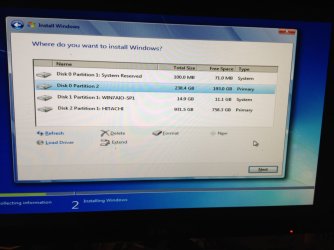
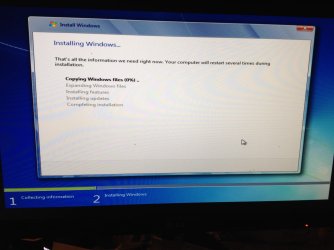
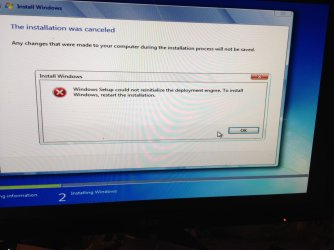
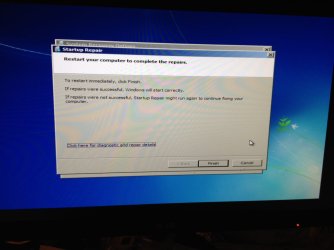
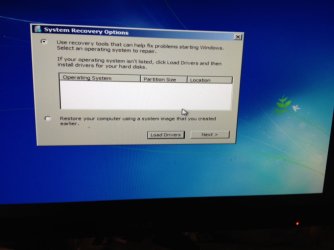
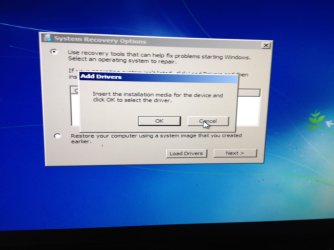
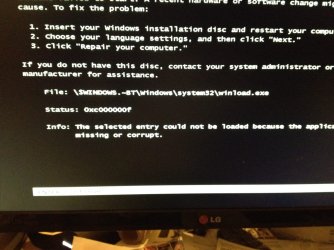
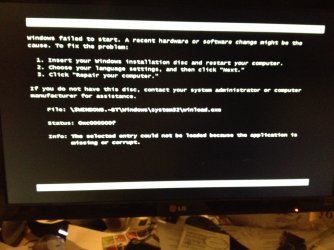
I then tried to run the setup from my USB and before doing so i found a tutorial online that said to delete a file i think called Ef.cfg or something like that, it was contained in the sources folder, the reason for deleting this file was so that upon going to setup page i would be presented with a list of versions of win 7 that i could choose from. I did the above, got to the install page, picked win 7 ultimate, clicked next, it started installing, i went for a shower and came back and i had a message about an error, i did not pay full attention to the error but it failed to install. The pc tried to reboot but now i get presented with a screen that says repair or something along those lines. I tried to repair it but it failed.

I know i'm doing a bad job of all the messages, but i will shortly post a video of what happens.

I do NOT have an installation disk or usb, i am still using the bootlegged usb to try and fix this. If i need to download a different install iso please let me know.

I have or rather did have my win 7 installed on an ssd if that is of any help.
 

My Computer

Computer type
PC/Desktop
OS
Win 7 Ultimate x64
Welcome to Seven Forums and good to know you bought a Genuine w7 key. I'd throw away the bootleg version, but save the USB stick to use this.
http://www.sevenforums.com/tutorials/1649-clean-install-windows-7-a.html#post16008
There are links to download the version you need and to make the USB installer.

The N version is for Europe and has no Media player included. The EU thought is was a monopoly or something.

Related:
http://www.sevenforums.com/tutorials/2432-usb-windows-7-installation-key-drive-create.html

http://www.sevenforums.com/tutorials/85813-windows-7-universal-installation-disc-create.html

The key you have will only validate for the version, Home, Pro, Ultimate, it is for.
 

My Computer

Computer type
PC/Desktop
Computer Manufacturer/Model Number
Home Built Desktop By DataTech
OS
Windows 7 Ultimate X64 SP1
CPU
Intel i5-2550K, Differing ~4.4-4.8GHz No built in GPU
Motherboard
ASUS P8Z68-V PRO/GEN3
Memory
16GB G.Skill Sniper 1866MHz @ 2133MHz 2x8GB
Graphics Card(s)
ASUS GTX650TIB-DC2OC-2GD5, (650TI Boost)
Sound Card
Onboard Realtek 5-1
Monitor(s) Displays
Samsung P2570HD
Screen Resolution
1920x1080
Hard Drives
Samsung 840 Pro 256GB SSD for OS, 500GB Seagate Constellation (Enterprise drive) for Data
PSU
Corsair HX650W
Case
Inwin Dragon Rider
Cooling
Hyper 212 EVO w/two Noctua fans, push-pull, @1300 RPM
Keyboard
E-Z Eyes, bright yellow keys with large characters
Mouse
steelseries SENSEI Laser Pro Gaming
Internet Speed
48-51Mbs Mbs down, 11 Mbs up Xfinity Cable
Antivirus
Norton Internet Security 2013
Browser
IE 10, Opera, Pale Moon if needed
Other Info
4 case fans, LG BluRay-RE, ASUS DVD-RW, Mr. Fusion power supply, 1.21 gigawatts.

My Computer

Computer Manufacturer/Model Number
HP, Dell, Gateway, Toshiba - 4 laptops and 2 desktops
OS
Vista, Windows7, Mint Mate, Zorin, Windows 8
CPU
from 1.6GHz Duo to i7
Monitor(s) Displays
2x HP w2207
Hard Drives
5x HDD, 7x SSD, 12x Externals
Keyboard
with trackball - no mices
Mouse
Trackball mice
Internet Speed
DSL 6000
Hi, thanks for the quick response! Yes i know N version excludes wmp & i think a few other extras. Ok so i will delete the bootlog and d/l the one you have mentioned.

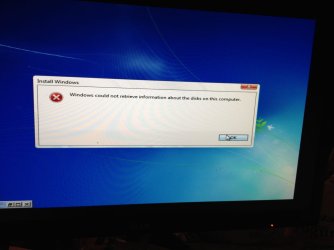
I have attached a few pics of screens i get.

Am i going to have to reinstall all my progs/drivers/etc etc again or will they still work?
 

Attachments

  • img_0772.jpg
    img_0772.jpg
    130.3 KB · Views: 2
  • img_0773.jpg
    img_0773.jpg
    147.5 KB · Views: 2
  • img_0774.jpg
    img_0774.jpg
    120.8 KB · Views: 1
  • img_0775.jpg
    img_0775.jpg
    162.1 KB · Views: 1
  • img_0776.jpg
    img_0776.jpg
    85.8 KB · Views: 1

My Computer

Computer type
PC/Desktop
OS
Win 7 Ultimate x64
Unfortunately you will lose you installed stuff, but you will have a nice fresh install to enjoy.

Back up what you want to keep and disconnect all other drives except the one you install too.
 

My Computer

Computer type
PC/Desktop
Computer Manufacturer/Model Number
Home Built Desktop By DataTech
OS
Windows 7 Ultimate X64 SP1
CPU
Intel i5-2550K, Differing ~4.4-4.8GHz No built in GPU
Motherboard
ASUS P8Z68-V PRO/GEN3
Memory
16GB G.Skill Sniper 1866MHz @ 2133MHz 2x8GB
Graphics Card(s)
ASUS GTX650TIB-DC2OC-2GD5, (650TI Boost)
Sound Card
Onboard Realtek 5-1
Monitor(s) Displays
Samsung P2570HD
Screen Resolution
1920x1080
Hard Drives
Samsung 840 Pro 256GB SSD for OS, 500GB Seagate Constellation (Enterprise drive) for Data
PSU
Corsair HX650W
Case
Inwin Dragon Rider
Cooling
Hyper 212 EVO w/two Noctua fans, push-pull, @1300 RPM
Keyboard
E-Z Eyes, bright yellow keys with large characters
Mouse
steelseries SENSEI Laser Pro Gaming
Internet Speed
48-51Mbs Mbs down, 11 Mbs up Xfinity Cable
Antivirus
Norton Internet Security 2013
Browser
IE 10, Opera, Pale Moon if needed
Other Info
4 case fans, LG BluRay-RE, ASUS DVD-RW, Mr. Fusion power supply, 1.21 gigawatts.
more pics
 

Attachments

  • img_0781.jpg
    img_0781.jpg
    104.8 KB · Views: 1
  • img_0780.jpg
    img_0780.jpg
    110.1 KB · Views: 1
  • img_0779.jpg
    img_0779.jpg
    100.6 KB · Views: 1
  • img_0778.jpg
    img_0778.jpg
    197.6 KB · Views: 1
  • img_0777.jpg
    img_0777.jpg
    171.3 KB · Views: 1

My Computer

Computer type
PC/Desktop
OS
Win 7 Ultimate x64
I suspect all the "more pics" are due to a bad installer you have.
You should try to fond and download all drivers and put on a stick or disk to have ready too, especially the network adapter one, Ethernet and wireless if you have it.
 

My Computer

Computer type
PC/Desktop
Computer Manufacturer/Model Number
Home Built Desktop By DataTech
OS
Windows 7 Ultimate X64 SP1
CPU
Intel i5-2550K, Differing ~4.4-4.8GHz No built in GPU
Motherboard
ASUS P8Z68-V PRO/GEN3
Memory
16GB G.Skill Sniper 1866MHz @ 2133MHz 2x8GB
Graphics Card(s)
ASUS GTX650TIB-DC2OC-2GD5, (650TI Boost)
Sound Card
Onboard Realtek 5-1
Monitor(s) Displays
Samsung P2570HD
Screen Resolution
1920x1080
Hard Drives
Samsung 840 Pro 256GB SSD for OS, 500GB Seagate Constellation (Enterprise drive) for Data
PSU
Corsair HX650W
Case
Inwin Dragon Rider
Cooling
Hyper 212 EVO w/two Noctua fans, push-pull, @1300 RPM
Keyboard
E-Z Eyes, bright yellow keys with large characters
Mouse
steelseries SENSEI Laser Pro Gaming
Internet Speed
48-51Mbs Mbs down, 11 Mbs up Xfinity Cable
Antivirus
Norton Internet Security 2013
Browser
IE 10, Opera, Pale Moon if needed
Other Info
4 case fans, LG BluRay-RE, ASUS DVD-RW, Mr. Fusion power supply, 1.21 gigawatts.
man this is gonna suck! I'm not going to lose all my personal files/folders though am I? I'm just writing over windows again right?
 

My Computer

Computer type
PC/Desktop
OS
Win 7 Ultimate x64
sorry, before i make another mistake, on the page to d/l win 7 i see there are 2 i can pick from, i don't want to go through all the hassle agin, so could you please tell me which is the correct win 7 ultimate i want to d/l Windows 7 Ultimate x64 SP1 (old) X17-24395.iso or Windows 7 Ultimate x86 RTM X15-65921.iso i think one of them is supposed to be usb bootable already, i think!
 

My Computer

Computer type
PC/Desktop
OS
Win 7 Ultimate x64
sorry, before i make another mistake, on the page to d/l win 7 i see there are 2 i can pick from, i don't want to go through all the hassle agin, so could you please tell me which is the correct win 7 ultimate i want to d/l Windows 7 Ultimate x64 SP1 (old) X17-24395.iso or Windows 7 Ultimate x86 RTM X15-65921.iso i think one of them is supposed to be usb bootable already, i think!

You don't want either one of those, you want the one labeled X17-59465 from this link,

Windows 7 Direct Download Links, Official Disk Images from Digital River

For creating a USB the tutorial Britton posted will show you how,

http://www.sevenforums.com/tutorials/2432-usb-windows-7-installation-key-drive-create.html
 

My Computer

Computer type
PC/Desktop
Computer Manufacturer/Model Number
Self Built
OS
Win 10 Pro x64
CPU
Intel I5-2500K @3.3GHz
Motherboard
Asrock P67 Extreme4
Memory
16GB G.Skill Ripjaws X (4x4GB)
Graphics Card(s)
EVGA GeForce 750 Ti SC 2GB
Sound Card
ASUS Xonar DG 5.1 Channels 24-bit 96KHz PCI Interface Sound
Monitor(s) Displays
auria eq2367
Screen Resolution
1920 x 1080
Hard Drives
250GB Samsung 850 EVO SSD
1TB WD Blue
1TB Hitachi
PSU
SeaSonic X 650W 80 Plus Gold
Case
Corsair Obsidian 750D
Cooling
Corsair H60, Three 140mm case fans
Keyboard
Logitech Wireless Keyboard K520
Mouse
Logitech Wireless Mouse M310
Internet Speed
Wave Broadband ~ 100 dn 5 up
Antivirus
Windows Defender, Malwarebytes Premium
Browser
Edge, IE11, Chrome
Other Info
Laptop specs: HP g7-1365dx /
CPU: AMD A6-3420M APU with Radeon(tm) HD Graphics /
RAM: Crucial 8Gb (2x4Gb) /
SSD: Crucial M4-CT128M4SSD2 ATA Device/ FW 000F /
GFX: AMD Radeon HD 6520G /
OS: Windows 10 Pro x64
man this is gonna suck! I'm not going to lose all my personal files/folders though am I? I'm just writing over windows again right?
You have to backup all your stuff that is in the C partition because that will be erased. Copy your files to a stick or external disk. The programs you have to reinstall and the settings too.
 

My Computer

Computer Manufacturer/Model Number
HP, Dell, Gateway, Toshiba - 4 laptops and 2 desktops
OS
Vista, Windows7, Mint Mate, Zorin, Windows 8
CPU
from 1.6GHz Duo to i7
Monitor(s) Displays
2x HP w2207
Hard Drives
5x HDD, 7x SSD, 12x Externals
Keyboard
with trackball - no mices
Mouse
Trackball mice
Internet Speed
DSL 6000
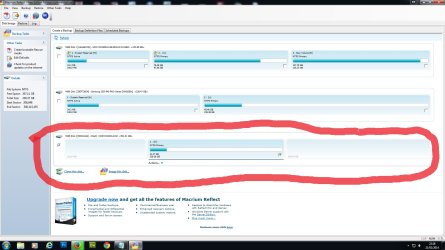
OMG!!! I did a clone of my ssd to my external hdd which is 1tb, the clone size was 41gb, it now seems to have wiped my entire external hdd!!! I was using Macrium Reflec, please tell me i've not gone and also lost all my data on my external hdd!!
 

My Computer

Computer type
PC/Desktop
OS
Win 7 Ultimate x64
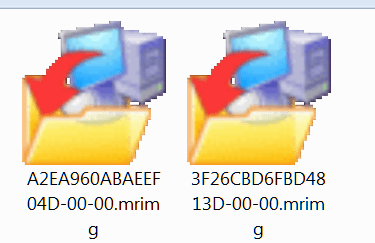
If you did not have a designated folder for the Macrium image, the image should have went into the root of the 1TB drive without wiping any data that was there. Look for files with this icon.
 

Attachments

  • 2014-02-21_1713.png
    2014-02-21_1713.png
    10.1 KB · Views: 24

My Computer

Computer Manufacturer/Model Number
HP, Dell, Gateway, Toshiba - 4 laptops and 2 desktops
OS
Vista, Windows7, Mint Mate, Zorin, Windows 8
CPU
from 1.6GHz Duo to i7
Monitor(s) Displays
2x HP w2207
Hard Drives
5x HDD, 7x SSD, 12x Externals
Keyboard
with trackball - no mices
Mouse
Trackball mice
Internet Speed
DSL 6000
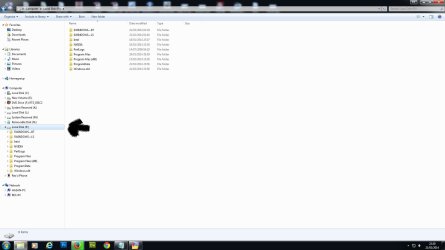
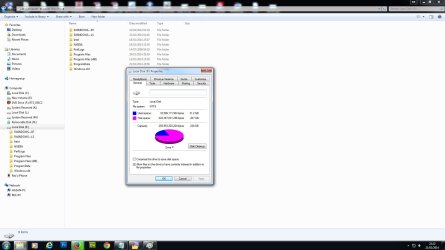
ok, i didn't do an image, i did a clone of the ssd. Also i don't see anything like what you have shown me above, what i see is below, also my external hdd now shows as 238GB??? Its meant to be 1tb. Also in the 1st image it shows 693.04gb but i can't click on it.
 

Attachments

  • clone1.jpg
    clone1.jpg
    154.4 KB · Views: 5
  • clone2.jpg
    clone2.jpg
    77.8 KB · Views: 5
  • clone3.jpg
    clone3.jpg
    107.2 KB · Views: 4

My Computer

Computer type
PC/Desktop
OS
Win 7 Ultimate x64
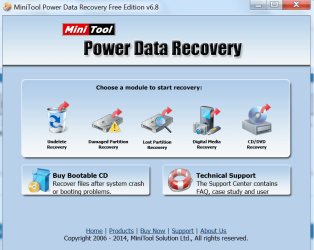
That is indeed strange. In 5 years using Macrium on a dozen machines that has never happened to me. You must have made some user error. You can try this program to recover your stuff:
 

Attachments

  • 2014-02-21_1733.png
    2014-02-21_1733.png
    50.6 KB · Views: 2

My Computer

Computer Manufacturer/Model Number
HP, Dell, Gateway, Toshiba - 4 laptops and 2 desktops
OS
Vista, Windows7, Mint Mate, Zorin, Windows 8
CPU
from 1.6GHz Duo to i7
Monitor(s) Displays
2x HP w2207
Hard Drives
5x HDD, 7x SSD, 12x Externals
Keyboard
with trackball - no mices
Mouse
Trackball mice
Internet Speed
DSL 6000
hi all, appreciate the help i got yesterdy. Managed to reinstall win 7 fine, now just having issues trying to recover/sort out what has happened to my external hdd. I have installed the recovery pointed out above, but after 8hrs it still hasn't finished scanning the drive, is this normal? It is at 37% and the percentages are going up so it hasn't crashed. The drive is 1tb
 

My Computer

Computer type
PC/Desktop
OS
Win 7 Ultimate x64
I guess it is normal. A 1TB external drive can be a drag. It's slow if on USB2.
 

My Computer

Computer Manufacturer/Model Number
HP, Dell, Gateway, Toshiba - 4 laptops and 2 desktops
OS
Vista, Windows7, Mint Mate, Zorin, Windows 8
CPU
from 1.6GHz Duo to i7
Monitor(s) Displays
2x HP w2207
Hard Drives
5x HDD, 7x SSD, 12x Externals
Keyboard
with trackball - no mices
Mouse
Trackball mice
Internet Speed
DSL 6000
Hi, i'm back again for help! The recovery software has finished it's scan and before i do anything i want advice on what i do next. Just a reminder, this is my 1tb ext hdd which was somehow overwritten by Macrium when i was backing up my ssd. The recovery software shows many partitions on my ext hdd, however i never created any partitions on it ever, i used it as storage without doing anything to it since i bought it. Also i have clicked SHOW files on some of the partitions shown in the image below, non of the file names or folders actually resemble any of the orginal stuff i had on this drive.....will it bring back my folder names again or am i just going to have a mess of data to go through?
 

Attachments

  • recover.jpg
    recover.jpg
    105.3 KB · Views: 6

My Computer

Computer type
PC/Desktop
OS
Win 7 Ultimate x64
Back
Top