Win 7 drive letters - please help

semaj

New member
Local time
6:21 PM
Messages
5
When I had win 7 installed for me I had some of the drive letters changed. I cant remember which but I think it was the DVD drives. I have 3 hard drives and 3 cd rom and dvd drives. I am desperate to change back to the letters Win 7 auto assigned. Can anyone tell me if this is possible as I don't know what they were originally. I need to do this because I bought Acronis True Image and recovery cannot auto find find backup files. It asks me to change locations and I am sure I would precipitate a disaster!! As a 76 year old ignoramus I am depending on your help otherwise I have wasted a wad of cash on a program I cannot use. Ta.

:(
 

My Computer

OS
windows 7 ultimate 64bit
Welcome to Seven Forums semaj. You can certainly change drive letters:

http://www.sevenforums.com/tutorials/82994-drive-letter-add-change-remove-windows-7-a.html

You may have to change some letters to a higher letter to free up that letter for another drive. For instance. If you currently have C:, D:, E:, F:. G:, H:. You may have to change H: temporarily to M:, so you can change E: to H:, and then use E: for another drive, etc. Hope that made sense. Also, make sure any letters you chose aren't used by USB devices, if so, just pick another letter until you get everything renamed. A Guy
 

My Computer

Computer type
PC/Desktop
OS
Windows 10 Home x64
CPU
INTEL Core i5-750 Quad-Core 3.37GHz
Motherboard
ASUS P7P55D
Memory
HyperX Fury Black Series 8GB (2 x 4GB) 1866Mhz
Graphics Card(s)
EVGA GeForce GTX 750 Superclocked 1GB 128-Bit GDDR5
Monitor(s) Displays
LG 32MA68HY 32" IPS
Screen Resolution
1920 x 1080
Hard Drives
Samsung 840 Evo 120GB, SEAGATE 500GB Barracuda® 7200.12, SATA 3 Gb/s, 7200 RPM, 16MB cache
PSU
ANTEC TruePower New TP-550, 80 PLUS, 550W
Case
ANTEC Three Hundred Illusion
Cooling
COOLER MASTER Hyper 212 Plus, 4 x 120mm 1 x 140mm Noctua's
Internet Speed
85 + Mbps
Antivirus
Avast
Browser
Vivaldi

My Computer

Computer type
PC/Desktop
Computer Manufacturer/Model Number
Dell inspiron 1564
OS
MS Windows 8
CPU
Intel Core i5 @ 2.27GHz Arrandale 32nm Technology
Motherboard
Dell Inc. 0M9XW4 (U2E1)
Memory
8.0GB Dual-Channel DDR3 @ 532MHz (7-7-7-20)
Graphics Card(s)
ATI Mobility Radeon HD 4300 Series (Dell)
Sound Card
Realtek High Definition Audio
Monitor(s) Displays
Generic PnP Monitor on ATI Mobility Radeon HD 4330
Screen Resolution
1366x768 pixels
Hard Drives
1 tb TOSHIBA (SATA)
PSU
built-in
Case
Dell Laptop
Cooling
built-in
Keyboard
built-in
Mouse
Dell Touchpad/Microsoft Arc Mouse
Other Info
Snake Laptop Skin, Detachable Alfa USB wifi with custom 15dbi antenna (for better signal range)
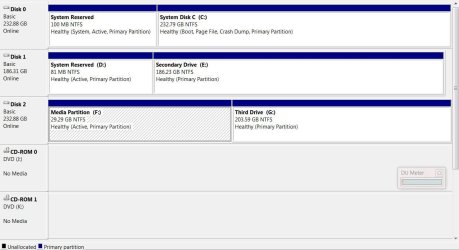
Thanks Guy but yep I know I can change letters but I want to change them back to what win 7 originally assigned. Trouble is I don't know what letters Win 7 gave the them. This is currently how they look.
drives.JPG
drives.JPG
%5CUsers%5CUser%5CPictures
 

My Computer

OS
windows 7 ultimate 64bit
oops how do I insert picture?
 

My Computer

OS
windows 7 ultimate 64bit
Add images to posts:

http://www.sevenforums.com/tutorials/9733-screenshots-files-upload-post-seven-forums.html

rbeldua is correct, that windows will assign the 1st 3 letters to the hard drives (assuming they were all installed originally), then the optical drives. Since we can assume that C: will be the OS drive, the other 2 HDDs will be D: and E:. Which was which originally would be hard to say. I think we need to see what you have now, then tackle what Acronis is telling you. Acronis should be able to find images on whatever drive they are placed on, regardless of letter.

A Guy
 

My Computer

Computer type
PC/Desktop
OS
Windows 10 Home x64
CPU
INTEL Core i5-750 Quad-Core 3.37GHz
Motherboard
ASUS P7P55D
Memory
HyperX Fury Black Series 8GB (2 x 4GB) 1866Mhz
Graphics Card(s)
EVGA GeForce GTX 750 Superclocked 1GB 128-Bit GDDR5
Monitor(s) Displays
LG 32MA68HY 32" IPS
Screen Resolution
1920 x 1080
Hard Drives
Samsung 840 Evo 120GB, SEAGATE 500GB Barracuda® 7200.12, SATA 3 Gb/s, 7200 RPM, 16MB cache
PSU
ANTEC TruePower New TP-550, 80 PLUS, 550W
Case
ANTEC Three Hundred Illusion
Cooling
COOLER MASTER Hyper 212 Plus, 4 x 120mm 1 x 140mm Noctua's
Internet Speed
85 + Mbps
Antivirus
Avast
Browser
Vivaldi

My Computer

Computer type
PC/Desktop
Computer Manufacturer/Model Number
Dell inspiron 1564
OS
MS Windows 8
CPU
Intel Core i5 @ 2.27GHz Arrandale 32nm Technology
Motherboard
Dell Inc. 0M9XW4 (U2E1)
Memory
8.0GB Dual-Channel DDR3 @ 532MHz (7-7-7-20)
Graphics Card(s)
ATI Mobility Radeon HD 4300 Series (Dell)
Sound Card
Realtek High Definition Audio
Monitor(s) Displays
Generic PnP Monitor on ATI Mobility Radeon HD 4330
Screen Resolution
1366x768 pixels
Hard Drives
1 tb TOSHIBA (SATA)
PSU
built-in
Case
Dell Laptop
Cooling
built-in
Keyboard
built-in
Mouse
Dell Touchpad/Microsoft Arc Mouse
Other Info
Snake Laptop Skin, Detachable Alfa USB wifi with custom 15dbi antenna (for better signal range)
Thanks so here goesdrives 1.JPG
 

My Computer

OS
windows 7 ultimate 64bit
Ahhh, you have 2 other drives, with 2 partitions each. rather then tackle what their original drive letters may have been. Lets come at this from what is Acronis telling you is wrong. Attach some screen shots and explain what you try to do, specifically, and what error(s) you get :)

A Guy
 

My Computer

Computer type
PC/Desktop
OS
Windows 10 Home x64
CPU
INTEL Core i5-750 Quad-Core 3.37GHz
Motherboard
ASUS P7P55D
Memory
HyperX Fury Black Series 8GB (2 x 4GB) 1866Mhz
Graphics Card(s)
EVGA GeForce GTX 750 Superclocked 1GB 128-Bit GDDR5
Monitor(s) Displays
LG 32MA68HY 32" IPS
Screen Resolution
1920 x 1080
Hard Drives
Samsung 840 Evo 120GB, SEAGATE 500GB Barracuda® 7200.12, SATA 3 Gb/s, 7200 RPM, 16MB cache
PSU
ANTEC TruePower New TP-550, 80 PLUS, 550W
Case
ANTEC Three Hundred Illusion
Cooling
COOLER MASTER Hyper 212 Plus, 4 x 120mm 1 x 140mm Noctua's
Internet Speed
85 + Mbps
Antivirus
Avast
Browser
Vivaldi
Thanks you guys for trying to help. However have run out of time. 0830 here in Scotland and wife (bless her) needs me to be up and about to assist. Will come back to this later in the day - God willing!!
 

My Computer

OS
windows 7 ultimate 64bit
Thanks you guys for trying to help. However have run out of time. 0830 here in Scotland and wife (bless her) needs me to be up and about to assist. Will come back to this later in the day - God willing!!

Always someone here to help. I'll look in tomorrow to see how you are getting along. A Guy
 

My Computer

Computer type
PC/Desktop
OS
Windows 10 Home x64
CPU
INTEL Core i5-750 Quad-Core 3.37GHz
Motherboard
ASUS P7P55D
Memory
HyperX Fury Black Series 8GB (2 x 4GB) 1866Mhz
Graphics Card(s)
EVGA GeForce GTX 750 Superclocked 1GB 128-Bit GDDR5
Monitor(s) Displays
LG 32MA68HY 32" IPS
Screen Resolution
1920 x 1080
Hard Drives
Samsung 840 Evo 120GB, SEAGATE 500GB Barracuda® 7200.12, SATA 3 Gb/s, 7200 RPM, 16MB cache
PSU
ANTEC TruePower New TP-550, 80 PLUS, 550W
Case
ANTEC Three Hundred Illusion
Cooling
COOLER MASTER Hyper 212 Plus, 4 x 120mm 1 x 140mm Noctua's
Internet Speed
85 + Mbps
Antivirus
Avast
Browser
Vivaldi
Back
Top