Solved Win 7 Enterprise, x64 - Update error : Code 80070424

burko01

New member
Local time
9:48 AM
Messages
19
Hi there,
using Lenovo, T430 laptop, from my daughters grad school. Don't have admin access, of course, but still puzzled that can't get the damn thing to update, after all these years she finished.
Didn't bother me much, 'cause everything worked regardless !

The other day I wanted to install Kodi, couldn't; and I decided to give it a shot and read a little.
To no avail ! So...


1. SURT
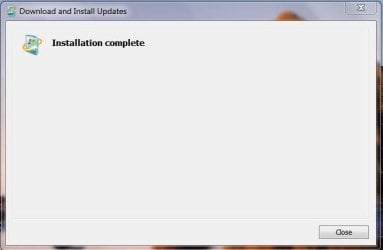
D-loaded it, it was sitting there installing for 10-15min without any progress bar moving across, and then it was done.
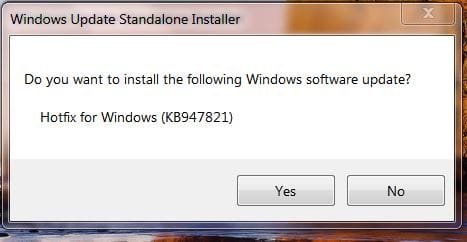
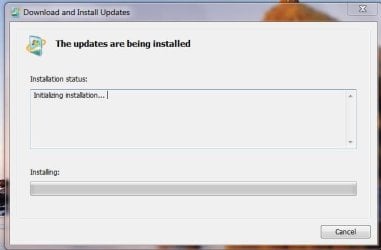
Windows Update Standalone Installer 022119.JPGThe Updates Are Being Installed 022119.JPG Installation Complete 022119.JPG


After "the installation" here is what I have :
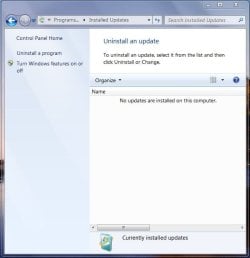
Currently Installed Updates 022119.JPG


2. SFC Scan
Couldn't get it to work...
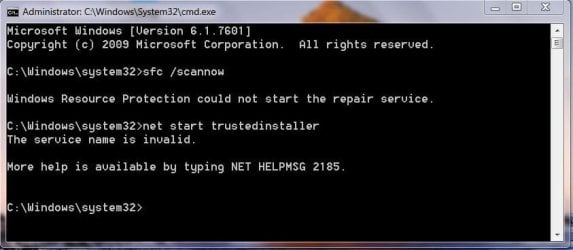
SFC Fail 022119.JPG


Since I don't have Windows Modules Installer, I tried Windows Installer, to no avail...
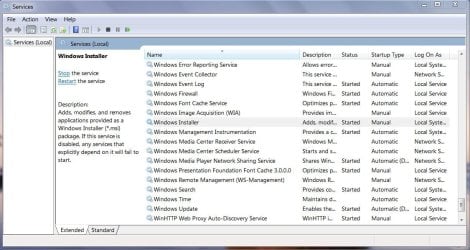
Windows Installer 022119.JPG


3.Error Codes
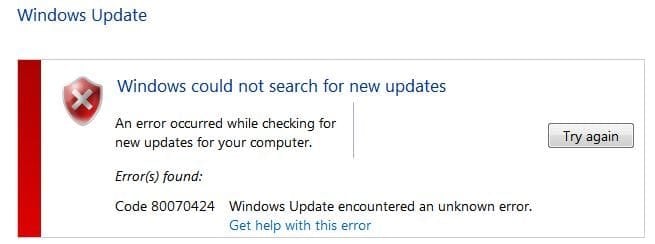
Err Code 022119.JPG


4. Log (nothing there?)
CBS.zip has 39.2 MBs (too much to upload !?), and there are in it some old cab files from 2016 & 2017 ; here is the pic :
View attachment 407047


Anyway, the prospect looks pretty grim, I know, but I'm not in despair.


"You live, you learn" & " Curiosity killed the cat " !


Thanks all for your insight.
 

My Computer

Computer type
Laptop
Computer Manufacturer/Model Number
LENOVO T430
OS
Microsoft Windows 7 Enterprise 64-bit 7601 Multiprocessor Free Service Pack 1
CPU
Intel(R) Core(TM) i5-3320M CPU @ 2.60GHz
Motherboard
LENOVO 23473Q2
Memory
8.00 GB
Graphics Card(s)
Intel(R) HD Graphics 4000
Sound Card
(1) Bluetooth Hands-free Audio (2) Realtek High Definition
Hard Drives
HGST HTS725050A7E630
Internet Speed
40 Mbps
Antivirus
Avira, Gmer, MBytes, HitmanPro
Browser
Firefox
Other Info
PIA
Update System Specifications

Please update your system specifications in your UserCP => Edit System Spec setup. It will help us to help you!

This SevenForums tutorial [Published by Brink and written by CyberZeus] makes this task very easy and quick to do. Click here => System Info - See Your System Specs.

Thanks.
 

My Computer

Computer type
Laptop
Computer Manufacturer/Model Number
Fujitsu LIFEBOOK
OS
Win 7 HP SP1 64-bit Vista HB SP2 32-bit Linux Mint 18.3
CPU
Intel(R) Pentium(R) CPU P6200 @ 2.13GHz
Motherboard
FUJITSU FJNBB06
Memory
4.00 GB
Graphics Card(s)
Intel(R) Graphics Media Accelerator HD
Sound Card
[1] Realtek High Definition Audio [2] Intel(R) Display Audio
Screen Resolution
1366 x 768 x 32 bits (4294967296 colors) @ 59 Hz
Hard Drives
TOSHIBA MK5076GSX
Antivirus
AVG FREE
Sorry P.B.,
rookie approach. Done.
 

My Computer

Computer type
Laptop
Computer Manufacturer/Model Number
LENOVO T430
OS
Microsoft Windows 7 Enterprise 64-bit 7601 Multiprocessor Free Service Pack 1
CPU
Intel(R) Core(TM) i5-3320M CPU @ 2.60GHz
Motherboard
LENOVO 23473Q2
Memory
8.00 GB
Graphics Card(s)
Intel(R) HD Graphics 4000
Sound Card
(1) Bluetooth Hands-free Audio (2) Realtek High Definition
Hard Drives
HGST HTS725050A7E630
Internet Speed
40 Mbps
Antivirus
Avira, Gmer, MBytes, HitmanPro
Browser
Firefox
Other Info
PIA
Just a quick observation. Birko01, that laptop has too many anti virus programs installed. There should only be one, otherwise they can clash & cause problems. You can usually have MBytes with one AV without any problems.
 

My Computer

Computer type
PC/Desktop
Computer Manufacturer/Model Number
Self built using existing case
OS
Windows 7 Home Premium 64 bit sp1
CPU
Intel i5 3570 3.4Ghz Ivy Bridge SKT 1155 quad core
Motherboard
Gigabyte Z77-HD3 SKT 1155 2xSata 3, 4x USB 3.0
Memory
G-Skill Rip Jaws 16Gb (8x2) DDR3 -1600 PC3 12800 CL 10 red
Graphics Card(s)
Gigabyte NVIDIA GT610 1Gb DDR3 810/1200 PCI-E 2.0 Silent
Sound Card
NVIDIA High Definition & Realtech High Definition Audio
Monitor(s) Displays
2 x Philips 226V4L 16:9 aspect ratio
Screen Resolution
1920 x 1080 HD
Hard Drives
Samsung 840 Pro 256gb SSD, SATA 3.
Hitachi Touro Portable 1tb, USB 3.0 HDD used for image b/ups.
PSU
Corsair VS450
Case
Codeng
Cooling
PSU fan & CPU fan
Keyboard
Logitech
Mouse
Logitech Wireless trackball M570
Internet Speed
Wireless 3G. 3mg down & 550kb up.
Antivirus
Bitdefender Internet Security 2020
Browser
Opera (Current Version) & Firefox
Other Info
MS Office 2013 Pro. Davis weather station software. MGE Nova 600 avr UPS.

My Computer

Computer type
Laptop
Computer Manufacturer/Model Number
Fujitsu LIFEBOOK
OS
Win 7 HP SP1 64-bit Vista HB SP2 32-bit Linux Mint 18.3
CPU
Intel(R) Pentium(R) CPU P6200 @ 2.13GHz
Motherboard
FUJITSU FJNBB06
Memory
4.00 GB
Graphics Card(s)
Intel(R) Graphics Media Accelerator HD
Sound Card
[1] Realtek High Definition Audio [2] Intel(R) Display Audio
Screen Resolution
1366 x 768 x 32 bits (4294967296 colors) @ 59 Hz
Hard Drives
TOSHIBA MK5076GSX
Antivirus
AVG FREE
You are running Win 7 Enterprise, contact your system's administrator.
Computer type Laptop
System Manufacturer/Model Number LENOVO T430
OS Microsoft Windows 7 Enterprise 64-bit 7601 Multiprocessor Free Service Pack 1
CPU Intel(R) Core(TM) i5-3320M CPU @ 2.60GHz
Motherboard LENOVO 23473Q2
Memory 8.00 GB
Graphics Card Intel(R) HD Graphics 4000
Sound Card (1) Bluetooth Hands-free Audio (2) Realtek High Definition


Gmer is rootkit detector scanner
HitmanPro is on demand multi av engine scanner free or paid version.
Avast is antivirus
Mbytes is free scanner or paid compatible with most other AVs etc.

I don't see a conflict.
 

My Computer

Computer type
PC/Desktop
Computer Manufacturer/Model Number
HP Desktop & Compaq Laptop
OS
Win 10 x64, Linux Lite, Win 7 x64, BlackArch, & Kali
Hard Drives
Samsung 850 Pro 256Gb,
Hitachi HDD 1Tb,
Crucial MX SSD 250Gb
Segate 3Tb USB 3.0 Ext. Backup HDD
Internet Speed
150Mbps dn, 20Mbps up
Antivirus
Avast Free, Malwarebytes Anti-Exploit & Anti-Ransomware
Browser
Firefox, Chrome, Opera, & VPN
You are running Win 7 Enterprise, contact your system's administrator.
....

Hi there,
thanks for trying to help. You probably missed this part in my post :
...using Lenovo, T430 laptop, from my daughters grad school. Don't have admin access, of course, but still puzzled that can't get the damn thing to update, after all these years she finished.
We payed $40k for tuition and now the sa(i)d laptop is mine, as I was the main financial backer :cool:!
And, ...my own sys admin, apparently :geek:!

So, if there is any real technical advise, or explanation for the fact that I can't get it update, you guys could give me, it would be appreciated.
If not, it's not the end of the world, 'cause the laptop is actually working. I can browse, do mu e-mails,viber, music and watch movies.

But...

As I mentioned already, "You live, you learn" & " Curiosity killed the cat " !


If nothing else, I'll do a fresh do-over one of these days. The spring is coming (one would hope)!


Thank you all.
 

My Computer

Computer type
Laptop
Computer Manufacturer/Model Number
LENOVO T430
OS
Microsoft Windows 7 Enterprise 64-bit 7601 Multiprocessor Free Service Pack 1
CPU
Intel(R) Core(TM) i5-3320M CPU @ 2.60GHz
Motherboard
LENOVO 23473Q2
Memory
8.00 GB
Graphics Card(s)
Intel(R) HD Graphics 4000
Sound Card
(1) Bluetooth Hands-free Audio (2) Realtek High Definition
Hard Drives
HGST HTS725050A7E630
Internet Speed
40 Mbps
Antivirus
Avira, Gmer, MBytes, HitmanPro
Browser
Firefox
Other Info
PIA
Hi burko01,

So, if there is any real technical advise, or explanation for the fact that I can't get it update, you guys could give me, it would be appreciated.

There are a couple of options available.

[1] Try running DISM++ to see if that will update the OS.
[2] Do a Repair Install from an updated ISO download.

DISM++ - Basic Overview

DISM++ is a FREE implementation tool that has the ability to perform Windows Updates [WU]. Some of the advantages [but not all] are:

[1] The GUI is very easy to understand and use.
[2] It is much faster than M$’s WU because it uses a different engine.
[3] It downloads the latest WU DB from the M$ servers, scans your OS, and then lists the updates available.
[4] It doesn’t install superseded updates like M$ does.
[5] It gives you the option of what you want to install.
[6] The pre-ticked updates are what is recommended and are similar to the WU critical and recommended updates. The un-ticked updates are similar to the WU optional updates.
[7] It warns you if an update:
  • Includes telemetry.
  • Has known issues with certain hardware.
  • Needs exclusive access.
  • Is suspect.
  • Your OS doesn't need it.
  • Has any other known issues.
[8] It doesn’t require re-booting between updates.
[9] It can be used to either update an install.wim image OFFLINE, or to update the LIVE OS.

Repair Install - Overview

A repair install differs from a clean install in the fact that it ONLY replaces the corrupted OS with a new fresh copy. This means that ALL your User Accounts, Folders, Files, Documents, Pictures, Music, Videos, Data Files, Icons, and any installed programs are left intact. It does however, delete ALL the Window updates, and can affect, sounds, services, visual effect settings and device drivers by re-setting them to default. You cannot do a repair install at boot, in Safe Mode, using a system repair disk, or using an integrated Windows update disk. Basically, this process can ONLY be performed from within the LIVE OS.

I hope this helps!
 

My Computer

Computer type
Laptop
Computer Manufacturer/Model Number
Fujitsu LIFEBOOK
OS
Win 7 HP SP1 64-bit Vista HB SP2 32-bit Linux Mint 18.3
CPU
Intel(R) Pentium(R) CPU P6200 @ 2.13GHz
Motherboard
FUJITSU FJNBB06
Memory
4.00 GB
Graphics Card(s)
Intel(R) Graphics Media Accelerator HD
Sound Card
[1] Realtek High Definition Audio [2] Intel(R) Display Audio
Screen Resolution
1366 x 768 x 32 bits (4294967296 colors) @ 59 Hz
Hard Drives
TOSHIBA MK5076GSX
Antivirus
AVG FREE
Hi P.B,


so, if this ain't technical, I don't know what is, right :cool:?


Thanks for your time. The only one i was able to dig out is this one :
DISM++x64022319.JPG
Does it look right to you ?


I wanna make sure before going any further with this funky business...
 

My Computer

Computer type
Laptop
Computer Manufacturer/Model Number
LENOVO T430
OS
Microsoft Windows 7 Enterprise 64-bit 7601 Multiprocessor Free Service Pack 1
CPU
Intel(R) Core(TM) i5-3320M CPU @ 2.60GHz
Motherboard
LENOVO 23473Q2
Memory
8.00 GB
Graphics Card(s)
Intel(R) HD Graphics 4000
Sound Card
(1) Bluetooth Hands-free Audio (2) Realtek High Definition
Hard Drives
HGST HTS725050A7E630
Internet Speed
40 Mbps
Antivirus
Avira, Gmer, MBytes, HitmanPro
Browser
Firefox
Other Info
PIA
Hi burko01,

Hi P.B, so, if this ain't technical, I don't know what is, right :cool:?

Thanks for your time. The only one i was able to dig out is this one :
View attachment 407068
Does it look right to you?

IMPORTANT: Make a system restore point prior to running anything!

If you decide to use DISM++, then it is best to run the DISM++ Windows updates a couple of times to make sure you get ALL the updates that are needed. DON’T install ANY of the ORANGE updates though [see numbers [6] and [7] above]. It can also install the required .NET Framework updates. Then just run WU to see what other updates are available, if any.

DISM++ - Run Windows Updates On The LIVE OS
DISM++ Direct download [zip] => DISM++.

Here is the quick procedure guide:

[1] Download the latest version of DISM++ [see the DISM++ Direct download [zip] link above].
[2] Extract the files using something like 7-Zip here => 7-Zip.
[3] Turn Sleep mode OFF in Power Options [you can turn it back on after you have finished].
[4] Double-click Dism++x86 or Dism++x64 and then click Run.
[5] Click Updates in the left-hand pane and then click Scan [bottom right].
[6] Once the scan has completed, click Install Updates [blue button to the right of Scan].
[7] If any warning pop-ups appear [see item [7] in the Basic Overview above], click Cancel and it will skip that one. There could be several of these appear so click Cancel to all of them.
[8] It is advisable to run the DISM++ WU a couple of times. To do this, just re-boot and Scan again [from number [4] above].
[9] Run M$ WU [Windows Update] to see if there are any other updates available.

That's it!
 

My Computer

Computer type
Laptop
Computer Manufacturer/Model Number
Fujitsu LIFEBOOK
OS
Win 7 HP SP1 64-bit Vista HB SP2 32-bit Linux Mint 18.3
CPU
Intel(R) Pentium(R) CPU P6200 @ 2.13GHz
Motherboard
FUJITSU FJNBB06
Memory
4.00 GB
Graphics Card(s)
Intel(R) Graphics Media Accelerator HD
Sound Card
[1] Realtek High Definition Audio [2] Intel(R) Display Audio
Screen Resolution
1366 x 768 x 32 bits (4294967296 colors) @ 59 Hz
Hard Drives
TOSHIBA MK5076GSX
Antivirus
AVG FREE
OK accept your Enterprise explanation.
If you would please download and run
System Update Readiness Tool (SURT) for Windows 7 for x64

Be patient, it will complete. When it does please post CBS.log CheckSUR.log, WindowsUpdate.log.
CBS.log and CheckSUR.log location: C:\Windows\Logs\CBS
WindowsUpdate.log
location: C:\Windows

Place them in a zip/compressed folder and upload them please.
CheckSUR.log is temporary in its default location. If it's not there, you'll have to run SURT again.
 

My Computer

Computer type
PC/Desktop
Computer Manufacturer/Model Number
HP Desktop & Compaq Laptop
OS
Win 10 x64, Linux Lite, Win 7 x64, BlackArch, & Kali
Hard Drives
Samsung 850 Pro 256Gb,
Hitachi HDD 1Tb,
Crucial MX SSD 250Gb
Segate 3Tb USB 3.0 Ext. Backup HDD
Internet Speed
150Mbps dn, 20Mbps up
Antivirus
Avast Free, Malwarebytes Anti-Exploit & Anti-Ransomware
Browser
Firefox, Chrome, Opera, & VPN
Hi burko01,
IMPORTANT: Make a system restore point prior to running anything!
...


1. system restore point - done.


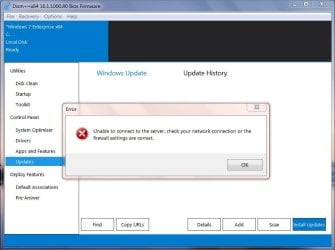
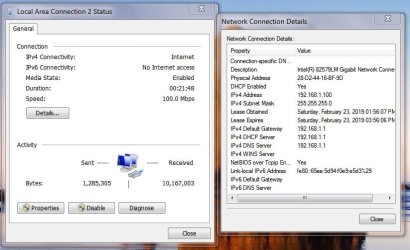
2. After " Click Updates in the left-hand pane and then click Scan", I got this:
DISM++ 022319.JPG


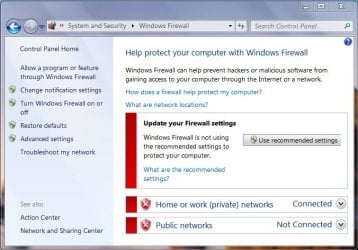
and the firewall was turned off prior to that
Firewall OFF 022319.JPG


and the internet was on, as you could see
Internet ON 022319.JPG


Tough cookie :cry: !


Now what !?
 

My Computer

Computer type
Laptop
Computer Manufacturer/Model Number
LENOVO T430
OS
Microsoft Windows 7 Enterprise 64-bit 7601 Multiprocessor Free Service Pack 1
CPU
Intel(R) Core(TM) i5-3320M CPU @ 2.60GHz
Motherboard
LENOVO 23473Q2
Memory
8.00 GB
Graphics Card(s)
Intel(R) HD Graphics 4000
Sound Card
(1) Bluetooth Hands-free Audio (2) Realtek High Definition
Hard Drives
HGST HTS725050A7E630
Internet Speed
40 Mbps
Antivirus
Avira, Gmer, MBytes, HitmanPro
Browser
Firefox
Other Info
PIA
Hi burko01,

I suggest that you do what Snick has recommended first.

As a reply to your question, download and run KB4487345 from here => MS Update Catalog KB4487345.

Then try running WU again.
If that doesn't work then run DISM++ again.
 

My Computer

Computer type
Laptop
Computer Manufacturer/Model Number
Fujitsu LIFEBOOK
OS
Win 7 HP SP1 64-bit Vista HB SP2 32-bit Linux Mint 18.3
CPU
Intel(R) Pentium(R) CPU P6200 @ 2.13GHz
Motherboard
FUJITSU FJNBB06
Memory
4.00 GB
Graphics Card(s)
Intel(R) Graphics Media Accelerator HD
Sound Card
[1] Realtek High Definition Audio [2] Intel(R) Display Audio
Screen Resolution
1366 x 768 x 32 bits (4294967296 colors) @ 59 Hz
Hard Drives
TOSHIBA MK5076GSX
Antivirus
AVG FREE
OK accept your Enterprise explanation.
If you would please download and run
System Update Readiness Tool (SURT) for Windows 7 for x64
...

Hi S(enior)nick,

thank you for lending me helping hand & your expertise.

I dloaded SURT and it's a déjà vu of my first post. You are welcome to re-visit it.

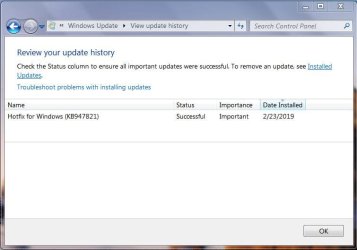
The only snip I didn't post yesterday is this one (it was the same yesterday):
Review yuor update history 022319.JPG

This was the only file that showed up after 9 min of chuggin' hdd light.


Also, there was no CBS.log created in the location you mentioned, only CheckSur.log.
After a search thru the C: drive, an old text file from 2013 turned up in a following location:
View attachment 407074
I included it in a zip you recommended, it might give you an insight-maybe-what was happening back
then, when,supposedly, everything was OK.
View attachment Logs 022319.zip

Well, that'll be all for now. If you two guys get tired of me soon, don't hesitate to call it quits.

The laptop, as I already mentioned, is working and this is only for the intellectual gymnastics:party:!


Thank you both.
 
Last edited:

My Computer

Computer type
Laptop
Computer Manufacturer/Model Number
LENOVO T430
OS
Microsoft Windows 7 Enterprise 64-bit 7601 Multiprocessor Free Service Pack 1
CPU
Intel(R) Core(TM) i5-3320M CPU @ 2.60GHz
Motherboard
LENOVO 23473Q2
Memory
8.00 GB
Graphics Card(s)
Intel(R) HD Graphics 4000
Sound Card
(1) Bluetooth Hands-free Audio (2) Realtek High Definition
Hard Drives
HGST HTS725050A7E630
Internet Speed
40 Mbps
Antivirus
Avira, Gmer, MBytes, HitmanPro
Browser
Firefox
Other Info
PIA
Hi burko01,

I suggest that you do what Snick has recommended first.

As a reply to your question, download and run KB4487345 from here => MS Update Catalog KB4487345.

Then try running WU again.
If that doesn't work then run DISM++ again.


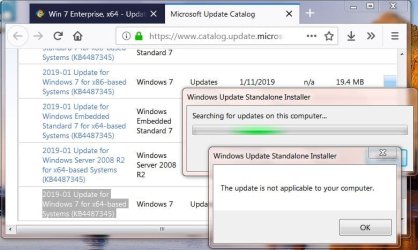
Naaaah...The Lord Of The Rings is not in my corner on this matter:
KB4487345 FAIL 022319.JPG

Sigh:confused:
 

My Computer

Computer type
Laptop
Computer Manufacturer/Model Number
LENOVO T430
OS
Microsoft Windows 7 Enterprise 64-bit 7601 Multiprocessor Free Service Pack 1
CPU
Intel(R) Core(TM) i5-3320M CPU @ 2.60GHz
Motherboard
LENOVO 23473Q2
Memory
8.00 GB
Graphics Card(s)
Intel(R) HD Graphics 4000
Sound Card
(1) Bluetooth Hands-free Audio (2) Realtek High Definition
Hard Drives
HGST HTS725050A7E630
Internet Speed
40 Mbps
Antivirus
Avira, Gmer, MBytes, HitmanPro
Browser
Firefox
Other Info
PIA
...and, just to add that, as I was researching the best approach for the absolution, I ran into Simplix Pack
that, sadly, didn't get me too far on foot...

And the story goes on...
 

My Computer

Computer type
Laptop
Computer Manufacturer/Model Number
LENOVO T430
OS
Microsoft Windows 7 Enterprise 64-bit 7601 Multiprocessor Free Service Pack 1
CPU
Intel(R) Core(TM) i5-3320M CPU @ 2.60GHz
Motherboard
LENOVO 23473Q2
Memory
8.00 GB
Graphics Card(s)
Intel(R) HD Graphics 4000
Sound Card
(1) Bluetooth Hands-free Audio (2) Realtek High Definition
Hard Drives
HGST HTS725050A7E630
Internet Speed
40 Mbps
Antivirus
Avira, Gmer, MBytes, HitmanPro
Browser
Firefox
Other Info
PIA
If you receive server not found error with DISM++, reboot/restart your computer and try again. Had same error in the past several times. Please don't try that right now.

Your CheckSUR.log is clean
Your WindowsUpdate.log is empty 0 bytes (weird)
Perusing CBS.log

CBS.log is full of DISM++ entries. Would you please try to run Windows Update again. When it fails, please post CBS.log and WindowsUpdate.log. Hopefully WU log will be populated!
 
Last edited:

My Computer

Computer type
PC/Desktop
Computer Manufacturer/Model Number
HP Desktop & Compaq Laptop
OS
Win 10 x64, Linux Lite, Win 7 x64, BlackArch, & Kali
Hard Drives
Samsung 850 Pro 256Gb,
Hitachi HDD 1Tb,
Crucial MX SSD 250Gb
Segate 3Tb USB 3.0 Ext. Backup HDD
Internet Speed
150Mbps dn, 20Mbps up
Antivirus
Avast Free, Malwarebytes Anti-Exploit & Anti-Ransomware
Browser
Firefox, Chrome, Opera, & VPN
...
CBS.log is full of DISM++ entries...


Heeeey Snick,

let me remind you that it's weekend, Saturday...you shouldn't be sweating around this at all!
Since I am at keyboard, I'll respectfully point out that you missed this:
...
Also, there was no CBS.log created in the location you mentioned, only CheckSur.log.
After a search thru the C: drive, an old text file from 2013 turned up in a following location:
View attachment 407079
I included it in a zip you recommended, it might give you an insight-maybe-what was happening back
then, when,supposedly, everything was OK
.
So, CBS.log file was from 2013 in location C:\Windows\Panther !? whatever...


I apologize for the confusion; all the best and have a good one !
 

My Computer

Computer type
Laptop
Computer Manufacturer/Model Number
LENOVO T430
OS
Microsoft Windows 7 Enterprise 64-bit 7601 Multiprocessor Free Service Pack 1
CPU
Intel(R) Core(TM) i5-3320M CPU @ 2.60GHz
Motherboard
LENOVO 23473Q2
Memory
8.00 GB
Graphics Card(s)
Intel(R) HD Graphics 4000
Sound Card
(1) Bluetooth Hands-free Audio (2) Realtek High Definition
Hard Drives
HGST HTS725050A7E630
Internet Speed
40 Mbps
Antivirus
Avira, Gmer, MBytes, HitmanPro
Browser
Firefox
Other Info
PIA
Heeeey Snick,

let me remind you that it's weekend, Saturday...you shouldn't be sweating around this at all!
Since I am at keyboard, I'll respectfully point out that you missed this:

So, CBS.log file was from 2013 in location C:\Windows\Panther !? whatever...


I apologize for the confusion; all the best and have a good one !

Yes, it is Saturday here in Michigan. I don't sweat anything anymore, I'm too old! LOL Computers have been a hobby of mine since the early 80s and I enjoy helping others with their computer issues.

Wish you would have informed me of the missing CBS.log in the location I provided, however, all is well. I only spent a minute or two on it.

Are there any cbs.persist.cabs in the cbs folder?

Would you please run Win Update again. Hopefully it will produce a new CBS.log & populate the WindowsUpdate.log. Include the latest CBS.persist.cab with your next post please.
 
Last edited:

My Computer

Computer type
PC/Desktop
Computer Manufacturer/Model Number
HP Desktop & Compaq Laptop
OS
Win 10 x64, Linux Lite, Win 7 x64, BlackArch, & Kali
Hard Drives
Samsung 850 Pro 256Gb,
Hitachi HDD 1Tb,
Crucial MX SSD 250Gb
Segate 3Tb USB 3.0 Ext. Backup HDD
Internet Speed
150Mbps dn, 20Mbps up
Antivirus
Avast Free, Malwarebytes Anti-Exploit & Anti-Ransomware
Browser
Firefox, Chrome, Opera, & VPN
You ran DISM++ in 2013? I don't believe it was available then. Something amiss here!

With that said, what time and date do you have on your system clock?

Snick is correct, DISM++ wasn't available in 2013!

If as Snick has pointed out, your time and date are wrong, then this could be the cause of the WU not working as WU uses todays date for reference!
 

My Computer

Computer type
Laptop
Computer Manufacturer/Model Number
Fujitsu LIFEBOOK
OS
Win 7 HP SP1 64-bit Vista HB SP2 32-bit Linux Mint 18.3
CPU
Intel(R) Pentium(R) CPU P6200 @ 2.13GHz
Motherboard
FUJITSU FJNBB06
Memory
4.00 GB
Graphics Card(s)
Intel(R) Graphics Media Accelerator HD
Sound Card
[1] Realtek High Definition Audio [2] Intel(R) Display Audio
Screen Resolution
1366 x 768 x 32 bits (4294967296 colors) @ 59 Hz
Hard Drives
TOSHIBA MK5076GSX
Antivirus
AVG FREE
Back
Top