Win 7 extremly slow, even after clean install. CPU running low, RAM ok

buccjko

New member
Local time
9:03 AM
Messages
3
Hey guys, I'm new here, and I really need yours help. Two months ago my computer started crashing on startup, BSOD, and after first crash, I boot it up again, and than works normally, like nothing happend. But I wanted to fix that, and I shut down all services on startup, that aren't related to Windows and I used used three antivirus programs, all showing no virusis in system. Than I updated all drivers, as BSOD code was some kind of problem with video graphics, even used some registry cleaners and Windows didn't crash any more. But than real problem showed up. Windows started to be very slow, and unresponsive, to open page in browser, it needs like 5 minutes, simplest task became too hard to do with my computer. I don't use it for gaming, just simpel stuff. I cleaned all the dust inside computer, but all the same. I couldn't deal with that any more, so I decided that it's time for fresh start.

That's why, I decided to do a clean install of Windows. On my great surprise, it's still slow as it was before clean install! Usage of CPU is never above 50%, and RAM also. I really don't know what to do next. Any help is welcomed! Thanks!

System spec: CPU - Pentium(R) Dual-Core CPU E6500 @ 2.93GHz
Motherboard - ASRock G31M-VS2
RAM - 4GB
HDD - WDC WD5000AAKS-00WWPA0 ATA Device
Graphics card - AMD Radeon HD5450
OS - Microsoft Windows 7 Home Premium 32-bit
 

My Computer My Computer

At a glance

Alabama
Computer type
PC/Desktop
OS
Alabama

My Computer My Computer

At a glance

Windows 7 Ultimate x64 SP1AMD Phenom 2 1090T2x8GB Kingston HyperX Fury Black 1600Mhz Unga...MSI GTX 970 Gaming 4G
Computer type
PC/Desktop
Computer Manufacturer/Model Number
Custom Build
OS
Windows 7 Ultimate x64 SP1
CPU
AMD Phenom 2 1090T
Motherboard
Gigabyte GA-890FXA-UD5
Memory
2x8GB Kingston HyperX Fury Black 1600Mhz Unganged
Graphics Card(s)
MSI GTX 970 Gaming 4G
Sound Card
Realtek On-Board HD 7.1 Audio / Logitech G35
Monitor(s) Displays
3xAcer GD245HQ
Screen Resolution
1920x1080
Hard Drives
Samsung 850 Pro 512GB SSD - OS /
WD Caviar Black SATA 3 - 1 TBx2 - Dynamic RAID 0 /
WD Caviar Green SATA 2 - 640GBx2 - Dynamic RAID 0 /
WD Caviar Green SATA 2 - 640GB - Internal Backup /
Seagate Barracude SATA 3 - 3TB - External Backup/ Sync
PSU
HighPower 1000W
Case
Cooler Master HAF 932
Cooling
Noctua NH-D14
Keyboard
Logitech G19
Mouse
Logitech G500
Internet Speed
100/4 Mbit Cable (100GB quota)
Antivirus
ZoneAlarm Extreme Security / MBAM Pro / MBAE Free / SAS Free
Browser
IE 11 - Firefox - Chrome
Other Info
Logitech F710/ G27/ G940/ Z5500 // TrackIR 5 // Nvidia 3D Surround Vision
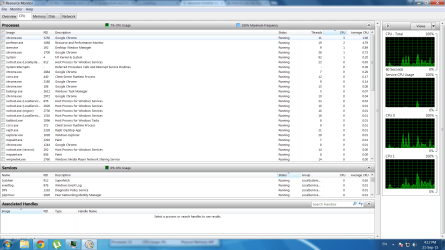
Hey Gokay, thanks for help. Thanks for clear instructions. I did clean startup even before I did clean installation of Win7, and than again after new install and it didn't help, it's still very slow. I didn't install antivirus after new install, because computer is too slow, and it's basically blank, without any additional programs. Here's screenshots you asked
 

Attachments

  • CPU.png
    CPU.png
    99.9 KB · Views: 4
  • Memory.png
    Memory.png
    98.9 KB · Views: 5

My Computer My Computer

At a glance

Alabama
Computer type
PC/Desktop
OS
Alabama
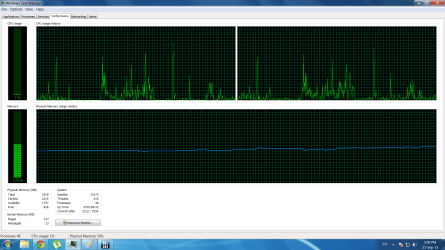
Hmm, CPU and RAM is totally alright.

Are there any unexpected high read/writes in Disk tab? And a screenshot of Performance tab of Task Manager please.

Load defaults in BIOS. How to Clear Your Computer?s CMOS to Reset BIOS Settings

Then select High Performance power plan (if you haven't already) - http://www.sevenforums.com/tutorials/778-power-plan-settings-change.html
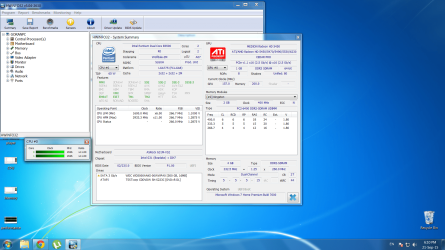
Also download and run HWInfo with sensors-only and keep an eye on temperatures and clocks.

Next would be some hardware checks - http://www.sevenforums.com/tutorials/220165-troubleshooting-steps-windows-7-a.html
 

My Computer My Computer

At a glance

Windows 7 Ultimate x64 SP1AMD Phenom 2 1090T2x8GB Kingston HyperX Fury Black 1600Mhz Unga...MSI GTX 970 Gaming 4G
Computer type
PC/Desktop
Computer Manufacturer/Model Number
Custom Build
OS
Windows 7 Ultimate x64 SP1
CPU
AMD Phenom 2 1090T
Motherboard
Gigabyte GA-890FXA-UD5
Memory
2x8GB Kingston HyperX Fury Black 1600Mhz Unganged
Graphics Card(s)
MSI GTX 970 Gaming 4G
Sound Card
Realtek On-Board HD 7.1 Audio / Logitech G35
Monitor(s) Displays
3xAcer GD245HQ
Screen Resolution
1920x1080
Hard Drives
Samsung 850 Pro 512GB SSD - OS /
WD Caviar Black SATA 3 - 1 TBx2 - Dynamic RAID 0 /
WD Caviar Green SATA 2 - 640GBx2 - Dynamic RAID 0 /
WD Caviar Green SATA 2 - 640GB - Internal Backup /
Seagate Barracude SATA 3 - 3TB - External Backup/ Sync
PSU
HighPower 1000W
Case
Cooler Master HAF 932
Cooling
Noctua NH-D14
Keyboard
Logitech G19
Mouse
Logitech G500
Internet Speed
100/4 Mbit Cable (100GB quota)
Antivirus
ZoneAlarm Extreme Security / MBAM Pro / MBAE Free / SAS Free
Browser
IE 11 - Firefox - Chrome
Other Info
Logitech F710/ G27/ G940/ Z5500 // TrackIR 5 // Nvidia 3D Surround Vision
I did ''load bios defaults'' and It's still the same. I did High performance power plan and nothing changed. I will do hardware checks tomorrow, because it takes hours with my computer to do it. I did install HWinfo, but I don't know what those values mean, I see clocks, but not temperature, I will upload screenshot. But here are performance screenshots, CPU spikes randomly, does it mean something?
 

Attachments

  • performance.png
    performance.png
    59.3 KB · Views: 4
  • perf2.png
    perf2.png
    55 KB · Views: 2
  • hdm.png
    hdm.png
    354.1 KB · Views: 4

My Computer My Computer

At a glance

Alabama
Computer type
PC/Desktop
OS
Alabama
Back
Top