Win 7 Home Premium x64 Randomly Freezes requiring hard boot

Max Hartrate

New member
Local time
11:07 AM
Messages
6
I recently upgraded my own custom built PC by replacing the primary HDD with a 500GB Samsung SSD, a new graphics card and installed OEM Windows Home Premium x64. From the beginning, I have experienced random freezes that require a hard boot, at least once a day. There’s never a BSOD. The freezes occur while I’m browsing, playing games, or doing nothing at all. The computer will crash immediately in sleep mode and restart, so I have disabled the power settings. I don’t know if that’s a separate problem or not. I built this rig in 2007 with XPSP3 that worked more or less fine for years.


Here's the rig:

OS Windows 7 Home Premium 64 bit CPU Intel Core 2 Quad Q6600 2.4 GHz Motherboard Asus P5N-E SLI Memory 2 x 2GB Graphics Card(s) Gigabyte GTX 750 TI 2GB Hard Drives Samsung SSD 850 EVO 500 GB My power supply is a 600WCooler Master RS-600-PCAR-E3.


I have updated graphics and WiFi network card device drivers with no resolution. My HP 2575 all-in-one drivers seemed to be involved (Event viewer), so I completely uninstalled them. No help.

I’ve looked for the dump files, and there is nothing in there - ever. (show hidden files is checked. If anything was there I would see it).

I’ve gone to the Startup and Recovery Settings and set the “write debugging information” to:

Small memory dump, uncheck automatically restart, and set the small dump directory to”

%SystemRoot%\Minidump

There’s no memory.dmp file either.

The event viewer consistently shows two things:

Critical: The system has rebooted without cleanly shutting down first. This error could be caused if the system stopped responding, crashed, or lost power unexpectedly. (8:35:25 AM on ‎6/‎13/‎15)

Error: The previous system shutdown at 8:05:58 AM on ‎6/‎13/‎2015 was unexpected. (8:35:34 AM 6/13/15)

When I look for an event at the time 8:05:58 AM on ‎6/‎13/‎15, I don’t see anything.

It’s the same pattern whenever this happens.


WTH is going on? :banghead: Help would be much appreciated.


(If I didn’t post this in the right place, or broke a forum rule- don’t crucify me, I’m a n00b. Point me to the right place.)
 

My Computer My Computer

At a glance

Windows 7 Home Premium 64 bitIntel Core 2 Quad Q6600 2.4 GHzGigabyte GTX 750 TI 2GB
Computer type
PC/Desktop
Computer Manufacturer/Model Number
Custom
OS
Windows 7 Home Premium 64 bit
CPU
Intel Core 2 Quad Q6600 2.4 GHz
Motherboard
Asus P5N-E SLI
Graphics Card(s)
Gigabyte GTX 750 TI 2GB
Hard Drives
Samsung SSD 850 EVO 500 GB
Antivirus
ESET
Browser
Firefox

My Computer My Computer

At a glance

Windows 7 Home Premium SP1, 64-bitIntel Skylake i5-6600K, not overclocked8 GB HyperX DDR4-2666 (2 x 4 GB)none; graphics are integrated on CPU
Computer type
PC/Desktop
Computer Manufacturer/Model Number
Ignatz Special; 4 speed manual gearbox; factory air conditioning; one of one
OS
Windows 7 Home Premium SP1, 64-bit
CPU
Intel Skylake i5-6600K, not overclocked
Motherboard
AsRock Z170M Extreme 4, micro ATX
Memory
8 GB HyperX DDR4-2666 (2 x 4 GB)
Graphics Card(s)
none; graphics are integrated on CPU
Sound Card
onboard: Realtek ALC1150; external: USB Behringer UF0-202
Monitor(s) Displays
Dell S2340M 23 inch IPS
Screen Resolution
1600 x 900
Hard Drives
System: Crucial MX100 series SSD, 128 GB;
Data: Samsung Spinpoint 103SJ, 1 TB;
Backup: WD Caviar Green WD30EZRX-00D8PB0, 3 TB
PSU
Rosewill SilentNight 500 watt fanless, semi-modular
Case
Antec Solo II
Cooling
Noctua NH-U12S; Noctua F12 intake, Noctua S12A exhaust
Keyboard
Microsoft 200 6JH-00001 USB
Mouse
Dell or Microsoft optical wired; USB
Antivirus
Microsoft Security Essentials and Malwarebytes Premium
Browser
Pale Moon
Other Info
All fans PWM; speeds at idle: CPU circa 500 rpm; intake circa 600 rpm; exhaust circa 600 rpm; CPU temps 27 idle and 47 C load in a warm room (27 C/81 F) when running Intel Extreme Tuning Utility stress test.
Are you installing the full suite of Nvidia drivers including GeForce Experience?

Clean uninstall Nvidia drivers and install only graphics and PhysX drivers. See if it will help.

You can also try a CMOS clear, load defaults in BIOS.
 

My Computer My Computer

At a glance

Windows 7 Ultimate x64 SP1AMD Phenom 2 1090T2x8GB Kingston HyperX Fury Black 1600Mhz Unga...MSI GTX 970 Gaming 4G
Computer type
PC/Desktop
Computer Manufacturer/Model Number
Custom Build
OS
Windows 7 Ultimate x64 SP1
CPU
AMD Phenom 2 1090T
Motherboard
Gigabyte GA-890FXA-UD5
Memory
2x8GB Kingston HyperX Fury Black 1600Mhz Unganged
Graphics Card(s)
MSI GTX 970 Gaming 4G
Sound Card
Realtek On-Board HD 7.1 Audio / Logitech G35
Monitor(s) Displays
3xAcer GD245HQ
Screen Resolution
1920x1080
Hard Drives
Samsung 850 Pro 512GB SSD - OS /
WD Caviar Black SATA 3 - 1 TBx2 - Dynamic RAID 0 /
WD Caviar Green SATA 2 - 640GBx2 - Dynamic RAID 0 /
WD Caviar Green SATA 2 - 640GB - Internal Backup /
Seagate Barracude SATA 3 - 3TB - External Backup/ Sync
PSU
HighPower 1000W
Case
Cooler Master HAF 932
Cooling
Noctua NH-D14
Keyboard
Logitech G19
Mouse
Logitech G500
Internet Speed
100/4 Mbit Cable (100GB quota)
Antivirus
ZoneAlarm Extreme Security / MBAM Pro / MBAE Free / SAS Free
Browser
IE 11 - Firefox - Chrome
Other Info
Logitech F710/ G27/ G940/ Z5500 // TrackIR 5 // Nvidia 3D Surround Vision

My Computer My Computer

At a glance

Windows 7 Home Premium 64 bitIntel Core 2 Quad Q6600 2.4 GHzGigabyte GTX 750 TI 2GB
Computer type
PC/Desktop
Computer Manufacturer/Model Number
Custom
OS
Windows 7 Home Premium 64 bit
CPU
Intel Core 2 Quad Q6600 2.4 GHz
Motherboard
Asus P5N-E SLI
Graphics Card(s)
Gigabyte GTX 750 TI 2GB
Hard Drives
Samsung SSD 850 EVO 500 GB
Antivirus
ESET
Browser
Firefox
Are you installing the full suite of Nvidia drivers including GeForce Experience?

Clean uninstall Nvidia drivers and install only graphics and PhysX drivers. See if it will help.

You can also try a CMOS clear, load defaults in BIOS.


I will try this also. Thank you.
 

My Computer My Computer

At a glance

Windows 7 Home Premium 64 bitIntel Core 2 Quad Q6600 2.4 GHzGigabyte GTX 750 TI 2GB
Computer type
PC/Desktop
Computer Manufacturer/Model Number
Custom
OS
Windows 7 Home Premium 64 bit
CPU
Intel Core 2 Quad Q6600 2.4 GHz
Motherboard
Asus P5N-E SLI
Graphics Card(s)
Gigabyte GTX 750 TI 2GB
Hard Drives
Samsung SSD 850 EVO 500 GB
Antivirus
ESET
Browser
Firefox
Update- The ONLY two things I did were:

1. Installed the SSD Magician, but I did not update the firmware. I get a message that says Magician is not properly communicating with the drive. I did not go down that road any further or update the firmware.

I have experienced my issue only once since my OP. I also experienced a true BSOD once.

2. I uninstalled all of the Ge Force Experience and fluff. I reinstalled ONLY the driver.

I'm guessing the GeForce experience suite of stuff was the main (perhaps only) culprit as GokAy suspected.
 

My Computer My Computer

At a glance

Windows 7 Home Premium 64 bitIntel Core 2 Quad Q6600 2.4 GHzGigabyte GTX 750 TI 2GB
Computer type
PC/Desktop
Computer Manufacturer/Model Number
Custom
OS
Windows 7 Home Premium 64 bit
CPU
Intel Core 2 Quad Q6600 2.4 GHz
Motherboard
Asus P5N-E SLI
Graphics Card(s)
Gigabyte GTX 750 TI 2GB
Hard Drives
Samsung SSD 850 EVO 500 GB
Antivirus
ESET
Browser
Firefox
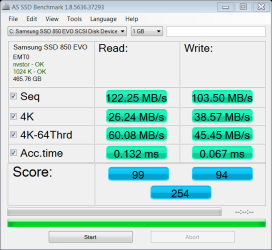
Can you check something please? Download AS SSD benchmark and run it (no need to actually start a benchmark). On upper left it will say either in green or red text the driver being used. If you are unsure post a screenshot. I suspect your SATA operation mode is set to IDE or RAID in BIOS.
 

My Computer My Computer

At a glance

Windows 7 Ultimate x64 SP1AMD Phenom 2 1090T2x8GB Kingston HyperX Fury Black 1600Mhz Unga...MSI GTX 970 Gaming 4G
Computer type
PC/Desktop
Computer Manufacturer/Model Number
Custom Build
OS
Windows 7 Ultimate x64 SP1
CPU
AMD Phenom 2 1090T
Motherboard
Gigabyte GA-890FXA-UD5
Memory
2x8GB Kingston HyperX Fury Black 1600Mhz Unganged
Graphics Card(s)
MSI GTX 970 Gaming 4G
Sound Card
Realtek On-Board HD 7.1 Audio / Logitech G35
Monitor(s) Displays
3xAcer GD245HQ
Screen Resolution
1920x1080
Hard Drives
Samsung 850 Pro 512GB SSD - OS /
WD Caviar Black SATA 3 - 1 TBx2 - Dynamic RAID 0 /
WD Caviar Green SATA 2 - 640GBx2 - Dynamic RAID 0 /
WD Caviar Green SATA 2 - 640GB - Internal Backup /
Seagate Barracude SATA 3 - 3TB - External Backup/ Sync
PSU
HighPower 1000W
Case
Cooler Master HAF 932
Cooling
Noctua NH-D14
Keyboard
Logitech G19
Mouse
Logitech G500
Internet Speed
100/4 Mbit Cable (100GB quota)
Antivirus
ZoneAlarm Extreme Security / MBAM Pro / MBAE Free / SAS Free
Browser
IE 11 - Firefox - Chrome
Other Info
Logitech F710/ G27/ G940/ Z5500 // TrackIR 5 // Nvidia 3D Surround Vision
can you check something please? Download as ssd benchmark and run it (no need to actually start a benchmark). On upper left it will say either in green or red text the driver being used. If you are unsure post a screenshot. I suspect your sata operation mode is set to ide or raid in bios.
as-ssd-bench Samsung SSD 850  7.5.2015 6-34-22 AM.png
 

My Computer My Computer

At a glance

Windows 7 Home Premium 64 bitIntel Core 2 Quad Q6600 2.4 GHzGigabyte GTX 750 TI 2GB
Computer type
PC/Desktop
Computer Manufacturer/Model Number
Custom
OS
Windows 7 Home Premium 64 bit
CPU
Intel Core 2 Quad Q6600 2.4 GHz
Motherboard
Asus P5N-E SLI
Graphics Card(s)
Gigabyte GTX 750 TI 2GB
Hard Drives
Samsung SSD 850 EVO 500 GB
Antivirus
ESET
Browser
Firefox
Hi and welcome to SevenForums,
I would suggest you prep the ssd for clean install,
http://www.sevenforums.com/tutorials/149969-ssd-install-transfer-operating-system.html
Prepare the SSD – You first have to initialize the SSD to create the MBR. You can do that with Disk Management or with this program (which you will need later anyhow).

Then you need to align the SSD and define an active partition on it. You use an elevated Command Prompt with the following commands:

Diskpart
List disk
Select disk n (where n is the number that was given for your SSD in List disk)
Clean
Create partition primary align=1024
Format fs=ntfs quick
Active (assuming you want to install an OS)
Exit
 

My Computer My Computer

At a glance

Win-7-Pro64bit 7-H-Prem-64biti7-5930K 2nd i9-9940x both water blocked VRM'...Trident-z 3200C14 2nd Trident-z 3600C16EVGA 1080ti ftw3 2nd Titan Xp both water blocked
Computer type
PC/Desktop
Computer Manufacturer/Model Number
Custom assembled by me :}
OS
Win-7-Pro64bit 7-H-Prem-64bit
CPU
i7-5930K 2nd i9-9940x both water blocked VRM's too
Motherboard
ASUS SABERTOOTH X99 2nd ASUS x299 Apex
Memory
Trident-z 3200C14 2nd Trident-z 3600C16
Graphics Card(s)
EVGA 1080ti ftw3 2nd Titan Xp both water blocked
Sound Card
Built-in Realtek
Monitor(s) Displays
1-AOC G2460PG 24"G-Sync 144Hz/ 2nd 1-ASUS VG248QE 24" 144Hz
Screen Resolution
1920 x 1080 144Hz
Hard Drives
2-Samsung M.2 Evo & Evo Plus
2-Samsung 850 EVO 500GB SSD's/ 3-2.5 W.D. Black 1tb-&3-1tb/3-3.5 WD Black 1tb hdd's
PSU
EVGA SuperNOVA 1000-P2 2nd 1200-P2
Case
2-Corsair Obsidian Series 450D Black ATX Mid Tower
Cooling
Custom water loops
Keyboard
Logitech G710+/ 2nd Logitech G910
Mouse
2-RedDragon M901 Perdition 16400 dpi Gaming mouse = wired
Internet Speed
Comcast Ping 19ms 89.31mbps download speed 6.12mbps upload
Antivirus
Malwarebytes Pro/ Superantispyware Pro
Browser
FireFox & Pale moon
Other Info
2nd ASUS X299 Apex/Intel i9-9940x with Custom water loop/7H-Prem-x64/Corsair 450D case/Ram Trident-z 3600C16 4x8gb / Samsung970Evo plus 500gb SSD/Dual ssd EZ swap evo/PSU EVGA SuperNova 1200w-P2 80+Platinum/GPU Titan Xp /8-ML-140 on push-pull on 2-280GTX rads
Thanks for the suggestion, but why would I want/need to do that? (No snarky here - honest question :party:)

When I upgraded a few months ago, I did a clean fresh install on the SSD -no ghosting, no migration, nuthin'. Minty fresh Win 7 OEM install on a new drive.

Thanks.
 

My Computer My Computer

At a glance

Windows 7 Home Premium 64 bitIntel Core 2 Quad Q6600 2.4 GHzGigabyte GTX 750 TI 2GB
Computer type
PC/Desktop
Computer Manufacturer/Model Number
Custom
OS
Windows 7 Home Premium 64 bit
CPU
Intel Core 2 Quad Q6600 2.4 GHz
Motherboard
Asus P5N-E SLI
Graphics Card(s)
Gigabyte GTX 750 TI 2GB
Hard Drives
Samsung SSD 850 EVO 500 GB
Antivirus
ESET
Browser
Firefox

My Computer My Computer

At a glance

Windows 7 Ultimate x64 SP1AMD Phenom 2 1090T2x8GB Kingston HyperX Fury Black 1600Mhz Unga...MSI GTX 970 Gaming 4G
Computer type
PC/Desktop
Computer Manufacturer/Model Number
Custom Build
OS
Windows 7 Ultimate x64 SP1
CPU
AMD Phenom 2 1090T
Motherboard
Gigabyte GA-890FXA-UD5
Memory
2x8GB Kingston HyperX Fury Black 1600Mhz Unganged
Graphics Card(s)
MSI GTX 970 Gaming 4G
Sound Card
Realtek On-Board HD 7.1 Audio / Logitech G35
Monitor(s) Displays
3xAcer GD245HQ
Screen Resolution
1920x1080
Hard Drives
Samsung 850 Pro 512GB SSD - OS /
WD Caviar Black SATA 3 - 1 TBx2 - Dynamic RAID 0 /
WD Caviar Green SATA 2 - 640GBx2 - Dynamic RAID 0 /
WD Caviar Green SATA 2 - 640GB - Internal Backup /
Seagate Barracude SATA 3 - 3TB - External Backup/ Sync
PSU
HighPower 1000W
Case
Cooler Master HAF 932
Cooling
Noctua NH-D14
Keyboard
Logitech G19
Mouse
Logitech G500
Internet Speed
100/4 Mbit Cable (100GB quota)
Antivirus
ZoneAlarm Extreme Security / MBAM Pro / MBAE Free / SAS Free
Browser
IE 11 - Firefox - Chrome
Other Info
Logitech F710/ G27/ G940/ Z5500 // TrackIR 5 // Nvidia 3D Surround Vision
Back
Top