Win 7 HomePrem 64-bit, 32-Bit and Pro 64-Bit; Multiboot Drive Letters

Bart B

New member
Local time
2:20 PM
Messages
3
Here's my problem after installing other Win OS's on my PC.

First, original hard drive has Win. 7 HomePrem 64-bit on drive C.

Second, added a partition (drive B) to the original hard drive then installing Win. 7 Pro in it. Then installed Virtual XP on top of Win. 7 Pro.

Third, added a second 250 GB hard drive (E) then installed Win. 7 HomePrem 32-bit on it.

Installed EasyBCD 2.1.2 to manage multiboot issues. But the hard drive letters don't stay the same. And it takes a long time to go from starting Windows to complete desktop with all OS's.

What's an easy way to assign letters to hard drives such that they stay with them so whatever OS I use, the physical drive's letters showing on Disk Management and Windows Explorer stay the same?

After "freezing" drive's letters, what problems may arise?

Thanks in advance,

Bart
 
Last edited:

My Computer My Computer

At a glance

Windows 7 Pro 64-bit w/Virt. XP, 7 Home Prem ...Intel i3-21308 GBIntel HD Graphics
Computer Manufacturer/Model Number
HP p7-1120
OS
Windows 7 Pro 64-bit w/Virt. XP, 7 Home Prem 64-Bit, 7 Home Prem 32-Bit
CPU
Intel i3-2130
Memory
8 GB
Graphics Card(s)
Intel HD Graphics
Monitor(s) Displays
Insignia 27"
Hard Drives
Western Digital 1.5 TB
Seagate 1.5 TB
Seagate 250 GB
Case
HP
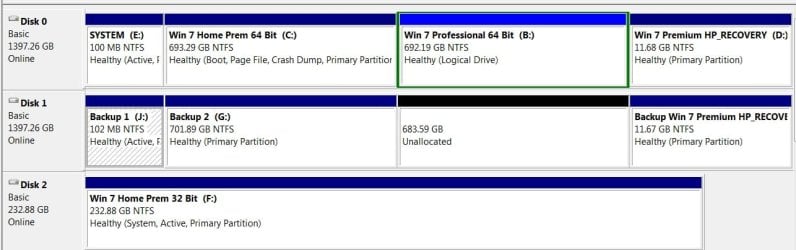
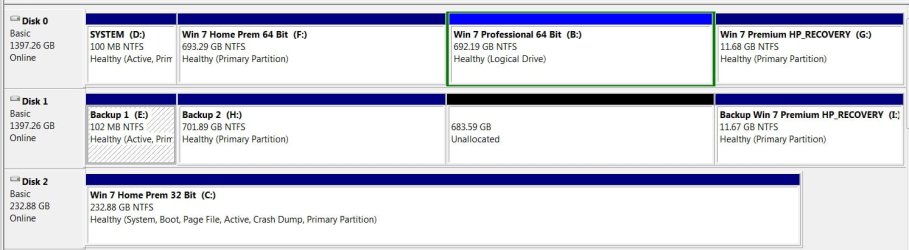
Please post back a screenshot of your maximized Disk Management drive map with listings, using Snipping Tool in Start Menu. Tell us what is on each partition.

If you incorrectly installed WIn7 from an OS instead of booting the installer, it takes away its ability to always be seen as C when booted.
 
Attached are screen shots of each OS's disk management.

Bart
 

Attachments

  • Win 7 Hm Prem 64-bit Dsk Mgt.jpg
    Win 7 Hm Prem 64-bit Dsk Mgt.jpg
    61.8 KB · Views: 15
  • Win 7 Pro 64-bit Dsk Mgmt.jpg
    Win 7 Pro 64-bit Dsk Mgmt.jpg
    80.3 KB · Views: 12
  • Win 7 Hm Prem 32-bit Dsk Mgmt.jpg
    Win 7 Hm Prem 32-bit Dsk Mgmt.jpg
    66.5 KB · Views: 8

My Computer My Computer

At a glance

Windows 7 Pro 64-bit w/Virt. XP, 7 Home Prem ...Intel i3-21308 GBIntel HD Graphics
Computer Manufacturer/Model Number
HP p7-1120
OS
Windows 7 Pro 64-bit w/Virt. XP, 7 Home Prem 64-Bit, 7 Home Prem 32-Bit
CPU
Intel i3-2130
Memory
8 GB
Graphics Card(s)
Intel HD Graphics
Monitor(s) Displays
Insignia 27"
Hard Drives
Western Digital 1.5 TB
Seagate 1.5 TB
Seagate 250 GB
Case
HP
1. I see you have given Win 7 Pro 64-bit drive letter B. Drive letters A and B are reserved for floppy drives and shouldn't be used for a system partition.

2. Whichever operating system you boot into will automatically take drive letter C with the others taking the next available drive letters, which means you can't freeze the drive letters as you put it.

3. I also notice that the 100MB System Reserved partition has been given drive letter J. This partition shouldn't have a drive letter from a security point of view. The system reserved partition contains the boot files and if the drive letter changes it could make the computer unbootable. When you boot into the other operating systems drive letters will change as I explained so you need to remove drive letter J.
 

My Computer My Computer

At a glance

Windows 7 Ultimate SP1 64-BitIntel Core i7 870 @ 2.93GHz8Gb Dual-Channel DDR3 @ 664MHznVidia GeForce GTX 460 1024MB dedicated RAM
Computer Manufacturer/Model Number
HP Pavilion Elite 495UK
OS
Windows 7 Ultimate SP1 64-Bit
CPU
Intel Core i7 870 @ 2.93GHz
Motherboard
MSI 2A9C (CPU1)
Memory
8Gb Dual-Channel DDR3 @ 664MHz
Graphics Card(s)
nVidia GeForce GTX 460 1024MB dedicated RAM
Sound Card
Realtek HD Audio
Monitor(s) Displays
HP2310i
Screen Resolution
1920 x 1080
Hard Drives
1x1954GB Hitachi HDS22020ALA 330 (RAID), 1x1954GB Hitachi External for backup and storage
PSU
460W
Case
HP Elite
Cooling
Air cooled
Keyboard
Logitech K750 solar-powered keyboard
Mouse
Logitech Wireless M180 mouse
Internet Speed
2Mb
Other Info
Pure Avanti Flow Internet Radio with iPod Dock, 64Gb iPod, HP USB Speakers, Sony MDR-V500 Headphones, Sony Vaio F-Series Laptop
In the second screenshot OP is booted (Boot label) into Pro 64 showing as B, which means it was incorrectly installed from another OS instead of booting the installer or it would show as C when booted.

I would clean reinstall Pro to that partition by correctly booting the installer which should autoconfigure the Multi-boot correctly since the other two OS's appear correct.

If not, install Easy BCD, on Edit OS Menu tab delete all other listings and then Add the other two OS's back by Name, Type, letting the app autodetect the drive letter.

You can also boot the single OS HD when needed by tapping the one-time BIOS Boot Menu key which will keep it independent.
 
Thanks for both replys.

About the drive letter B; does anyone on this forum have the clout to convince Microsoft to change their Windows software so when one wants to change a drive letter, "A" nor "B" does not show up on the available drive letters available? If these letters are not good to use for hard drives, something should prevent users like me from doing so. I'll change it and see what happens.

I installed Win. 7 Pro 64 from a Microsoft DVD with its activation code. To reinstall Pro to that partition (after relettering it) by correctly booting the installer, how do I "boot the installer?" I'm not familiar with this process.

EasyBCD is installed and I used it to set up the OS selection startup screen. I may well do as suggested to let this app detect/use the OS's drive letters. Might be the easiest to do without reinstalling Win. 7 Pro then Virtual XP Pro on top of it.

And I'll remove the drive letter from drive J; didn't know about the security issue. But I'll need a bit of help on this one as I see no way to remove the drive letter; only change it. How do I remove the drive letter

Thanks again for the help.

All OS's now boot in reasonable time. Something changed regarding this; have no idea what. The backup drive wasn't showing up after booting Win 7 HP 32-bit, but I let it crunch away after opening "Computer" to see all the drives. A popup window appeared saying drivers got installed for it, then it finally appeared.

Things are looking better, best regards to all,

Bart
 

My Computer My Computer

At a glance

Windows 7 Pro 64-bit w/Virt. XP, 7 Home Prem ...Intel i3-21308 GBIntel HD Graphics
Computer Manufacturer/Model Number
HP p7-1120
OS
Windows 7 Pro 64-bit w/Virt. XP, 7 Home Prem 64-Bit, 7 Home Prem 32-Bit
CPU
Intel i3-2130
Memory
8 GB
Graphics Card(s)
Intel HD Graphics
Monitor(s) Displays
Insignia 27"
Hard Drives
Western Digital 1.5 TB
Seagate 1.5 TB
Seagate 250 GB
Case
HP
Have you considered simplifying with virtualization? I can't imagine ever having a need or want to have the same OS installed several times on the same system.
 

My Computer My Computer

At a glance

Windows 7 Ultimate x64 SP1Intel Core i7-260012 GB Patriot Extreme DDR3-1333Nvidia GTX 470
OS
Windows 7 Ultimate x64 SP1
CPU
Intel Core i7-2600
Motherboard
Gigabyte GA-P67A-UD3P-B3
Memory
12 GB Patriot Extreme DDR3-1333
Graphics Card(s)
Nvidia GTX 470
Monitor(s) Displays
Dell UltraSharp 2209WA
Hard Drives
OCZ Agility3 240 GB, WD5001AALS, WD7501AALS
PSU
OCZ ModStream 700W
Case
CoolerMaster HAF 912 Advanced
Cooling
CoolerMaster Hyper 212 Plus
Back
Top