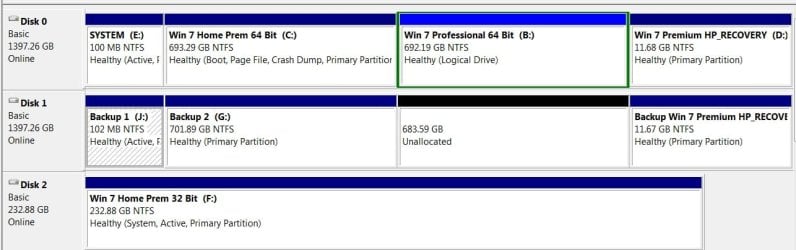
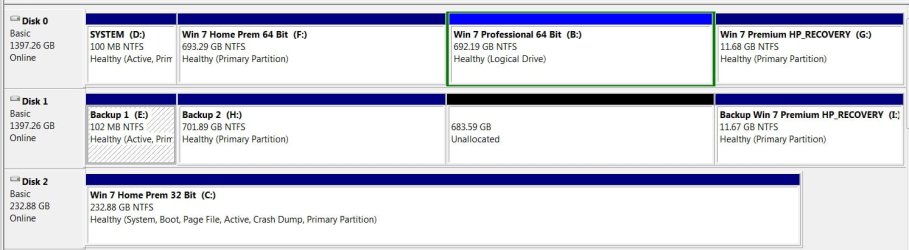
Here's my problem after installing other Win OS's on my PC.
First, original hard drive has Win. 7 HomePrem 64-bit on drive C.
Second, added a partition (drive B) to the original hard drive then installing Win. 7 Pro in it. Then installed Virtual XP on top of Win. 7 Pro.
Third, added a second 250 GB hard drive (E) then installed Win. 7 HomePrem 32-bit on it.
Installed EasyBCD 2.1.2 to manage multiboot issues. But the hard drive letters don't stay the same. And it takes a long time to go from starting Windows to complete desktop with all OS's.
What's an easy way to assign letters to hard drives such that they stay with them so whatever OS I use, the physical drive's letters showing on Disk Management and Windows Explorer stay the same?
After "freezing" drive's letters, what problems may arise?
Thanks in advance,
Bart
First, original hard drive has Win. 7 HomePrem 64-bit on drive C.
Second, added a partition (drive B) to the original hard drive then installing Win. 7 Pro in it. Then installed Virtual XP on top of Win. 7 Pro.
Third, added a second 250 GB hard drive (E) then installed Win. 7 HomePrem 32-bit on it.
Installed EasyBCD 2.1.2 to manage multiboot issues. But the hard drive letters don't stay the same. And it takes a long time to go from starting Windows to complete desktop with all OS's.
What's an easy way to assign letters to hard drives such that they stay with them so whatever OS I use, the physical drive's letters showing on Disk Management and Windows Explorer stay the same?
After "freezing" drive's letters, what problems may arise?
Thanks in advance,
Bart
Last edited:
My Computer
At a glance
Windows 7 Pro 64-bit w/Virt. XP, 7 Home Prem ...Intel i3-21308 GBIntel HD Graphics
- Computer Manufacturer/Model Number
- HP p7-1120
- OS
- Windows 7 Pro 64-bit w/Virt. XP, 7 Home Prem 64-Bit, 7 Home Prem 32-Bit
- CPU
- Intel i3-2130
- Memory
- 8 GB
- Graphics Card(s)
- Intel HD Graphics
- Monitor(s) Displays
- Insignia 27"
- Hard Drives
- Western Digital 1.5 TB
Seagate 1.5 TB
Seagate 250 GB
- Case
- HP