
Solved Win 7 keeps freezing, increases memory usage then reboots itself

philipmossman

New member
Local time
5:53 PM
Messages
22
Location
South West UK
Hi,

Firstly, I have searched many thread and found similar but not exactly the same symptoms, and tried a number of the suggested remedies. However, I'd like to list all symptoms here and ask advice. It is possible there are multiple issues at work (e.g with Firefox and with sound playback) so my apologies for appearing to be an idiot :o

1. Recently Win 7 kept giving me a "memory almost full" error, and occasional freezing. I did the normal memory tests and full hardware tests, nothing showed. As I am not on auto update I did a manual Win 7 update. Did not solve the problem. Any app I am running (including Windows Explorer) is prone to freeze for several seconds, yet Resource Monitor shows a lull in all activities (i.e. HDD, memory and CPU), the CPU usage shows as 0-2% but nothing happens. In these cases Firefox shows a "not responding" message.

2. I ran ESET which came up with 2 instances of "a variant of Win32/Adware.Yontoo.B " both of which were deleted, but the problem persists. I have Kaspersky installed, with auto updates and daily scans, nothing shows. I ran Malwarebytes, nothing shows.

3. I did the BSOD check and downloads (now in a ZIP file), also made several screen captures of Task Manager and Resorce Monitor at various stages (first logon, with 1 app running, after one of these freezes) in a Word file, but each time I try to upload them on here, individually or together, I get a Time Out error.

4. Possibly unrelated, I am not sure, but since this started any sound playback (whether a media player like GOM, Windows etc.) or online streaming, is intermittemt, i.e. sound runs a few seconds, then silence a few seconds, then sound again etc.

Many thanks in advance for any help you can give

Philip
 

My Computer

Computer Manufacturer/Model Number
Asus X52F
OS
Windows 7 Home Premium 64bit Service Pack 1 v6.1.7601
CPU
Intel Core i5 M480 2.76GHz
Motherboard
ASUSTeK Computer Inc. K52F
Memory
4GB
Graphics Card(s)
Intel HD i5 1366 x 768 x 32 bits (4294967296 colors) @ 59 Hz
Sound Card
1.Conexant SmartAudio HD 2.Intel(R) Display Audio
Monitor(s) Displays
Laptop Screen
Screen Resolution
1366 x 768 x 32 bits (4294967296 colors) @ 59 Hz (?)
Hard Drives
ST9640320AS with 3 Partitions
C: 255GB
D: 315GB
Internet Speed
Claimed to be 25Mb d/l 10Mb u/l (usually slower)
Whoops, sorry, I suppose I should add system info too :

Asus X52F Laptop(K52F/K62F Series) with Intel Core i5 M480 2.67GHz 2.67GHz
4GB RAM (3.79GB usable) 64 Bit Operating System
Windows 7 Home Premium with Service Pack 1
Windows Experience Index 3.9 (not sure if that is relevant)

Anything else I should add?
 

My Computer

Computer Manufacturer/Model Number
Asus X52F
OS
Windows 7 Home Premium 64bit Service Pack 1 v6.1.7601
CPU
Intel Core i5 M480 2.76GHz
Motherboard
ASUSTeK Computer Inc. K52F
Memory
4GB
Graphics Card(s)
Intel HD i5 1366 x 768 x 32 bits (4294967296 colors) @ 59 Hz
Sound Card
1.Conexant SmartAudio HD 2.Intel(R) Display Audio
Monitor(s) Displays
Laptop Screen
Screen Resolution
1366 x 768 x 32 bits (4294967296 colors) @ 59 Hz (?)
Hard Drives
ST9640320AS with 3 Partitions
C: 255GB
D: 315GB
Internet Speed
Claimed to be 25Mb d/l 10Mb u/l (usually slower)
Philip,

Update your SevenForums System Specs
User CP (located on the top menu bar) |
Your Profile | Edit System Spec
(left-hand column)

To gather info, use Speccy (my favorite) or SIW or System Info

In the System Manufacturer Block, enter:
Manufacturer and Model and
ADD the word laptop, desktop, netbook or tablet.
For example:
Toshiba Satellite L305D notebook.

Provide full windows version info, for example:
MS Windows 7 Ultimate SP1 64-bit

Use the “Other Info” block for Optical Reader,
Mouse, touchpad, wifi adapter, speakers, monitor, etc

Scroll down and click on SAVE CHANGES.

You will find that in Speccy, you can select info from the display
using your mouse/touchpad and then paste that info into your specs.

SIW is a marvelous program, but the free version does not offer
this capability.

===================================================
===================================================
Install CCleaner:
CCleaner - PC Optimization and Cleaning - Free Download

list of STARTUP PROGRAMS

CCleaner | Tools
icon | Startup button | Windows tab |
click on Save to text file button (bottom right side) |
accept Startup.txt as file name | SAVE button

list of SCHEDULED TASKS

CCleaner | Tools
icon | Startup button | Scheduled Tasks tab |
click on Save to text file button (bottom right side) |
enter Scheduled Tasks as File name | Save button

List of INSTALLED PROGRAMS

CCleaner | Tools
icon | Uninstall button |
click on Save to text file button (bottom right side) |
accept install.txt as File name | Save button


UPLOAD, as an attachment, the startup.txt file
UPLOAD, as an attachment, the Scheduled Tasks.txt file
UPLOAD, as an attachment, the install.txt file.

HOW TO UPLOAD
Post a File or Screenshot in Seven Forums
==============================================

will await the updated specs and the three files,
karl
 

My Computer

Computer Manufacturer/Model Number
Toshiba Satellite S875D-S7239 laptop
OS
MS Windows 7 Ultimate SP1 64-bit
CPU
AMD A10-4600M
Motherboard
AMD Pumori (Socket FT1)
Memory
6.00 GB Dual-Channel DDR3 @ 798MHz (11-11-12-28)
Graphics Card(s)
AMD Radeon HD 7660G
Sound Card
High Definition Audio Device
Monitor(s) Displays
Generic PnP Monitor (1600x900@60Hz)
Screen Resolution
1600x900@60Hz
Hard Drives
SSD 119GB Corsair CSSD-V128GB2 ATA Device
Keyboard
Standard PS/2 Keyboard
Mouse
HP Wireless Optical Mobile Mouse Model FHA-3410
Internet Speed
What the local pub, local coffee shop offers.
Other Info
Optical Drive:MATSHITA BD-CMB UJ160B ATA Device


Also have an Asus ha1002xp netbook with Win 7 Ultimate installed.

My Computer

Computer type
PC/Desktop
Computer Manufacturer/Model Number
Golden Mk. I.4
OS
Windows 10 Pro x64 ; Xubuntu x64
CPU
Intel i7 860 @ 2.80 GHz O/C'ed to 4.0GHz
Motherboard
Gigabyte P55A-UD3R Rev.1. Award BIOS F13
Memory
16GB Corsair Vengance DDR3 @ 661 MHz Dual Channel (9-9-9-24)
Graphics Card(s)
EVGA NVidia GTX 560 1024MB
Sound Card
Realtek Integrated
Monitor(s) Displays
Dual Samsung SyncMaster 2494HS
Screen Resolution
1920*1080 and 1920*1080
Hard Drives
1*Samsung 840 EVO 120GB SSD;
1*OCZ Vertex 2 60GB SSD;
2*Samsung F3 SpinPoint 1TB in RAID0;
1*Samsung F1 SpinPoint 1TB;
2*Western Digital 1TB External USB 3.0
1*Western Digital 500GB External USB 3.0
1*Seagate 500GB External USB 2.0
PSU
Thermaltake ToughPower QFan 750W
Case
Thermaltake Element S VK60001W2Z
Cooling
Corsair H60 Water Cooling, 2*230mm and 2*80mm case fans
Keyboard
Logitech G110
Mouse
Logitech MX518
golden,
I provide a link to the SF aid, however, that aid does not supply some key info which is why I recommend the other tools.

karl
 

My Computer

Computer Manufacturer/Model Number
Toshiba Satellite S875D-S7239 laptop
OS
MS Windows 7 Ultimate SP1 64-bit
CPU
AMD A10-4600M
Motherboard
AMD Pumori (Socket FT1)
Memory
6.00 GB Dual-Channel DDR3 @ 798MHz (11-11-12-28)
Graphics Card(s)
AMD Radeon HD 7660G
Sound Card
High Definition Audio Device
Monitor(s) Displays
Generic PnP Monitor (1600x900@60Hz)
Screen Resolution
1600x900@60Hz
Hard Drives
SSD 119GB Corsair CSSD-V128GB2 ATA Device
Keyboard
Standard PS/2 Keyboard
Mouse
HP Wireless Optical Mobile Mouse Model FHA-3410
Internet Speed
What the local pub, local coffee shop offers.
Other Info
Optical Drive:MATSHITA BD-CMB UJ160B ATA Device


Also have an Asus ha1002xp netbook with Win 7 Ultimate installed.
Ahh, apologies Karl. I didn't see it amongst the other text.
 

My Computer

Computer type
PC/Desktop
Computer Manufacturer/Model Number
Golden Mk. I.4
OS
Windows 10 Pro x64 ; Xubuntu x64
CPU
Intel i7 860 @ 2.80 GHz O/C'ed to 4.0GHz
Motherboard
Gigabyte P55A-UD3R Rev.1. Award BIOS F13
Memory
16GB Corsair Vengance DDR3 @ 661 MHz Dual Channel (9-9-9-24)
Graphics Card(s)
EVGA NVidia GTX 560 1024MB
Sound Card
Realtek Integrated
Monitor(s) Displays
Dual Samsung SyncMaster 2494HS
Screen Resolution
1920*1080 and 1920*1080
Hard Drives
1*Samsung 840 EVO 120GB SSD;
1*OCZ Vertex 2 60GB SSD;
2*Samsung F3 SpinPoint 1TB in RAID0;
1*Samsung F1 SpinPoint 1TB;
2*Western Digital 1TB External USB 3.0
1*Western Digital 500GB External USB 3.0
1*Seagate 500GB External USB 2.0
PSU
Thermaltake ToughPower QFan 750W
Case
Thermaltake Element S VK60001W2Z
Cooling
Corsair H60 Water Cooling, 2*230mm and 2*80mm case fans
Keyboard
Logitech G110
Mouse
Logitech MX518
Very many thanks Golden and Karl.

I have updated my profile with system specs as advised; installed and run CCCleaner, 3 files attached (I hope - the Manage Attachments window keeps freezing with the "not responding" message). It seems that my computer is getting slower and the freezes more frequent and longer lasting :confused:

Thanks again

Philip
 

Attachments

My Computer

Computer Manufacturer/Model Number
Asus X52F
OS
Windows 7 Home Premium 64bit Service Pack 1 v6.1.7601
CPU
Intel Core i5 M480 2.76GHz
Motherboard
ASUSTeK Computer Inc. K52F
Memory
4GB
Graphics Card(s)
Intel HD i5 1366 x 768 x 32 bits (4294967296 colors) @ 59 Hz
Sound Card
1.Conexant SmartAudio HD 2.Intel(R) Display Audio
Monitor(s) Displays
Laptop Screen
Screen Resolution
1366 x 768 x 32 bits (4294967296 colors) @ 59 Hz (?)
Hard Drives
ST9640320AS with 3 Partitions
C: 255GB
D: 315GB
Internet Speed
Claimed to be 25Mb d/l 10Mb u/l (usually slower)
thanks,
Specs show all of the essential info. You do nice work.

Will now look at the files and get back to you.
 

My Computer

Computer Manufacturer/Model Number
Toshiba Satellite S875D-S7239 laptop
OS
MS Windows 7 Ultimate SP1 64-bit
CPU
AMD A10-4600M
Motherboard
AMD Pumori (Socket FT1)
Memory
6.00 GB Dual-Channel DDR3 @ 798MHz (11-11-12-28)
Graphics Card(s)
AMD Radeon HD 7660G
Sound Card
High Definition Audio Device
Monitor(s) Displays
Generic PnP Monitor (1600x900@60Hz)
Screen Resolution
1600x900@60Hz
Hard Drives
SSD 119GB Corsair CSSD-V128GB2 ATA Device
Keyboard
Standard PS/2 Keyboard
Mouse
HP Wireless Optical Mobile Mouse Model FHA-3410
Internet Speed
What the local pub, local coffee shop offers.
Other Info
Optical Drive:MATSHITA BD-CMB UJ160B ATA Device


Also have an Asus ha1002xp netbook with Win 7 Ultimate installed.
philip,

UNINSTALL

PHP:
 BitTorrent        15/07/2011        7.2.1
BitTorrentBar Toolbar    BitTorrentBar    30/03/2012
REBOOT


REMOVAL OF P2P PROGRAMS

There are signs of one or more P2P (Peer to Peer) File Sharing Programs on your computer.

As long as you are using any form of P2P networking to download files, you can anticipate malware infestations.

References citing the risk of using P2P programs:
How cyber criminals infect victims via P2P with pirated software on Vimeo
Malware: Help prevent the Infection
Perils of P2P File Sharing
How to Prevent the Online Invasion of Spyware and Adware
The Hidden Security Risks of P2P Traffic


I strongly recommend that you uninstall:
µTorrent
BitTorrent
Vuze

=============================================

I'm not even going further until you get an opportunity to carry out following since you have been using p2p software and your install list shows some cracked software.

I have many other programs to be uninstalled, but first i need you to carry out following procedures. Then and only then will I be able to continue.

HOW TO USE WINDOWS DEFENDER OFFLINE ON A USB STICK
Windows Defender Offline
· is a free standalone, bootable malware and virus remover from Microsoft.
· performs an offline scan of an infected PC to remove viruses, rootkits and other advanced malware.

Download Windows Defender Offline (about 764 kB)

You will have the choice of downloading the 32bit version (x86) or the 64 bit version (x64).
The link will help you determine whether you are running a 32 bit version or 64 bit version of Windows

NOTE!! You can download and prepare a 32 bit version using a 64 bit version of Windows
NOTE!! You can download and prepare a 64 bit version using a 32bit version of Windows.

You run the 32 bit version on a 32 bit version of Windows.
You run the 64 bit version on a 64 bit version of Windows.

The 32 bit download file name is: mssstool32.exe
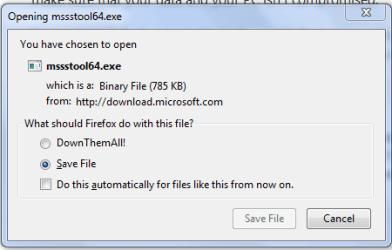
The 64 bit download file name is: mssstool64.exe

For the curious, this program was originally name Microsoft Standalone System Sweeper.


INSTALLATION:
You will need an Internet Connection.
Insert 512 mB (Microsoft’s 256 mB is no longer accurate) or larger USB stick into a usb port.
Run the downloaded program--mssstool64.exe or mssstool32.exe
NEXT button
Choose the option On a USB flash drive that is not password protected
NEXT button
NEXT button
.
The install program will format the usb stick using the NTFS format.
The install program will download about 210 mB.
The install program will name the USB stick WDO_Media32 or WDO_Media64
The WDO_Media32 usb stick will have used space of 255 mB (268,140,544 bytes)
The WDO_Media64 usb stick will have used space of 282 mB (296,165,376 bytes)
You can expect the number of mB to increase as more malware appears.

UPDATE Windows Defender Offline USB stick:
· reinsert the usb stick
· run the installation program, mssstool64.exe or mssstool32.exe, again.
· the update will download about 66 mB (mssstool32.exe) and 68 mB (mssstool64.exe).

Since the malware database is sometimes updated several times in a day, always update before running.

PERFORM AN OFFLINE SCAN
Bootup your computer from the USB stick
Windows Defender Offline will automatically perform a quick scan.
After the quick scan finishes, Choose Full Scan
Select all of your drives

The initial, full scan can easily take several hours, but
Remember, your computer is being very thoroughly checked for all types of malware.


RESULTS OF THE SCAN
The results will be in 4 log files on your computer's disk in:
\Windows\Microsoft Antimalware\Support
===========================================
===========================================

I will await the following .ZIP file.

PHP:
# ************************************************************
# Zips up your log files from Windows Defender Offline
#  and extended info about the log files
# Places WDOlogs.ZIP on your Desktop
#
# **********************INSTRUCTIONS**************************
# STEP 1 *****************************************************
# RUN PowerShell as administrator
# START ORB | type POWERSHELL | CTRL+SHIFT+ENTER key combo | ALT+Y keycombo
# ************************************************************
# STEP 2 *****************************************************
# COPY, using CTRL+C, every line down thru both EXIT statements 
# PASTE into Powershell == Right-Click at the PowerShell Prompt
#  (Ctrl+V does not work)
# Start copying with first line without a # at start of the line
# Note: Actually, you can paste the entire file if you rather
#       Lines starting with a # are ignored by PowerShell
# ************************************************************
#functions

function New-Zip {
    param([Parameter(Mandatory=$true, Position=0, ValueFromPipeline=$true)]
    [String] $Path, [Switch] $PassThru, [Switch] $Force )
    Process { if (Test-Path $path) {if (-not $Force) { return } }
    Set-Content $path ("PK" + [char]5 + [char]6 + ("$([char]0)" * 18))
    $item = Get-Item $path; $item.IsReadOnly = $false;if ($passThru) { $item } } }
function Copy-ToZip {param(
  [Parameter(Mandatory=$true,Position=0,ValueFromPipelineByPropertyName=$true)] [Alias('FullName')] 
  [String]$File, [Parameter(Mandatory=$true,Position=1)] [String]$ZipFile,[Switch]$HideProgress,[Switch]$Force )
  Begin {$ShellApplication = New-Object -ComObject Shell.Application
  if (-not (Test-Path $ZipFile)) {New-Zip $ZipFile};$Path = Resolve-Path $ZipFile
  $ZipPackage =$ShellApplication.Namespace("$Path")}
  Process {$RealFile = Get-Item $File; if (-not $RealFile) { return }        
  if (-not $hideProgress) {$perc +=5; if ($perc -gt 100) { $perc = 0 } 
    Write-Progress "Copying to $ZipFile" $RealFile.FullName -PercentComplete $perc}
  $Flags = 0; if ($force) {$flags = 16 -bor 1024 -bor 64 -bor 512};Write-Verbose $realFile.Fullname
   $ZipPackage.CopyHere($realFile.Fullname, $flags);Start-Sleep -Milliseconds 500}}

$fileinfo = join-path $env:TEMP \wdofileinfo.txt
IF (test-path $fileinfo) {del $fileinfo -ea:silentlycontinue -force:$true}
$dir = $env:windir + '\Microsoft Antimalware\Support'
$a = dir $dir  -rec -force -ea:silentlycontinue | sort-object -property lastwritetime 
$b = $a | where {$_.extension -eq '.log'} |Select  mode, fullname, name, creationtime, lastwritetime,  lastaccesstime, length, extension
$b | out-file -append $fileinfo
$b | foreach ($_.fullname) {get-content -path $_.fullname} | out-file -append $fileinfo 
$ziploc = $env:userprofile + '\desktop\WDOlogs.ZIP'
new-zip $ziploc -verbose:$false -ea:silentlycontinue -force:$true
copy-tozip  $fileinfo $ziploc -verbose:$false -hideprogress:$true
del $fileinfo

EXIT
EXIT

# ***************** NOTE - POWERSHELL VERSION*****************
# if you receive this error msg:
#  Get-WinEvent: The system can not find the path specified
# you need to update your PowerShell
# you must be using Powershell 2.0 or later.
#
# To determine your Powershell version:
#   Run PowerShell
#   enter $host.version
#   you should see at least:
# Major  Minor  Build  Revision
# -----  -----  -----  --------
# 2      0      -1     -1
#
# If you do not see the above, update your Vista/Win 7.
# ************************************************************
# *************** NOTE - EXECUTION POLICY*********************
# If you haven't set the execution policy, you may need to:
#   Run PowerShell
#   enter Set-ExecutionPolicy -executionpolicy remotesigned
#
# ************************************************************

====================================
karl
 

My Computer

Computer Manufacturer/Model Number
Toshiba Satellite S875D-S7239 laptop
OS
MS Windows 7 Ultimate SP1 64-bit
CPU
AMD A10-4600M
Motherboard
AMD Pumori (Socket FT1)
Memory
6.00 GB Dual-Channel DDR3 @ 798MHz (11-11-12-28)
Graphics Card(s)
AMD Radeon HD 7660G
Sound Card
High Definition Audio Device
Monitor(s) Displays
Generic PnP Monitor (1600x900@60Hz)
Screen Resolution
1600x900@60Hz
Hard Drives
SSD 119GB Corsair CSSD-V128GB2 ATA Device
Keyboard
Standard PS/2 Keyboard
Mouse
HP Wireless Optical Mobile Mouse Model FHA-3410
Internet Speed
What the local pub, local coffee shop offers.
Other Info
Optical Drive:MATSHITA BD-CMB UJ160B ATA Device


Also have an Asus ha1002xp netbook with Win 7 Ultimate installed.
Hi Karl

Firstly, this is turning into a nightmare! My computer is now hanging up for around a minute or so every 2 or 3 minutes. It has frozen twice already even in this brief message. Anyway, I have uninstalled BitTorrent, I do not have the other 2 as far as I am aware (cannot find them), and rebooted. As for Defender Offline, I have downloaded the .exe file but when I try to install, on USB, DVD even ISO file (as suggested on the MS website) it hangs at 190.12Mb of 190.82Mb and after a couple of minutes returns an error. I have been trying every option and hitting retry, rebooted my computer twice, used 2 USB sticks and 3 DVDs, same error each time. I even tried another laptop, same error on there too (with both USB and DVD).

Any ideas please?

PS I tried a cold restart, the d/l was then 221.82MB, reached 220.12MB and hung, on retry it reverted to 190.82MB and hung at 190.12MB
 
Last edited:

My Computer

Computer Manufacturer/Model Number
Asus X52F
OS
Windows 7 Home Premium 64bit Service Pack 1 v6.1.7601
CPU
Intel Core i5 M480 2.76GHz
Motherboard
ASUSTeK Computer Inc. K52F
Memory
4GB
Graphics Card(s)
Intel HD i5 1366 x 768 x 32 bits (4294967296 colors) @ 59 Hz
Sound Card
1.Conexant SmartAudio HD 2.Intel(R) Display Audio
Monitor(s) Displays
Laptop Screen
Screen Resolution
1366 x 768 x 32 bits (4294967296 colors) @ 59 Hz (?)
Hard Drives
ST9640320AS with 3 Partitions
C: 255GB
D: 315GB
Internet Speed
Claimed to be 25Mb d/l 10Mb u/l (usually slower)
philip,
perform the download and putting of wdo onto a USB on another Win 7 computer. Can be any version thereof as long as you download the version corresponding to your computer.

If you can not use the usb stick or a dvd on another computer, then you are not following the directions. If you prefer you can click on the WDO link in my signature and read what Microsoft has written. Thousands upon thousands have run WDO on their computer. Try again. Be sure to read carefully.

Oh yes, one possible source of your problem is a cracked version of Win 7.

Run following and post the results:

WVCHECK

Please download WVCheck from Artellos.com.

  • Double click WVCheck.exe. (If you downloaded the zipped version you will need to extract it.)
  • As indicated by the prompt, This program can take a while depending on your hard drive space.
  • Once the program is done, copy the contents of the notepad file as a reply.


==============================
karl
 

My Computer

Computer Manufacturer/Model Number
Toshiba Satellite S875D-S7239 laptop
OS
MS Windows 7 Ultimate SP1 64-bit
CPU
AMD A10-4600M
Motherboard
AMD Pumori (Socket FT1)
Memory
6.00 GB Dual-Channel DDR3 @ 798MHz (11-11-12-28)
Graphics Card(s)
AMD Radeon HD 7660G
Sound Card
High Definition Audio Device
Monitor(s) Displays
Generic PnP Monitor (1600x900@60Hz)
Screen Resolution
1600x900@60Hz
Hard Drives
SSD 119GB Corsair CSSD-V128GB2 ATA Device
Keyboard
Standard PS/2 Keyboard
Mouse
HP Wireless Optical Mobile Mouse Model FHA-3410
Internet Speed
What the local pub, local coffee shop offers.
Other Info
Optical Drive:MATSHITA BD-CMB UJ160B ATA Device


Also have an Asus ha1002xp netbook with Win 7 Ultimate installed.
Hi again Karl

Do you have any other suggestions to get the info you require, please? I have now tried to d/l the Defender Offline Tool on 5 different computers, all with excellent internet connection, all d/l failed "There was a problem downloading the required WDO files. Make sure your PC is connected to the internet and try again". The weird thing is, the initial d/l is always around 210-220 ish MB (different on each PC) but after the first failure, it always shows as 190.82MB and hangs at 190.12. I have posted on a MS forum but nobody replied.

Ironically my laptop was working well yesterday until the evening when it slowed down again, and this morning, but all afternoon I have been getting the memory full error message and when I am not there it reboots. Also I had a BSOD last evening and a black screen this afternoon.

Many thanks in advance

Philip
 

My Computer

Computer Manufacturer/Model Number
Asus X52F
OS
Windows 7 Home Premium 64bit Service Pack 1 v6.1.7601
CPU
Intel Core i5 M480 2.76GHz
Motherboard
ASUSTeK Computer Inc. K52F
Memory
4GB
Graphics Card(s)
Intel HD i5 1366 x 768 x 32 bits (4294967296 colors) @ 59 Hz
Sound Card
1.Conexant SmartAudio HD 2.Intel(R) Display Audio
Monitor(s) Displays
Laptop Screen
Screen Resolution
1366 x 768 x 32 bits (4294967296 colors) @ 59 Hz (?)
Hard Drives
ST9640320AS with 3 Partitions
C: 255GB
D: 315GB
Internet Speed
Claimed to be 25Mb d/l 10Mb u/l (usually slower)
Keep trying.

Hundreds of thousands have downloaded Windows Defender Offline.

Be sure to use the link in my signature to download WDO.
 

My Computer

Computer Manufacturer/Model Number
Toshiba Satellite S875D-S7239 laptop
OS
MS Windows 7 Ultimate SP1 64-bit
CPU
AMD A10-4600M
Motherboard
AMD Pumori (Socket FT1)
Memory
6.00 GB Dual-Channel DDR3 @ 798MHz (11-11-12-28)
Graphics Card(s)
AMD Radeon HD 7660G
Sound Card
High Definition Audio Device
Monitor(s) Displays
Generic PnP Monitor (1600x900@60Hz)
Screen Resolution
1600x900@60Hz
Hard Drives
SSD 119GB Corsair CSSD-V128GB2 ATA Device
Keyboard
Standard PS/2 Keyboard
Mouse
HP Wireless Optical Mobile Mouse Model FHA-3410
Internet Speed
What the local pub, local coffee shop offers.
Other Info
Optical Drive:MATSHITA BD-CMB UJ160B ATA Device


Also have an Asus ha1002xp netbook with Win 7 Ultimate installed.
I did follow your link Karl, even tried again last evening and this morning, always the same result (Error code : 0002-80072EE2), I again followed the link and applied FixIt 50566, retried, same; rebooted, retried, same again (except now it d/l 190.12MB of 190.92MB). The fault according to MS is my internet connection but this is a minimum 25MB d/l (10MB up) and I was monitoring the connection, keeping another computer also online, and I saw there was traffic all throughout. My only conclusion is that either my ISP is doing something to reject the file, or every computer in the house is similarly affected (even though none shows any signs of performance problems and one is on Vista).

Unfortunately I do not have access to the internet elsewhere but I will ask our neighbours if I can try using their WiFi to see if that solves it.

Otherwise, I have no idea what to do :(

Kind regards

Philip
 

My Computer

Computer Manufacturer/Model Number
Asus X52F
OS
Windows 7 Home Premium 64bit Service Pack 1 v6.1.7601
CPU
Intel Core i5 M480 2.76GHz
Motherboard
ASUSTeK Computer Inc. K52F
Memory
4GB
Graphics Card(s)
Intel HD i5 1366 x 768 x 32 bits (4294967296 colors) @ 59 Hz
Sound Card
1.Conexant SmartAudio HD 2.Intel(R) Display Audio
Monitor(s) Displays
Laptop Screen
Screen Resolution
1366 x 768 x 32 bits (4294967296 colors) @ 59 Hz (?)
Hard Drives
ST9640320AS with 3 Partitions
C: 255GB
D: 315GB
Internet Speed
Claimed to be 25Mb d/l 10Mb u/l (usually slower)
phillip,
I don't know what you are doing, but I just clicked on the WDO link in my signature. I then chose to download the 64 bit version.

Here is a snippet for you. Yes, maybe your system is very badly infected with the memsize that you are reporting.

Go somewhere, anywhere and download the file 64 bit version.

wdo size.PNG
 

My Computer

Computer Manufacturer/Model Number
Toshiba Satellite S875D-S7239 laptop
OS
MS Windows 7 Ultimate SP1 64-bit
CPU
AMD A10-4600M
Motherboard
AMD Pumori (Socket FT1)
Memory
6.00 GB Dual-Channel DDR3 @ 798MHz (11-11-12-28)
Graphics Card(s)
AMD Radeon HD 7660G
Sound Card
High Definition Audio Device
Monitor(s) Displays
Generic PnP Monitor (1600x900@60Hz)
Screen Resolution
1600x900@60Hz
Hard Drives
SSD 119GB Corsair CSSD-V128GB2 ATA Device
Keyboard
Standard PS/2 Keyboard
Mouse
HP Wireless Optical Mobile Mouse Model FHA-3410
Internet Speed
What the local pub, local coffee shop offers.
Other Info
Optical Drive:MATSHITA BD-CMB UJ160B ATA Device


Also have an Asus ha1002xp netbook with Win 7 Ultimate installed.
Hi Karl

Yes I have saved it three times on my computer, once each on the other 4, even tried to do it with IE, it is the actual download which is causing the problem, just hangs at 190.12MB then the error comes up. I'll ask around and try to find another ISP I can use, otherwise I guess I'll have to take my computer to the repair shop.

Incidentally, I have reported this to Kaspersky and asked them why ESET found something that their AV did not, and how my compter got infected. I am still awaiting their response (5 days now, but this morning they asked me to resend the query as they could not find the original :confused:)
 

My Computer

Computer Manufacturer/Model Number
Asus X52F
OS
Windows 7 Home Premium 64bit Service Pack 1 v6.1.7601
CPU
Intel Core i5 M480 2.76GHz
Motherboard
ASUSTeK Computer Inc. K52F
Memory
4GB
Graphics Card(s)
Intel HD i5 1366 x 768 x 32 bits (4294967296 colors) @ 59 Hz
Sound Card
1.Conexant SmartAudio HD 2.Intel(R) Display Audio
Monitor(s) Displays
Laptop Screen
Screen Resolution
1366 x 768 x 32 bits (4294967296 colors) @ 59 Hz (?)
Hard Drives
ST9640320AS with 3 Partitions
C: 255GB
D: 315GB
Internet Speed
Claimed to be 25Mb d/l 10Mb u/l (usually slower)
There are many possible answers, but:

Download and run WDO.

Impossible to proceed until you have done that!!
 

My Computer

Computer Manufacturer/Model Number
Toshiba Satellite S875D-S7239 laptop
OS
MS Windows 7 Ultimate SP1 64-bit
CPU
AMD A10-4600M
Motherboard
AMD Pumori (Socket FT1)
Memory
6.00 GB Dual-Channel DDR3 @ 798MHz (11-11-12-28)
Graphics Card(s)
AMD Radeon HD 7660G
Sound Card
High Definition Audio Device
Monitor(s) Displays
Generic PnP Monitor (1600x900@60Hz)
Screen Resolution
1600x900@60Hz
Hard Drives
SSD 119GB Corsair CSSD-V128GB2 ATA Device
Keyboard
Standard PS/2 Keyboard
Mouse
HP Wireless Optical Mobile Mouse Model FHA-3410
Internet Speed
What the local pub, local coffee shop offers.
Other Info
Optical Drive:MATSHITA BD-CMB UJ160B ATA Device


Also have an Asus ha1002xp netbook with Win 7 Ultimate installed.
Hi Karl

Bingo! I hope this is correct. I had asked Kaspersky for help, they are still working on it but although I have daily updates it seems I am on an older version. Once that updated, everything seems fine (so far!). I managed to burn the WDO DVD and run both scans, which showed no problems. I have not used WinZip for years (normally use WinRar but it would not create an archive for some reason) but it returned an error, although it did create a file. However, it is 61.6MB and the forum will not accept it. Presumably this is because it is the entire directory, but I am not sure from your post which 4 files you need. Could you please let me know so I can zip them into a file for you. Meanwhile I am attaching the 2 files resulting from the scans I did for Kaspersky, in caee they may assist.

Many thanks again

Philip

PS I did try following the instructions in your message, opened Powershell but could get no further (eror messages with everything I tried, apart from verifying the version is correct). Nor could I find anything relating to ORB in Windows. Sorry, I did warn you I am no expert :o
 

Attachments

Last edited:

My Computer

Computer Manufacturer/Model Number
Asus X52F
OS
Windows 7 Home Premium 64bit Service Pack 1 v6.1.7601
CPU
Intel Core i5 M480 2.76GHz
Motherboard
ASUSTeK Computer Inc. K52F
Memory
4GB
Graphics Card(s)
Intel HD i5 1366 x 768 x 32 bits (4294967296 colors) @ 59 Hz
Sound Card
1.Conexant SmartAudio HD 2.Intel(R) Display Audio
Monitor(s) Displays
Laptop Screen
Screen Resolution
1366 x 768 x 32 bits (4294967296 colors) @ 59 Hz (?)
Hard Drives
ST9640320AS with 3 Partitions
C: 255GB
D: 315GB
Internet Speed
Claimed to be 25Mb d/l 10Mb u/l (usually slower)
As I am not sure which files you need, Karl, and am already embarrassed at taking up so much of your time, I have zipped the 3 folders listed under Results in the hope that these are at least some of what you want.

Philip
 

Attachments

My Computer

Computer Manufacturer/Model Number
Asus X52F
OS
Windows 7 Home Premium 64bit Service Pack 1 v6.1.7601
CPU
Intel Core i5 M480 2.76GHz
Motherboard
ASUSTeK Computer Inc. K52F
Memory
4GB
Graphics Card(s)
Intel HD i5 1366 x 768 x 32 bits (4294967296 colors) @ 59 Hz
Sound Card
1.Conexant SmartAudio HD 2.Intel(R) Display Audio
Monitor(s) Displays
Laptop Screen
Screen Resolution
1366 x 768 x 32 bits (4294967296 colors) @ 59 Hz (?)
Hard Drives
ST9640320AS with 3 Partitions
C: 255GB
D: 315GB
Internet Speed
Claimed to be 25Mb d/l 10Mb u/l (usually slower)
Let's backtrack.

Where are the results from running WVCheck?

Please post those results.
 

My Computer

Computer Manufacturer/Model Number
Toshiba Satellite S875D-S7239 laptop
OS
MS Windows 7 Ultimate SP1 64-bit
CPU
AMD A10-4600M
Motherboard
AMD Pumori (Socket FT1)
Memory
6.00 GB Dual-Channel DDR3 @ 798MHz (11-11-12-28)
Graphics Card(s)
AMD Radeon HD 7660G
Sound Card
High Definition Audio Device
Monitor(s) Displays
Generic PnP Monitor (1600x900@60Hz)
Screen Resolution
1600x900@60Hz
Hard Drives
SSD 119GB Corsair CSSD-V128GB2 ATA Device
Keyboard
Standard PS/2 Keyboard
Mouse
HP Wireless Optical Mobile Mouse Model FHA-3410
Internet Speed
What the local pub, local coffee shop offers.
Other Info
Optical Drive:MATSHITA BD-CMB UJ160B ATA Device


Also have an Asus ha1002xp netbook with Win 7 Ultimate installed.
Back
Top