Solved Win 7 on Logical D: want to move to Primary C: or merge both

derelict

New member
Local time
6:11 PM
Messages
14
Hi all,
I have a laptop that used to be running XP, I installed windows 7 onto the D: partition that I had for a while. This partition is Logical.
After using win 7 for a while I had no use to the XP partition and wanted the space back.
I formatted the partition that had XP on it, that caused my laptop not to boot because it lost BOOTMGR, I was able to fix it by copying the win 7 install disk to the C: root. That let me do a system repair and boot to windows 7. Thankfully.

Well, now I want to get my C: back and I'm not sure of the best way.
-Can I change the D: from logical to primary/active? I haven't been able to do it using -MiniTool Partition Magic (it sees the partition as Unallocated)
-Can I just merge the D: and C: back into one partition?
-Can I transfer the D: to C:

Not really sure of the best plan of attack. But from what I understand I need to first get the D: logical partition that has win 7 set to be primary/active?

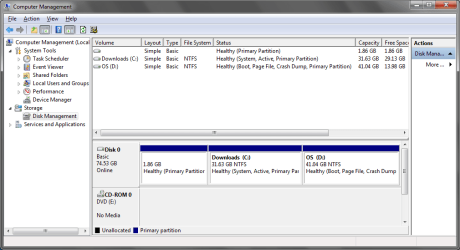
Here are the screen shots of computer management and the 'unallocated' partition.
 

Attachments
  • comp_manage.png
    comp_manage.png
    26.5 KB · Views: 42
  • unallocated.png
    unallocated.png
    50.7 KB · Views: 28

My Computer My Computer

At a glance

Windows 7 Ultimate (32 bit)
OS
Windows 7 Ultimate (32 bit)
I would clean reinstall after wiping the HD since Win7 was never installed correctly by booting installer so it would claim C when booted: Clean Install Windows 7
SSD - HDD Optimize for Windows Reinstallation

In addition there are other problems since I've never seen PW CD fail to see the booted Win7 partition. Try using the PW boot CD.

PW should not only see Win7 but if you want Win7 on D allow you to convert D to Primary, then you can follow these steps to resize into C while recovering the System boot files into Win7 by marking Active and running Startup Repair 3 times: Partition Recover Space Used by an Older OS
 
Thanks for the reply,
I'd rather not do a fresh install, I have my Win 7 set up juuuust how I want it.

At the moment its not killing me having the install directory on the D: but I would like to tidy things up if I can.

The guide you posted about recovering the old partition space will help me out with this I think, I just need to see if I can set this D: partition as primary or active in some way.

I was reading also that in some cases PW was reporting OS partitions as unallocated but couldnt nail down a cause.

Thanks for the help.
 

My Computer My Computer

At a glance

Windows 7 Ultimate (32 bit)
OS
Windows 7 Ultimate (32 bit)
Try the PW boot disk. You need to convert D to Logical before it will accept the Active flag and then the System boot files using the method given.

Then you can recover the disk space from deleted C, once you know D will boot without it because it shows the System Active flags.

If it won't convert then you'll need to figure out why or keep the boot files on C which you can then shrink to contain only the System boot files.
 
OK, so I got a different partition application (Aomei) and that allowed me to set the Logical D as Primary. Success.
I set the D: as Active in Computer Management and rebooted. No so much success.

It booted into nothing and I had to set the Active flag back to C: on another PC using the laptop hdd in a caddy. Though that is to be expected based on the linked article as I should then get into the Repair options. The Win 7 install files that I had on C: I was hoping would be seen during the boot process and it would use them like it did previously, guess I need to go out and get a DVD to burn the Win 7 image to instead. That will be a job for tomorrow. Can't even remember the last time I bought DVDs.

Thanks for the help
 

My Computer My Computer

At a glance

Windows 7 Ultimate (32 bit)
OS
Windows 7 Ultimate (32 bit)
Not exactly, I just didn't have the win 7 DVD, I had the ISO extracted to C: in the hope that it would recognise it while it tried to boot. I have to go out and get a DVD and a CD now. Will post back with results.
 

My Computer My Computer

At a glance

Windows 7 Ultimate (32 bit)
OS
Windows 7 Ultimate (32 bit)
How did you succeed in installing in a drive called D? Windows ALWAYS calls it's own partition C as far as I know.
 

My Computer My Computer

At a glance

Microsoft Windows 7 Home Premium 64-bits 7601...Intel(R) Core(TM) i3 CPU M 370 @ 2.40GHz4,00 GBATI Mobility Radeon HD 5400 Series
Computer type
Laptop
Computer Manufacturer/Model Number
ACER ASPIRE 5742G
OS
Microsoft Windows 7 Home Premium 64-bits 7601 Multiprocessor Free Service Pack 1
CPU
Intel(R) Core(TM) i3 CPU M 370 @ 2.40GHz
Motherboard
Acer Aspire 5742G
Memory
4,00 GB
Graphics Card(s)
ATI Mobility Radeon HD 5400 Series
Sound Card
(1) AMD High Definition Audio Device (2) Realtek High Defi
Screen Resolution
1366 x 768 x 32 bits (4294967296 colors) @ 60 Hz
Hard Drives
WDC WD5000BEVT-22ZAT0
I had win XP running on C: and wanted to get dual boot going so installed Win 7 on my D: partition.
 

My Computer My Computer

At a glance

Windows 7 Ultimate (32 bit)
OS
Windows 7 Ultimate (32 bit)
I had win XP running on C: and wanted to get dual boot going so installed Win 7 on my D: partition.
But how?? From installation DVD, from USB stick? ... how?

C is just a logical description of an partition. You can alter it in winxp to S and then only winxp sees it as S! But never change driveletter of OS-partition!!! Many registry and file pointers point to the original driveletter... making your system unbootable

Normally in your config and start winxp:
-windowsxp system disk should be C
-other partition (win7) is normally D, in case you have an cd/dvd drive maybe E


Normally in your config and start win7:
-windows7 system disk should be C
-other partition (winxp) is normally D, in case you have an cd/dvd drive maybe E
 

My Computer My Computer

At a glance

Microsoft Windows 7 Home Premium 64-bits 7601...Intel(R) Core(TM) i3 CPU M 370 @ 2.40GHz4,00 GBATI Mobility Radeon HD 5400 Series
Computer type
Laptop
Computer Manufacturer/Model Number
ACER ASPIRE 5742G
OS
Microsoft Windows 7 Home Premium 64-bits 7601 Multiprocessor Free Service Pack 1
CPU
Intel(R) Core(TM) i3 CPU M 370 @ 2.40GHz
Motherboard
Acer Aspire 5742G
Memory
4,00 GB
Graphics Card(s)
ATI Mobility Radeon HD 5400 Series
Sound Card
(1) AMD High Definition Audio Device (2) Realtek High Defi
Screen Resolution
1366 x 768 x 32 bits (4294967296 colors) @ 60 Hz
Hard Drives
WDC WD5000BEVT-22ZAT0
You wanna remove winxp and reclaim the space to win7 isn't it?
Do you realy want it to be primary ... if so why?
 

My Computer My Computer

At a glance

Microsoft Windows 7 Home Premium 64-bits 7601...Intel(R) Core(TM) i3 CPU M 370 @ 2.40GHz4,00 GBATI Mobility Radeon HD 5400 Series
Computer type
Laptop
Computer Manufacturer/Model Number
ACER ASPIRE 5742G
OS
Microsoft Windows 7 Home Premium 64-bits 7601 Multiprocessor Free Service Pack 1
CPU
Intel(R) Core(TM) i3 CPU M 370 @ 2.40GHz
Motherboard
Acer Aspire 5742G
Memory
4,00 GB
Graphics Card(s)
ATI Mobility Radeon HD 5400 Series
Sound Card
(1) AMD High Definition Audio Device (2) Realtek High Defi
Screen Resolution
1366 x 768 x 32 bits (4294967296 colors) @ 60 Hz
Hard Drives
WDC WD5000BEVT-22ZAT0
I didn't have a DVD or a big enough USB stick so I extracted the ISO to C:\Win7Install directory and ran the set up. I told it to install to the D: partition, where it did (though I wasn't aware at the time that this was a logical partition and that it wasnt going to convert it to primary/active/system) and during the required reboot for the installation of Win 7 it picked up that I had the set up files in my C: and completed the set up.

It was pretty straight forward. I believe I picked up the 'how to' from this forum.
 

My Computer My Computer

At a glance

Windows 7 Ultimate (32 bit)
OS
Windows 7 Ultimate (32 bit)
You wanna remove winxp and reclaim the space to win7 isn't it?
Do you realy want it to be primary ... if so why?

I was under the impression that because the Win 7 partition on D: is Logical then I can not reclaim this space until it is Primary.

I have managed to set it to primary and it boots on its own, though there are still BOOTMGR files on C: so I'm not sure if they are still being used to boot or if the BOOTMGR file on D: is now being used - I could delete it and find out, but I have taken this hdd in and out so many times now I'm getting a little sick of it. There is nothing else on the C: where win XP used to live.

I'm not sure if it is even worth the effort to do all this as it wont really put me in much of a better situation anyway. Best bet is of course to reformat everything and clean install Win 7 - its just so teadious and time consuming. Maybe if I get bored.
 

My Computer My Computer

At a glance

Windows 7 Ultimate (32 bit)
OS
Windows 7 Ultimate (32 bit)
is the win7 partition primary now ...nice
old winxp partition is empty now, only bootmgr and boot folder (hidden)? nice as well.
Which partition is active now?
Send full screenshot of diskmanagement please
 

My Computer My Computer

At a glance

Microsoft Windows 7 Home Premium 64-bits 7601...Intel(R) Core(TM) i3 CPU M 370 @ 2.40GHz4,00 GBATI Mobility Radeon HD 5400 Series
Computer type
Laptop
Computer Manufacturer/Model Number
ACER ASPIRE 5742G
OS
Microsoft Windows 7 Home Premium 64-bits 7601 Multiprocessor Free Service Pack 1
CPU
Intel(R) Core(TM) i3 CPU M 370 @ 2.40GHz
Motherboard
Acer Aspire 5742G
Memory
4,00 GB
Graphics Card(s)
ATI Mobility Radeon HD 5400 Series
Sound Card
(1) AMD High Definition Audio Device (2) Realtek High Defi
Screen Resolution
1366 x 768 x 32 bits (4294967296 colors) @ 60 Hz
Hard Drives
WDC WD5000BEVT-22ZAT0
just rename bootmgr on old winxp partition to be very sure. But if win7 partition is active and primary now ... it isn't using winxp partition anymore.

Send me output of
bcdedit /enum all

form elevated command prompt please
 

My Computer My Computer

At a glance

Microsoft Windows 7 Home Premium 64-bits 7601...Intel(R) Core(TM) i3 CPU M 370 @ 2.40GHz4,00 GBATI Mobility Radeon HD 5400 Series
Computer type
Laptop
Computer Manufacturer/Model Number
ACER ASPIRE 5742G
OS
Microsoft Windows 7 Home Premium 64-bits 7601 Multiprocessor Free Service Pack 1
CPU
Intel(R) Core(TM) i3 CPU M 370 @ 2.40GHz
Motherboard
Acer Aspire 5742G
Memory
4,00 GB
Graphics Card(s)
ATI Mobility Radeon HD 5400 Series
Sound Card
(1) AMD High Definition Audio Device (2) Realtek High Defi
Screen Resolution
1366 x 768 x 32 bits (4294967296 colors) @ 60 Hz
Hard Drives
WDC WD5000BEVT-22ZAT0
Response of bcdedit:

Windows Boot Manager
--------------------
identifier {bootmgr}
device partition=C:
path \bootmgr
description Windows Boot Manager
locale en-US
default {current}
displayorder {current}
timeout 30

Windows Boot Loader
-------------------
identifier {current}
device partition=D:
path \Windows\system32\winload.exe
description Windows 7 Ultimate (recovered)
locale en-US
recoverysequence {501b8831-5c56-11e1-8122-fa93929f74d9}
recoveryenabled Yes
osdevice partition=D:
systemroot \Windows
resumeobject {51d6ef4b-5c13-11e1-86cc-806e6f6e6963}

Windows Boot Loader
-------------------
identifier {501b8831-5c56-11e1-8122-fa93929f74d9}
device ramdisk=[D:]\Recovery\8300650a-28ea-11e1-950c-89ffff1265
ce\Winre.wim,{501b8832-5c56-11e1-8122-fa93929f74d9}
path \windows\system32\winload.exe
description Windows Recovery Environment (recovered)
locale
osdevice ramdisk=[D:]\Recovery\8300650a-28ea-11e1-950c-89ffff1265
ce\Winre.wim,{501b8832-5c56-11e1-8122-fa93929f74d9}
systemroot \windows
winpe Yes

Resume from Hibernate
---------------------
identifier {51d6ef4b-5c13-11e1-86cc-806e6f6e6963}
device partition=D:
path \Windows\system32\winresume.exe
description Windows 7 Ultimate (recovered)
locale en-US
inherit {resumeloadersettings}
filedevice partition=D:
filepath \hiberfil.sys
pae Yes
debugoptionenabled No

Windows Memory Tester
---------------------
identifier {memdiag}
device partition=C:
path \boot\memtest.exe
description Windows Memory Diagnostic
locale en-US

Device options
--------------
identifier {501b8832-5c56-11e1-8122-fa93929f74d9}
ramdisksdidevice partition=D:
ramdisksdipath \Recovery\8300650a-28ea-11e1-950c-89ffff1265ce\boot.sdi


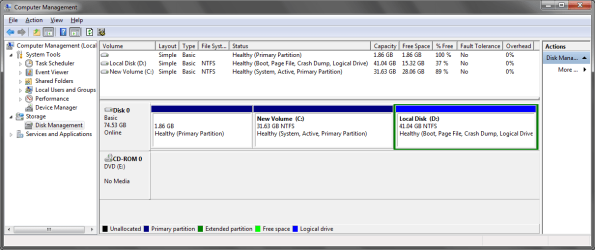
computer management as it is currently...I did rename the partitions but you get the idea...
 

Attachments

  • new_comp_mg.png
    new_comp_mg.png
    25.1 KB · Views: 9

My Computer My Computer

At a glance

Windows 7 Ultimate (32 bit)
OS
Windows 7 Ultimate (32 bit)
you didn't mark the win7 partition as active!!
Do what is decribed here Changing the Boot Partition - EasyBCD - NeoSmart Technologies Wiki
it copies boot bcd and bootmgr to win7 partition and mark it active. It does all you wanna do!
It just copies so it's save. If it fails to boot, you can mark the old winxp as active and you are back to where you're now. you need a "repair disk" or "installation dvd" in case of trouble!! marking winxp as active is impossible from an not booting system of course

after doing what's described on http://neosmart.net/wiki/display/EBCD/Changing+the+Boot+Partition don't reboot!!
First have a look at the newly created bcd store.

bcdedit /store d:\boot\bcd /enum all
and post output
 

My Computer My Computer

At a glance

Microsoft Windows 7 Home Premium 64-bits 7601...Intel(R) Core(TM) i3 CPU M 370 @ 2.40GHz4,00 GBATI Mobility Radeon HD 5400 Series
Computer type
Laptop
Computer Manufacturer/Model Number
ACER ASPIRE 5742G
OS
Microsoft Windows 7 Home Premium 64-bits 7601 Multiprocessor Free Service Pack 1
CPU
Intel(R) Core(TM) i3 CPU M 370 @ 2.40GHz
Motherboard
Acer Aspire 5742G
Memory
4,00 GB
Graphics Card(s)
ATI Mobility Radeon HD 5400 Series
Sound Card
(1) AMD High Definition Audio Device (2) Realtek High Defi
Screen Resolution
1366 x 768 x 32 bits (4294967296 colors) @ 60 Hz
Hard Drives
WDC WD5000BEVT-22ZAT0

My Computer My Computer

At a glance

ME/XP/Vista/Win7
OS
ME/XP/Vista/Win7
Changed the boot location using EasyBCD.
Result from CMD


Windows Boot Manager
--------------------
identifier {bootmgr}
device boot
path \bootmgr
description Windows Boot Manager
locale en-US
default {default}
displayorder {default}
timeout 30

Windows Boot Loader
-------------------
identifier {default}
device partition=D:
path \Windows\system32\winload.exe
description Windows 7 Ultimate (recovered)
locale en-US
recoverysequence {501b8831-5c56-11e1-8122-fa93929f74d9}
recoveryenabled Yes
osdevice partition=D:
systemroot \Windows
resumeobject {51d6ef4b-5c13-11e1-86cc-806e6f6e6963}

Windows Boot Loader
-------------------
identifier {501b8831-5c56-11e1-8122-fa93929f74d9}
device ramdisk=[D:]\Recovery\8300650a-28ea-11e1-950c-89ffff1265
ce\Winre.wim,{501b8832-5c56-11e1-8122-fa93929f74d9}
path \windows\system32\winload.exe
description Windows Recovery Environment (recovered)
locale
osdevice ramdisk=[D:]\Recovery\8300650a-28ea-11e1-950c-89ffff1265
ce\Winre.wim,{501b8832-5c56-11e1-8122-fa93929f74d9}
systemroot \windows
winpe Yes

Resume from Hibernate
---------------------
identifier {51d6ef4b-5c13-11e1-86cc-806e6f6e6963}
device partition=D:
path \Windows\system32\winresume.exe
description Windows 7 Ultimate (recovered)
locale en-US
inherit {resumeloadersettings}
filedevice partition=D:
filepath \hiberfil.sys
pae Yes
debugoptionenabled No

Windows Memory Tester
---------------------
identifier {memdiag}
device boot
path \Boot\memtest.exe
description Windows Memory Diagnostic
locale en-US

Device options
--------------
identifier {501b8832-5c56-11e1-8122-fa93929f74d9}
ramdisksdidevice partition=D:
ramdisksdipath \Recovery\8300650a-28ea-11e1-950c-89ffff1265ce\boot.sdi
 

My Computer My Computer

At a glance

Windows 7 Ultimate (32 bit)
OS
Windows 7 Ultimate (32 bit)
PW should not only see Win7 but if you want Win7 on D allow you to convert D to Primary, then you can follow these steps to resize into C while recovering the System boot files into Win7 by marking Active and running Startup Repair 3 times: Partition Recover Space Used by an Older OS


Are you following the tutorial above?

I was, until I hit the section where I require Win 7 boot/recovery disk. I have no DVDs atm, and I have no CDs to burn the ISO for PM either.

I guess my outlook has changed slightly in that I if I can get my boot files off C: and on to D: that might suffice - which is what I believe we are doing now by using EasyBCD to move the BOOTMGR
 

My Computer My Computer

At a glance

Windows 7 Ultimate (32 bit)
OS
Windows 7 Ultimate (32 bit)
Back
Top