Win 7 PC will not allow other PC to read/write and others PC not seen

Fenshome

New member
Member
Local time
7:51 PM
Messages
34
I have 3 Win7 PC in the same home group, 2 of them are able to see the problem PC, but not able to read/Write to it. While the problem PC can't see the other two PC's. Can Ping other 2 PC's from problem PC, has discovery, shared, public turned on and P/word off.

IPconfig of problem PC provided below:


Host Name . . . . . . . . . . . . : Kim-PC
Primary Dns Suffix . . . . . . . :
Node Type . . . . . . . . . . . . : Mixed
IP Routing Enabled. . . . . . . . : No
WINS Proxy Enabled. . . . . . . . : No
DNS Suffix Search List. . . . . . : iiNet

Ethernet adapter Local Area Connection:

Connection-specific DNS Suffix . : iiNet
Description . . . . . . . . . . . : Realtek RTL8168C(P)/8111C(P) Family PCI-E
Gigabit Ethernet NIC (NDIS 6.20)
Physical Address. . . . . . . . . : 00-23-7D-C7-8F-26
DHCP Enabled. . . . . . . . . . . : Yes
Autoconfiguration Enabled . . . . : Yes
Link-local IPv6 Address . . . . . : fe80::c85c:1583:6624:f24a%10(Preferred)
IPv4 Address. . . . . . . . . . . : 10.1.1.2(Preferred)
Subnet Mask . . . . . . . . . . . : 255.255.255.0
Lease Obtained. . . . . . . . . . : Monday, 1 April 2013 9:22:44 PM
Lease Expires . . . . . . . . . . : Wednesday, 3 April 2013 9:22:44 AM
Default Gateway . . . . . . . . . : 10.1.1.1
DHCP Server . . . . . . . . . . . : 10.1.1.1
DHCPv6 IAID . . . . . . . . . . . : 234890369
DHCPv6 Client DUID. . . . . . . . : 00-01-00-01-18-36-58-E3-00-23-7D-C7-8F-26

DNS Servers . . . . . . . . . . . : 10.1.1.1
NetBIOS over Tcpip. . . . . . . . : Enabled

Tunnel adapter isatap.{2603F447-53A7-4FAE-B177-EEFC4C4408D1}:

Media State . . . . . . . . . . . : Media disconnected
Connection-specific DNS Suffix . :
Description . . . . . . . . . . . : Microsoft ISATAP Adapter
Physical Address. . . . . . . . . : 00-00-00-00-00-00-00-E0
DHCP Enabled. . . . . . . . . . . : No
Autoconfiguration Enabled . . . . : Yes

Tunnel adapter Teredo Tunneling Pseudo-Interface:

Media State . . . . . . . . . . . : Media disconnected
Connection-specific DNS Suffix . :
Description . . . . . . . . . . . : Teredo Tunneling Pseudo-Interface
Physical Address. . . . . . . . . : 00-00-00-00-00-00-00-E0
DHCP Enabled. . . . . . . . . . . : No
Autoconfiguration Enabled . . . . : Yes

All folders are shared, and permissions = everyone

any suggestions.
 

My Computer My Computer

At a glance

Win 74 GBs
Computer Manufacturer/Model Number
HP Dx 2810 MT
OS
Win 7
Memory
4 GBs
Hello there,

From the problematic PC, can you please try this?

Click on Start, in Search and Programs Files box type \\IPAddress\SharedFolderName (for ex. \\10.1.1.3\TimFolder) then press enter, see if you're able to access the other computer.
You'll have to do an iponfig or ipconfig/all to obtain the IP Address of the other computer that you're trying to access.
 

My Computer My Computer

At a glance

Win7 & Win8 64bitIntel i5
Computer Manufacturer/Model Number
Lenovo Desktop/Samsung Laptop
OS
Win7 & Win8 64bit
CPU
Intel i5
Internet Speed
Charter-20 Mbps
Antivirus
Avast
Browser
FF, IE9 and Chrome
2xg

No success with \\10.1.1.4\c: or \\HP_Dell\c: which are the appropriate machine addresses.

But now the PC name shows up in File Manager, but no access to it through File Manager.
 

My Computer My Computer

At a glance

Win 74 GBs
Computer Manufacturer/Model Number
HP Dx 2810 MT
OS
Win 7
Memory
4 GBs
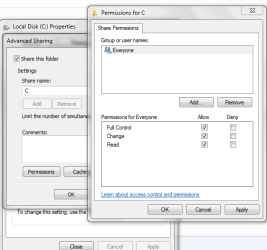
Let's undo your file sharing if you don't mind, give the C drive a full permission access and just call it C for now. See attached image, then try my suggestion again: \\10.1.1.4\C no colonneeded.
 

Attachments

  • permission-Win 7.PNG
    permission-Win 7.PNG
    18.8 KB · Views: 3

My Computer My Computer

At a glance

Win7 & Win8 64bitIntel i5
Computer Manufacturer/Model Number
Lenovo Desktop/Samsung Laptop
OS
Win7 & Win8 64bit
CPU
Intel i5
Internet Speed
Charter-20 Mbps
Antivirus
Avast
Browser
FF, IE9 and Chrome
2xg

was already set up that way. works ok from good to bad PC, but not bad to good PC -no visiblity
 

My Computer My Computer

At a glance

Win 74 GBs
Computer Manufacturer/Model Number
HP Dx 2810 MT
OS
Win 7
Memory
4 GBs
Colon removed?
\\10.1.1.4\c: or \\HP_Dell\c:

Can you please post an ipconfig /all output of the PC the other PC?

Have you tried disabling the Firewall temporarily?

Also, make sure that from the troublesome computer verify that all your network services are Started from Control Panel=> Admin Tools=> Services:
• COM+ Event System (for WZC issues)
• Computer Browser
• DHCP Client
• DNS Client
• Network Connections
• Network Location Awareness
• Remote Procedure Call (RPC)
• Server
• TCP/IP Netbios helper
• Workstation
 

My Computer My Computer

At a glance

Win7 & Win8 64bitIntel i5
Computer Manufacturer/Model Number
Lenovo Desktop/Samsung Laptop
OS
Win7 & Win8 64bit
CPU
Intel i5
Internet Speed
Charter-20 Mbps
Antivirus
Avast
Browser
FF, IE9 and Chrome
Colon was removed in test as suggested.

Both IPconfig's are attached - bad PC first and good PC second in Word file.

Firewall was disabled

all services were running

Can't see anything of the network from bad PC, but good PC in the network can see all file in the bad PC, even upload and download files from the bad PC.
 

Attachments

My Computer My Computer

At a glance

Win 74 GBs
Computer Manufacturer/Model Number
HP Dx 2810 MT
OS
Win 7
Memory
4 GBs
Just to confirm, are you able to ping bad PC to good PC, good PC to bad PC? What type of AV or Security Software are you running on all your 3 PCs?
 

My Computer My Computer

At a glance

Win7 & Win8 64bitIntel i5
Computer Manufacturer/Model Number
Lenovo Desktop/Samsung Laptop
OS
Win7 & Win8 64bit
CPU
Intel i5
Internet Speed
Charter-20 Mbps
Antivirus
Avast
Browser
FF, IE9 and Chrome
yep ping in both directions

all PC use MS Security Essentials
 

My Computer My Computer

At a glance

Win 74 GBs
Computer Manufacturer/Model Number
HP Dx 2810 MT
OS
Win 7
Memory
4 GBs
PS

Are there any Registry entries that should be looked at?
 

My Computer My Computer

At a glance

Win 74 GBs
Computer Manufacturer/Model Number
HP Dx 2810 MT
OS
Win 7
Memory
4 GBs
Can you please create identical User Names and Passwords on all your PCs? Also, I have to retire for tonight, we'll continue tomorrow okay? I'm sure someone will chime in to help out.
 

My Computer My Computer

At a glance

Win7 & Win8 64bitIntel i5
Computer Manufacturer/Model Number
Lenovo Desktop/Samsung Laptop
OS
Win7 & Win8 64bit
CPU
Intel i5
Internet Speed
Charter-20 Mbps
Antivirus
Avast
Browser
FF, IE9 and Chrome
OK all the same now and all PC names show up in problematic PC, but no access to them and visa versa.

Sleep well speak tomorrow
 

My Computer My Computer

At a glance

Win 74 GBs
Computer Manufacturer/Model Number
HP Dx 2810 MT
OS
Win 7
Memory
4 GBs
The problems I see with Homegroups is that certain files build up under peer networking and they need to be deleted, these extra files will make certain machines vanish from the Homegroup or become inaccessible. The other symptoms are that you can't leave or join a Homegroup, this tends to occur most often with wireless machines.

You should be setting up the shares from the C:>Users folder rather than the C: drive. This is the default setting and it's safer than sharing the entire C: drive.

If there is any type of third party anti virus software installed then it will need to be configured to work with Homegroups or removed from the system using the special uninstall tool.

If it's the peer networking problem just go to the location listed in the picture and delete the files below the black line. It might be required to delete all the files in the peer networking folder but deleting the ones below the line seems to work for me. It will probably show more files to delete than in my picture.

Many other Homegroup problems can be fixed by going through the guide in the link. :)

Ultimate Troubleshooting Guide for Windows 7 HomeGroup Connection Issues - Help Desk Geek
 

Attachments

  • Peer Networking Delete white pages to fix Homegroup 1.jpg
    Peer Networking Delete white pages to fix Homegroup 1.jpg
    95.6 KB · Views: 3

My Computer My Computer

At a glance

Windows 7 Ult, Windows 8.1 Pro,Q9650-4.275GHz, E8600 4.5GHz, E6750-3.8GHzG.Skill PC2 9600 1200Mhz 5 5 5 15 2TGTX480
Computer type
PC/Desktop
Computer Manufacturer/Model Number
Home built
OS
Windows 7 Ult, Windows 8.1 Pro,
CPU
Q9650-4.275GHz, E8600 4.5GHz, E6750-3.8GHz
Motherboard
Evga 780i FTW
Memory
G.Skill PC2 9600 1200Mhz 5 5 5 15 2T
Graphics Card(s)
GTX480
Sound Card
Asus Xonar D2
Monitor(s) Displays
HannsG
Screen Resolution
1680X1050
Hard Drives
GSkill Phoenix Pro 120GB SSD
PSU
ThermalTake Toughpower 1000Watt modular
Case
ThermalTake XaserV
Cooling
Xigmatek S1283
Keyboard
Logitech G15
Mouse
Logitech G9
Internet Speed
T1
All home-group entities are correct in all PC's as in above. All PC's can now see each other as far as there allocated names. But the problematic PC even thought it can now see all other PC's can't access any of the the other PC's in the network even though all Folders and Drives are shared and have permission set to everyone and allowed. The other PC's can access each other, but not the problematic PC.
 

My Computer My Computer

At a glance

Win 74 GBs
Computer Manufacturer/Model Number
HP Dx 2810 MT
OS
Win 7
Memory
4 GBs
Can you please install and run Secunia PSI, this will detect all the programs that you have installed, outdated and updated. I wonder if you have any outdated AV or Security Software, we'll find out when you install Secunia.

If you have more than one AV installed in the bad PC, uninstall the rest and leave one.
 
Last edited:

My Computer My Computer

At a glance

Win7 & Win8 64bitIntel i5
Computer Manufacturer/Model Number
Lenovo Desktop/Samsung Laptop
OS
Win7 & Win8 64bit
CPU
Intel i5
Internet Speed
Charter-20 Mbps
Antivirus
Avast
Browser
FF, IE9 and Chrome
Everything is up-to-date and only MS Security Essentials running
 

My Computer My Computer

At a glance

Win 74 GBs
Computer Manufacturer/Model Number
HP Dx 2810 MT
OS
Win 7
Memory
4 GBs
can we continue in a weeks time as I'm away
 

My Computer My Computer

At a glance

Win 74 GBs
Computer Manufacturer/Model Number
HP Dx 2810 MT
OS
Win 7
Memory
4 GBs

My Computer My Computer

At a glance

Win7 & Win8 64bitIntel i5
Computer Manufacturer/Model Number
Lenovo Desktop/Samsung Laptop
OS
Win7 & Win8 64bit
CPU
Intel i5
Internet Speed
Charter-20 Mbps
Antivirus
Avast
Browser
FF, IE9 and Chrome
Found that after changing all homegroup names on all pcs I could get access.
Thanks for help
 

My Computer My Computer

At a glance

Win 74 GBs
Computer Manufacturer/Model Number
HP Dx 2810 MT
OS
Win 7
Memory
4 GBs
Thanks for letting us know, glad to hear that all is sorted.
 

My Computer My Computer

At a glance

Win7 & Win8 64bitIntel i5
Computer Manufacturer/Model Number
Lenovo Desktop/Samsung Laptop
OS
Win7 & Win8 64bit
CPU
Intel i5
Internet Speed
Charter-20 Mbps
Antivirus
Avast
Browser
FF, IE9 and Chrome
Back
Top