WIN 7 print dialog box

yaofeng

New member
Local time
4:01 AM
Messages
3
First time on the forum.

Our network administrator just updated my HP T9500 2.6 Ghz laptop to Win 7 w/ 8GB memory. Two questions.

1) the print dialog box opens and but stays in the background. If you have many windows open you don't even notice it pops up. How do you make the print dialog box to come to the foreground by default?
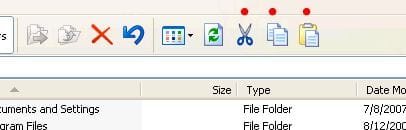
2) I miss the feature in my XP Pro windows explorer where I can add features such as "cut", "paste", "copy", on the menu bar. Can you do the same in Win 7?
 

My Computer

Computer Manufacturer/Model Number
HP T9500
OS
Windows 7 enterprise
CPU
Core 2 duo 2.6 GHz
Memory
8 GB
Graphics Card(s)
Nvidia Quadro FX1600M
Monitor(s) Displays
17 inch
Hard Drives
Hitachi HTS73216L9A360 150 GB

My Computer

Computer Manufacturer/Model Number
HP T9500
OS
Windows 7 enterprise
CPU
Core 2 duo 2.6 GHz
Memory
8 GB
Graphics Card(s)
Nvidia Quadro FX1600M
Monitor(s) Displays
17 inch
Hard Drives
Hitachi HTS73216L9A360 150 GB
2. Right-clicking would be much faster, but if you want the menu options back, hit the ALT key to get them to show. If you want them to stay, there's an option in Tools > Folder Options to always show menus.
 

My Computer

OS
Windows 7 Ultimate x64 SP1
CPU
Intel Core i7-2600
Motherboard
Gigabyte GA-P67A-UD3P-B3
Memory
12 GB Patriot Extreme DDR3-1333
Graphics Card(s)
Nvidia GTX 470
Monitor(s) Displays
Dell UltraSharp 2209WA
Hard Drives
OCZ Agility3 240 GB, WD5001AALS, WD7501AALS
PSU
OCZ ModStream 700W
Case
CoolerMaster HAF 912 Advanced
Cooling
CoolerMaster Hyper 212 Plus
First of all I do not agree right click to delete is faster. Right click and then delete involve two mouse clicks. With the XP Pro I highlight the group of files I want to manipulate. And just click either copy, cut or paste. There is only one mouse click. You just can't do it in Win 7 explorer anymore.
 

My Computer

Computer Manufacturer/Model Number
HP T9500
OS
Windows 7 enterprise
CPU
Core 2 duo 2.6 GHz
Memory
8 GB
Graphics Card(s)
Nvidia Quadro FX1600M
Monitor(s) Displays
17 inch
Hard Drives
Hitachi HTS73216L9A360 150 GB
First of all I do not agree right click to delete is faster. Right click and then delete involve two mouse clicks. With the XP Pro I highlight the group of files I want to manipulate. And just click either copy, cut or paste. There is only one mouse click. You just can't do it in Win 7 explorer anymore.

No, but other options are:

1) Organize\Cut|Copy|Paste
2) Keyboard shortcut ctrl+c (copy) ctrl+v (paste) ctrl+x (cut)
3) search for a 3rd party file manager that does what you want.

James
 

My Computer

OS
Win7U 64 RTM
CPU
Q9550
Motherboard
GA-EP45-UD3R
Memory
8GB Gskill
Graphics Card(s)
ASUS|EAH4850/HTDI/1GD3/A
Sound Card
xfi Plat
Monitor(s) Displays
Dell 2405fpw
Screen Resolution
1920x1200
Hard Drives
Seagate & WD sata Drives
PSU
Antec
Case
Antec
Keyboard
MS Natural Ergonomic 4000
Mouse
Logitech MX610 USB Cordless
First of all I do not agree right click to delete is faster. Right click and then delete involve two mouse clicks. With the XP Pro I highlight the group of files I want to manipulate. And just click either copy, cut or paste. There is only one mouse click. You just can't do it in Win 7 explorer anymore.
It's two either way. Going by your method, you still have to click Edit, and then click on the command. What I don't understand is the griping about something so simple, or the attitude for those offering solutions. If you don't like to right-click like the rest of us, you have keyboard shortcuts, or my explanation above on how to restore the menu options just like XP. Beyond that, I'm not sure what else anyone can do for you.
 

My Computer

OS
Windows 7 Ultimate x64 SP1
CPU
Intel Core i7-2600
Motherboard
Gigabyte GA-P67A-UD3P-B3
Memory
12 GB Patriot Extreme DDR3-1333
Graphics Card(s)
Nvidia GTX 470
Monitor(s) Displays
Dell UltraSharp 2209WA
Hard Drives
OCZ Agility3 240 GB, WD5001AALS, WD7501AALS
PSU
OCZ ModStream 700W
Case
CoolerMaster HAF 912 Advanced
Cooling
CoolerMaster Hyper 212 Plus
First of all I do not agree right click to delete is faster. Right click and then delete involve two mouse clicks. With the XP Pro I highlight the group of files I want to manipulate. And just click either copy, cut or paste. There is only one mouse click. You just can't do it in Win 7 explorer anymore.
It's two either way. Going by your method, you still have to click Edit, and then click on the command.

Actually, he's referring to the toolbar icons for Cut, Copy & Paste available in XP WE, marked by red dots in the screen shot:
 

Attachments

  • XP_Cut_Copy_Paste.JPG
    XP_Cut_Copy_Paste.JPG
    16 KB · Views: 6

My Computer

OS
Win7U 64 RTM
CPU
Q9550
Motherboard
GA-EP45-UD3R
Memory
8GB Gskill
Graphics Card(s)
ASUS|EAH4850/HTDI/1GD3/A
Sound Card
xfi Plat
Monitor(s) Displays
Dell 2405fpw
Screen Resolution
1920x1200
Hard Drives
Seagate & WD sata Drives
PSU
Antec
Case
Antec
Keyboard
MS Natural Ergonomic 4000
Mouse
Logitech MX610 USB Cordless

My Computer

OS
Win7U 64 RTM
CPU
Q9550
Motherboard
GA-EP45-UD3R
Memory
8GB Gskill
Graphics Card(s)
ASUS|EAH4850/HTDI/1GD3/A
Sound Card
xfi Plat
Monitor(s) Displays
Dell 2405fpw
Screen Resolution
1920x1200
Hard Drives
Seagate & WD sata Drives
PSU
Antec
Case
Antec
Keyboard
MS Natural Ergonomic 4000
Mouse
Logitech MX610 USB Cordless
Back
Top