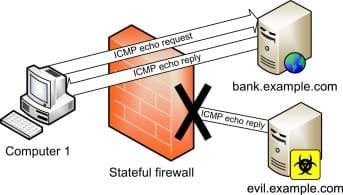
I have been researching the hosts file in Win 7, and Google has failed to answer some questions, so I'll try here.
1. From this article, is appears using the hosts file to blacklist a URL only prevents your computer from reaching that site:
How To Block Websites On Windows Using The Hosts File
....but apparently does nothing to prevent that site from reaching your computer. True or false?
2. If true, what options are there to prevent a snoopy site like Fakebook from accessing your computer[FONT=Open Sans, sans-serif],[/FONT] other than PeerBlock, which seems to be on everyone's hiss list?
1. From this article, is appears using the hosts file to blacklist a URL only prevents your computer from reaching that site:
How To Block Websites On Windows Using The Hosts File
....but apparently does nothing to prevent that site from reaching your computer. True or false?
2. If true, what options are there to prevent a snoopy site like Fakebook from accessing your computer[FONT=Open Sans, sans-serif],[/FONT] other than PeerBlock, which seems to be on everyone's hiss list?
My Computers
-
At a glance
Windows 7 Pro 64-biti7-377016GBonboard- Computer type
- PC/Desktop
- Computer Manufacturer/Model Number
- Dell OptiPlex 7010 Tower
- OS
- Windows 7 Pro 64-bit
- CPU
- i7-3770
- Memory
- 16GB
- Graphics Card(s)
- onboard
- Monitor(s) Displays
- Dell
- Hard Drives
- 1TB.
- Keyboard
- Wyse ku8933
- Mouse
- Microsoft optical
- Antivirus
- none
- Browser
- ComodoDragon, Basilisk, WaterFox, Brave, Chrome, Iridium
-
- Computer type
- PC/Desktop