Win 7 Pro hosts file question

Uitlander

New member
Member
Local time
2:14 AM
Messages
36
I have been researching the hosts file in Win 7, and Google has failed to answer some questions, so I'll try here.

1. From this article, is appears using the hosts file to blacklist a URL only prevents your computer from reaching that site:
How To Block Websites On Windows Using The Hosts File
....but apparently does nothing to prevent that site from reaching your computer. True or false?

2. If true, what options are there to prevent a snoopy site like Fakebook from accessing your computer[FONT=Open Sans, sans-serif],[/FONT] other than PeerBlock, which seems to be on everyone's hiss list?


My Computers

System One System Two

  • Computer type
    PC/Desktop
    Computer Manufacturer/Model Number
    Dell OptiPlex 7010 Tower
    OS
    Windows 7 Pro 64-bit
    CPU
    i7-3770
    Memory
    16GB
    Graphics Card(s)
    onboard
    Monitor(s) Displays
    Dell
    Hard Drives
    1TB.
    Keyboard
    Wyse ku8933
    Mouse
    Microsoft optical
    Antivirus
    none
    Browser
    ComodoDragon, Basilisk, WaterFox, Brave, Chrome, Iridium
  • Computer type
    PC/Desktop
I'll try to answer this as best I can so you can understand it.

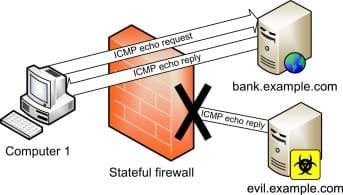
Generally, websites DO NOT connect to your computer. You, that's right -- YOU connect to the website.

So Facebook connecting to your computer isn't happening. There may be programs or Apps making that connection though. They ESTABLISH the connection. Automatically in some cases. Even if something tried connecting to you from outside the WAN I'm sure you have a router that will block it because that's the nature of SPI (Stateful Packet Inspection) in a router and NAT (Network Address Translation). If you have UPnP or port forwarding turned on in the router then things can get inside your network.

Now about the hosts file. The hosts file is NOT meant for blocking domains. It was intended for another purpose in a network situation. But it can be used for blocking purposes but in limited scope. If you have several hundred domains in the hosts file you'll wind up having to turn off the DNS Cache service for performance reasons. Again, the hosts file was never meant for blocking things. In a limited way it's fine and I use it in that regard to block NVIDIA telemetry and whatnot. You want to use something more applicable for the intent. Like pfSense, OPNSense, PiHole or DNS blocking services like OpenDNS et al. Also, the hosts file functionality is domain to IP resolution. So you can't do something like:

127.0.0.1 192.168.1.1

Only domain to IP resolution like this:

127.0.0.1 facebook.com

You could also use, 127.0.0.22 facebook.com

Why? Because the reserved space of 127.0.0.0/8 for localhost has over 16 MILLION possibilities. (And here we're running out of IPV4 addressees and need IPv6.... :rolleyes: CIDR to IPv4 Address Range Utility Tool | IPAddressGuide


frdshg.jpg
 

My Computer

Computer type
PC/Desktop
OS
Windows 7 Ultimate x64
In order for an external computer to connect to your computer, your computer would have to have some software installed that acts as a server. Windows blocks incoming connections by default. Programs that want to act as a server generate a security notification asking you what to do with the program's incoming connections. So don't worry about incoming connections unless you have malicious programs installed.

As for outbound connections I have been using NextDNS for a couple of years now. The free version (300k queries a month) is perfectly usable by the average user.

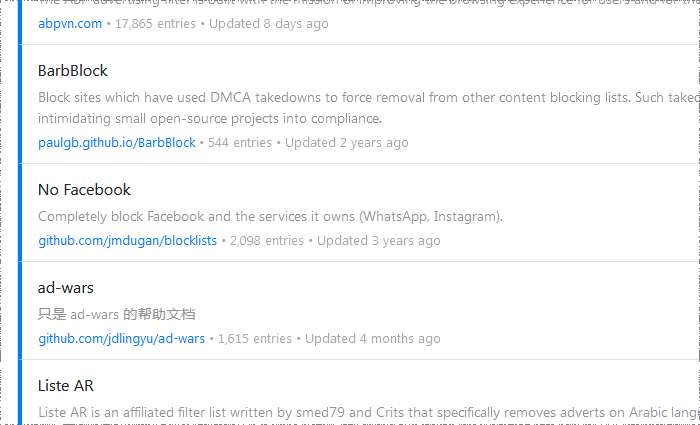
NextDNS is an online DNS-over-TLS/DNS-over-HTTPS service, but it also offers other interesting services, such as block lists. It has dozens of filters to choose from, "No Facebook" is one of them.

Xy7ExBF.png


The graphical client doesn't seem to work on windows 7, so to use it on windows 7 you have to use the CLI version:

1. Register on NextDNS
2. Download: NextDNS CLI client

Releases . nextdns/nextdns . GitHub

Execute:

Code:
C:\>downloads\nextdns.exe install
	
C:\Program Files\nextdns\nextdns.exe -config <yourconfigid_itsonthewebsite>
C:\Program Files\nextdns\nextdns.exe start
C:\Program Files\nextdns\nextdns.exe activate


And that's it, it installs as a service. It starts with windows. And apply the block to all windows programs that use the DNS service.


List of filter lists:


xMNw7x7.png


More screenshoots:
Setup: Imgur: The magic of the Internet
Security: Imgur: The magic of the Internet
Privacy: Imgur: The magic of the Internet
Parental Control: Imgur: The magic of the Internet
Denylist: Imgur: The magic of the Internet
Allowlist: Imgur: The magic of the Internet
Analytics: Imgur: The magic of the Internet
Logs: Imgur: The magic of the Internet
Settings: https://imgur.com/nJRdxXr
 

My Computers

System One System Two

  • Computer type
    PC/Desktop
    OS
    Windows 7 Ultimate 64-bit SP1
    CPU
    Intel Core 2 Quad Q6700 @ 2.66GHz
    Motherboard
    ECS MCP73PVT-SM
    Memory
    4.00GB Single-Channel DDR2 @ 399MHz
    Graphics Card(s)
    2047MB NVIDIA GeForce GT 710 (ASUStek Computer Inc)
    Sound Card
    Realtek High Definition Audio
    Monitor(s) Displays
    HP 21kd
    Screen Resolution
    1920x1080@60Hz
    Hard Drives
    149GB Western Digital WDC WD1600AABS-61PRA0 ATA Device (SATA )
    4000GB Seagate ST4000DM004-2U9104 ATA Device (SATA )
    931GB TOSHIBA External USB 3.0 USB Device (USB (SATA) )
    Antivirus
    None. Don't Need it.
    Browser
    Librewolf Portable
    Other Info
    It's a very old system.
  • Computer type
    PC/Desktop
Back
Top