Win 7 SP1 Install

Jutta

New member
Local time
3:37 PM
Messages
23
Location
Geraldton Western Australia
Hi,
Any Help very much appreciated,
Since installing SP1 (last Week) when right clicking on a WLM Folder in my created Stationery Folder, to choose open with WM, I can select WM from Program Files, but nothing happens, which worked perfectly before upgrading to SP1.
WLM was run as Default, and WM was opened by right clicking a WLM Icon in Stationery Folder.
If I select to make "WM" my Default Mail Handler, (which turns WLM Icons into WM Icons) I can just double click on the created Stationery Icon it will open fine in WM.
However if I want to open "WLM" (not being selected as default anymore, I get a Message "not installed properly"), and is unusable.
Unfortunately, I need both Mail handlers to function, WM to use like O.E. , and WLM to send, and view Meta Creation etc. Stationery.
I have reinstalled WM 3 Times as per Instructions in 7 Forums, to no avail.
Also run Malware with good Results, McAfee also came up clean.
As it stands now I can either use WM, or WLM.
(Btw. I had problems installing SP1 for Win7, and had to call for Microsoft Remote Help, who installed it OK. after 2 Days, their Verdict by the Way was "a Corrupted File"??, but can't help wondering if they deleted something, as I know of few other Stationery Creators who installed SP1, and WLM, and WM work Hand in Hand as before the Install)
Sorry for the long winded Post, and hope some good Samaritan has the Answer for me.
Jutta
 

My Computer

OS
Win 7 64 bit Ultimate
Mouse
Logitech

My Computer

Computer Manufacturer/Model Number
WALLONN7 / LIN BLACK SERIES II
OS
Windows 7 Ultimate x64 SP1
CPU
AMD PHENOM II X6 1090T 3.2GHz
Motherboard
GIGABYTE GA-890FXA-UD7
Memory
8GB G.SKILL RIPJAWS - F3-10666CL7D
Graphics Card(s)
SAPPHIRE ATI RADEON HD 5870 VAPOR X OC
Sound Card
REALTEK DOLBY HOME THEATER
Monitor(s) Displays
LED LG W2486L
Screen Resolution
1080p
Hard Drives
SEAGATE 1TB -ST31000528AS - AHCI MODE - AS SATA
PSU
ZALMAN ZM1000-HP 1000W
Case
THERMALTAKE XASER VI VG4000SWA
Cooling
140MM x3 / 120MM x1 AIR COOLING - THERMALTAKE
Keyboard
MICROSOFT DIGITAL MEDIA KEYBOARD 3000 - USB
Mouse
MICROSOFT BASIC OPTICAL MOUSE 2.0 - USB
Internet Speed
600KBPS
Other Info
MICROSOFT XBOX 360 CONTROLLER
No Luck

Wallon7

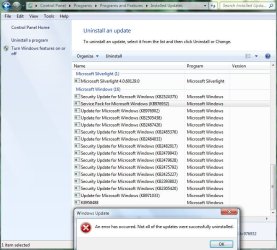
Can not Use the Uninstaller, unable to locate the Installed SP1 anywhere, apart from the the Entry on Attachment, in Windows Update, have tried to uninstall it from there, received Message as on bottom of Attachment.
I have a SP1.exe File on Desktop, with no Options but to run it, message shows as, SP1 is already installed.
In my Computer Properties SP1 also shows as installed.
Any further Advice you can think of at this Stage?
Thank you Jutta
 

Attachments

  • 2011-03-24_163748.jpg
    2011-03-24_163748.jpg
    87.3 KB · Views: 26

My Computer

OS
Win 7 64 bit Ultimate
Mouse
Logitech
I see that I could not be clear enough ... and I apologize for that! :o When told to uninstall and reinstall, I referred to the VM, not the SP1. :D Then try what I suggested above and let us know the results. ;)
 

My Computer

Computer Manufacturer/Model Number
WALLONN7 / LIN BLACK SERIES II
OS
Windows 7 Ultimate x64 SP1
CPU
AMD PHENOM II X6 1090T 3.2GHz
Motherboard
GIGABYTE GA-890FXA-UD7
Memory
8GB G.SKILL RIPJAWS - F3-10666CL7D
Graphics Card(s)
SAPPHIRE ATI RADEON HD 5870 VAPOR X OC
Sound Card
REALTEK DOLBY HOME THEATER
Monitor(s) Displays
LED LG W2486L
Screen Resolution
1080p
Hard Drives
SEAGATE 1TB -ST31000528AS - AHCI MODE - AS SATA
PSU
ZALMAN ZM1000-HP 1000W
Case
THERMALTAKE XASER VI VG4000SWA
Cooling
140MM x3 / 120MM x1 AIR COOLING - THERMALTAKE
Keyboard
MICROSOFT DIGITAL MEDIA KEYBOARD 3000 - USB
Mouse
MICROSOFT BASIC OPTICAL MOUSE 2.0 - USB
Internet Speed
600KBPS
Other Info
MICROSOFT XBOX 360 CONTROLLER
Tried following your Suggestion Wallon7, opened the Revo Uninstaller, but there is no sign of Windows Mail to uninstall?
Thanks you for your Time
Jutta
 

My Computer

OS
Win 7 64 bit Ultimate
Mouse
Logitech
Tried following your Suggestion Wallon7, opened the Revo Uninstaller, but there is no sign of Windows Mail to uninstall?
Thanks you for your Time
Jutta

Given that Windows Mail is part of Windows Live Essentials, you have to uninstall from there. I suggest you back up the logs of your conversations, if you think they are indispensable. Another thing that would be good to do is to uninstall the whole WLE package ... Done it with Revo, then reinstall WLE package again.
 

My Computer

Computer Manufacturer/Model Number
WALLONN7 / LIN BLACK SERIES II
OS
Windows 7 Ultimate x64 SP1
CPU
AMD PHENOM II X6 1090T 3.2GHz
Motherboard
GIGABYTE GA-890FXA-UD7
Memory
8GB G.SKILL RIPJAWS - F3-10666CL7D
Graphics Card(s)
SAPPHIRE ATI RADEON HD 5870 VAPOR X OC
Sound Card
REALTEK DOLBY HOME THEATER
Monitor(s) Displays
LED LG W2486L
Screen Resolution
1080p
Hard Drives
SEAGATE 1TB -ST31000528AS - AHCI MODE - AS SATA
PSU
ZALMAN ZM1000-HP 1000W
Case
THERMALTAKE XASER VI VG4000SWA
Cooling
140MM x3 / 120MM x1 AIR COOLING - THERMALTAKE
Keyboard
MICROSOFT DIGITAL MEDIA KEYBOARD 3000 - USB
Mouse
MICROSOFT BASIC OPTICAL MOUSE 2.0 - USB
Internet Speed
600KBPS
Other Info
MICROSOFT XBOX 360 CONTROLLER
Followed your latest Instructions Wallon7, but could not see any improvements afterwards.
However found the Service Pack 1 Install, in System Restore at last (did not go back far enough the first Time to see it), and performed a System Restore back before SP1 Install, and all seems to be nearly back to normal, apart from the "right click Open With WM" Function, but I might have to live with it, and work around it.
Thank you kindly for your Effort, and Time.
Jutta
 

My Computer

OS
Win 7 64 bit Ultimate
Mouse
Logitech

My Computer

Computer Manufacturer/Model Number
WALLONN7 / LIN BLACK SERIES II
OS
Windows 7 Ultimate x64 SP1
CPU
AMD PHENOM II X6 1090T 3.2GHz
Motherboard
GIGABYTE GA-890FXA-UD7
Memory
8GB G.SKILL RIPJAWS - F3-10666CL7D
Graphics Card(s)
SAPPHIRE ATI RADEON HD 5870 VAPOR X OC
Sound Card
REALTEK DOLBY HOME THEATER
Monitor(s) Displays
LED LG W2486L
Screen Resolution
1080p
Hard Drives
SEAGATE 1TB -ST31000528AS - AHCI MODE - AS SATA
PSU
ZALMAN ZM1000-HP 1000W
Case
THERMALTAKE XASER VI VG4000SWA
Cooling
140MM x3 / 120MM x1 AIR COOLING - THERMALTAKE
Keyboard
MICROSOFT DIGITAL MEDIA KEYBOARD 3000 - USB
Mouse
MICROSOFT BASIC OPTICAL MOUSE 2.0 - USB
Internet Speed
600KBPS
Other Info
MICROSOFT XBOX 360 CONTROLLER
Before I applied the System Restore, I un-installed , and reinstalled WM several Times as explained in my first Post with no Results.
The System Restore seemed to be the only Option I had open to me, however I realise Microsoft does not send Service Packs for fun, and will reinstall it from WinUpdates this Time around, with all the Anti Virus, and AntiSpyware Programs disabled, which I forgot the first Time, hoping this will make the Difference.
Will get back to you.
Thanks again.
 

My Computer

OS
Win 7 64 bit Ultimate
Mouse
Logitech
And I'm waiting...
 

My Computer

Computer Manufacturer/Model Number
WALLONN7 / LIN BLACK SERIES II
OS
Windows 7 Ultimate x64 SP1
CPU
AMD PHENOM II X6 1090T 3.2GHz
Motherboard
GIGABYTE GA-890FXA-UD7
Memory
8GB G.SKILL RIPJAWS - F3-10666CL7D
Graphics Card(s)
SAPPHIRE ATI RADEON HD 5870 VAPOR X OC
Sound Card
REALTEK DOLBY HOME THEATER
Monitor(s) Displays
LED LG W2486L
Screen Resolution
1080p
Hard Drives
SEAGATE 1TB -ST31000528AS - AHCI MODE - AS SATA
PSU
ZALMAN ZM1000-HP 1000W
Case
THERMALTAKE XASER VI VG4000SWA
Cooling
140MM x3 / 120MM x1 AIR COOLING - THERMALTAKE
Keyboard
MICROSOFT DIGITAL MEDIA KEYBOARD 3000 - USB
Mouse
MICROSOFT BASIC OPTICAL MOUSE 2.0 - USB
Internet Speed
600KBPS
Other Info
MICROSOFT XBOX 360 CONTROLLER
Lol, Wallonn7
I have successfully reinstalled SP1 from Windows Update, but
I am still going around in Circles, have tried to reinstate WM about 4 Times now, no Change.
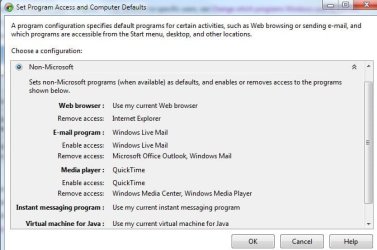
I just wonder if it has some bearing on "Set Program Access and Computer Defaults", Windows Mail is enabled in the "Custom" Screen, Microsoft Windows Screen, but in the Non-Microsoft Screen, as in Attachment.
Admire your Patients with me!
Thank you.... Jutta
 

Attachments

  • Set Progr. Acc. and Comp. Defautsl Non-Miicrosoft jpg.jpg
    Set Progr. Acc. and Comp. Defautsl Non-Miicrosoft jpg.jpg
    41.9 KB · Views: 5
Last edited:

My Computer

OS
Win 7 64 bit Ultimate
Mouse
Logitech
Hi Wallonn7, have a bit more Info on my WM Problem,
I reinstated WM again, excactly as per Tut and discovered, it will open fine from the .exe Shortcut, but the Open With Function is not available still
1. WM does not show up in Add/Remove Programs,
2. I also have the .eml Folder missing by checking the Registy as per Instructions here, (how do I get a new one?)
2. Manually edit the following registry key if it is installed.

  • Start Menu ==> All Programs ==> Accessories ==> Run ==> Type: Regedit ==> OK
  • Go to: HKEY_CURRENT_USER ==> Software ==> Classes ==> eml_auto_file ==> shell ==> open ==> command
  • Double click: Default (in right pane) ==> Value Data ==> Completely replace by copying and pasting the following exactly as shown:
  • "C:\Program Files\Windows Mail\winmail.exe" /eml:%1
I am hoping this can be rectified somehow!
Thanks so much for your Patients
Jutta
 

Attachments

  • Missing .eml Folder.jpg
    Missing .eml Folder.jpg
    14.2 KB · Views: 4

My Computer

OS
Win 7 64 bit Ultimate
Mouse
Logitech
First of all, sorry for the delay in giving you feedback. I had to resolve some things here.
Well, as I said in another post, WM comes in the package of Windows Live Essentials, therefore, to uninstall it, you should use the WLE uninstaller - the same holds for its other programs.
From what I understand from your posts, it seems that your problem is almost 100% solved, since the trouble still persists with the "open with". Am I wrong?! If so, tell me.
 

My Computer

Computer Manufacturer/Model Number
WALLONN7 / LIN BLACK SERIES II
OS
Windows 7 Ultimate x64 SP1
CPU
AMD PHENOM II X6 1090T 3.2GHz
Motherboard
GIGABYTE GA-890FXA-UD7
Memory
8GB G.SKILL RIPJAWS - F3-10666CL7D
Graphics Card(s)
SAPPHIRE ATI RADEON HD 5870 VAPOR X OC
Sound Card
REALTEK DOLBY HOME THEATER
Monitor(s) Displays
LED LG W2486L
Screen Resolution
1080p
Hard Drives
SEAGATE 1TB -ST31000528AS - AHCI MODE - AS SATA
PSU
ZALMAN ZM1000-HP 1000W
Case
THERMALTAKE XASER VI VG4000SWA
Cooling
140MM x3 / 120MM x1 AIR COOLING - THERMALTAKE
Keyboard
MICROSOFT DIGITAL MEDIA KEYBOARD 3000 - USB
Mouse
MICROSOFT BASIC OPTICAL MOUSE 2.0 - USB
Internet Speed
600KBPS
Other Info
MICROSOFT XBOX 360 CONTROLLER
Wallonn7
Will try the Uninstall from WLM, again, as I find myself in a real Mess now. Open With has disappeared from my Dropdown Menu and replaced itself with just "Open', it is fine to open WM with now, and WLM, but can not open any other Program like Psp 9, Notepad etc.
Would it be wise to uninstall SP1 again, and reinstall Win7, to get the Registry back to normal???
Start all over again?
Advise would be most valued!
Jutta
 
Last edited:

My Computer

OS
Win 7 64 bit Ultimate
Mouse
Logitech
Wallonn7
Will try the Uninstall from WLM, again, as I find myself in a real Mess now. Open With has disappeared from my Dropdown Menu and replaced itself with just "Open', it is fine to open WM with now, and WLM, but can not open any other Program like Psp 9, Notepad etc.
Would it be wise to uninstall SP1 again, and reinstall Win7, to get the Registry back to normal???
Start all over again?
Advise would be most valued!
Jutta

This is getting bizarre ... Do the following. Click the Windows Orb and type "cmd" without quotes and run it as administrator. Type "chkdsk / f" again without quotes and press enter. If you are prompted to restart, do so. After this part, redo the process until you run the cmd as admins. Type "sfc / scannow" without quotes and press enter. Post the results
.
 

My Computer

Computer Manufacturer/Model Number
WALLONN7 / LIN BLACK SERIES II
OS
Windows 7 Ultimate x64 SP1
CPU
AMD PHENOM II X6 1090T 3.2GHz
Motherboard
GIGABYTE GA-890FXA-UD7
Memory
8GB G.SKILL RIPJAWS - F3-10666CL7D
Graphics Card(s)
SAPPHIRE ATI RADEON HD 5870 VAPOR X OC
Sound Card
REALTEK DOLBY HOME THEATER
Monitor(s) Displays
LED LG W2486L
Screen Resolution
1080p
Hard Drives
SEAGATE 1TB -ST31000528AS - AHCI MODE - AS SATA
PSU
ZALMAN ZM1000-HP 1000W
Case
THERMALTAKE XASER VI VG4000SWA
Cooling
140MM x3 / 120MM x1 AIR COOLING - THERMALTAKE
Keyboard
MICROSOFT DIGITAL MEDIA KEYBOARD 3000 - USB
Mouse
MICROSOFT BASIC OPTICAL MOUSE 2.0 - USB
Internet Speed
600KBPS
Other Info
MICROSOFT XBOX 360 CONTROLLER
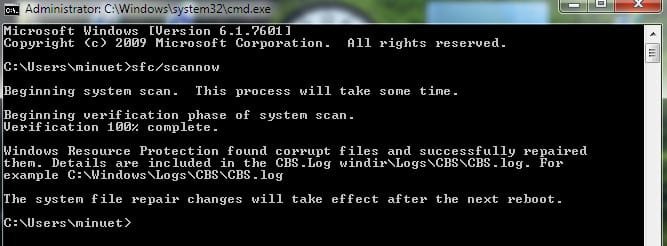
Results from cmd attached Wallon7,
have rebooted as directed, unable to open or use WM after Reboot.
Hoping for a Miracle Solution by the Morning,
Good Night, and thank you
Jutta
 

Attachments

  • 2011-04-01_230453.jpg
    2011-04-01_230453.jpg
    28.8 KB · Views: 4

My Computer

OS
Win 7 64 bit Ultimate
Mouse
Logitech
Results from cmd attached Wallon7,
have rebooted as directed, unable to open or use WM after Reboot.
Hoping for a Miracle Solution by the Morning,
Good Night, and thank you
Jutta

Go to add and remove programs and click on the WLE uninstaller and then repair (...). Then run sfc / scannow to make sure that the corrupted files were actually fixed. Try to use WM. Good night and good luck. ;)

ps. If you are using the web installer, download and use this one: http://g.live.com/1rewlive4-all/en/wlsetup-all.exe
 
Last edited:

My Computer

Computer Manufacturer/Model Number
WALLONN7 / LIN BLACK SERIES II
OS
Windows 7 Ultimate x64 SP1
CPU
AMD PHENOM II X6 1090T 3.2GHz
Motherboard
GIGABYTE GA-890FXA-UD7
Memory
8GB G.SKILL RIPJAWS - F3-10666CL7D
Graphics Card(s)
SAPPHIRE ATI RADEON HD 5870 VAPOR X OC
Sound Card
REALTEK DOLBY HOME THEATER
Monitor(s) Displays
LED LG W2486L
Screen Resolution
1080p
Hard Drives
SEAGATE 1TB -ST31000528AS - AHCI MODE - AS SATA
PSU
ZALMAN ZM1000-HP 1000W
Case
THERMALTAKE XASER VI VG4000SWA
Cooling
140MM x3 / 120MM x1 AIR COOLING - THERMALTAKE
Keyboard
MICROSOFT DIGITAL MEDIA KEYBOARD 3000 - USB
Mouse
MICROSOFT BASIC OPTICAL MOUSE 2.0 - USB
Internet Speed
600KBPS
Other Info
MICROSOFT XBOX 360 CONTROLLER
Wallon7
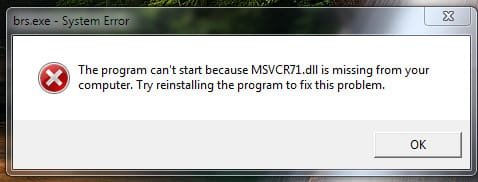
Attached are the latest Results for cmd, the other pops up after rebooting.
will run your .exe File, Question: do I have to install all, as it is so bloated and I only need WLM.
Jutta
 

Attachments

  • 2011-04-02_094220.jpg
    2011-04-02_094220.jpg
    26.8 KB · Views: 3
  • 2011-04-02_090406.jpg
    2011-04-02_090406.jpg
    12.6 KB · Views: 1

My Computer

OS
Win 7 64 bit Ultimate
Mouse
Logitech
Back
Top