Win 7 SP1 Install

Hello Wallonn7,
I tried to uninstall SP1 from Add/Remove Progr., and from cmd, unfortunately get the Message Error occured, some Files can not be uninstalled.
According to the Computer Properties Window it is still installed, as in Add/Remove,
In you link above they suggest for me to insert the Windows7 CD and choose upgrade? , as not to lose my Programs etc. (that would be a Disaster), and I do hope I do not have to Reformat in the End.
Btw. since trying to Uninstall SP1 WM is working again, at least to read and send Emails.
Still only showin "Open", instead of "Open With" in the dropdown Menu, and my Images in Psp. do not show any file extensions, wether they are .jpg or gifs.
Thanks for Help ...........Jutta
 

My Computer

OS
Win 7 64 bit Ultimate
Mouse
Logitech
Wallon7
Attached are the latest Results for cmd, the other pops up after rebooting.
will run your .exe File, Question: do I have to install all, as it is so bloated and I only need WLM.
Jutta

No, you do not need to install all. Install only those you need.

Hello Wallonn7,
I tried to uninstall SP1 from Add/Remove Progr., and from cmd, unfortunately get the Message Error occured, some Files can not be uninstalled.
According to the Computer Properties Window it is still installed, as in Add/Remove,
In you link above they suggest for me to insert the Windows7 CD and choose upgrade? , as not to lose my Programs etc. (that would be a Disaster), and I do hope I do not have to Reformat in the End.
Btw. since trying to Uninstall SP1 WM is working again, at least to read and send Emails.
Still only showin "Open", instead of "Open With" in the dropdown Menu, and my Images in Psp. do not show any file extensions, wether they are .jpg or gifs.
Thanks for Help ...........Jutta

Insert the DVD and choose the Windows upgrade is not, nor is something that I suggest to anyone. It is a lengthy process, since by definition has to maintain settings and user files already installed previously. Another problem besides the delay, are those previously documented problems after upgrade. Finally, although only as a last resort, "formatting" is the only hint that all will hear me. Your case has not reached that far yet. I know things for you are away from work satisfactorily and I am very sorry for that. I'll continue with the search for a permanent solution to your case. For now, I ask that you be patient and use the WM ... please wait ... you use Windows Mail or Windows Live Mail?...
 

My Computer

Computer Manufacturer/Model Number
WALLONN7 / LIN BLACK SERIES II
OS
Windows 7 Ultimate x64 SP1
CPU
AMD PHENOM II X6 1090T 3.2GHz
Motherboard
GIGABYTE GA-890FXA-UD7
Memory
8GB G.SKILL RIPJAWS - F3-10666CL7D
Graphics Card(s)
SAPPHIRE ATI RADEON HD 5870 VAPOR X OC
Sound Card
REALTEK DOLBY HOME THEATER
Monitor(s) Displays
LED LG W2486L
Screen Resolution
1080p
Hard Drives
SEAGATE 1TB -ST31000528AS - AHCI MODE - AS SATA
PSU
ZALMAN ZM1000-HP 1000W
Case
THERMALTAKE XASER VI VG4000SWA
Cooling
140MM x3 / 120MM x1 AIR COOLING - THERMALTAKE
Keyboard
MICROSOFT DIGITAL MEDIA KEYBOARD 3000 - USB
Mouse
MICROSOFT BASIC OPTICAL MOUSE 2.0 - USB
Internet Speed
600KBPS
Other Info
MICROSOFT XBOX 360 CONTROLLER
Thank you very much Wallonn7 for your Patients with me, very much appreciated.
I will definitely wait for your next Instructions, and give the inserting Disk -Upgrade a miss.
I am a keen Psp'er and create fancy Stationery. I have to use WLM to view, and send Stationery created with .dxt meta files , which WM does not cater for , but use WM for all other Stationery or sending, and receiving Mail. Other then that WLM is pretty useless and not very popular.
Thank again.............Jutta
 
Last edited:

My Computer

OS
Win 7 64 bit Ultimate
Mouse
Logitech
Hi Wallonn,
further to my "OpenWith" Problem, a Scan for Issues with CCleaner, showed the following (as in Screenshot),
I wonder if this is any Help to find a Fix, as there are maybe some Default Values missing, which I tried to replace with the "Reinstate OpenWith.reg", and "OpenWith.reg", alas nothing has changed, still no OpenWith Contexmenu shows.
Happy Easter..............Jutta
 

Attachments

  • 2011-04-24_103518.jpg
    2011-04-24_103518.jpg
    8.3 KB · Views: 6

My Computer

OS
Win 7 64 bit Ultimate
Mouse
Logitech
I found this tutorial that should help you with the context menu. Then tell me if it worked. Happy Easter to you too! ;)
 

My Computer

Computer Manufacturer/Model Number
WALLONN7 / LIN BLACK SERIES II
OS
Windows 7 Ultimate x64 SP1
CPU
AMD PHENOM II X6 1090T 3.2GHz
Motherboard
GIGABYTE GA-890FXA-UD7
Memory
8GB G.SKILL RIPJAWS - F3-10666CL7D
Graphics Card(s)
SAPPHIRE ATI RADEON HD 5870 VAPOR X OC
Sound Card
REALTEK DOLBY HOME THEATER
Monitor(s) Displays
LED LG W2486L
Screen Resolution
1080p
Hard Drives
SEAGATE 1TB -ST31000528AS - AHCI MODE - AS SATA
PSU
ZALMAN ZM1000-HP 1000W
Case
THERMALTAKE XASER VI VG4000SWA
Cooling
140MM x3 / 120MM x1 AIR COOLING - THERMALTAKE
Keyboard
MICROSOFT DIGITAL MEDIA KEYBOARD 3000 - USB
Mouse
MICROSOFT BASIC OPTICAL MOUSE 2.0 - USB
Internet Speed
600KBPS
Other Info
MICROSOFT XBOX 360 CONTROLLER
Hi Wallonn, followed your Lead, but nothing has changed, still no OpenWith in my Contexmenu.
Thanks for trying to Help anyway,
Jutta
 

My Computer

OS
Win 7 64 bit Ultimate
Mouse
Logitech
Hello Wallonn,
back again with a Solution to my "OpenWith" Probl, and another Question, as the Solution pruduced another Problem .

HKEY_Classes_Root

shell-openas-command... "C:\Program Files\Windows Mail\winmail.exe" /eml:%1
by removing all of shell- openas -Command Entry, "OpenWith" was restored again on my PC.


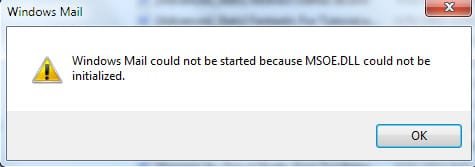
Result is I gained OpenWith, and I can still use WM to read, and send Emails, but I am unable to right click on a .eml Folder now to open in WM. as before, the Message I am getting is Attached.
Any Ideas on how I can solve this please.
Jutta


Attachments

  • 2011-05-10_081430.jpg
    2011-05-10_081430.jpg
    8.8 KB · Views: 2

My Computer

OS
Win 7 64 bit Ultimate
Mouse
Logitech
Hi Jutta. Good to see you! :)
Go to C:\Users\username\AppData\Local\Microsoft\Windows Mail\. Cut its contents and paste into a folder for safe keeping. Try now.
 

My Computer

Computer Manufacturer/Model Number
WALLONN7 / LIN BLACK SERIES II
OS
Windows 7 Ultimate x64 SP1
CPU
AMD PHENOM II X6 1090T 3.2GHz
Motherboard
GIGABYTE GA-890FXA-UD7
Memory
8GB G.SKILL RIPJAWS - F3-10666CL7D
Graphics Card(s)
SAPPHIRE ATI RADEON HD 5870 VAPOR X OC
Sound Card
REALTEK DOLBY HOME THEATER
Monitor(s) Displays
LED LG W2486L
Screen Resolution
1080p
Hard Drives
SEAGATE 1TB -ST31000528AS - AHCI MODE - AS SATA
PSU
ZALMAN ZM1000-HP 1000W
Case
THERMALTAKE XASER VI VG4000SWA
Cooling
140MM x3 / 120MM x1 AIR COOLING - THERMALTAKE
Keyboard
MICROSOFT DIGITAL MEDIA KEYBOARD 3000 - USB
Mouse
MICROSOFT BASIC OPTICAL MOUSE 2.0 - USB
Internet Speed
600KBPS
Other Info
MICROSOFT XBOX 360 CONTROLLER

My Computer

Computer Manufacturer/Model Number
WALLONN7 / LIN BLACK SERIES II
OS
Windows 7 Ultimate x64 SP1
CPU
AMD PHENOM II X6 1090T 3.2GHz
Motherboard
GIGABYTE GA-890FXA-UD7
Memory
8GB G.SKILL RIPJAWS - F3-10666CL7D
Graphics Card(s)
SAPPHIRE ATI RADEON HD 5870 VAPOR X OC
Sound Card
REALTEK DOLBY HOME THEATER
Monitor(s) Displays
LED LG W2486L
Screen Resolution
1080p
Hard Drives
SEAGATE 1TB -ST31000528AS - AHCI MODE - AS SATA
PSU
ZALMAN ZM1000-HP 1000W
Case
THERMALTAKE XASER VI VG4000SWA
Cooling
140MM x3 / 120MM x1 AIR COOLING - THERMALTAKE
Keyboard
MICROSOFT DIGITAL MEDIA KEYBOARD 3000 - USB
Mouse
MICROSOFT BASIC OPTICAL MOUSE 2.0 - USB
Internet Speed
600KBPS
Other Info
MICROSOFT XBOX 360 CONTROLLER
Hi Wallonn7,
I just don't seem to have any Luck with WM, tried below Suggestion, then Reinstated WM in my Win7 SP1 64bit from scratch, but still getting the same Message popping up .....MSOE.Dll could not be initilized.....

Go to C:\Users\username\AppData\Local\Microsoft\Windows Mail\. Cut its contents and paste into a folder for safe keeping.

Thanks for Help
Jutta
 

My Computer

OS
Win 7 64 bit Ultimate
Mouse
Logitech
Hi Wallonn7,
I just don't seem to have any Luck with WM, tried below Suggestion, then Reinstated WM in my Win7 SP1 64bit from scratch, but still getting the same Message popping up .....MSOE.Dll could not be initilized.....

Go to C:\Users\username\AppData\Local\Microsoft\Windows Mail\. Cut its contents and paste into a folder for safe keeping.

Thanks for Help
Jutta


Have you tried my post # 30 quoted above?
 

My Computer

Computer Manufacturer/Model Number
WALLONN7 / LIN BLACK SERIES II
OS
Windows 7 Ultimate x64 SP1
CPU
AMD PHENOM II X6 1090T 3.2GHz
Motherboard
GIGABYTE GA-890FXA-UD7
Memory
8GB G.SKILL RIPJAWS - F3-10666CL7D
Graphics Card(s)
SAPPHIRE ATI RADEON HD 5870 VAPOR X OC
Sound Card
REALTEK DOLBY HOME THEATER
Monitor(s) Displays
LED LG W2486L
Screen Resolution
1080p
Hard Drives
SEAGATE 1TB -ST31000528AS - AHCI MODE - AS SATA
PSU
ZALMAN ZM1000-HP 1000W
Case
THERMALTAKE XASER VI VG4000SWA
Cooling
140MM x3 / 120MM x1 AIR COOLING - THERMALTAKE
Keyboard
MICROSOFT DIGITAL MEDIA KEYBOARD 3000 - USB
Mouse
MICROSOFT BASIC OPTICAL MOUSE 2.0 - USB
Internet Speed
600KBPS
Other Info
MICROSOFT XBOX 360 CONTROLLER
Hi Wallonn7,
Have reinstalled WM again, and yet again, with no Change,
then I tried the following,
in the Registry with the Entry I deleted, which ran as
HKEY_Classes_Root.......shell "openas--command", which resulted in gaining
my Default " OpenWith" Contextmenu again, but could not open .eml Folders as WM.
Have reinstated the shell Key, and renamed the "openas" with "openwith", voila, it is
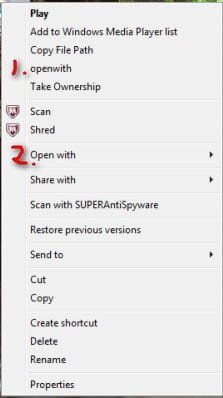
far from how it should work, but now in my "righclick" Contextmenu on Desktop I have 2
OpenWith, as in Screenshot,
No.1 "openwith" opens in WM, and No.2 "OpenWith" is the Default openwith,
which opens All but WM.
Would appreciate your Thoughts on this,
Jutta
 

Attachments

  • 2011-05-13_072602.jpg
    2011-05-13_072602.jpg
    10.6 KB · Views: 1

My Computer

OS
Win 7 64 bit Ultimate
Mouse
Logitech
Hi Wallonn7,
Have reinstalled WM again, and yet again, with no Change,
then I tried the following,
in the Registry with the Entry I deleted, which ran as
HKEY_Classes_Root.......shell "openas--command", which resulted in gaining
my Default " OpenWith" Contextmenu again, but could not open .eml Folders as WM.
Have reinstated the shell Key, and renamed the "openas" with "openwith", voila, it is
far from how it should work, but now in my "righclick" Contextmenu on Desktop I have 2
OpenWith, as in Screenshot,
No.1 "openwith" opens in WM, and No.2 "OpenWith" is the Default openwith,
which opens All but WM.
Would appreciate your Thoughts on this,
Jutta

How far from work as expected "openwith" is?
1 - makes no difference in the context menu;
2 - does less than it should be the basics;
3 - does the basics.
 

My Computer

Computer Manufacturer/Model Number
WALLONN7 / LIN BLACK SERIES II
OS
Windows 7 Ultimate x64 SP1
CPU
AMD PHENOM II X6 1090T 3.2GHz
Motherboard
GIGABYTE GA-890FXA-UD7
Memory
8GB G.SKILL RIPJAWS - F3-10666CL7D
Graphics Card(s)
SAPPHIRE ATI RADEON HD 5870 VAPOR X OC
Sound Card
REALTEK DOLBY HOME THEATER
Monitor(s) Displays
LED LG W2486L
Screen Resolution
1080p
Hard Drives
SEAGATE 1TB -ST31000528AS - AHCI MODE - AS SATA
PSU
ZALMAN ZM1000-HP 1000W
Case
THERMALTAKE XASER VI VG4000SWA
Cooling
140MM x3 / 120MM x1 AIR COOLING - THERMALTAKE
Keyboard
MICROSOFT DIGITAL MEDIA KEYBOARD 3000 - USB
Mouse
MICROSOFT BASIC OPTICAL MOUSE 2.0 - USB
Internet Speed
600KBPS
Other Info
MICROSOFT XBOX 360 CONTROLLER
Back
Top