Win 7 start menu search stopped working

charentejohn

New member
Local time
12:29 AM
Messages
23
Location
France
In fact all windows type searches have stopped working.
I have looked at the many posts here and at microsoft but no change, main problem with microsoft ones are that they ask me to select control panel options that don't exist (I am a plug and play type so need to see stuff) or they ask me to go to start and type in something like indexing options. You guessed start search isn't working so that doesn't work.

I am fairly sure I need to rebuild the index but need to know how to get there if index search isn't working.

No idea when this may have failed so don't want to go to previous versions. I have windows update set to ask me, as it keeps trying to install IE10. I did run the 'stop install of IE10' fix but nothing happened. I have also had to restore to IE9 as the IE10 update got me as I thought it was blocked, I must have not run the blocker properly. Just mentioned in case that can cause the problem, it is the only 'system' type thing I have done.
I have had Kaspersky security on the PC for 2 years so shouldn't be that ?

Any help appreciated, also windows explorer search isn't working either.
 

My Computer

Computer Manufacturer/Model Number
Medion
OS
windows 7 64 home premium
CPU
Intel i3
Hard Drives
Intel 180GB SSD

My Computer

Computer type
PC/Desktop
Computer Manufacturer/Model Number
Skylake Special #666
OS
Windows 10 Pro x64
CPU
Intel Core i7 6700K
Motherboard
Asus Sabertooth Z170 Mark 1
Memory
GSkill TridentZ RGB 16GB 3600 16-16-16-36
Graphics Card(s)
EVGA GTX 980 Ti SC x2
Sound Card
Realtek High Definition
Monitor(s) Displays
AOC G2460PG
Screen Resolution
1920 x 1080 144Hz
Hard Drives
Samsung 860 Pro 256GB, Seagate Barracuda 4TB x2
PSU
EVGA 1000 P2, EVGA White Custom Braided Cables
Case
Corsair Vengeance C70 Gunmetal Black
Cooling
Corsair H100i v2, Corsair ML120 x2, Thermal Grizzly Kryonaut
Keyboard
Logitech G910 Orion Spectrum
Mouse
Logitech G700s
Internet Speed
Verizon Fios Quantum Gateway 75/75
Antivirus
Windows Defender, Malwarebytes Free 3.8.3
Browser
Chrome
Other Info
Corsair SP120 x4, LG Blu-ray Drive, Durabrand HT-395 100 Watt Dolby Digital Amp, Corsair H2100 Wireless 7.1 Headset
Thanks, tried the verifyonly option and it says, did not find any integrity violations. I assume that's good news :)
Then again still not working, so maybe not system files ?
 

My Computer

Computer Manufacturer/Model Number
Medion
OS
windows 7 64 home premium
CPU
Intel i3
Hard Drives
Intel 180GB SSD

My Computer

Computer type
PC/Desktop
Computer Manufacturer/Model Number
home built
OS
Multi-Boot W7_Pro_x64 W8.1_Pro_x64 W10_Pro_x64 +Linux_VMs +Chromium_VM
CPU
AMD Athlon II x4 620
Motherboard
Gigabyte GA-MA785G-UD3H
Memory
6GB GSkill DDR2 800
Graphics Card(s)
AMD 4670 GPU + AMD 4200 IGP
Sound Card
on board Realtek ALC889A
Monitor(s) Displays
RCA 40" LCD TV, Insignia 32" LCD TV, HP 15" LCD monitor
Screen Resolution
1680 x 1050
Hard Drives
OCZ Vertex 3 120GB,
Samsung F3 1TB (3),
Several others - WD, Seagate, Hitachi, ...
PSU
Corsair 500 W
Case
Rosewill mid tower
Cooling
CM 90mm rifle
Keyboard
Gyration wireless, Logitech wireless, Dell USB wired
Mouse
Gyration wireless, Logitech wireless, V7 USB wired
Internet Speed
Spectrum - 100Mbps D / 10Mbps U
Antivirus
Avast, MBAM3, EMET, WinPatrol
Browser
Pale Moon, Firefox, IE
Other Info
2 multi-boot PC's
Mainly HTPC/Office/Gen purpose (no gaming).
Trendnet USB KVM.
LG DVD burner/Blue Ray Player.
Tray system for removable SATA backup drives.

Not currently OCd, under-volted.
I use Hybrid sleep, rarely re-boot or shutdown.

Hauppauge HD-PVR, Avermedia PCIe TV Tuner, Hauppauge PCI TV Tuner.
Hi, I have tried that before but did try again, same result, nothing to fix. I think it is wrong there.....
I did respond to the did it fix it question wth (for all the good it will do) comment that this seems a common problem so why no simple fix ?
I assume the search is basicaslly a program that is missing something, or a bit missing on a file. I would have assumed Microsoft would have had a general fix by now, seems not and we are left with you guys struggling to identify the cause.
 

My Computer

Computer Manufacturer/Model Number
Medion
OS
windows 7 64 home premium
CPU
Intel i3
Hard Drives
Intel 180GB SSD
If you can get to Services you could try disabling Search Index to see if you get search results with this disabled.
Index - Enable or Disable
If you get search results with it off, re-enable it and see if that works.
Re-boot after each of these changes turning it off/on.
Maybe this will force an index rebuild ???

While you don't want to use Restore, you might try that to see if the issue can be fixed with a Restore...
It might be your easiest solution...

As this sounds like a system problem, you could consider a Repair Install:
http://www.sevenforums.com/tutorials/3413-repair-install.html

I would create a System Backup Image before making any of these changes.
I use and trust Backup Imaging much more than Restore points.
A Backup Image is "copy" of the ENTIRE "OS" partition, a Restore Point is NOT.
Maybe time to learn about Backup Imaging?
http://www.sevenforums.com/tutorials/73828-imaging-free-macrium.html
http://www.sevenforums.com/tutorials/663-backup-complete-computer-create-image-backup.html
 

My Computer

Computer type
PC/Desktop
Computer Manufacturer/Model Number
home built
OS
Multi-Boot W7_Pro_x64 W8.1_Pro_x64 W10_Pro_x64 +Linux_VMs +Chromium_VM
CPU
AMD Athlon II x4 620
Motherboard
Gigabyte GA-MA785G-UD3H
Memory
6GB GSkill DDR2 800
Graphics Card(s)
AMD 4670 GPU + AMD 4200 IGP
Sound Card
on board Realtek ALC889A
Monitor(s) Displays
RCA 40" LCD TV, Insignia 32" LCD TV, HP 15" LCD monitor
Screen Resolution
1680 x 1050
Hard Drives
OCZ Vertex 3 120GB,
Samsung F3 1TB (3),
Several others - WD, Seagate, Hitachi, ...
PSU
Corsair 500 W
Case
Rosewill mid tower
Cooling
CM 90mm rifle
Keyboard
Gyration wireless, Logitech wireless, Dell USB wired
Mouse
Gyration wireless, Logitech wireless, V7 USB wired
Internet Speed
Spectrum - 100Mbps D / 10Mbps U
Antivirus
Avast, MBAM3, EMET, WinPatrol
Browser
Pale Moon, Firefox, IE
Other Info
2 multi-boot PC's
Mainly HTPC/Office/Gen purpose (no gaming).
Trendnet USB KVM.
LG DVD burner/Blue Ray Player.
Tray system for removable SATA backup drives.

Not currently OCd, under-volted.
I use Hybrid sleep, rarely re-boot or shutdown.

Hauppauge HD-PVR, Avermedia PCIe TV Tuner, Hauppauge PCI TV Tuner.
Didn't work I'm afraid, one option said (as MS often do) to type in to the start search field to open an option, only works if start search works, poor logic there I think. Like them saying (if your sat nav is broken), to find repair centre type x into your sat nav.

I may end up doing a full restore at this rate, hopefully that would fix it but a pain to have to do it. Basically it seems these things screw up and there is no solution. I noticed all other threads on this remained unresolved too.
Can't do repair install as my Win7 came with the PC. If I do a restore then I reckon it will take me about a day to set it up again, it shouldn't have to be this way.

I did read the rebuild index could fix it but I can't get to it, is there a command I can use in the 'run' option to get me there. I know the scans said there was nothing wrong but they are incorrect, because there obviously is.
No idea what to do now.
 

My Computer

Computer Manufacturer/Model Number
Medion
OS
windows 7 64 home premium
CPU
Intel i3
Hard Drives
Intel 180GB SSD
If you do end up reinstalling, you should consider a Clean Install without all the OEM Bloatware that you get with a "Factory Restore".
This tutorial has everything needed for this, including where to get and how to use a Win 7 ISO Installation file.
You do need a valid/genuine License (COA) to use this.
http://www.sevenforums.com/tutorials/219487-clean-reinstall-factory-oem-windows-7-a.html

With the Win 7 installation disc, you may be able to Repair Install without starting over...
I use Backup Images, so I never needed to do a Repair Install.
 

My Computer

Computer type
PC/Desktop
Computer Manufacturer/Model Number
home built
OS
Multi-Boot W7_Pro_x64 W8.1_Pro_x64 W10_Pro_x64 +Linux_VMs +Chromium_VM
CPU
AMD Athlon II x4 620
Motherboard
Gigabyte GA-MA785G-UD3H
Memory
6GB GSkill DDR2 800
Graphics Card(s)
AMD 4670 GPU + AMD 4200 IGP
Sound Card
on board Realtek ALC889A
Monitor(s) Displays
RCA 40" LCD TV, Insignia 32" LCD TV, HP 15" LCD monitor
Screen Resolution
1680 x 1050
Hard Drives
OCZ Vertex 3 120GB,
Samsung F3 1TB (3),
Several others - WD, Seagate, Hitachi, ...
PSU
Corsair 500 W
Case
Rosewill mid tower
Cooling
CM 90mm rifle
Keyboard
Gyration wireless, Logitech wireless, Dell USB wired
Mouse
Gyration wireless, Logitech wireless, V7 USB wired
Internet Speed
Spectrum - 100Mbps D / 10Mbps U
Antivirus
Avast, MBAM3, EMET, WinPatrol
Browser
Pale Moon, Firefox, IE
Other Info
2 multi-boot PC's
Mainly HTPC/Office/Gen purpose (no gaming).
Trendnet USB KVM.
LG DVD burner/Blue Ray Player.
Tray system for removable SATA backup drives.

Not currently OCd, under-volted.
I use Hybrid sleep, rarely re-boot or shutdown.

Hauppauge HD-PVR, Avermedia PCIe TV Tuner, Hauppauge PCI TV Tuner.
Thanks, I think a reinstall is due anyway. I do mean to obtain a windows install disc just in case so will do that anyway.
As it happens the stuff I got with the PC is what I wanted, unusually Kaspersky AV which I like and not Symantec, also no Itunes etc. So this time I will do a reinstall from the backup partition.
Shame there is no other solution to this problem, something Microsoft might want to look into as it is a main part of the software and losing the ability to search for files (all ways) is very bad. Can't believe there isn't a solution.
 

My Computer

Computer Manufacturer/Model Number
Medion
OS
windows 7 64 home premium
CPU
Intel i3
Hard Drives
Intel 180GB SSD
Wait a sec.

Open Control Panel, select "show small icons" from top right. Select indexing options and see if it says that the indexing is online or not, or if it is indexing something (from the list of folders in the "included locations").

If it is stopped (or heck, check this out anyway), go in Control panel again, select Administrative Tools, then select Services, then find an entry called "windows search" (duh!), right-click and select properties, then from the panel select automatic startup and if you see the button called Start click on it.


In case you still want to reinstall, everyone here recommends this tutorial. Has links to clean install isos and all the tools and tips you need for best performance.
 

My Computer

Computer type
PC/Desktop
Computer Manufacturer/Model Number
custom built
OS
Win 7 Pro 64-bit 7601
CPU
AMD Phenom 9650 QuadCore, revision DR-B3
Motherboard
ASUS M4A78
Memory
5 GB yes I run 2x 2GB and 1x 1GB, different brand, spank me.
Graphics Card(s)
NVIDIA GeForce 9800 GT 512 Mb, unknown manufacturer.
Sound Card
Crappy Realtek Integrated Audio
Monitor(s) Displays
Fujitsu Siemens P19-3P
Screen Resolution
1280 x 1024 x 32 bits @ 60 Hz Oh yeah, 4:3 rocks!
Hard Drives
(1) MAXTOR S TM3320613AS SATA Disk Device (2) STM35004 18AS SATA Disk Device (3) TOSHIBA USB 2.5"-HDD
PSU
whatever, around 450w
Case
Scavenged from old company PC, 10+ years old
Cooling
CPU fan, GPU fan, case fan, nothing fancy
Keyboard
Microsoft, PS/2, white.
Mouse
Optical, logitec.
Internet Speed
effective max speeds: 70-ish kB/s down 30-ish kB/s up
Antivirus
Avira, free edition.
Browser
Firefox with FXChrome to make it look like Google Chrome :P
Other Info
Was discarded by previous owner due to "horrible performance".
Was running Win Xp from a IDE drive. Yeah. Was a pain.
SATA II drive and Win7 and it zips away! Yay!
At last, I can see the Indexing options, thanks. Whether it works or not at least the options are available and without the multiple moves in MS help. Small Icons is better than standard as it shows all options whereas I have to expand the others to see them, and obviously not all as Indexing was missing.

So, now I can see this I select it and have on the 1st panel, Included locatopns, IEhistory, Start Menu, Users-excluding Appdata
If I then select Modify I get, Change Locations, IE hist only selected. Summary has IEhistory, Start Menu, Users-excluding Appdata.
Selecting Advanced shows Index setting file settings blank, not ticked. I also have (hooray) the Rebuild option I was looking for.

So, if nothing else I can at least rebuild the index. But before I try that do the above selections seem correct.
I have the C drive and a secondary drive, neither of which are selected, should they be to allow it to find stuff ?
 

My Computer

Computer Manufacturer/Model Number
Medion
OS
windows 7 64 home premium
CPU
Intel i3
Hard Drives
Intel 180GB SSD
Can you post a screenshot?

These forums allow you to attach images to the post.

New Bitmap Image.jpg
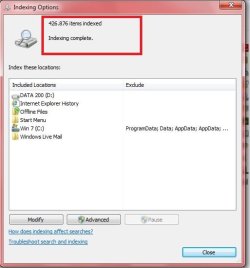
This is an image of my indexing options. Note the text in the red box (I made the red box to highlight it).
It can also say that it is still indexing, or that indexing is stopped. What is it saying in yours?

Below I have selected two drives as I want it to be able to search in both, otherwise it works only for the folders that are not C and D in the pic (those are the standard folders, apart from the Windows Live Mail one if you don't have it).

Also, do that thing about services I talked of above, it doesn't hurt and will save time.
 

My Computer

Computer type
PC/Desktop
Computer Manufacturer/Model Number
custom built
OS
Win 7 Pro 64-bit 7601
CPU
AMD Phenom 9650 QuadCore, revision DR-B3
Motherboard
ASUS M4A78
Memory
5 GB yes I run 2x 2GB and 1x 1GB, different brand, spank me.
Graphics Card(s)
NVIDIA GeForce 9800 GT 512 Mb, unknown manufacturer.
Sound Card
Crappy Realtek Integrated Audio
Monitor(s) Displays
Fujitsu Siemens P19-3P
Screen Resolution
1280 x 1024 x 32 bits @ 60 Hz Oh yeah, 4:3 rocks!
Hard Drives
(1) MAXTOR S TM3320613AS SATA Disk Device (2) STM35004 18AS SATA Disk Device (3) TOSHIBA USB 2.5"-HDD
PSU
whatever, around 450w
Case
Scavenged from old company PC, 10+ years old
Cooling
CPU fan, GPU fan, case fan, nothing fancy
Keyboard
Microsoft, PS/2, white.
Mouse
Optical, logitec.
Internet Speed
effective max speeds: 70-ish kB/s down 30-ish kB/s up
Antivirus
Avira, free edition.
Browser
Firefox with FXChrome to make it look like Google Chrome :P
Other Info
Was discarded by previous owner due to "horrible performance".
Was running Win Xp from a IDE drive. Yeah. Was a pain.
SATA II drive and Win7 and it zips away! Yay!
Getting somewhere, but not very far.
I checked my wife's PC (same as mine) and it only has the same IE hist start menu and Users as I have, her one works.

But at least I could re-index the files, worked ok but still can't access anything.
What I did though was click the 'see more search results' optio on the start search and it said - Searchquery=xxx Cannot access path or file. You may not have the appropriate permission to access the item.

Sadly it didn't manage to say what path I didn't have access to.
Any ideas as to what this could be ? Is it an individual item or something search needs.
 

My Computer

Computer Manufacturer/Model Number
Medion
OS
windows 7 64 home premium
CPU
Intel i3
Hard Drives
Intel 180GB SSD
Back
Top