Win 7 startup issues, and dynamic disks

Shahmir k

New member
Local time
8:45 PM
Messages
7
Hello.
So my problem is this - yesterday, my laptop wouldn't turn on, got stuck at the HP logo. So after some search, I saw someone saying to reset BIOS. I did. Now it went past the logo but said 'missing operating system'. I again read around and found I needed to use a recovery cd/dvd (i used win 10 installation dvd) to set my partitions as active or something. Also on advice I did 3 cmd commands, bootrec fix MBR and something like that.

At restart, it gave no problems but went into a boot loop.

I decided to give up and install win 10 and be done with that. But, I could not, it said my drives were dynamic and it needed basic drives.
Then I read some more and found that win7 uses dynamic, while some places said that dynamic are a lost cause for any Windows installation.


So, fine people of 7forums, I ask you this - should I use a win7 recovery disk to install a fresh copy of win7? I prefer 7, but I don't know if win 7 actually can install on dynamic. OR, should I use a bootable partition software DVD to convert my disks to basic? I'm told that it wouldn't wipe my data.

Thanks in advance!
 

My Computer

Computer type
Laptop
Computer Manufacturer/Model Number
HP Probook 4540s
OS
Windows 7 Ultimate x64
Hi -- First off you do not want Dynamic Disks. The next thing you do is get the disks back to Basic. You sound like you know how to do that with the partition software, so do that and we will then get your PC back to Win 7. If you don't want Win 10, don't get it. If you don't know how to get the disks back to Basic, reply back and state what software you have. Don't do anything you are not sure of. We can help.
 

My Computer

Computer type
PC/Desktop
Computer Manufacturer/Model Number
Custom Build
OS
Windows 7 Home Premium 32-Bit - Build 7600 SP1
CPU
Intel Core i3-2120 3.30Ghz
Motherboard
Asus P8Z68-V LX Intel Z68 Socket H2 ATX
Memory
Kingston 4 GB DDR3 1333 mhz
Graphics Card(s)
AMD Radeon HD6670
Sound Card
Sound Blaster Audigy SE 24-Bit
Monitor(s) Displays
Asus VE228
Screen Resolution
1440 X 900
Hard Drives
OCZ Vertex 3 120 GB Sata 3 SSD ==
Kingston SH103/S3 120 G Hyper X 120 GB SSD ==
Western Digital 500 GB Caviar Green 7200 RPM ==
PSU
Corsair CX600M == 600 Watt
Case
NZXT Apollo - Silver with Clear Side Panel
Cooling
Three 120 mm Fans
Keyboard
Microsoft Natural 4000
Mouse
Microsoft Custom Optical 3000
Internet Speed
AT&T Fiber Optic Wireless Network
Antivirus
Microsoft Security Essentials
Browser
Chrome
Other Info
120 mm Blue LED Fan -- Three Blue LED Lazer Light Sticks

My Computer

Computer type
PC/Desktop
Computer Manufacturer/Model Number
Custom assembled by me :}
OS
Win-7-Pro64bit 7-H-Prem-64bit
CPU
i7-5930K 2nd i9-9940x both water blocked VRM's too
Motherboard
ASUS SABERTOOTH X99 2nd ASUS x299 Apex
Memory
Trident-z 3200C14 2nd Trident-z 3600C16
Graphics Card(s)
EVGA 1080ti ftw3 2nd Titan Xp both water blocked
Sound Card
Built-in Realtek
Monitor(s) Displays
1-AOC G2460PG 24"G-Sync 144Hz/ 2nd 1-ASUS VG248QE 24" 144Hz
Screen Resolution
1920 x 1080 144Hz
Hard Drives
2-Samsung M.2 Evo & Evo Plus
2-Samsung 850 EVO 500GB SSD's/ 3-2.5 W.D. Black 1tb-&3-1tb/3-3.5 WD Black 1tb hdd's
PSU
EVGA SuperNOVA 1000-P2 2nd 1200-P2
Case
2-Corsair Obsidian Series 450D Black ATX Mid Tower
Cooling
Custom water loops
Keyboard
Logitech G710+/ 2nd Logitech G910
Mouse
2-RedDragon M901 Perdition 16400 dpi Gaming mouse = wired
Internet Speed
Comcast Ping 19ms 89.31mbps download speed 6.12mbps upload
Antivirus
Malwarebytes Pro/ Superantispyware Pro
Browser
FireFox & Pale moon
Other Info
2nd ASUS X299 Apex/Intel i9-9940x with Custom water loop/7H-Prem-x64/Corsair 450D case/Ram Trident-z 3600C16 4x8gb / Samsung970Evo plus 500gb SSD/Dual ssd EZ swap evo/PSU EVGA SuperNova 1200w-P2 80+Platinum/GPU Titan Xp /8-ML-140 on push-pull on 2-280GTX rads
Ahoy again guys. So after making my post I inserted the win7 DVD and tried the custom install, again it said that my disks were dynamic and it wouldn't install. For the sake of nothing else to do I went into cmd once more and tried the whole bunch of bootrec commands (fixmbr, rebuildbcd and 2 more). I'd already tried that with win10 disk, but this time it worked! Booted into my intact win7.

So what do I do? Carry on with dynamic disks? Won't they cause a problem sometime?

There is another problem, when I click hibernate, screen turns off and after a few minutes, I'm at the lock screen. Should I make a new thread for this issue?

Anyway thanks a lot for the help!
 

My Computer

Computer type
Laptop
Computer Manufacturer/Model Number
HP Probook 4540s
OS
Windows 7 Ultimate x64
Keep all of you information on this thread. Do not worry about Hibernate, that can be fixed later == The first thing you must do is convert your disk to Basic. A Dynamic Disk is no good. Download MiniTool Partition Wizard Free Edition - Free download and software reviews - CNET Download.com You will use this to boot your PC. It will take a couple of minutes to boot. You will see dots on your screen, that is good. Once in Partition Wizard you will use it to convert back to Basic Disk. On the menu at the top you will see "Disk". Click on that and you will see "Convert Dynamic Disk to Basic". When you have clicked on that, let it work and then click "Apply" and it is done. Let us know how it goes.
 
Last edited:

My Computer

Computer type
PC/Desktop
Computer Manufacturer/Model Number
Custom Build
OS
Windows 7 Home Premium 32-Bit - Build 7600 SP1
CPU
Intel Core i3-2120 3.30Ghz
Motherboard
Asus P8Z68-V LX Intel Z68 Socket H2 ATX
Memory
Kingston 4 GB DDR3 1333 mhz
Graphics Card(s)
AMD Radeon HD6670
Sound Card
Sound Blaster Audigy SE 24-Bit
Monitor(s) Displays
Asus VE228
Screen Resolution
1440 X 900
Hard Drives
OCZ Vertex 3 120 GB Sata 3 SSD ==
Kingston SH103/S3 120 G Hyper X 120 GB SSD ==
Western Digital 500 GB Caviar Green 7200 RPM ==
PSU
Corsair CX600M == 600 Watt
Case
NZXT Apollo - Silver with Clear Side Panel
Cooling
Three 120 mm Fans
Keyboard
Microsoft Natural 4000
Mouse
Microsoft Custom Optical 3000
Internet Speed
AT&T Fiber Optic Wireless Network
Antivirus
Microsoft Security Essentials
Browser
Chrome
Other Info
120 mm Blue LED Fan -- Three Blue LED Lazer Light Sticks
Minitool is a program right? So you mean I have to click the 'create bootable dvd' in the corner, to get a bootable dvd?

Also, when I ran the program on Windows it didn't allow conversion to basic, gave an error. Anyhow I'll try the button and try from boot.
 

My Computer

Computer type
Laptop
Computer Manufacturer/Model Number
HP Probook 4540s
OS
Windows 7 Ultimate x64
Minitool is a program right? So you mean I have to click the 'create bootable dvd' in the corner, to get a bootable dvd?

Also, when I ran the program on Windows it didn't allow conversion to basic, gave an error. Anyhow I'll try the button and try from boot.

Click on the blue link in my post and it will take you to the site. Make the bootable DVD and boot your PC with it in the DVD drive. Then go in and follow my instructions in the previous post. You must boot with Partition Wizard in the DVD Drive.
 

My Computer

Computer type
PC/Desktop
Computer Manufacturer/Model Number
Custom Build
OS
Windows 7 Home Premium 32-Bit - Build 7600 SP1
CPU
Intel Core i3-2120 3.30Ghz
Motherboard
Asus P8Z68-V LX Intel Z68 Socket H2 ATX
Memory
Kingston 4 GB DDR3 1333 mhz
Graphics Card(s)
AMD Radeon HD6670
Sound Card
Sound Blaster Audigy SE 24-Bit
Monitor(s) Displays
Asus VE228
Screen Resolution
1440 X 900
Hard Drives
OCZ Vertex 3 120 GB Sata 3 SSD ==
Kingston SH103/S3 120 G Hyper X 120 GB SSD ==
Western Digital 500 GB Caviar Green 7200 RPM ==
PSU
Corsair CX600M == 600 Watt
Case
NZXT Apollo - Silver with Clear Side Panel
Cooling
Three 120 mm Fans
Keyboard
Microsoft Natural 4000
Mouse
Microsoft Custom Optical 3000
Internet Speed
AT&T Fiber Optic Wireless Network
Antivirus
Microsoft Security Essentials
Browser
Chrome
Other Info
120 mm Blue LED Fan -- Three Blue LED Lazer Light Sticks

My Computer

Computer type
Laptop
Computer Manufacturer/Model Number
HP Probook 4540s
OS
Windows 7 Ultimate x64
So I ended up using the .iso provided here. Gave this error.

IMG_20160809_095807.png

__________________________________________________________________________________________

Another thought - could this be the problem? I read somewhere that basic disks don't support this kind of configuration (sorry for the load of questions, I didn't want to be completely useless :P)

50e21b4e343d4c19908ee487d0fe674e.png
 

My Computer

Computer type
Laptop
Computer Manufacturer/Model Number
HP Probook 4540s
OS
Windows 7 Ultimate x64
The only problem that you need to worry about now is changing back to Basic Disk, nothing else. Click on the link in Post 3 and read the tutorial? That is must.
 

My Computer

Computer type
PC/Desktop
Computer Manufacturer/Model Number
Custom Build
OS
Windows 7 Home Premium 32-Bit - Build 7600 SP1
CPU
Intel Core i3-2120 3.30Ghz
Motherboard
Asus P8Z68-V LX Intel Z68 Socket H2 ATX
Memory
Kingston 4 GB DDR3 1333 mhz
Graphics Card(s)
AMD Radeon HD6670
Sound Card
Sound Blaster Audigy SE 24-Bit
Monitor(s) Displays
Asus VE228
Screen Resolution
1440 X 900
Hard Drives
OCZ Vertex 3 120 GB Sata 3 SSD ==
Kingston SH103/S3 120 G Hyper X 120 GB SSD ==
Western Digital 500 GB Caviar Green 7200 RPM ==
PSU
Corsair CX600M == 600 Watt
Case
NZXT Apollo - Silver with Clear Side Panel
Cooling
Three 120 mm Fans
Keyboard
Microsoft Natural 4000
Mouse
Microsoft Custom Optical 3000
Internet Speed
AT&T Fiber Optic Wireless Network
Antivirus
Microsoft Security Essentials
Browser
Chrome
Other Info
120 mm Blue LED Fan -- Three Blue LED Lazer Light Sticks
The only problem that you need to worry about now is changing back to Basic Disk, nothing else. Click on the link in Post 3 and read the tutorial? That is must.

I did read the tutorial - of the 4 options listed, only the first can do it w/o wiping data. I did both methods listed in option 1 (boot and program) and both gave same error (Cannot convert any dynamic volume type except simple or mirrored volume).

What can I do now?

Thanks for the help.
 

My Computer

Computer type
Laptop
Computer Manufacturer/Model Number
HP Probook 4540s
OS
Windows 7 Ultimate x64

My Computer

Computer type
PC/Desktop
Computer Manufacturer/Model Number
Custom Build
OS
Windows 7 Home Premium 32-Bit - Build 7600 SP1
CPU
Intel Core i3-2120 3.30Ghz
Motherboard
Asus P8Z68-V LX Intel Z68 Socket H2 ATX
Memory
Kingston 4 GB DDR3 1333 mhz
Graphics Card(s)
AMD Radeon HD6670
Sound Card
Sound Blaster Audigy SE 24-Bit
Monitor(s) Displays
Asus VE228
Screen Resolution
1440 X 900
Hard Drives
OCZ Vertex 3 120 GB Sata 3 SSD ==
Kingston SH103/S3 120 G Hyper X 120 GB SSD ==
Western Digital 500 GB Caviar Green 7200 RPM ==
PSU
Corsair CX600M == 600 Watt
Case
NZXT Apollo - Silver with Clear Side Panel
Cooling
Three 120 mm Fans
Keyboard
Microsoft Natural 4000
Mouse
Microsoft Custom Optical 3000
Internet Speed
AT&T Fiber Optic Wireless Network
Antivirus
Microsoft Security Essentials
Browser
Chrome
Other Info
120 mm Blue LED Fan -- Three Blue LED Lazer Light Sticks
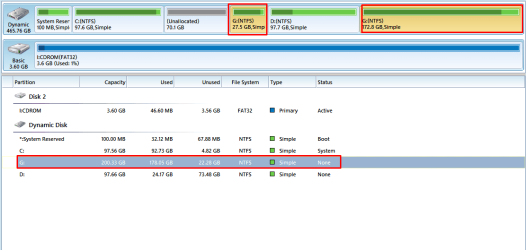
Downloaded EaseUS, there's no option to convert where there should be. I *tried* the paid version of Partition Wizard as well, same result as free version. Could you maybe instruct me how to get the 2 G:/ drives and the 2 unallocated spaces merged? I think that's why none of these programs are able to convert.

Screenshot_1.png
 

My Computer

Computer type
Laptop
Computer Manufacturer/Model Number
HP Probook 4540s
OS
Windows 7 Ultimate x64
You are doing something wrong with Partition Wizard professional (pay copy). It will do it.. Read the instructions again. It will correct your problem and not lose data. Did you make a boot disk? You can not install the program on the same disk you are trying to change. Make a bootable disk and do the work from that.
 

My Computer

Computer type
PC/Desktop
Computer Manufacturer/Model Number
Custom Build
OS
Windows 7 Home Premium 32-Bit - Build 7600 SP1
CPU
Intel Core i3-2120 3.30Ghz
Motherboard
Asus P8Z68-V LX Intel Z68 Socket H2 ATX
Memory
Kingston 4 GB DDR3 1333 mhz
Graphics Card(s)
AMD Radeon HD6670
Sound Card
Sound Blaster Audigy SE 24-Bit
Monitor(s) Displays
Asus VE228
Screen Resolution
1440 X 900
Hard Drives
OCZ Vertex 3 120 GB Sata 3 SSD ==
Kingston SH103/S3 120 G Hyper X 120 GB SSD ==
Western Digital 500 GB Caviar Green 7200 RPM ==
PSU
Corsair CX600M == 600 Watt
Case
NZXT Apollo - Silver with Clear Side Panel
Cooling
Three 120 mm Fans
Keyboard
Microsoft Natural 4000
Mouse
Microsoft Custom Optical 3000
Internet Speed
AT&T Fiber Optic Wireless Network
Antivirus
Microsoft Security Essentials
Browser
Chrome
Other Info
120 mm Blue LED Fan -- Three Blue LED Lazer Light Sticks
Back
Top