
Hi,
I've been trying all sorts of things for the past 2 days but I just can't figure it out on my own.
My PC crashed to a blue screen and on startup gave the "Bootmgr is missing Press Ctrl+Alt+Del to restart" error.
I used my USB with a recovery tool for windows 7 and booted up via the USB.
At the Windows Recovery screen I press [Next] after selecting my language etc and then press 'Repair computer'
This activates an automatic pop-up which finds an issue with my windows which when pressing next gives me "failed to save startup options" and there is no Operating System listed.
I then followed Option Two of [THIS Startup Repair - Run 3 Separate Times] tutorial.
Only when doing so, when I run the Startup Repair I get a message saying (And I'm paraphrasing);
Cannot repair windows automatically
Problem event name: Startup repair offline.
01: 0.0.0.0
02: 0.0.0.0
03: unknown
04: 0
05: unknown
06: 1
07: unknown
Even when doing this 4 times, which I doubt helped, I get the same message.
I've tried many other options (bootrec.exe etc) but they all result in the recovery tool not finding an Operating system, which is (as far as I can see) clearly installed on the C: drive.
I have 3 drives, (c: and d and the third drive isn't connected anymore since I thought this might be the cause of the problem.
When first checking my Hard Disk drives I found that there was now a drive called System Reserved (C with only 100MB, and my Original (C drive was now (D, and the (D was now (E
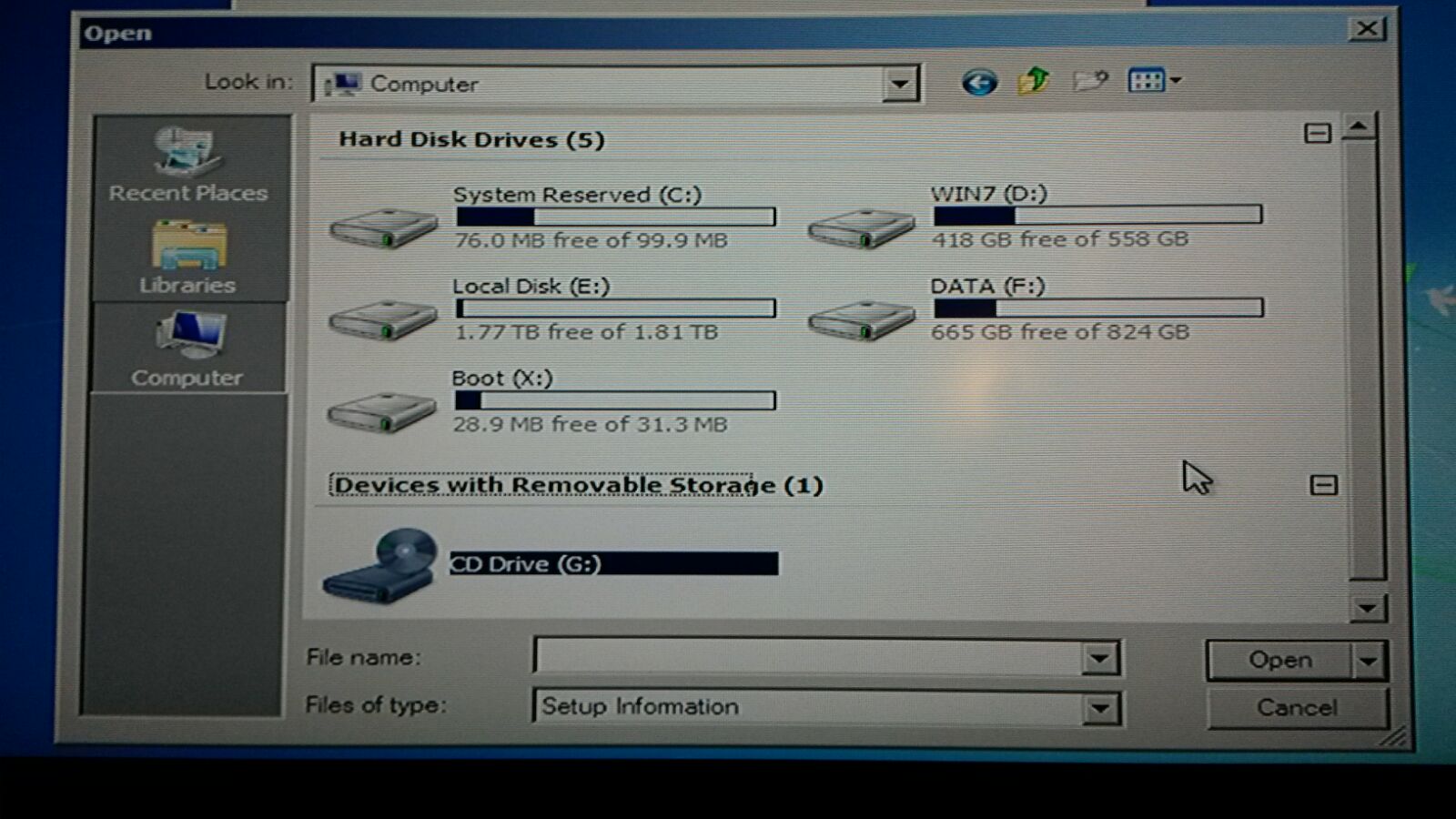
Only when I disconnected the now DATA (F drive (Which has all my pictures, movies, video's but no programms installed) I noticed everything going back to normal (No System Reserved, and the orignal C: was C: again)
I would love to just fix this problem instead of formatting everything and doing a clean install.
Thanks in advance, I wouldn't mind giving any information needed to fix this problem, just ask.
Kind Regards,
Alex
Oh I almost Forgot to mention/ask I get the "S.M.A.R.T. Status Bad" which I assume means my Hard Drive is about to die. Since I have 3 drives, I have no clue which one is actually dying (I assume it's the one with windows installed but still) Can I make one of the 2 other drives the "main drive" and install Windows on one of those to still have a working pc?
I've been trying all sorts of things for the past 2 days but I just can't figure it out on my own.
My PC crashed to a blue screen and on startup gave the "Bootmgr is missing Press Ctrl+Alt+Del to restart" error.
I used my USB with a recovery tool for windows 7 and booted up via the USB.
At the Windows Recovery screen I press [Next] after selecting my language etc and then press 'Repair computer'
This activates an automatic pop-up which finds an issue with my windows which when pressing next gives me "failed to save startup options" and there is no Operating System listed.
I then followed Option Two of [THIS Startup Repair - Run 3 Separate Times] tutorial.
Only when doing so, when I run the Startup Repair I get a message saying (And I'm paraphrasing);
Cannot repair windows automatically
Problem event name: Startup repair offline.
01: 0.0.0.0
02: 0.0.0.0
03: unknown
04: 0
05: unknown
06: 1
07: unknown
Even when doing this 4 times, which I doubt helped, I get the same message.
I've tried many other options (bootrec.exe etc) but they all result in the recovery tool not finding an Operating system, which is (as far as I can see) clearly installed on the C: drive.
I have 3 drives, (c: and d
and the third drive isn't connected anymore since I thought this might be the cause of the problem. When first checking my Hard Disk drives I found that there was now a drive called System Reserved (C
with only 100MB, and my Original (C drive was now (D, and the (D was now (E
Only when I disconnected the now DATA (F
drive (Which has all my pictures, movies, video's but no programms installed) I noticed everything going back to normal (No System Reserved, and the orignal C: was C: again)I would love to just fix this problem instead of formatting everything and doing a clean install.
Thanks in advance, I wouldn't mind giving any information needed to fix this problem, just ask.
Kind Regards,
Alex
Oh I almost Forgot to mention/ask I get the "S.M.A.R.T. Status Bad" which I assume means my Hard Drive is about to die. Since I have 3 drives, I have no clue which one is actually dying (I assume it's the one with windows installed but still) Can I make one of the 2 other drives the "main drive" and install Windows on one of those to still have a working pc?
Last edited:
My Computer
- OS
- Windows 7 64 bit


