Win 7 upgrade iso will not boot

Proximon

New member
Member
Local time
10:32 PM
Messages
32
Hi all, I have read everything I could find on this but I just can't figure it out. I'm the go-to guy for a small non-profit. I recently built some new office comps and got some win 7 upgrade licenses through techsoup.
MS was not offering the deep discounts on full versions, so I had to order upgrades.
The OSes we have to work with are XP Pro, 32-bit. In order to upgrade 32-bit XP to Win 64-bit, you are supposed to boot with the upgrade disk and do a custom install... so I HAVE to boot from a DVD.
-I have downloaded the Win 7 Professional 64-bit upgrade W/SP1 several times, to different machines with different connections. In each case the download seemed successful.
-I have burned the iso using Win 7. I have used both DVD-R and DVD+R. These were readable but would not boot.
-I tried ImgBurn with DVD-R and got the same results. No Boot.
-I tried Cheetah DVD Burner, same result. -I tried the resulting DVDs in OTHER machines with different types of DVD drives.
The DVDs are simply NOT recognized as boot disks. Anyone have an idea about this? I'm thinking this download is simply not bootable.
 
Last edited:

My Computer

Computer Manufacturer/Model Number
Homebuilt
OS
Windows 7 Premium 64-bit
CPU
i5 2600K
Motherboard
Asus P8P67 Pro
Memory
2x4GB DDR3 1600 G.skill CL9 1.5V
Graphics Card(s)
Radeon 5870
Sound Card
X-fi
Monitor(s) Displays
24" LG
Hard Drives
Intel 320 180GB SSD
WD 640GB Caviar Black
PSU
Seasonic X650
Case
Case Labs M8
Cooling
Water - Mostly Swiftech.
Hi, welcome to the forums :)

This may sound like a "suck eggs" question but are the machines set to boot from CD/DVD in the BIOS?

Also, it could be that the ISO's you've downloaded are indeed non-booting. You can download UltraISO - Trial which can tell you if the media in the drive is infact bootable.
   Note
With the trial you cannot create and re-burn a bootable ISO :(


OS
 

My Computer

Computer Manufacturer/Model Number
Compaq Desktop
OS
Windows 7 Ultimate x64
CPU
AMD Sempron Dual Core
Memory
3GB
Graphics Card(s)
NVIDIA GeForce 6150SE nForce 430
Screen Resolution
1024x768
Hard Drives
150GB Sata
Also, can you not just run the setup from within XP and choose the Custom Install?
   Note
Windows XP cannot be directly upgraded to Windows 7
 

My Computer

Computer Manufacturer/Model Number
Compaq Desktop
OS
Windows 7 Ultimate x64
CPU
AMD Sempron Dual Core
Memory
3GB
Graphics Card(s)
NVIDIA GeForce 6150SE nForce 430
Screen Resolution
1024x768
Hard Drives
150GB Sata
Thanks for the quick response. It helps just to have someone that understands the problem. Yes, I have in each case made the BIOS changes that were needed. I have also booted with other DVDs just to prove to myself that I could. I'll grab that trial version right now.
 

My Computer

Computer Manufacturer/Model Number
Homebuilt
OS
Windows 7 Premium 64-bit
CPU
i5 2600K
Motherboard
Asus P8P67 Pro
Memory
2x4GB DDR3 1600 G.skill CL9 1.5V
Graphics Card(s)
Radeon 5870
Sound Card
X-fi
Monitor(s) Displays
24" LG
Hard Drives
Intel 320 180GB SSD
WD 640GB Caviar Black
PSU
Seasonic X650
Case
Case Labs M8
Cooling
Water - Mostly Swiftech.
Oh, and because I am upgrading from 32-bit to 64-bit I just get an error about the incorrect version if I click on setup from within XP.
 

My Computer

Computer Manufacturer/Model Number
Homebuilt
OS
Windows 7 Premium 64-bit
CPU
i5 2600K
Motherboard
Asus P8P67 Pro
Memory
2x4GB DDR3 1600 G.skill CL9 1.5V
Graphics Card(s)
Radeon 5870
Sound Card
X-fi
Monitor(s) Displays
24" LG
Hard Drives
Intel 320 180GB SSD
WD 640GB Caviar Black
PSU
Seasonic X650
Case
Case Labs M8
Cooling
Water - Mostly Swiftech.
Oh, and because I am upgrading from 32-bit to 64-bit I just get an error about the incorrect version if I click on setup from within XP.

ok ;)
 

My Computer

Computer Manufacturer/Model Number
Compaq Desktop
OS
Windows 7 Ultimate x64
CPU
AMD Sempron Dual Core
Memory
3GB
Graphics Card(s)
NVIDIA GeForce 6150SE nForce 430
Screen Resolution
1024x768
Hard Drives
150GB Sata
ultraISO didn't see a bootable disk or ISO either. I'm hoping this is just a problem with the newer SP1 version. Downloading the original non-SP version now to see if that will boot.
 

My Computer

Computer Manufacturer/Model Number
Homebuilt
OS
Windows 7 Premium 64-bit
CPU
i5 2600K
Motherboard
Asus P8P67 Pro
Memory
2x4GB DDR3 1600 G.skill CL9 1.5V
Graphics Card(s)
Radeon 5870
Sound Card
X-fi
Monitor(s) Displays
24" LG
Hard Drives
Intel 320 180GB SSD
WD 640GB Caviar Black
PSU
Seasonic X650
Case
Case Labs M8
Cooling
Water - Mostly Swiftech.
Not bootable either. I have an email into volume licensing support.
 

My Computer

Computer Manufacturer/Model Number
Homebuilt
OS
Windows 7 Premium 64-bit
CPU
i5 2600K
Motherboard
Asus P8P67 Pro
Memory
2x4GB DDR3 1600 G.skill CL9 1.5V
Graphics Card(s)
Radeon 5870
Sound Card
X-fi
Monitor(s) Displays
24" LG
Hard Drives
Intel 320 180GB SSD
WD 640GB Caviar Black
PSU
Seasonic X650
Case
Case Labs M8
Cooling
Water - Mostly Swiftech.
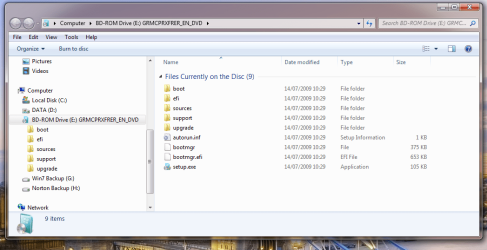
Can you open the DVD & check to see you have all files?
Should look like this:

Capturewin7dvd.PNG
 

My Computer

OS
ME/XP/Vista/Win7
I think you will have a lot better luck with the non-sp1 ISO as it seems that there has been an error when it was made :shock:
 

My Computer

Computer Manufacturer/Model Number
Compaq Desktop
OS
Windows 7 Ultimate x64
CPU
AMD Sempron Dual Core
Memory
3GB
Graphics Card(s)
NVIDIA GeForce 6150SE nForce 430
Screen Resolution
1024x768
Hard Drives
150GB Sata

My Computer

Computer Manufacturer/Model Number
Homebuilt
OS
Windows 7 Premium 64-bit
CPU
i5 2600K
Motherboard
Asus P8P67 Pro
Memory
2x4GB DDR3 1600 G.skill CL9 1.5V
Graphics Card(s)
Radeon 5870
Sound Card
X-fi
Monitor(s) Displays
24" LG
Hard Drives
Intel 320 180GB SSD
WD 640GB Caviar Black
PSU
Seasonic X650
Case
Case Labs M8
Cooling
Water - Mostly Swiftech.
I think you will have a lot better luck with the non-sp1 ISO as it seems that there has been an error when it was made :shock:

You would think so, but no. No boot from the non-SP1 ISO either.
 

My Computer

Computer Manufacturer/Model Number
Homebuilt
OS
Windows 7 Premium 64-bit
CPU
i5 2600K
Motherboard
Asus P8P67 Pro
Memory
2x4GB DDR3 1600 G.skill CL9 1.5V
Graphics Card(s)
Radeon 5870
Sound Card
X-fi
Monitor(s) Displays
24" LG
Hard Drives
Intel 320 180GB SSD
WD 640GB Caviar Black
PSU
Seasonic X650
Case
Case Labs M8
Cooling
Water - Mostly Swiftech.
I'm going to burn something else to boot from as a check... I'll post results here.
 

My Computer

Computer Manufacturer/Model Number
Homebuilt
OS
Windows 7 Premium 64-bit
CPU
i5 2600K
Motherboard
Asus P8P67 Pro
Memory
2x4GB DDR3 1600 G.skill CL9 1.5V
Graphics Card(s)
Radeon 5870
Sound Card
X-fi
Monitor(s) Displays
24" LG
Hard Drives
Intel 320 180GB SSD
WD 640GB Caviar Black
PSU
Seasonic X650
Case
Case Labs M8
Cooling
Water - Mostly Swiftech.
1) Try burning at a very slow speed.
2) Try booting from the same DVD drive ISO burnt on.
 

My Computer

OS
ME/XP/Vista/Win7
@ Proximon Are you sure the dvd players are in working order ? Maybe the player is having probs because they are on their way out ?? You can always get program to boot from USB and install from there also. It's from Microsuck, ( I mean Microsoft LOL ) itself; it is called : Win Setup From USB. Just search it on MS web site and follow directions.If it says Vista don't worry it work on 7. This is assuming you can boot from USB on these systems. Hope this helps you out, it has me in past w/ bad dvd players and system would not boot from external DVD. I have tried others but this one worked best (yes I know who its from but still.... ) Welcome in advance if work for you,
Hannibal001 :D
 

My Computer

Computer Manufacturer/Model Number
HP Compaq dc7100
OS
windows 7 Ultimate 64 Bit
CPU
Intel Pentium 4 531, 3000 MHz (15 x 200)
Motherboard
HP Compaq dc7100
Memory
3 Gigs DDR
Graphics Card(s)
EVGA e-GeForce 9500 GT
Sound Card
AD1981B(L) @ Intel 82801FB ICH6
Monitor(s) Displays
Acer AL1912 19.5"
Hard Drives
Drive #1 - WDC WD1200BEVS-22LAT0 (111 GB)
Drive #2 - HDT722525DLA380 (232 GB)
Drive #3 - WDC (Model Unknown) (320GB)
PSU
HP 340W Max
Case
HP Slim-Line
Cooling
Standard PSU dual fan,HP CPU side mount cooling,2.5 Case fan
Good morning and thank you all for your willingness to help out. I spend a good bit of time over at the Tom's Hardware forums helping folks out troubleshooting and making parts selections, and it's kind of nice to be on the other end for a change.
I'm currently burning a new disk (non-SP1) at slower speed (x4) with ImgBurn. I had only used ImgBurn on my laptop previously and this time it gave me many more options and a few prompts. I guess my Samsung BD-ROM combo drive is more capable than whatever is in the laptop. Still, I have burned half a dozen Win 7 disks from here so far and none have booted.

Last night I used the exact same equipment and same method to burn Ubuntu 10.10. This booted with no issues at all. Still, the size of the burn and the speed they have been done at could be factors... most burns were verified of course.

Well, I'm off to try this latest slower burn.
 

My Computer

Computer Manufacturer/Model Number
Homebuilt
OS
Windows 7 Premium 64-bit
CPU
i5 2600K
Motherboard
Asus P8P67 Pro
Memory
2x4GB DDR3 1600 G.skill CL9 1.5V
Graphics Card(s)
Radeon 5870
Sound Card
X-fi
Monitor(s) Displays
24" LG
Hard Drives
Intel 320 180GB SSD
WD 640GB Caviar Black
PSU
Seasonic X650
Case
Case Labs M8
Cooling
Water - Mostly Swiftech.
No Joy.

Here is the data of the latest disk from ImgBurn:
SAMSUNG DVDWBD SH-B083L SB00 (ATA)
Current Profile: DVD+R DL

Disc Information:
Status: Complete
State of Last Session: Complete
Erasable: No
Sessions: 1
Sectors: 1,523,248
Size: 3,119,611,904 bytes
Time: 338:31:73 (MM:SS:FF)
Supported Write Speeds: 4x, 6x, 8x

DVD±R DL Boundary Information:
L0 Data Zone Capacity: 761,632
Changeable: No

TOC Information:
Session 1... (LBA: 0)
-> Track 01 (Mode 1, LBA: 0 - 1523247)
-> LeadOut (LBA: 1523248)

Disc Control Blocks Information:
TSSTcorp TS-LB23A

Physical Format Information (ADIP - L0):
Disc ID: CMC MAG-D03-64
Book Type: DVD+R DL
Part Version: 1
Disc Size: 120mm
Maximum Read Rate: Not Specified
Number of Layers: 2
Track Path: Opposite Track Path (OTP)
Linear Density: 0.293 um/bit
Track Density: 0.74 um/track
First Physical Sector of Data Area: 196,608
Last Physical Sector of Data Area: 16,580,607
Last Physical Sector in Layer 0: 2,283,519

Physical Format Information (ADIP - L1):
Disc ID: CMC MAG-D03-64
Book Type: DVD+R DL
Part Version: 1
Disc Size: 120mm
Maximum Read Rate: Not Specified
Number of Layers: 2
Track Path: Opposite Track Path (OTP)
Linear Density: 0.293 um/bit
Track Density: 0.74 um/track
First Physical Sector of Data Area: 196,608
Last Physical Sector of Data Area: 16,580,607
Last Physical Sector in Layer 0: 2,283,519

Physical Format Information (Last Recorded - L0):
Disc ID: CMC MAG-D03-64
Book Type: DVD+R DL
Part Version: 1
Disc Size: 120mm
Maximum Read Rate: Not Specified
Number of Layers: 2
Track Path: Opposite Track Path (OTP)
Linear Density: 0.293 um/bit
Track Density: 0.74 um/track
First Physical Sector of Data Area: 196,608
Last Physical Sector of Data Area: 16,580,591
Last Physical Sector in Layer 0: 958,239

Physical Format Information (Last Recorded - L1):
Disc ID: CMC MAG-D03-64
Book Type: DVD+R DL
Part Version: 1
Disc Size: 120mm
Maximum Read Rate: Not Specified
Number of Layers: 2
Track Path: Opposite Track Path (OTP)
Linear Density: 0.293 um/bit
Track Density: 0.74 um/track
First Physical Sector of Data Area: 196,608
Last Physical Sector of Data Area: 16,580,591
Last Physical Sector in Layer 0: 958,239

Layer Information:
Layer 0 Sectors: 761,632 (50%)
Layer 1 Sectors: 761,616 (50%)

Performance (Write Speed):
Descriptor 1...
-> B0: 0x00, B1: 0x00, B2: 0x00, B3: 0x00
-> EL: 1523247 (0x00173E2F)
-> RS: 16,620 KB/s (12x) - WS: 5,540 KB/s (4x)
Descriptor 2...
-> B0: 0x00, B1: 0x00, B2: 0x00, B3: 0x00
-> EL: 1523247 (0x00173E2F)
-> RS: 16,620 KB/s (12x) - WS: 8,310 KB/s (6x)
Descriptor 3...
-> B0: 0x00, B1: 0x00, B2: 0x00, B3: 0x00
-> EL: 1523247 (0x00173E2F)
-> RS: 16,620 KB/s (12x) - WS: 11,080 KB/s (8x)
-----------------------------------------

@gregrocker I'm using the upgrade version so none of those checksums match. The SHA-1 taken from the downloaded ISO is : 4201AA47113697688F4DA8E8B151E32F1CF61B36

I want to thank you for this tool though! I'm just paranoid enough to keep this one around.

I think my next step is a USB drive. The MSI 880G motherboards have simple little BIOS screens but I did notice an option to "Boot from other device" so I hope that means USB.

I'm tired of making coasters :)
 

My Computer

Computer Manufacturer/Model Number
Homebuilt
OS
Windows 7 Premium 64-bit
CPU
i5 2600K
Motherboard
Asus P8P67 Pro
Memory
2x4GB DDR3 1600 G.skill CL9 1.5V
Graphics Card(s)
Radeon 5870
Sound Card
X-fi
Monitor(s) Displays
24" LG
Hard Drives
Intel 320 180GB SSD
WD 640GB Caviar Black
PSU
Seasonic X650
Case
Case Labs M8
Cooling
Water - Mostly Swiftech.
Tried the MS tool to burn a DVD. Same as before.

The USB drive successfully booted, however. So, I have a solution but not an answer.

Thanks to everyone that suggested the USB drive.

Could it be the HP media? I was trying two different types:
HP Double Layer 8X DVD+R 8.5GB
HP 16x DVD-R 4.7GB
 

My Computer

Computer Manufacturer/Model Number
Homebuilt
OS
Windows 7 Premium 64-bit
CPU
i5 2600K
Motherboard
Asus P8P67 Pro
Memory
2x4GB DDR3 1600 G.skill CL9 1.5V
Graphics Card(s)
Radeon 5870
Sound Card
X-fi
Monitor(s) Displays
24" LG
Hard Drives
Intel 320 180GB SSD
WD 640GB Caviar Black
PSU
Seasonic X650
Case
Case Labs M8
Cooling
Water - Mostly Swiftech.
Did the bootable USB stick complete the install successfully?

This would rule out the ISO.

Where did you get Win7?
 
Back
Top