Win 7 Upgrade worked fine, but a few issues...

TerryTOH

New member
Local time
3:59 AM
Messages
10
I upgraded Vista x64 Ultimate to Win 7 x64 Ultimate.

The upgrade went fine - no major issues with the upgrade process.

I am, though, having some small issues when running 7:

1. Outlook 2007 process remains open after closing Outlook.
2. Very slow closing certain programs/games.
3. Gadgets doesn't work.
4. Occasional empty folder pops up on taskbar that I can't close.
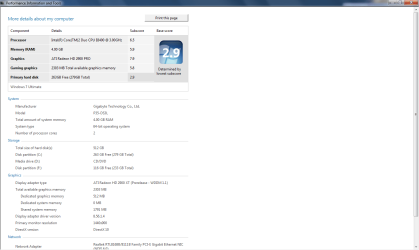
5. WEI for my SATA3 HD is 2.9 - 500GB Seagate
6. System shutdowns take forever

The system, overall, seems to be quite responsive but the problems I'm running into are somewhat frustrating

Not sure if these have been addressed in other threads yet, as I'm still searching them. I'm guessing that part of it may be due to MB driver issues, but not sure - running an EVGA 780i MB.

Thanks,

Terry
 

My Computer My Computer

OS
Windows 7 Beta
Your problems are probably all related to the fact that upgraded instead of a fresh install either that or you have disabled UAC
 

My Computer My Computer

Computer Manufacturer/Model Number
Home Brew
OS
Windows 7 Ultimate Vista Ultimate x64
CPU
Core 2 Duo E8500 3.16Ghz @ 3.8Ghz
Motherboard
eVGA 750i FTW
Memory
2x2Gigs Patriot PC2-6400 LL
Graphics Card(s)
Inno3D GeForce GTX260 216 SP
Monitor(s) Displays
ASUS VW222U 22" 2ms Response time
Screen Resolution
1680x1050
Hard Drives
SATA 150GB
SATA II 250GB
USB IDE 750GB Ext.
PSU
HYTEC 600W & Thermaltake 650W Toughpower Power Exp
Case
Thermaltake Armor LCS (Liquid Cooling System)
Cooling
Liquid Cooling System
Keyboard
Logitech G15 Gaming Keyboard
Mouse
Logitech G9 Gaming Mouse
I had the same problem with gadgets until I revisited my UAC settings...I had immediately turned it oof after install. Well, gadgets wouldn't work. Then I found out that UAC needs to be turned on at at least the lowest level (not off but the one above that) for it to work. So change your UAC level and then restart. Gadgets should then work.

As for shutting down.... I have the same problem here. It takes forever and a day. Usually, after 3 or 4 minutes, I give up and just hit the reset button......
Oh, and I did not do an upgrade, I did a clean install on a seperate partition....
 

My Computer My Computer

OS
Win7 x64 NL
CPU
Intel Core 2 Duo E8400 3,0 GHz
Motherboard
Asus P5K Pro
Memory
4Gb Kingston Dual Channel Kit
Graphics Card(s)
ATI 4770
Sound Card
integrated
Monitor(s) Displays
samsung syncmaster 226cw
Screen Resolution
1680x1050
Hard Drives
Intel X25 2nd gen 80 GB
2X samsung 750 GB F1
2X WD 500 GB
Internet Speed
50 mbit fibre to the home
UAC seems to have resolved most of my issues, other than shutdown. I can live with the shutdown part for the time being.

Still surprised at how low my HD's performance index rating is, though.
 

My Computer My Computer

OS
Windows 7 Beta
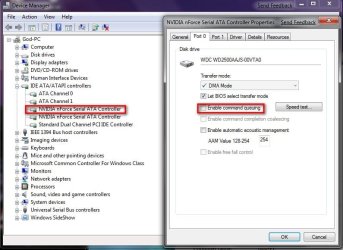
To improve your HHD (only works on Nvidia chipsets) go to device manager and find your SATA drivers and deselect this option

2009-01-12_033420.jpg

Then Restart your computer and refresh your score and you should have a performance increase.
 

My Computer My Computer

Computer Manufacturer/Model Number
Home Brew
OS
Windows 7 Ultimate Vista Ultimate x64
CPU
Core 2 Duo E8500 3.16Ghz @ 3.8Ghz
Motherboard
eVGA 750i FTW
Memory
2x2Gigs Patriot PC2-6400 LL
Graphics Card(s)
Inno3D GeForce GTX260 216 SP
Monitor(s) Displays
ASUS VW222U 22" 2ms Response time
Screen Resolution
1680x1050
Hard Drives
SATA 150GB
SATA II 250GB
USB IDE 750GB Ext.
PSU
HYTEC 600W & Thermaltake 650W Toughpower Power Exp
Case
Thermaltake Armor LCS (Liquid Cooling System)
Cooling
Liquid Cooling System
Keyboard
Logitech G15 Gaming Keyboard
Mouse
Logitech G9 Gaming Mouse
my long shut down issues were gone with windows 7, in vista toshiba flashkeys was the culprit...those took three to four minutes to shut the services for them down...disabled those and missed them not at all. they never loaded on windows 7 so my shut down is a minute tops. see if you have anything comparable running.
 

My Computer My Computer

OS
XP/Vista/Windows 7 builld 7000

My Computer My Computer

Computer Manufacturer/Model Number
HP dv7-3080us
OS
Microsoft Windows 7 x64 Ultimate
CPU
Intel Core i7 720M 1.6-2.8GHz
Motherboard
HP dv7-3080us
Memory
6GB DDR3 1066MHz RAM
Graphics Card(s)
NVIDIA GeForce 230M
Sound Card
HP dv7-3080us
Monitor(s) Displays
17.3" BrightView LED/LCD (1650x900) ViewSonic 22" LCD 1080p
Screen Resolution
17.3" BrightView LED/LCD (1650x900) ViewSonic 22" LCD 1080p
Hard Drives
500GB OS Drive
100GB OS Partition
400GB Media Partition

640GB Secondary Drive for Movies
PSU
HP dv7-3080us
Case
HP dv7-3080us
Cooling
HP dv7-3080us
Keyboard
HP dv7-3080us - Microsoft Wireless Keyboard 6000 v3.0
Mouse
Logitech G7

Attachments

  • sytem per.png
    sytem per.png
    32.4 KB · Views: 39

My Computer My Computer

Computer Manufacturer/Model Number
custom
OS
windows 7 6.1 build 7068x64
CPU
1333 Qcore 2.5
Motherboard
MSI neo3 p43 icH10
Memory
8gb ddr2 dual channal 800
Graphics Card(s)
ati hd 4870 512 sapphire
Sound Card
onboard hd realtech
Monitor(s) Displays
acerx193w
Screen Resolution
1440x900
Hard Drives
seagate baracuta 500 gb .11
samung 250gb sat.8
seagate baracuta 300gb.8
PSU
Antec 650 blue
Cooling
Stock fan
Internet Speed
15mb
Yes i happen to have the same score...

Refer to my post under General Discussion about Low Hard Drive Scores.

I tried the moderator's suggestion and no change.
 

My Computer My Computer

Computer Manufacturer/Model Number
HP dv7-3080us
OS
Microsoft Windows 7 x64 Ultimate
CPU
Intel Core i7 720M 1.6-2.8GHz
Motherboard
HP dv7-3080us
Memory
6GB DDR3 1066MHz RAM
Graphics Card(s)
NVIDIA GeForce 230M
Sound Card
HP dv7-3080us
Monitor(s) Displays
17.3" BrightView LED/LCD (1650x900) ViewSonic 22" LCD 1080p
Screen Resolution
17.3" BrightView LED/LCD (1650x900) ViewSonic 22" LCD 1080p
Hard Drives
500GB OS Drive
100GB OS Partition
400GB Media Partition

640GB Secondary Drive for Movies
PSU
HP dv7-3080us
Case
HP dv7-3080us
Cooling
HP dv7-3080us
Keyboard
HP dv7-3080us - Microsoft Wireless Keyboard 6000 v3.0
Mouse
Logitech G7
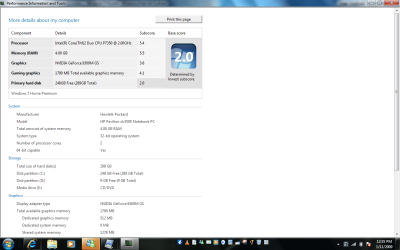
My scores are terrible but my PC is performing excellent... The machine is running very crisp shuts down with no problem. Go figure...
 

Attachments

  • WEI score.png
    WEI score.png
    45.6 KB · Views: 31

My Computer My Computer

OS
XP,Vista, Windows 7

My Computer My Computer

Computer Manufacturer/Model Number
HP dv7-3080us
OS
Microsoft Windows 7 x64 Ultimate
CPU
Intel Core i7 720M 1.6-2.8GHz
Motherboard
HP dv7-3080us
Memory
6GB DDR3 1066MHz RAM
Graphics Card(s)
NVIDIA GeForce 230M
Sound Card
HP dv7-3080us
Monitor(s) Displays
17.3" BrightView LED/LCD (1650x900) ViewSonic 22" LCD 1080p
Screen Resolution
17.3" BrightView LED/LCD (1650x900) ViewSonic 22" LCD 1080p
Hard Drives
500GB OS Drive
100GB OS Partition
400GB Media Partition

640GB Secondary Drive for Movies
PSU
HP dv7-3080us
Case
HP dv7-3080us
Cooling
HP dv7-3080us
Keyboard
HP dv7-3080us - Microsoft Wireless Keyboard 6000 v3.0
Mouse
Logitech G7
Thanks for the tip but my scores stayed the same... like i said not really worried as my PC is performing excellent... :p
 

My Computer My Computer

OS
XP,Vista, Windows 7
Thanks for the tip but my scores stayed the same... like i said not really worried as my PC is performing excellent... :p

Yeah people are still getting higher benchmarks so at least we know it's just the WEI Test that's broken.
 

My Computer My Computer

Computer Manufacturer/Model Number
HP dv7-3080us
OS
Microsoft Windows 7 x64 Ultimate
CPU
Intel Core i7 720M 1.6-2.8GHz
Motherboard
HP dv7-3080us
Memory
6GB DDR3 1066MHz RAM
Graphics Card(s)
NVIDIA GeForce 230M
Sound Card
HP dv7-3080us
Monitor(s) Displays
17.3" BrightView LED/LCD (1650x900) ViewSonic 22" LCD 1080p
Screen Resolution
17.3" BrightView LED/LCD (1650x900) ViewSonic 22" LCD 1080p
Hard Drives
500GB OS Drive
100GB OS Partition
400GB Media Partition

640GB Secondary Drive for Movies
PSU
HP dv7-3080us
Case
HP dv7-3080us
Cooling
HP dv7-3080us
Keyboard
HP dv7-3080us - Microsoft Wireless Keyboard 6000 v3.0
Mouse
Logitech G7
Strangely enough I've tried the NCQ tweak as well as the write cache tweak, but neither has changed my score.

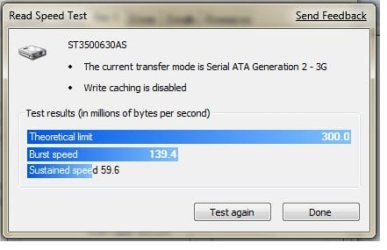
I did run the speed test on my hard drive from within the device manager properties for my nforce SATA controller and the sustained speed is terrible.

I'm running two seagate drives, both 16MB cache and they both have very similar results as shown below.

Any idea what may be at issue? I'd think the sustained rate should be significantly higher.

As an FYI, running an EVGA 780i motherboard

moz-screenshot.jpg
 

Attachments

  • speedtest.jpg
    speedtest.jpg
    16.8 KB · Views: 33
Last edited:

My Computer My Computer

OS
Windows 7 Beta
You did reboot after applying the Command Queuing tweak, right?
 

My Computers My Computers

System One System Two

  • Computer type
    PC/Desktop
    Computer Manufacturer/Model Number
    The Beast Model A (homebrew)
    OS
    Windows 11 21H2 Current build
    CPU
    AMD Ryzen 9 3950X
    Motherboard
    MSI MEG X570 GODLIKE
    Memory
    4 * 32 GB - Corsair Vengeance 3600 MHz
    Graphics Card(s)
    EVGA GeForce RTX 3080 Ti XC3 ULTRA GAMING (12G-P5-3955-KR)
    Sound Card
    Realtek® ALC1220 Codec
    Monitor(s) Displays
    2x Eve Spectrum ES07D03 4K Gaming Monitor (Matte) | Eve Spec
    Screen Resolution
    3x 3840 x 2160
    Hard Drives
    3x Samsung 980 Pro NVMe PCIe 4 M.2 2 TB SSD (MZ-V8P2T0B/AM) } 3x Sabrent Rocket NVMe 4.0 1 TB SSD
    PSU
    PC Power & Cooling’s Silencer Series 1050 Watt, 80 Plus Plat
    Case
    Fractal Design Define 7 XL Dark ATX Full Tower Case
    Cooling
    SteelSeries Apex Pro Wired Gaming Keyboard
    Keyboard
    SteelSeries Apex Pro
    Mouse
    Logitech MX Master 3S | MX Master 3 for business
    Internet Speed
    AT&T LightSpeed Gigabit Duplex Ftth
    Antivirus
    Windows Defender + MB 3
    Browser
    Nightly (default) + Firefox (stable),Chrome, Edge
  • Computer type
    PC/Desktop
    System Manufacturer/Model Number
    Dell Latitude E5470
    OS
    ChromeOS Flex Dev Channel (current)
    CPU
    Intel(R) Core(TM) i5-6300U CPU @ 2.40GHz, 2501 Mhz, 2 Core(s), 4 Logical Processor(s)
    Motherboard
    Dell
    Memory
    16 GB
    Graphics Card(s)
    Intel(R) HD Graphics 520
    Sound Card
    Intel(R) HD Graphics 520 + RealTek Audio
    Monitor(s) Displays
    Dell laptop display 15"
    Screen Resolution
    1920 * 1080
    Hard Drives
    Toshiba 128GB M.2 22300 drive
    INTEL Cherryville 520 Series SSDSC2CW180A 180 GB SATA III SSD
    PSU
    Dell
    Case
    Dell
    Cooling
    Dell
    Keyboard
    Dell
    Mouse
    Logitech MX Master 3S (shared w. Sys 1) | Dell TouchPad
    Internet Speed
    AT&T LightSpeed Gigabit Duplex Ftth
Yeah, rebooted after command que and then again after the write caching changes. Not seen a bit of change in the WEI.
 

My Computer My Computer

OS
Windows 7 Beta
Don't do both - do one or the other....and see how it does....

but I am assuming that is what you meant from your post....

To be honest, I don't even have the ability to change Command Queuing on my WD HD, only on my Seagate HDs. You sustained speed *is* terrible, and that means something is not working right. For now, I think this is a W7 issue.

Also, did you reboot when prompted, or did you wait and then reboot? I saw my settings revert if I canceled the reboot right then, and I had to reboot when prompted using the dialog box to get the setting to stick....
 

My Computers My Computers

System One System Two

  • Computer type
    PC/Desktop
    Computer Manufacturer/Model Number
    The Beast Model A (homebrew)
    OS
    Windows 11 21H2 Current build
    CPU
    AMD Ryzen 9 3950X
    Motherboard
    MSI MEG X570 GODLIKE
    Memory
    4 * 32 GB - Corsair Vengeance 3600 MHz
    Graphics Card(s)
    EVGA GeForce RTX 3080 Ti XC3 ULTRA GAMING (12G-P5-3955-KR)
    Sound Card
    Realtek® ALC1220 Codec
    Monitor(s) Displays
    2x Eve Spectrum ES07D03 4K Gaming Monitor (Matte) | Eve Spec
    Screen Resolution
    3x 3840 x 2160
    Hard Drives
    3x Samsung 980 Pro NVMe PCIe 4 M.2 2 TB SSD (MZ-V8P2T0B/AM) } 3x Sabrent Rocket NVMe 4.0 1 TB SSD
    PSU
    PC Power & Cooling’s Silencer Series 1050 Watt, 80 Plus Plat
    Case
    Fractal Design Define 7 XL Dark ATX Full Tower Case
    Cooling
    SteelSeries Apex Pro Wired Gaming Keyboard
    Keyboard
    SteelSeries Apex Pro
    Mouse
    Logitech MX Master 3S | MX Master 3 for business
    Internet Speed
    AT&T LightSpeed Gigabit Duplex Ftth
    Antivirus
    Windows Defender + MB 3
    Browser
    Nightly (default) + Firefox (stable),Chrome, Edge
  • Computer type
    PC/Desktop
    System Manufacturer/Model Number
    Dell Latitude E5470
    OS
    ChromeOS Flex Dev Channel (current)
    CPU
    Intel(R) Core(TM) i5-6300U CPU @ 2.40GHz, 2501 Mhz, 2 Core(s), 4 Logical Processor(s)
    Motherboard
    Dell
    Memory
    16 GB
    Graphics Card(s)
    Intel(R) HD Graphics 520
    Sound Card
    Intel(R) HD Graphics 520 + RealTek Audio
    Monitor(s) Displays
    Dell laptop display 15"
    Screen Resolution
    1920 * 1080
    Hard Drives
    Toshiba 128GB M.2 22300 drive
    INTEL Cherryville 520 Series SSDSC2CW180A 180 GB SATA III SSD
    PSU
    Dell
    Case
    Dell
    Cooling
    Dell
    Keyboard
    Dell
    Mouse
    Logitech MX Master 3S (shared w. Sys 1) | Dell TouchPad
    Internet Speed
    AT&T LightSpeed Gigabit Duplex Ftth
I did the cache changes and NCQ changes separately, and rebooted after each change. I rebooted when the NCQ change prompted me to.

I'm wondering if that, due to me doing an upgrade as opposed to a clean install, that some of the drivers may not have been updated properly for my mainboard. I know that the SATA drivers weren't - I had to change those manually...
 

My Computer My Computer

OS
Windows 7 Beta
Since you have the same mobo as I do, do a *full* install of the nForce 15.23 drivers and see if that helps....

Be sure to check everything, and you may want to run the setup file in Vista compatibility mode....
 

My Computers My Computers

System One System Two

  • Computer type
    PC/Desktop
    Computer Manufacturer/Model Number
    The Beast Model A (homebrew)
    OS
    Windows 11 21H2 Current build
    CPU
    AMD Ryzen 9 3950X
    Motherboard
    MSI MEG X570 GODLIKE
    Memory
    4 * 32 GB - Corsair Vengeance 3600 MHz
    Graphics Card(s)
    EVGA GeForce RTX 3080 Ti XC3 ULTRA GAMING (12G-P5-3955-KR)
    Sound Card
    Realtek® ALC1220 Codec
    Monitor(s) Displays
    2x Eve Spectrum ES07D03 4K Gaming Monitor (Matte) | Eve Spec
    Screen Resolution
    3x 3840 x 2160
    Hard Drives
    3x Samsung 980 Pro NVMe PCIe 4 M.2 2 TB SSD (MZ-V8P2T0B/AM) } 3x Sabrent Rocket NVMe 4.0 1 TB SSD
    PSU
    PC Power & Cooling’s Silencer Series 1050 Watt, 80 Plus Plat
    Case
    Fractal Design Define 7 XL Dark ATX Full Tower Case
    Cooling
    SteelSeries Apex Pro Wired Gaming Keyboard
    Keyboard
    SteelSeries Apex Pro
    Mouse
    Logitech MX Master 3S | MX Master 3 for business
    Internet Speed
    AT&T LightSpeed Gigabit Duplex Ftth
    Antivirus
    Windows Defender + MB 3
    Browser
    Nightly (default) + Firefox (stable),Chrome, Edge
  • Computer type
    PC/Desktop
    System Manufacturer/Model Number
    Dell Latitude E5470
    OS
    ChromeOS Flex Dev Channel (current)
    CPU
    Intel(R) Core(TM) i5-6300U CPU @ 2.40GHz, 2501 Mhz, 2 Core(s), 4 Logical Processor(s)
    Motherboard
    Dell
    Memory
    16 GB
    Graphics Card(s)
    Intel(R) HD Graphics 520
    Sound Card
    Intel(R) HD Graphics 520 + RealTek Audio
    Monitor(s) Displays
    Dell laptop display 15"
    Screen Resolution
    1920 * 1080
    Hard Drives
    Toshiba 128GB M.2 22300 drive
    INTEL Cherryville 520 Series SSDSC2CW180A 180 GB SATA III SSD
    PSU
    Dell
    Case
    Dell
    Cooling
    Dell
    Keyboard
    Dell
    Mouse
    Logitech MX Master 3S (shared w. Sys 1) | Dell TouchPad
    Internet Speed
    AT&T LightSpeed Gigabit Duplex Ftth
Did the install as you mentioned above and no difference. This is getting rather frustrating. And with my luck it's likely something simple.
 

My Computer My Computer

OS
Windows 7 Beta
Back
Top