Win 7, WD blue 500 GB HD, can no longer boot

murmur104

New member
Local time
6:27 AM
Messages
18
Hi, I am new in this forum and anything but an expert, more a user with some knowledge about specific things that came up during trouble shooting.


I run a desktop on Win 7, with 2 HD in a mirror configuration. Recently, one HD stopped working. I have replaced the broken HD with a new WD Caviar “Blue” 500 GB, reestablished the RAID; everything seemed to be ok. Until about 3 weeks ago, the replaced HD stopped working. I have replaced the failed HD, but it would not integrate into the system. The running HD started having problems on startup; however, I could get the PC working. From my local service center there was no real help to fix the issue. Finally, the PC would not startup anymore. So, all the desktop options are no longer available.


I have tried booting from the Win 7 System Repair Disk; all these attempts did not get me anywhere. I have gone many times through the System Recovery Options without success.


I have also tried booting from the Win 7 OEM systems disk. This did not solve the problem; however, the System Recovery Options showed that Windows sits now on D: \.


During these attempts I got 2 error messages:


· RecEnv.exe – Corrupt file (The file or directory E:\$Mft is corrupt and unreadable. Please run the Chkdsk utility). I did run Chkdsk as recommended; however, this did not solve the problem. During the rerun of the System Recovery Options another error message was displayed:


· RegSvr32 (The module “fverecover.dll” may not [be] compatible with the version of Windows you are running. Check if the module is compatible with an x86 (32 bit) or x64 (64 bit) version of regsvr32.exe.

Due to the nature of the problem, I could check the compatibility of the “fverecover.dll”.
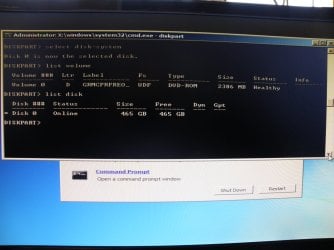
I have done DISKPART > list volume. The check came up with:
· Volume 0, C, System Rese, NFTS, Partition 100 MB, Healthy
· Volume 1, D, NFTS Partition 37 GB Healthy
· Volume 2 E Removable 0B No Media
· Volume 3 F Removable 0B No Media


I have read about the option from upgrading Win 7 from the OEM Systems disk; however, this option is not for me, as I cannot access the desktop environment.


I have made a completely new installation of Win 7 on a Seagate HD, just to verify that Motherboard and other peripherals are working properly, which they do.


The not bootable HD is spinning and after starting up, the sounds are completely normal. Most likely, the HD is ok.


I would like to run Win 7 from the currently not functioning WD HD to retrieve some data that are only on that HD. All other data are on a separate backup disk.


Any suggestion how to successfully tackle the problem?
 

My Computer My Computer

At a glance

Win 7 ProfessionalIntel (R) Core (TM) i5 CPU 650 @ 3.20 GHz 3.1...8GB RAMNVIDIA GeForce GT220
Computer type
PC/Desktop
Computer Manufacturer/Model Number
Cooler Master
OS
Win 7 Professional
CPU
Intel (R) Core (TM) i5 CPU 650 @ 3.20 GHz 3.19 GHz
Motherboard
Gigabyte GA-P55-UD3L
Memory
8GB RAM
Graphics Card(s)
NVIDIA GeForce GT220
Sound Card
Realtek High Definition Audio
Monitor(s) Displays
Generic PnP Monitor (ACR0347
Screen Resolution
1900 x 1080
Hard Drives
Western Digital Caviar Blue 500 GB
PSU
GVIEW Titanum 500 Watts
Case
CoolerMaster
Keyboard
Dell USB Keyboard
Mouse
USB Optical Mouse
Internet Speed
>15 Mb/s
Antivirus
Norton Internet Security
Browser
Firefox 49
Edit your profile with ALL your hardware specs.

What kind of RAID array you had (0 or 1). Is the new disk exactly same model type and size of the other?
Was the RAID array the boot able disks?

As you don't have now a RAID array, is it booting from the proper disk? Check on BIOS.

Expand Disk Management columns and post a image.
Follow the guidelines here to post an untruncated screenshot with all the information clearly visible. - Disk Management - Post a Screen Capture Image
Snipping Tool How to Use the Snipping Tool in Vista
Upload to Seven Forums: Screenshots and Files - Upload and Post in Seven Forums
 

My Computers My Computers

  • At a glance

    Windows 7 HP 64i5 6600K - 800MHz to 4200MHz4+4G GSkill DDR4 3000IG - Intel 530
    Computer type
    PC/Desktop
    Computer Manufacturer/Model Number
    custom build
    OS
    Windows 7 HP 64
    CPU
    i5 6600K - 800MHz to 4200MHz
    Motherboard
    GA-Z170-HD3P
    Memory
    4+4G GSkill DDR4 3000
    Graphics Card(s)
    IG - Intel 530
    Monitor(s) Displays
    Samsung 226BW
    Screen Resolution
    1680x1050
    Hard Drives
    (1) -1 SM951 – 128GB M.2 AHCI PCIe SSD drive for Windows 7 and Lubuntu
    (2) -1 WD SATA 3 - 1T for Data
    (3) -1 WD SATA 3 - 1T for backup
    PSU
    Thermaltake 450W TR2 gold
    Keyboard
    Old and good Chicony mechanical keyboard
    Mouse
    Logitech mX performance - 9 buttons (had to disable some)
    Internet Speed
    500Mb/s
    Browser
    Firefox 64
    Other Info
    TinyWall firewall
  • At a glance

    Windows 7 Proi7-4500U 800MHz to 3.0GHz(4+4)G DDR3 1600IG intel 4400 + NVIDIA GeForce GT 745M
    Computer type
    Laptop
    System Manufacturer/Model Number
    Asus Q550LF
    OS
    Windows 7 Pro
    CPU
    i7-4500U 800MHz to 3.0GHz
    Motherboard
    Asus Q550LF
    Memory
    (4+4)G DDR3 1600
    Graphics Card(s)
    IG intel 4400 + NVIDIA GeForce GT 745M
    Sound Card
    Realtek
    Monitor(s) Displays
    LG Display LP156WF4-SPH1
    Screen Resolution
    1920 x 1080
    Hard Drives
    BX500 120G SSD for Windows and programs +
    1T HDD for data
    Internet Speed
    500 Mb/s
    Browser
    Firefox
    Other Info
    TinyWall firewall
The configuration was RAID 1 (mirror). The new replacement disk for that RAID 1 was exactly the same model and size as the previous one. Both HDs are the same model and size. The RAID array was the boot able disk.


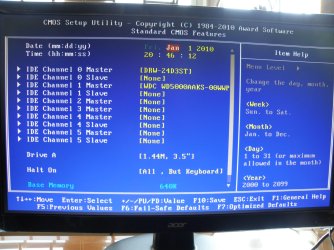
For collecting the required information, only WD 500 GB is connected. This is the HD that worked for some time alone in the broken RAID. The BIOS identifies this disk. The BIOS is set First Boot Device = Hard Disk. This HD is also set in BIOS Hard Disk Boot Priority as the primary boot media for Channel 1 Master.


After the PC would not start, I have had the remaining WD 500 GB HD (RAID 1) removed. Win 7 was then newly installed on a new Seagate HD. With the Seagate installation, Win 7 works fine. So the cable and the motherboard would not seem to be a primary cause for the problems with the WD 500 GB HDs. The RAID 1 configuration no longer exists in the BIOS.


I have opened both Western Digital 500 GB HDs to check for damage. For both HDs this is what I could see: the arm with the heads is parked in the resting position; the arm could be easily moved out of its resting position and back. The upper disk is completely clean (no marks, stains, scratches).


Both WD 500 GB do not produce noise when running.


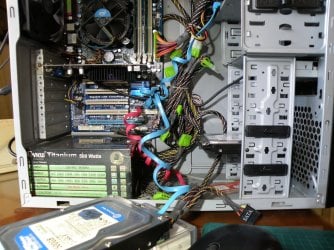
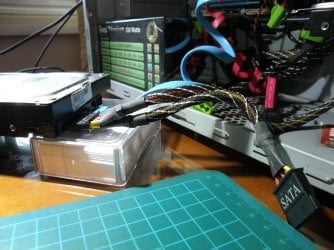
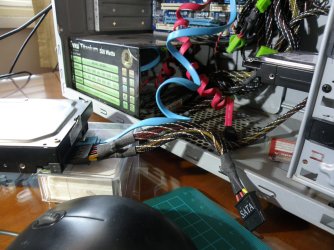
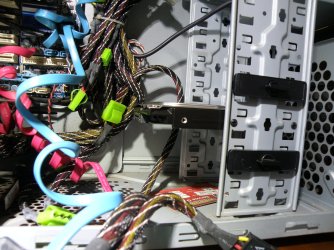
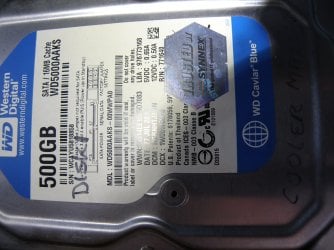
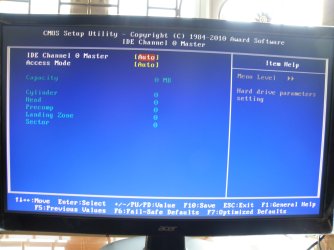
In the attached file are photos made from a DOS environment and hardware. If you need more information, please let me know.
 

Attachments

My Computer My Computer

At a glance

Win 7 ProfessionalIntel (R) Core (TM) i5 CPU 650 @ 3.20 GHz 3.1...8GB RAMNVIDIA GeForce GT220
Computer type
PC/Desktop
Computer Manufacturer/Model Number
Cooler Master
OS
Win 7 Professional
CPU
Intel (R) Core (TM) i5 CPU 650 @ 3.20 GHz 3.19 GHz
Motherboard
Gigabyte GA-P55-UD3L
Memory
8GB RAM
Graphics Card(s)
NVIDIA GeForce GT220
Sound Card
Realtek High Definition Audio
Monitor(s) Displays
Generic PnP Monitor (ACR0347
Screen Resolution
1900 x 1080
Hard Drives
Western Digital Caviar Blue 500 GB
PSU
GVIEW Titanum 500 Watts
Case
CoolerMaster
Keyboard
Dell USB Keyboard
Mouse
USB Optical Mouse
Internet Speed
>15 Mb/s
Antivirus
Norton Internet Security
Browser
Firefox 49
My Computers My Computers

  • At a glance

    Windows 7 HP 64i5 6600K - 800MHz to 4200MHz4+4G GSkill DDR4 3000IG - Intel 530
    Computer type
    PC/Desktop
    Computer Manufacturer/Model Number
    custom build
    OS
    Windows 7 HP 64
    CPU
    i5 6600K - 800MHz to 4200MHz
    Motherboard
    GA-Z170-HD3P
    Memory
    4+4G GSkill DDR4 3000
    Graphics Card(s)
    IG - Intel 530
    Monitor(s) Displays
    Samsung 226BW
    Screen Resolution
    1680x1050
    Hard Drives
    (1) -1 SM951 – 128GB M.2 AHCI PCIe SSD drive for Windows 7 and Lubuntu
    (2) -1 WD SATA 3 - 1T for Data
    (3) -1 WD SATA 3 - 1T for backup
    PSU
    Thermaltake 450W TR2 gold
    Keyboard
    Old and good Chicony mechanical keyboard
    Mouse
    Logitech mX performance - 9 buttons (had to disable some)
    Internet Speed
    500Mb/s
    Browser
    Firefox 64
    Other Info
    TinyWall firewall
  • At a glance

    Windows 7 Proi7-4500U 800MHz to 3.0GHz(4+4)G DDR3 1600IG intel 4400 + NVIDIA GeForce GT 745M
    Computer type
    Laptop
    System Manufacturer/Model Number
    Asus Q550LF
    OS
    Windows 7 Pro
    CPU
    i7-4500U 800MHz to 3.0GHz
    Motherboard
    Asus Q550LF
    Memory
    (4+4)G DDR3 1600
    Graphics Card(s)
    IG intel 4400 + NVIDIA GeForce GT 745M
    Sound Card
    Realtek
    Monitor(s) Displays
    LG Display LP156WF4-SPH1
    Screen Resolution
    1920 x 1080
    Hard Drives
    BX500 120G SSD for Windows and programs +
    1T HDD for data
    Internet Speed
    500 Mb/s
    Browser
    Firefox
    Other Info
    TinyWall firewall
I will update the HW specs in my profile and upload images as attachments after this.

I have copies from files on the WD HD in a separate location; however, what I really need from the WD HD is accessing my Outlook installation for accessing my E-Mails. The communication with the provider runs only through a computer-based system with no answers to my problem.

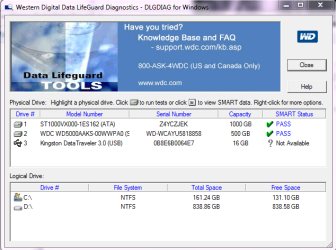
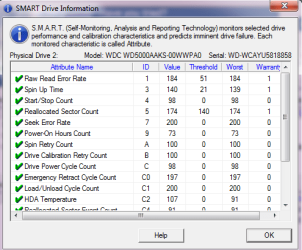
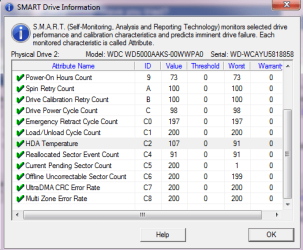
I have run the WD Data LifeGuard Diagnostics. No errors were detected, the WD HD got a PASS. The relevant results from the diagnostics are included in this reply.

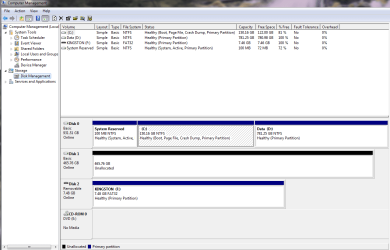
How would I do the cloning? Would I have to disconnect the Disk 0 currently identified in the Disk Management with System Reserved, drive C, and drive D. Would I use the WD 500 GB currently identified in the Disk Management as Disk 1 for cloning?

The data on Disk 0 are of no importance at all; however, keeping the Outlook installation on Disk 1 is of great importance.
 

Attachments

  • WD Data LifeGuard Diagnostics 2017 01 26 - 01.png
    WD Data LifeGuard Diagnostics 2017 01 26 - 01.png
    42.1 KB · Views: 43
  • WD Data LifeGuard Diagnostics 2017 01 26 - SMART Drive information 01.png
    WD Data LifeGuard Diagnostics 2017 01 26 - SMART Drive information 01.png
    17.7 KB · Views: 42
  • WD Data LifeGuard Diagnostics 2017 01 26 - SMART Drive information 02.png
    WD Data LifeGuard Diagnostics 2017 01 26 - SMART Drive information 02.png
    17.7 KB · Views: 42
  • Disk Management.png
    Disk Management.png
    35.8 KB · Views: 3

My Computer My Computer

At a glance

Win 7 ProfessionalIntel (R) Core (TM) i5 CPU 650 @ 3.20 GHz 3.1...8GB RAMNVIDIA GeForce GT220
Computer type
PC/Desktop
Computer Manufacturer/Model Number
Cooler Master
OS
Win 7 Professional
CPU
Intel (R) Core (TM) i5 CPU 650 @ 3.20 GHz 3.19 GHz
Motherboard
Gigabyte GA-P55-UD3L
Memory
8GB RAM
Graphics Card(s)
NVIDIA GeForce GT220
Sound Card
Realtek High Definition Audio
Monitor(s) Displays
Generic PnP Monitor (ACR0347
Screen Resolution
1900 x 1080
Hard Drives
Western Digital Caviar Blue 500 GB
PSU
GVIEW Titanum 500 Watts
Case
CoolerMaster
Keyboard
Dell USB Keyboard
Mouse
USB Optical Mouse
Internet Speed
>15 Mb/s
Antivirus
Norton Internet Security
Browser
Firefox 49
I will update the HW specs in my profile and upload images as attachments after this.

I have copies from files on the WD HD in a separate location; however, what I really need from the WD HD is accessing my Outlook installation for accessing my E-Mails. The communication with the provider runs only through a computer-based system with no answers to my problem.

I have run the WD Data LifeGuard Diagnostics. No errors were detected, the WD HD got a PASS. The relevant results from the diagnostics are included in this reply.

How would I do the cloning? Would I have to disconnect the Disk 0 currently identified in the Disk Management with System Reserved, drive C, and drive D. Would I use the WD 500 GB currently identified in the Disk Management as Disk 1 for cloning?

The data on Disk 0 are of no importance at all; however, keeping the Outlook installation on Disk 1 is of great importance.
 

My Computer My Computer

At a glance

Win 7 ProfessionalIntel (R) Core (TM) i5 CPU 650 @ 3.20 GHz 3.1...8GB RAMNVIDIA GeForce GT220
Computer type
PC/Desktop
Computer Manufacturer/Model Number
Cooler Master
OS
Win 7 Professional
CPU
Intel (R) Core (TM) i5 CPU 650 @ 3.20 GHz 3.19 GHz
Motherboard
Gigabyte GA-P55-UD3L
Memory
8GB RAM
Graphics Card(s)
NVIDIA GeForce GT220
Sound Card
Realtek High Definition Audio
Monitor(s) Displays
Generic PnP Monitor (ACR0347
Screen Resolution
1900 x 1080
Hard Drives
Western Digital Caviar Blue 500 GB
PSU
GVIEW Titanum 500 Watts
Case
CoolerMaster
Keyboard
Dell USB Keyboard
Mouse
USB Optical Mouse
Internet Speed
>15 Mb/s
Antivirus
Norton Internet Security
Browser
Firefox 49
As promised, here come the images as separate files.

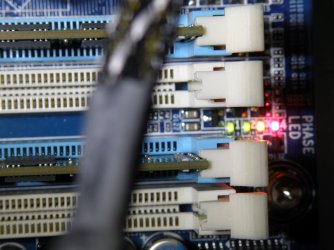
the images showing LED's represent the situation, when the PC is starting up. At the end of this process, the lights are turned off, indicating no errors detected.

1 more image to come.
 

Attachments

  • CoolerMaster - LED 02.JPG
    CoolerMaster - LED 02.JPG
    247.9 KB · Views: 2
  • CoolerMaster - LED 01.JPG
    CoolerMaster - LED 01.JPG
    223.5 KB · Views: 2
  • CoolerMaster - inside 01.JPG
    CoolerMaster - inside 01.JPG
    481.6 KB · Views: 1
  • CoolerMaster - cable 02.JPG
    CoolerMaster - cable 02.JPG
    315.4 KB · Views: 2
  • CoolerMaster - cable 01.JPG
    CoolerMaster - cable 01.JPG
    341.5 KB · Views: 2
  • CoolerMaster - Seagate HD not connected 01.JPG
    CoolerMaster - Seagate HD not connected 01.JPG
    408.2 KB · Views: 1
  • CoolerMaster - WD HD 01.JPG
    CoolerMaster - WD HD 01.JPG
    329.6 KB · Views: 2
  • Disk 1 - CMOS Setup.JPG
    Disk 1 - CMOS Setup.JPG
    313.3 KB · Views: 1
  • DISK 1 - IDE Channel 0 Master Access Mode.JPG
    DISK 1 - IDE Channel 0 Master Access Mode.JPG
    216 KB · Views: 2

My Computer My Computer

At a glance

Win 7 ProfessionalIntel (R) Core (TM) i5 CPU 650 @ 3.20 GHz 3.1...8GB RAMNVIDIA GeForce GT220
Computer type
PC/Desktop
Computer Manufacturer/Model Number
Cooler Master
OS
Win 7 Professional
CPU
Intel (R) Core (TM) i5 CPU 650 @ 3.20 GHz 3.19 GHz
Motherboard
Gigabyte GA-P55-UD3L
Memory
8GB RAM
Graphics Card(s)
NVIDIA GeForce GT220
Sound Card
Realtek High Definition Audio
Monitor(s) Displays
Generic PnP Monitor (ACR0347
Screen Resolution
1900 x 1080
Hard Drives
Western Digital Caviar Blue 500 GB
PSU
GVIEW Titanum 500 Watts
Case
CoolerMaster
Keyboard
Dell USB Keyboard
Mouse
USB Optical Mouse
Internet Speed
>15 Mb/s
Antivirus
Norton Internet Security
Browser
Firefox 49
The image "DISKPART - Systems Disk - list disk and volume" is the final image for my post on 25.01.17. Please let me know when you need more information.
 

Attachments

  • DISKPART - Systems Disk - list disk and volume.JPG
    DISKPART - Systems Disk - list disk and volume.JPG
    222.5 KB · Views: 1

My Computer My Computer

At a glance

Win 7 ProfessionalIntel (R) Core (TM) i5 CPU 650 @ 3.20 GHz 3.1...8GB RAMNVIDIA GeForce GT220
Computer type
PC/Desktop
Computer Manufacturer/Model Number
Cooler Master
OS
Win 7 Professional
CPU
Intel (R) Core (TM) i5 CPU 650 @ 3.20 GHz 3.19 GHz
Motherboard
Gigabyte GA-P55-UD3L
Memory
8GB RAM
Graphics Card(s)
NVIDIA GeForce GT220
Sound Card
Realtek High Definition Audio
Monitor(s) Displays
Generic PnP Monitor (ACR0347
Screen Resolution
1900 x 1080
Hard Drives
Western Digital Caviar Blue 500 GB
PSU
GVIEW Titanum 500 Watts
Case
CoolerMaster
Keyboard
Dell USB Keyboard
Mouse
USB Optical Mouse
Internet Speed
>15 Mb/s
Antivirus
Norton Internet Security
Browser
Firefox 49

My Computers My Computers

  • At a glance

    Windows 7 HP 64i5 6600K - 800MHz to 4200MHz4+4G GSkill DDR4 3000IG - Intel 530
    Computer type
    PC/Desktop
    Computer Manufacturer/Model Number
    custom build
    OS
    Windows 7 HP 64
    CPU
    i5 6600K - 800MHz to 4200MHz
    Motherboard
    GA-Z170-HD3P
    Memory
    4+4G GSkill DDR4 3000
    Graphics Card(s)
    IG - Intel 530
    Monitor(s) Displays
    Samsung 226BW
    Screen Resolution
    1680x1050
    Hard Drives
    (1) -1 SM951 – 128GB M.2 AHCI PCIe SSD drive for Windows 7 and Lubuntu
    (2) -1 WD SATA 3 - 1T for Data
    (3) -1 WD SATA 3 - 1T for backup
    PSU
    Thermaltake 450W TR2 gold
    Keyboard
    Old and good Chicony mechanical keyboard
    Mouse
    Logitech mX performance - 9 buttons (had to disable some)
    Internet Speed
    500Mb/s
    Browser
    Firefox 64
    Other Info
    TinyWall firewall
  • At a glance

    Windows 7 Proi7-4500U 800MHz to 3.0GHz(4+4)G DDR3 1600IG intel 4400 + NVIDIA GeForce GT 745M
    Computer type
    Laptop
    System Manufacturer/Model Number
    Asus Q550LF
    OS
    Windows 7 Pro
    CPU
    i7-4500U 800MHz to 3.0GHz
    Motherboard
    Asus Q550LF
    Memory
    (4+4)G DDR3 1600
    Graphics Card(s)
    IG intel 4400 + NVIDIA GeForce GT 745M
    Sound Card
    Realtek
    Monitor(s) Displays
    LG Display LP156WF4-SPH1
    Screen Resolution
    1920 x 1080
    Hard Drives
    BX500 120G SSD for Windows and programs +
    1T HDD for data
    Internet Speed
    500 Mb/s
    Browser
    Firefox
    Other Info
    TinyWall firewall
Hi Megahertz07,

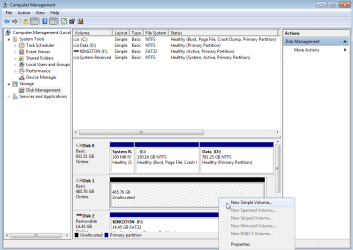
I would like to thank you for your support up to this point. Even though my problem did not go away, I have learnt a great deal, and probably you also have asked the right questions and made the right proposals. One of your proposals was using the working Seagate HD as boot media and also connecting the WD 500 GB disk to do the WD Diagnostics test. The disk management showed the WD 500 GB as online, but unallocated. Right-clicking on hat disk gives the option for creating a New Simple Volume (see attached file).

If creating a New Simple Volume leaves all data on the disk untouched, then Windows should be able to again read the disk, and if the Seagate HD is disconnected, then eventually the PC should eventually boot again from the WD 500 GB HD. If my assumptions were correct, my problem would be solved.

What do you think about this approach?
 

Attachments

  • New Simple Volume.png
    New Simple Volume.png
    26.2 KB · Views: 1

My Computer My Computer

At a glance

Win 7 ProfessionalIntel (R) Core (TM) i5 CPU 650 @ 3.20 GHz 3.1...8GB RAMNVIDIA GeForce GT220
Computer type
PC/Desktop
Computer Manufacturer/Model Number
Cooler Master
OS
Win 7 Professional
CPU
Intel (R) Core (TM) i5 CPU 650 @ 3.20 GHz 3.19 GHz
Motherboard
Gigabyte GA-P55-UD3L
Memory
8GB RAM
Graphics Card(s)
NVIDIA GeForce GT220
Sound Card
Realtek High Definition Audio
Monitor(s) Displays
Generic PnP Monitor (ACR0347
Screen Resolution
1900 x 1080
Hard Drives
Western Digital Caviar Blue 500 GB
PSU
GVIEW Titanum 500 Watts
Case
CoolerMaster
Keyboard
Dell USB Keyboard
Mouse
USB Optical Mouse
Internet Speed
>15 Mb/s
Antivirus
Norton Internet Security
Browser
Firefox 49
If you create a simple Volume ALL data on it will be deleted. DON'T DO IT.

If You haven't asked Jumanji for help, I'll do it.
 

My Computers My Computers

  • At a glance

    Windows 7 HP 64i5 6600K - 800MHz to 4200MHz4+4G GSkill DDR4 3000IG - Intel 530
    Computer type
    PC/Desktop
    Computer Manufacturer/Model Number
    custom build
    OS
    Windows 7 HP 64
    CPU
    i5 6600K - 800MHz to 4200MHz
    Motherboard
    GA-Z170-HD3P
    Memory
    4+4G GSkill DDR4 3000
    Graphics Card(s)
    IG - Intel 530
    Monitor(s) Displays
    Samsung 226BW
    Screen Resolution
    1680x1050
    Hard Drives
    (1) -1 SM951 – 128GB M.2 AHCI PCIe SSD drive for Windows 7 and Lubuntu
    (2) -1 WD SATA 3 - 1T for Data
    (3) -1 WD SATA 3 - 1T for backup
    PSU
    Thermaltake 450W TR2 gold
    Keyboard
    Old and good Chicony mechanical keyboard
    Mouse
    Logitech mX performance - 9 buttons (had to disable some)
    Internet Speed
    500Mb/s
    Browser
    Firefox 64
    Other Info
    TinyWall firewall
  • At a glance

    Windows 7 Proi7-4500U 800MHz to 3.0GHz(4+4)G DDR3 1600IG intel 4400 + NVIDIA GeForce GT 745M
    Computer type
    Laptop
    System Manufacturer/Model Number
    Asus Q550LF
    OS
    Windows 7 Pro
    CPU
    i7-4500U 800MHz to 3.0GHz
    Motherboard
    Asus Q550LF
    Memory
    (4+4)G DDR3 1600
    Graphics Card(s)
    IG intel 4400 + NVIDIA GeForce GT 745M
    Sound Card
    Realtek
    Monitor(s) Displays
    LG Display LP156WF4-SPH1
    Screen Resolution
    1920 x 1080
    Hard Drives
    BX500 120G SSD for Windows and programs +
    1T HDD for data
    Internet Speed
    500 Mb/s
    Browser
    Firefox
    Other Info
    TinyWall firewall
I am not surprised that my thoughts would not solve anything; would have been too easy.


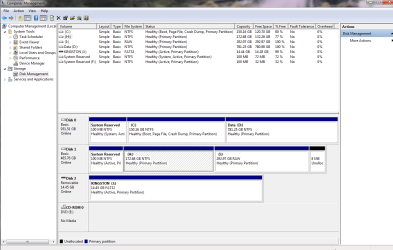
I have in parallel to the Seagate HD installed the WD 500 GB HD that hat failed first (I have labelled it Disk 2). The disk 2 is not an unallocated HD (see attached file); however, the drive “I:” is not accessible and the system proposed formatting it, which I have not done.


Drive “H:” shows in Explorer that it contains all program files; I do assume that drive “I:” would have been the drive containing my Data as with drives C: and D: respectively. As I store the Outlook files in drive D (and I), I would need accessing D (and I).


I will now contact Jumanji. If my problem ever gets solved, I will let you know.
 

Attachments

  • Disk 2 - Disk Management 2017 01 27.png
    Disk 2 - Disk Management 2017 01 27.png
    40 KB · Views: 1

My Computer My Computer

At a glance

Win 7 ProfessionalIntel (R) Core (TM) i5 CPU 650 @ 3.20 GHz 3.1...8GB RAMNVIDIA GeForce GT220
Computer type
PC/Desktop
Computer Manufacturer/Model Number
Cooler Master
OS
Win 7 Professional
CPU
Intel (R) Core (TM) i5 CPU 650 @ 3.20 GHz 3.19 GHz
Motherboard
Gigabyte GA-P55-UD3L
Memory
8GB RAM
Graphics Card(s)
NVIDIA GeForce GT220
Sound Card
Realtek High Definition Audio
Monitor(s) Displays
Generic PnP Monitor (ACR0347
Screen Resolution
1900 x 1080
Hard Drives
Western Digital Caviar Blue 500 GB
PSU
GVIEW Titanum 500 Watts
Case
CoolerMaster
Keyboard
Dell USB Keyboard
Mouse
USB Optical Mouse
Internet Speed
>15 Mb/s
Antivirus
Norton Internet Security
Browser
Firefox 49
Last one first. In the last screenshot Disk1 Drive I: shows RAW. It is connected internally. Keep it so.

Now go to post #6 in this thread WD Elements being read as RAW // Contents readable through app and use the TestDisk procedure outlined there.

In the second screenshot do not select your 1TB system disk. Select your 500GB disk. ( That should be the second one in the list)

Proceed upto the fifth screen. Post a screenshot of the fifth screen. ( It may show many partitions)

After taking the screenshot Close TestDisk by clicking on the X (top right) in the Menu bar. You can run it again if need be after I examine the screenshot.

( Do not try to play with TestDisk on your own. You may be tempted to but desist. Do only as instructed and instructed thus far.)

Note: If you are in Germany, please set the time zone correctly so that I need not calculate :)
It must be around 0645 now)
 

My Computer My Computer

At a glance

Windows 7 Home Premium 32 bit
OS
Windows 7 Home Premium 32 bit
First of all, I would like to thank for your support. Also, I am German, however, my country of residence is Thailand. This moves our working schedules a lot closer.


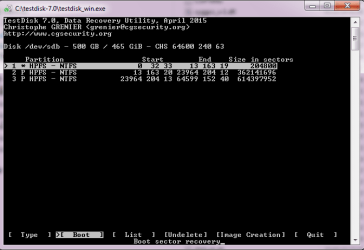
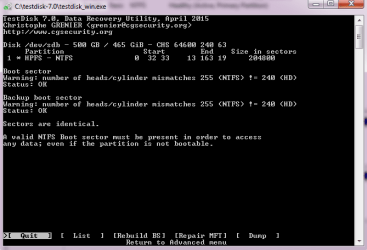
I have executed the TestDisk procedure. Screen 5 looks different from that in the reference post. I have continued the test as shown in the attached image.


The result looks not so promising and it is documented in the attached image.


The Disk Management still shows Drive I: as RAW.
 

Attachments

  • TD - Partition.png
    TD - Partition.png
    12.5 KB · Views: 26
  • TD - Partition - Result.png
    TD - Partition - Result.png
    11.4 KB · Views: 26

My Computer My Computer

At a glance

Win 7 ProfessionalIntel (R) Core (TM) i5 CPU 650 @ 3.20 GHz 3.1...8GB RAMNVIDIA GeForce GT220
Computer type
PC/Desktop
Computer Manufacturer/Model Number
Cooler Master
OS
Win 7 Professional
CPU
Intel (R) Core (TM) i5 CPU 650 @ 3.20 GHz 3.19 GHz
Motherboard
Gigabyte GA-P55-UD3L
Memory
8GB RAM
Graphics Card(s)
NVIDIA GeForce GT220
Sound Card
Realtek High Definition Audio
Monitor(s) Displays
Generic PnP Monitor (ACR0347
Screen Resolution
1900 x 1080
Hard Drives
Western Digital Caviar Blue 500 GB
PSU
GVIEW Titanum 500 Watts
Case
CoolerMaster
Keyboard
Dell USB Keyboard
Mouse
USB Optical Mouse
Internet Speed
>15 Mb/s
Antivirus
Norton Internet Security
Browser
Firefox 49
I only wanted you to go upto screen 5. You went upto screen 6 :). Not to worry.

Now Repeat again upto screen 5.( I already told you that it may show many partitions) Highlight the third partition shown (by using up/down arrow key of course)

[Boot] is highlighted. We don't want it. Move the highlight to
  • using the left/Right arrow key and then press enter.

    See whether it lists your files. Post a screenshot and then quit TestDisk as before.

    { I haven't dealt with a RAID 0 drive so far. So I am not sure whether the Head Cylinder mismatch is of any consequence. Let us see. }
 

My Computer My Computer

At a glance

Windows 7 Home Premium 32 bit
OS
Windows 7 Home Premium 32 bit
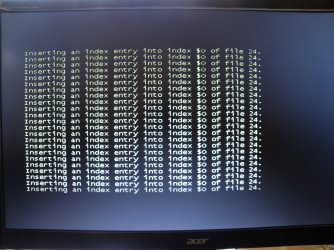
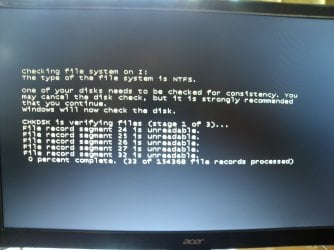
I forgot to mention that on startup last time, Windows did a check on the file system (images attached).
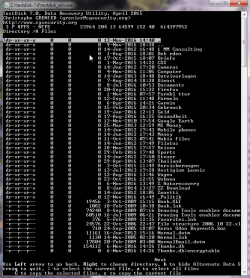
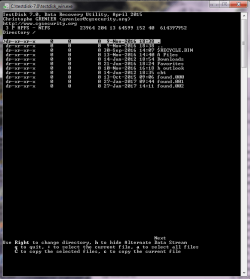
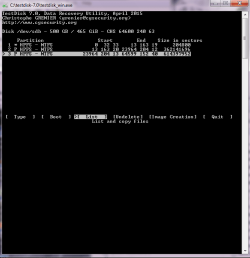
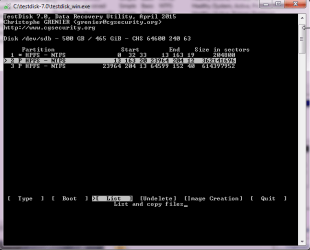
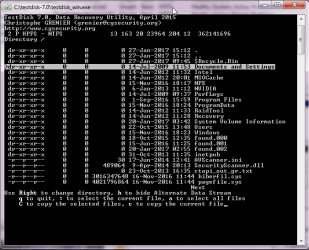
I have re-run TestDisk as you have described. The results are documented with the attached files.
The directory is correct and so are the folders containing my files.
This means that the 3rd Partition represents my files = Drive D in the previous installation.
These files I do have always backed up on an external HD. The only file I would be interested is the Outlook.pst file.
I have also looked at the 2nd Partition and this confirms that this partition represents my Drive C in the previous installation.
I am interested in running windows from my old WD 500 GB HDs. This is because my E-Mail provider does not support my problem that is installing my E-Mail account on a new PC. Currently, I do not know what the problem is: the password or settings concerning the ports. The password should not be the problem, as I had documented the password change in 2014, when the server of the E-Mail provider was attacked by “Heartbleed”.
I do assume that once I got Win 7 running from the WD 500GB HD, I can figure out what the actual problem is. For retrieving the password as stored, I can use the program “mailpv.exe”. I have tested it on other PCs and it really works quickly and correctly. And from the account settings I can retrieve all correct settings.
 

Attachments

  • TD - Partition - Directory folders 02.png
    TD - Partition - Directory folders 02.png
    28.6 KB · Views: 7
  • TD - Partition - Directory folders.png
    TD - Partition - Directory folders.png
    21 KB · Views: 7
  • TD - Partition - list.png
    TD - Partition - list.png
    16.4 KB · Views: 26
  • Checking file system 02.JPG
    Checking file system 02.JPG
    317 KB · Views: 1
  • Checking file system 01.JPG
    Checking file system 01.JPG
    251.7 KB · Views: 1

My Computer My Computer

At a glance

Win 7 ProfessionalIntel (R) Core (TM) i5 CPU 650 @ 3.20 GHz 3.1...8GB RAMNVIDIA GeForce GT220
Computer type
PC/Desktop
Computer Manufacturer/Model Number
Cooler Master
OS
Win 7 Professional
CPU
Intel (R) Core (TM) i5 CPU 650 @ 3.20 GHz 3.19 GHz
Motherboard
Gigabyte GA-P55-UD3L
Memory
8GB RAM
Graphics Card(s)
NVIDIA GeForce GT220
Sound Card
Realtek High Definition Audio
Monitor(s) Displays
Generic PnP Monitor (ACR0347
Screen Resolution
1900 x 1080
Hard Drives
Western Digital Caviar Blue 500 GB
PSU
GVIEW Titanum 500 Watts
Case
CoolerMaster
Keyboard
Dell USB Keyboard
Mouse
USB Optical Mouse
Internet Speed
>15 Mb/s
Antivirus
Norton Internet Security
Browser
Firefox 49
I think you are putting the screenshots in the reverse order :). Always put the screenshots in the order taken for clarity. Anyone else seeing that will get confused. Even I had to reorient myself..

Now tell me whether you are interested in recovering the data in the current disk on which we have run TestDisk. Atleast copy the important files to another external drive/flash drive (which should be connected before you start TestDisk for it to recognise that drive). Check the files' integrity and let me know if it is OK. Then we shall proceed with steps to restore this drive - which may or may not succeed. That is the name of the game - data recovery..

Is this the drive from which you want to run Windows? ( Your other 500 GB drive which shows fully unallocated is a difficult proposition. Let us get done with this first before we look into that. Don't change horses in midstream.)

You said there was a check disk run once. After check disk completed, did you reboot and check whether your RAW partition is still RAW?
 

My Computer My Computer

At a glance

Windows 7 Home Premium 32 bit
OS
Windows 7 Home Premium 32 bit
Except for the outlook.pst, I have copies of all other files. Therefore, let’s do this job next.
During the last TestDisk session, I have looked at a number of files and they seemed to be ok and worth trying to copy.

The last TestDisk session I have done on the drive from which I would like to run Windows.

Every time I start the PC in the configuration Seagate HD and WD 500 GB HD, the check disk is running. Thereafter, the I-drive is still RAW.
 

My Computer My Computer

At a glance

Win 7 ProfessionalIntel (R) Core (TM) i5 CPU 650 @ 3.20 GHz 3.1...8GB RAMNVIDIA GeForce GT220
Computer type
PC/Desktop
Computer Manufacturer/Model Number
Cooler Master
OS
Win 7 Professional
CPU
Intel (R) Core (TM) i5 CPU 650 @ 3.20 GHz 3.19 GHz
Motherboard
Gigabyte GA-P55-UD3L
Memory
8GB RAM
Graphics Card(s)
NVIDIA GeForce GT220
Sound Card
Realtek High Definition Audio
Monitor(s) Displays
Generic PnP Monitor (ACR0347
Screen Resolution
1900 x 1080
Hard Drives
Western Digital Caviar Blue 500 GB
PSU
GVIEW Titanum 500 Watts
Case
CoolerMaster
Keyboard
Dell USB Keyboard
Mouse
USB Optical Mouse
Internet Speed
>15 Mb/s
Antivirus
Norton Internet Security
Browser
Firefox 49
I have started with the next job.


First I have recovered the “Outlook 1.pst” file and the “Outlook 1.log”. This job was uneventful; therefore I did not upload images for this process.


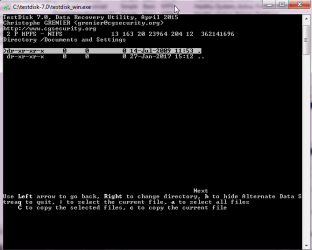
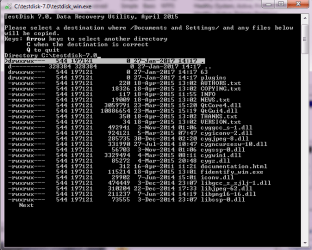
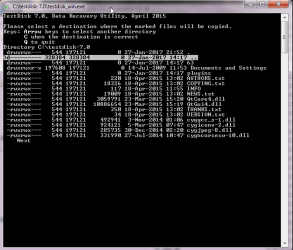
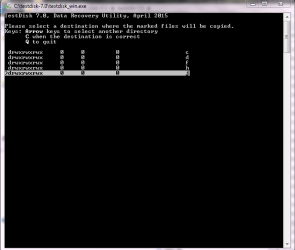
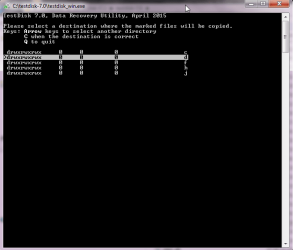
Then I have tried to recover from Drive H the “Documents and Settings” folder with all files in it. This did not work. Copying the folder was always marked in green with “Done! ok. 0 failed”. However, after selecting the destination I could not see the folder “Documents and Settings” in Drive D, which is the Seagate HD, or in Drive J, which is the Kingston Flash Drive. The uploaded images do not show the copying green marks “Done! Ok. 0 failed”, only the selection processes.


On Saturday, I will try copying the “Documents and Settings” folder again. Do I actually gain anything from viewing that folder? Are any relevant data stored there?
 

Attachments

  • TD - 2 HPFS - NTFS 01.png
    TD - 2 HPFS - NTFS 01.png
    14.7 KB · Views: 23
  • TD - 2 HPFS - NTFS 02 Directory.png
    TD - 2 HPFS - NTFS 02 Directory.png
    20 KB · Views: 23
  • TD - 2 HPFS - NTFS 03 Directory - Documents and Settings.png
    TD - 2 HPFS - NTFS 03 Directory - Documents and Settings.png
    13 KB · Views: 23
  • TD - 2 HPFS - NTFS 04 Directory - Documents and Settings.png
    TD - 2 HPFS - NTFS 04 Directory - Documents and Settings.png
    19.5 KB · Views: 23
  • TD - 2 HPFS - NTFS 05 Directory - Documents and Settings.png
    TD - 2 HPFS - NTFS 05 Directory - Documents and Settings.png
    17.1 KB · Views: 23
  • TD - 2 HPFS - NTFS 06 Directory - Documents and Settings.png
    TD - 2 HPFS - NTFS 06 Directory - Documents and Settings.png
    13.8 KB · Views: 23
  • TD - 2 HPFS - NTFS 07 Directory - Documents and Settings.png
    TD - 2 HPFS - NTFS 07 Directory - Documents and Settings.png
    13.5 KB · Views: 24

My Computer My Computer

At a glance

Win 7 ProfessionalIntel (R) Core (TM) i5 CPU 650 @ 3.20 GHz 3.1...8GB RAMNVIDIA GeForce GT220
Computer type
PC/Desktop
Computer Manufacturer/Model Number
Cooler Master
OS
Win 7 Professional
CPU
Intel (R) Core (TM) i5 CPU 650 @ 3.20 GHz 3.19 GHz
Motherboard
Gigabyte GA-P55-UD3L
Memory
8GB RAM
Graphics Card(s)
NVIDIA GeForce GT220
Sound Card
Realtek High Definition Audio
Monitor(s) Displays
Generic PnP Monitor (ACR0347
Screen Resolution
1900 x 1080
Hard Drives
Western Digital Caviar Blue 500 GB
PSU
GVIEW Titanum 500 Watts
Case
CoolerMaster
Keyboard
Dell USB Keyboard
Mouse
USB Optical Mouse
Internet Speed
>15 Mb/s
Antivirus
Norton Internet Security
Browser
Firefox 49
For copying the files follow the procedure outlined in my post #28 in this thread My external hard drive suddenly became unllocated:

Please take your time, read it and redo your copying. Go slow. As I said do not do things on your own. If you run fast, I cannot catch up and you may also err.. After each post please wait for my response before proceeding further.

Now tell me your drive H seems to be absolutely OK. It is not RAW. Are you not able to access it in Windows Explorer? Have you tried booting into Windows from that drive?

I shall wait for your response tomorrow. Off now.
 

My Computer My Computer

At a glance

Windows 7 Home Premium 32 bit
OS
Windows 7 Home Premium 32 bit
Back
Top