Win 7 - XP issues

aptcloe

New member
Local time
10:13 AM
Messages
6
I have read a lot about the problems trying to get a network working between 7 & XP. I have tried most of the options - but it still does not work for me. If anyone can help, it will be greatly appreciated. Here is the problem...
I have a new laptop running 7 & an old laptop running XP SP2. Both connect to the internet via a wireless network (router). I tried to get a local network going between the 2 laptops. I am able to successfully connect, access & use the shared folder on the XP thru the 7 laptop. While trying to access the 7's shared folder(s) on the XP i am facing a problem. I pinged the 7 thru the XP and found that is is accessible. The problem is that i can get to the 7's workgroup name on the XP under 'Microsoft Windows Network' under the section 'Other Places' only. When i click on this icon, i get to the computer name of the 7. Once i click on this is where the problem lies - I get an error message saying that the computer is not accessible'. It appears to be permissions issue. It seems like the connection is happenning at the root of the 7 machine & since the connection is not happenning at the root\share, i'm getting this error. Can someone please guide me fix this problem? I've spent an entire day on this reading and trying to fix the issue, but with no success. Any help suggestions will be greatly appreciated!:confused:
 

My Computer

OS
Win 7
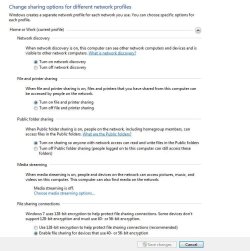
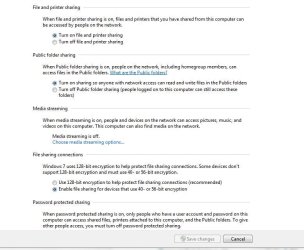
Do you have these settings checked on the win7 computer ?
 

Attachments

  • network_options.JPG
    network_options.JPG
    99 KB · Views: 20
  • Network_Options2.JPG
    Network_Options2.JPG
    82 KB · Views: 18

My Computer

Computer type
PC/Desktop
Computer Manufacturer/Model Number
Built them myself, Science Experiments !
OS
Win7 Enterprise, Win7 x86 (Ult 7600), Win7 x64 Ult 7600, TechNet RTM on AMD x64 (2.8Ghz)
CPU
AMD fx8350 4ghz, AMD-32 2400mhz, AMD-64 3200mhz, AMDx64 2.8G
Motherboard
SIS 755, ECS-K8M890M-M (Ult 7600), GigaByte & others
Memory
2gb, 4gb on the Ult 7600, 4gb on Technet RTM, 32gb on FX8350
Graphics Card(s)
Draw my own Graphics, several nVidia cards
Sound Card
on motherboard
Monitor(s) Displays
19" flat scr, 28" I-Inc widescr,22" Emprex Widescr, 23" Acer
Screen Resolution
1280 x 1024, 1440 x 900, 1920 x 1080
Hard Drives
6 pata Ide HD's & 2 Sata HD's
added 80gb external on Ult 7600 computer,
numerous extra 1tb, 2TB, 3Tb SATA HD's
A collection of ext HD Docks w/ HDs
PSU
430w, 550w, 600w, 700, 800, etc
Case
All Generic Full Towers
Cooling
Open Air & a few fans, some w/ colored LEDs
Keyboard
Compaq & Dell recycled from GoodWill
Mouse
Made in China Optical Wired Mouse
Internet Speed
Fast Cable InterNet
Antivirus
AVG Free on 24 different Desktops, NO Problems!
Browser
IE 8 is preferred, but use FireFox sometimes
Other Info
Linksys Routers, switches, & Hubs
Too Many USB Flash Drives to count, Biggest is 64GB !
Eight computers in my home network.
Sixteen computers at my business network.
Linked via TeamViewer !
Lots of old used spare computer parts everywhere!
The settings are exactly like that at the 'Users' share level which would be under the 'Computer Name' level.
 

My Computer

OS
Win 7
On the win7 computer, Do you have the folders you want to share, shared with everyone or a specific user or computer ?
 

Attachments

  • shared_with.JPG
    shared_with.JPG
    108.7 KB · Views: 17

My Computer

Computer type
PC/Desktop
Computer Manufacturer/Model Number
Built them myself, Science Experiments !
OS
Win7 Enterprise, Win7 x86 (Ult 7600), Win7 x64 Ult 7600, TechNet RTM on AMD x64 (2.8Ghz)
CPU
AMD fx8350 4ghz, AMD-32 2400mhz, AMD-64 3200mhz, AMDx64 2.8G
Motherboard
SIS 755, ECS-K8M890M-M (Ult 7600), GigaByte & others
Memory
2gb, 4gb on the Ult 7600, 4gb on Technet RTM, 32gb on FX8350
Graphics Card(s)
Draw my own Graphics, several nVidia cards
Sound Card
on motherboard
Monitor(s) Displays
19" flat scr, 28" I-Inc widescr,22" Emprex Widescr, 23" Acer
Screen Resolution
1280 x 1024, 1440 x 900, 1920 x 1080
Hard Drives
6 pata Ide HD's & 2 Sata HD's
added 80gb external on Ult 7600 computer,
numerous extra 1tb, 2TB, 3Tb SATA HD's
A collection of ext HD Docks w/ HDs
PSU
430w, 550w, 600w, 700, 800, etc
Case
All Generic Full Towers
Cooling
Open Air & a few fans, some w/ colored LEDs
Keyboard
Compaq & Dell recycled from GoodWill
Mouse
Made in China Optical Wired Mouse
Internet Speed
Fast Cable InterNet
Antivirus
AVG Free on 24 different Desktops, NO Problems!
Browser
IE 8 is preferred, but use FireFox sometimes
Other Info
Linksys Routers, switches, & Hubs
Too Many USB Flash Drives to count, Biggest is 64GB !
Eight computers in my home network.
Sixteen computers at my business network.
Linked via TeamViewer !
Lots of old used spare computer parts everywhere!
By default, Windows XP signs in to other Windows PCs using the Guest account. ^.^
All you have to do is set a permission for your sharing folder (in both the sharing access and for the folder in Win7) for YourComputerName\Guest, and you're good to go! You can use special permissions here too.
 

My Computer

Computer type
PC/Desktop
OS
Windows 8 Pro x64
CPU
i7 3820 @ 4.68GHz
Motherboard
ASUS Rampage IV Extreme RoG BF3
Memory
F3-12800CL9D-8GBXL (32GB)
Graphics Card(s)
GTX 480 SLI
Sound Card
Auzentech X-Fi HomeTheater HD
Monitor(s) Displays
Sony 32V5500
Screen Resolution
1920 x 1080
Hard Drives
LSI MR9260-4i (RAID10):
Toshiba DT01ACA300 x 4
iaStorA:
OCZ Vertex Enterprise 120GB
ST3500320AS 500GB
Intel 520 Series 120GB
PSU
OCZ ZX 1250W
Case
HAF X
Cooling
H80
Keyboard
Cyborg V.7
Mouse
Razer Lachesis 3.5G 5600dpi
Internet Speed
23296kbps ds / 812kbps us ADSL2+
Browser
Mozilla/5.0 (Windows NT 6.3; Win64; x64; rv:32.0) Gecko/2010
Other Info
AverMedia C127 Game Broadcaster HD
Yes, i have the 'documents' folder under 'Libraries' with that option.
 

Attachments

  • 1.jpg
    1.jpg
    54.3 KB · Views: 8

My Computer

OS
Win 7
Hi LuzTeTT

I did not understand how to try what you have suggested, can you please explain in steps. BTW, i don't have a guest account in the 7 laptop.
 

My Computer

OS
Win 7
I think when you click share with: Guest is one of the default options.
 

My Computer

Computer type
PC/Desktop
Computer Manufacturer/Model Number
Built them myself, Science Experiments !
OS
Win7 Enterprise, Win7 x86 (Ult 7600), Win7 x64 Ult 7600, TechNet RTM on AMD x64 (2.8Ghz)
CPU
AMD fx8350 4ghz, AMD-32 2400mhz, AMD-64 3200mhz, AMDx64 2.8G
Motherboard
SIS 755, ECS-K8M890M-M (Ult 7600), GigaByte & others
Memory
2gb, 4gb on the Ult 7600, 4gb on Technet RTM, 32gb on FX8350
Graphics Card(s)
Draw my own Graphics, several nVidia cards
Sound Card
on motherboard
Monitor(s) Displays
19" flat scr, 28" I-Inc widescr,22" Emprex Widescr, 23" Acer
Screen Resolution
1280 x 1024, 1440 x 900, 1920 x 1080
Hard Drives
6 pata Ide HD's & 2 Sata HD's
added 80gb external on Ult 7600 computer,
numerous extra 1tb, 2TB, 3Tb SATA HD's
A collection of ext HD Docks w/ HDs
PSU
430w, 550w, 600w, 700, 800, etc
Case
All Generic Full Towers
Cooling
Open Air & a few fans, some w/ colored LEDs
Keyboard
Compaq & Dell recycled from GoodWill
Mouse
Made in China Optical Wired Mouse
Internet Speed
Fast Cable InterNet
Antivirus
AVG Free on 24 different Desktops, NO Problems!
Browser
IE 8 is preferred, but use FireFox sometimes
Other Info
Linksys Routers, switches, & Hubs
Too Many USB Flash Drives to count, Biggest is 64GB !
Eight computers in my home network.
Sixteen computers at my business network.
Linked via TeamViewer !
Lots of old used spare computer parts everywhere!
I don't have Guest as an option as i don't have a guest account
 

My Computer

OS
Win 7
Do you have create a new user?

Create Guest
 

My Computer

Computer type
PC/Desktop
Computer Manufacturer/Model Number
Built them myself, Science Experiments !
OS
Win7 Enterprise, Win7 x86 (Ult 7600), Win7 x64 Ult 7600, TechNet RTM on AMD x64 (2.8Ghz)
CPU
AMD fx8350 4ghz, AMD-32 2400mhz, AMD-64 3200mhz, AMDx64 2.8G
Motherboard
SIS 755, ECS-K8M890M-M (Ult 7600), GigaByte & others
Memory
2gb, 4gb on the Ult 7600, 4gb on Technet RTM, 32gb on FX8350
Graphics Card(s)
Draw my own Graphics, several nVidia cards
Sound Card
on motherboard
Monitor(s) Displays
19" flat scr, 28" I-Inc widescr,22" Emprex Widescr, 23" Acer
Screen Resolution
1280 x 1024, 1440 x 900, 1920 x 1080
Hard Drives
6 pata Ide HD's & 2 Sata HD's
added 80gb external on Ult 7600 computer,
numerous extra 1tb, 2TB, 3Tb SATA HD's
A collection of ext HD Docks w/ HDs
PSU
430w, 550w, 600w, 700, 800, etc
Case
All Generic Full Towers
Cooling
Open Air & a few fans, some w/ colored LEDs
Keyboard
Compaq & Dell recycled from GoodWill
Mouse
Made in China Optical Wired Mouse
Internet Speed
Fast Cable InterNet
Antivirus
AVG Free on 24 different Desktops, NO Problems!
Browser
IE 8 is preferred, but use FireFox sometimes
Other Info
Linksys Routers, switches, & Hubs
Too Many USB Flash Drives to count, Biggest is 64GB !
Eight computers in my home network.
Sixteen computers at my business network.
Linked via TeamViewer !
Lots of old used spare computer parts everywhere!
i created a guest account; but still no diff
 

My Computer

OS
Win 7
Did you reBoot both computers
 

My Computer

Computer type
PC/Desktop
Computer Manufacturer/Model Number
Built them myself, Science Experiments !
OS
Win7 Enterprise, Win7 x86 (Ult 7600), Win7 x64 Ult 7600, TechNet RTM on AMD x64 (2.8Ghz)
CPU
AMD fx8350 4ghz, AMD-32 2400mhz, AMD-64 3200mhz, AMDx64 2.8G
Motherboard
SIS 755, ECS-K8M890M-M (Ult 7600), GigaByte & others
Memory
2gb, 4gb on the Ult 7600, 4gb on Technet RTM, 32gb on FX8350
Graphics Card(s)
Draw my own Graphics, several nVidia cards
Sound Card
on motherboard
Monitor(s) Displays
19" flat scr, 28" I-Inc widescr,22" Emprex Widescr, 23" Acer
Screen Resolution
1280 x 1024, 1440 x 900, 1920 x 1080
Hard Drives
6 pata Ide HD's & 2 Sata HD's
added 80gb external on Ult 7600 computer,
numerous extra 1tb, 2TB, 3Tb SATA HD's
A collection of ext HD Docks w/ HDs
PSU
430w, 550w, 600w, 700, 800, etc
Case
All Generic Full Towers
Cooling
Open Air & a few fans, some w/ colored LEDs
Keyboard
Compaq & Dell recycled from GoodWill
Mouse
Made in China Optical Wired Mouse
Internet Speed
Fast Cable InterNet
Antivirus
AVG Free on 24 different Desktops, NO Problems!
Browser
IE 8 is preferred, but use FireFox sometimes
Other Info
Linksys Routers, switches, & Hubs
Too Many USB Flash Drives to count, Biggest is 64GB !
Eight computers in my home network.
Sixteen computers at my business network.
Linked via TeamViewer !
Lots of old used spare computer parts everywhere!
Ok so lets do a checklist.

1) You can ping from Xp to W7. An easy oversight but double check it.
2) On W7, the share folder (right-click, and Properties):
Share tab - > Advance sharing - > Permission. Everyone Group is Full Control.
Security tab -> Have the user account you log onto W7 listed and is Full control. This might look like
name (W7computername\name).
3) Turn ON File and Printer sharing.

4) On XP, map to the shared folder. Start, type \\ipaddressof W7\sharename in the search box, Enter.

You should then be prompted with a logon box. Use the account you have logged onto W7 which, you have verified in point 2 to be the same.
 

My Computer

Computer Manufacturer/Model Number
Lenovo ThinkPad T60
OS
Windows 7 Ultimate 64Bit
CPU
GenuineIntel Intel(R) Core(TM) DuoCore T2400 @ 1.83GHz
Motherboard
Intel(R) 82801G (ICH7 Family)
Memory
2.00 GB
Graphics Card(s)
Mobile Intel(R) 945 Express Chipset
Sound Card
SoundMAX Integrated Digital HD Audio
Monitor(s) Displays
ThinkPad Display
Screen Resolution
1400x1050
Hard Drives
100Gb SATA
Keyboard
Standard Keyboard
Mouse
HID-compliant Mouse
Internet Speed
Cable Broadband - 54Mbps
Other Info
Intel(R) PRO/1000 PL Network Connection
11a/b/g Wireless LAN Mini PCI Express Adapter
Thanks for joining in here AEM . My networks are usually pretty simple setups of my different computers, where I use & control all of them myself.
 

My Computer

Computer type
PC/Desktop
Computer Manufacturer/Model Number
Built them myself, Science Experiments !
OS
Win7 Enterprise, Win7 x86 (Ult 7600), Win7 x64 Ult 7600, TechNet RTM on AMD x64 (2.8Ghz)
CPU
AMD fx8350 4ghz, AMD-32 2400mhz, AMD-64 3200mhz, AMDx64 2.8G
Motherboard
SIS 755, ECS-K8M890M-M (Ult 7600), GigaByte & others
Memory
2gb, 4gb on the Ult 7600, 4gb on Technet RTM, 32gb on FX8350
Graphics Card(s)
Draw my own Graphics, several nVidia cards
Sound Card
on motherboard
Monitor(s) Displays
19" flat scr, 28" I-Inc widescr,22" Emprex Widescr, 23" Acer
Screen Resolution
1280 x 1024, 1440 x 900, 1920 x 1080
Hard Drives
6 pata Ide HD's & 2 Sata HD's
added 80gb external on Ult 7600 computer,
numerous extra 1tb, 2TB, 3Tb SATA HD's
A collection of ext HD Docks w/ HDs
PSU
430w, 550w, 600w, 700, 800, etc
Case
All Generic Full Towers
Cooling
Open Air & a few fans, some w/ colored LEDs
Keyboard
Compaq & Dell recycled from GoodWill
Mouse
Made in China Optical Wired Mouse
Internet Speed
Fast Cable InterNet
Antivirus
AVG Free on 24 different Desktops, NO Problems!
Browser
IE 8 is preferred, but use FireFox sometimes
Other Info
Linksys Routers, switches, & Hubs
Too Many USB Flash Drives to count, Biggest is 64GB !
Eight computers in my home network.
Sixteen computers at my business network.
Linked via TeamViewer !
Lots of old used spare computer parts everywhere!
Yeh it's usually the simple things that gets people. That said i did try it out prior to posting the reply. Lets hope the OP hasn't made any restrictions on W7 which could prevent XP from mapping to it.
 

My Computer

Computer Manufacturer/Model Number
Lenovo ThinkPad T60
OS
Windows 7 Ultimate 64Bit
CPU
GenuineIntel Intel(R) Core(TM) DuoCore T2400 @ 1.83GHz
Motherboard
Intel(R) 82801G (ICH7 Family)
Memory
2.00 GB
Graphics Card(s)
Mobile Intel(R) 945 Express Chipset
Sound Card
SoundMAX Integrated Digital HD Audio
Monitor(s) Displays
ThinkPad Display
Screen Resolution
1400x1050
Hard Drives
100Gb SATA
Keyboard
Standard Keyboard
Mouse
HID-compliant Mouse
Internet Speed
Cable Broadband - 54Mbps
Other Info
Intel(R) PRO/1000 PL Network Connection
11a/b/g Wireless LAN Mini PCI Express Adapter
Guys the problem is not the guest account configuration but how the Local Security Policy is configured on XP and the NTLM permissions required to connect and browse shares on Vista/Win7 from an XP machine.

If you had installed SP3 as I suggested then it would have made these changes for you ;)

This is how the Local Security policy is configured between XP and Vista/Win7 and the primary problem people face networking XP with Vista/7.

Windows 2000 and Windows XP: send LM & NTLM responses only

Windows Vista, Windows Server 2008, Windows 7, and Windows Server 2008 R2: Send NTLMv2 response only

XP-SP2 and earlier are not configured to use the secure version of NTLM by default, that's required for connecting and browsing shares on XP-SP3 and later, your required to change these security settings before XP can connect and browse shares on later operating systems, its fairly easy to fix if you don't want SP3 installed.

On your XP machine, open Control Panel > Administrative Tools > Local Security Policy then goto Local Policy > Security Options

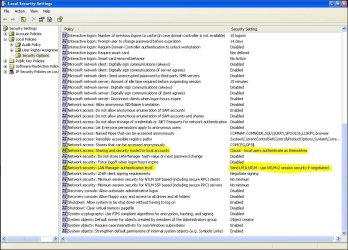
scroll down until you see Network security: LAN Manager authentication level

make sure its set to use Send LM & NTLM - use NTLMv2 session security if negotiated

also make sure Network access: Sharing and security model for local accounts is configured for Classic: Local users authenticate as themselves.

Heres how these two settings should look on XP:

xp_lsp.JPG

Once you've made the required changes just reboot and you should be able to connect and browse your Win7 Shares from XP using the user-name and password for your Windows 7 box (Note: you must have a password on your Win7 user account to be able to connect regardless)

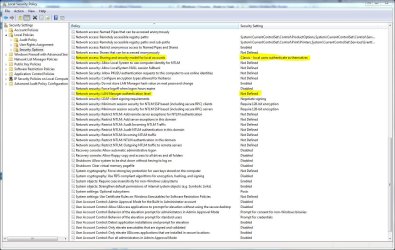
Just encase you want to double check your Win7 LSM settings, this is what it should be configured to use by default but you only need to change the two settings on XP that I mentioned above to solve the problem.

7_lsm.JPG

Let us know the result ;)

Steven
 
Back
Top