Win Update, AutoPatcher and Manual Update Attempts All Stall

ellentk

New member
Local time
5:07 AM
Messages
32
Like many people who have posted about this problem, I'm not able to update windows 7 pro, 64 bit, sp 1. The problem started after I replaced a failing HD in May or June and recovered with an October 2015 backup. (Control panel states that "Windows is Activated.")

I have tried many solutions I've read about here and elsewhere. My system passed the System Update Readiness Tool. I've tried installing updates in batches and singly. I don't want to use the convenience rollup package as I want to select the updates I install. My various attempts yielded consistent results:

-Windows Update shows a list of updates but stalls on downloading them.
-When I try to manually install an msu file, windows stalls on "searching for updates on this computer."
-Autopatcher 6.2.9 downloads the update files but hangs on installing them and I have to close wusa.exe from Task Manager in order to close AP.

In addition, now that MS has moved all updates to catalog.update.microsoft.com, I can no longer download any to see if I can try the few fixes that were recommended here (such as KB
3083324) because the site tells me that IE must have the "user data persistence" setting enabled, despite the fact that it is, as well as informing me that I need to use IE 6 or higher when I am using version 11.

I've wasted weeks trying to update windows 7. I've postponed an important project that requires some new software, which I had hoped to install on a secure system. At this point, I don't know what else to try and would appreciate any advice.
 

My Computer My Computer

At a glance

Windows Pro 64 biti78gbnvidea
Computer Manufacturer/Model Number
Lenovo Thinkpad W520
OS
Windows Pro 64 bit
CPU
i7
Memory
8gb
Graphics Card(s)
nvidea
Hard Drives
500GB
Case
laptop
Hi:

-When I try to manually install an msu file, windows stalls on "searching for updates on this computer."
In order to manually install updates, you need to first either disable the Windows Update service from services.msc or change your Windows Update settings in the Control Panel to "never check for updates" and then reboot.

As for the other items, I'll defer to others who are more expert in these matters.

HTH,
MM
 

My Computer My Computer

At a glance

OEM Windows 7 Ult (x64) SP1Intel Core-i7 3770 @ 3.4 GHz16 GB DDR3 SDRAM @ 1333 MHzNVidia GeForce GT620 1 GB
Computer type
PC/Desktop
Computer Manufacturer/Model Number
Dell Studio XPS 8500
OS
OEM Windows 7 Ult (x64) SP1
CPU
Intel Core-i7 3770 @ 3.4 GHz
Motherboard
"Dell" branded
Memory
16 GB DDR3 SDRAM @ 1333 MHz
Graphics Card(s)
NVidia GeForce GT620 1 GB
Sound Card
THX TruStudio PC
Monitor(s) Displays
Dell U2410 Full HD
Hard Drives
2.0 TB SATA2 @ 7200 RPM
PSU
350W
Keyboard
MS 4000 Ergon - Wired
Mouse
Logitech Anywhere MX
Internet Speed
Cable HSI w/Turbo (router)
Antivirus
KIS-MBAM Premium-MBAE Premium
Browser
Fx (current version); IE
Other Info
And a Win7/64 Pro laptop; And a Win10/64 Pro desktop.
Thanks, MM. With services/win update disabled and win update set to never check an attempt at manual install msu files returns Error 0x80070422 - Service can't be started because it is disabled. I believe win update or wusa must run, even for autopatcher. I had tried various settings, including these, but didn't want to make my post too long and explicitly describe all the tweaks and setting changes I've tried. I did forget to include that attempts were made with Windows Firewall, Malwarebytes and Bitdefender Virus Shield all off.
 

My Computer My Computer

At a glance

Windows Pro 64 biti78gbnvidea
Computer Manufacturer/Model Number
Lenovo Thinkpad W520
OS
Windows Pro 64 bit
CPU
i7
Memory
8gb
Graphics Card(s)
nvidea
Hard Drives
500GB
Case
laptop
Hi Ellen,
please reset any changes you have made, manual install does not require any changes to the system.
Then run this tool
http://go.microsoft.com/fwlink/?LinkID=52012
Would also like to see the WindowsUpdate log, 1 days worth will be fine.

Roy
 

My Computer My Computer

At a glance

W7 home premium 32bit/W7HP 64bit/w10 tp insid...E5300 dual core3gbNvidia Geforce 7100 Nforce 630i
Computer type
PC/Desktop
Computer Manufacturer/Model Number
medionl/Aspire 6930G/acer x55a
OS
W7 home premium 32bit/W7HP 64bit/w10 tp insider ring
CPU
E5300 dual core
Motherboard
medion MS7366
Memory
3gb
Graphics Card(s)
Nvidia Geforce 7100 Nforce 630i
Monitor(s) Displays
avixc
Internet Speed
n (isp resticted to 72)
Antivirus
mse/pands
Browser
palemoon
Other Info
Belkin Fd7050 n USB using Railink RT2870 drivers, more upto date
Hi Roy,

Thank you so much for your help.

I've always set windows update to "check for updates but let me choose whether to download and install them" except when testing and that's how it's set now.

When win update worked, services/win update was auto or manual, since I've been testing, it's also been disabled, which it is now.

Here's my MGADiag log. Looks like win7 remained genuine on the new hard drive, perhaps because I recovered from an image. What should I do next?

Ellen
--
Diagnostic Report (1.9.0027.0):
-----------------------------------------
Windows Validation Data-->

Validation Code: 0
Cached Online Validation Code: 0x0
Windows Product Key: *****-*****-MV8MH-98QJM-24367
Windows Product Key Hash: wgci5Gdejx4esg7++zTOe3LWF+4=
Windows Product ID: 55041-OEM-8992671-00437
Windows Product ID Type: 2
Windows License Type: OEM SLP
Windows OS version: 6.1.7601.2.00010100.1.0.048
ID: {41DC7B24-7E92-44BD-ABA0-E582E415DC53}(1)
Is Admin: Yes
TestCab: 0x0
LegitcheckControl ActiveX: N/A, hr = 0x80070002
Signed By: N/A, hr = 0x80070002
Product Name: Windows 7 Professional
Architecture: 0x00000009
Build lab: 7601.win7sp1_gdr.150525-0603
TTS Error:
Validation Diagnostic:
Resolution Status: N/A

Vista WgaER Data-->
ThreatID(s): N/A, hr = 0x80070002
Version: N/A, hr = 0x80070002

Windows XP Notifications Data-->
Cached Result: N/A, hr = 0x80070002
File Exists: No
Version: N/A, hr = 0x80070002
WgaTray.exe Signed By: N/A, hr = 0x80070002
WgaLogon.dll Signed By: N/A, hr = 0x80070002

OGA Notifications Data-->
Cached Result: N/A, hr = 0x80070002
Version: N/A, hr = 0x80070002
OGAExec.exe Signed By: N/A, hr = 0x80070002
OGAAddin.dll Signed By: N/A, hr = 0x80070002

OGA Data-->
Office Status: 109 N/A
OGA Version: N/A, 0x80070002
Signed By: N/A, hr = 0x80070002
Office Diagnostics: B4D0AA8B-604-645_025D1FF3-364-80041010_025D1FF3-229-80041010_025D1FF3-230-1_025D1FF3-517-80040154_025D1FF3-237-80040154_025D1FF3-238-2_025D1FF3-244-80070002_025D1FF3-258-3

Browser Data-->
Proxy settings: N/A
User Agent: Mozilla/4.0 (compatible; MSIE 8.0; Win32)
Default Browser: C:\Program Files (x86)\Google\Chrome\Application\chrome.exe
Download signed ActiveX controls: Prompt
Download unsigned ActiveX controls: Disabled
Run ActiveX controls and plug-ins: Allowed
Initialize and script ActiveX controls not marked as safe: Disabled
Allow scripting of Internet Explorer Webbrowser control: Disabled
Active scripting: Allowed
Script ActiveX controls marked as safe for scripting: Allowed

File Scan Data-->

Other data-->
Office Details: <GenuineResults><MachineData><UGUID>{41DC7B24-7E92-44BD-ABA0-E582E415DC53}</UGUID><Version>1.9.0027.0</Version><OS>6.1.7601.2.00010100.1.0.048</OS><Architecture>x64</Architecture><PKey>*****-*****-*****-*****-24367</PKey><PID>55041-OEM-8992671-00437</PID><PIDType>2</PIDType><SID>S-1-5-21-2054965532-489486130-684247946</SID><SYSTEM><Manufacturer>LENOVO</Manufacturer><Model>427637U</Model></SYSTEM><BIOS><Manufacturer>LENOVO</Manufacturer><Version>8BET60WW (1.40 )</Version><SMBIOSVersion major="2" minor="6"/><Date>20121206000000.000000+000</Date></BIOS><HWID>1FA13F07018400FE</HWID><UserLCID>0409</UserLCID><SystemLCID>0409</SystemLCID><TimeZone>Eastern Standard Time(GMT-05:00)</TimeZone><iJoin>0</iJoin><SBID><stat>3</stat><msppid></msppid><name></name><model></model></SBID><OEM><OEMID>LENOVO</OEMID><OEMTableID>TP-8B </OEMTableID></OEM><GANotification/></MachineData><Software><Office><Result>109</Result><Products/><Applications/></Office></Software></GenuineResults>

Spsys.log Content: 0x80070002

Licensing Data-->
Software licensing service version: 6.1.7601.17514

Name: Windows(R) 7, Professional edition
Description: Windows Operating System - Windows(R) 7, OEM_SLP channel
Activation ID: 50e329f7-a5fa-46b2-85fd-f224e5da7764
Application ID: 55c92734-d682-4d71-983e-d6ec3f16059f
Extended PID: 00371-00178-926-700437-02-1033-7601.0000-0462011
Installation ID: 016366187966217511140954900575785274331324351525070022
Processor Certificate URL: SpcService Web Service
Machine Certificate URL: RacService Web Service
Use License URL: UseLicenseService Web Service
Product Key Certificate URL: PkcService Web Service
Partial Product Key: 24367
License Status: Licensed
Remaining Windows rearm count: 2
Trusted time: 8/14/2016 11:28:10 PM

Windows Activation Technologies-->
HrOffline: 0x00000000
HrOnline: N/A
HealthStatus: 0x0000000000000000
Event Time Stamp: N/A
ActiveX: Registered, Version: 7.1.7600.16395
Admin Service: Registered, Version: 7.1.7600.16395
HealthStatus Bitmask Output:


HWID Data-->
HWID Hash Current: PgAAAAIAAQABAAIAAQAEAAAABQABAAEAHKKUqsF+hld8QZwSdiX6Lg4+LOKETSBPBX5crrLHEqmqv3R0LnM=

OEM Activation 1.0 Data-->
N/A

OEM Activation 2.0 Data-->
BIOS valid for OA 2.0: yes
Windows marker version: 0x20001
OEMID and OEMTableID Consistent: yes
BIOS Information:
ACPI Table Name OEMID Value OEMTableID Value
APIC LENOVO TP-8B
FACP LENOVO TP-8B
HPET LENOVO TP-8B
MCFG LENOVO TP-8B
SLIC LENOVO TP-8B
SSDT LENOVO TP-SSDT2
ECDT LENOVO TP-8B
ASF! LENOVO TP-8B
TCPA PTL LENOVO
SSDT LENOVO TP-SSDT2
UEFI LENOVO TP-8B
UEFI LENOVO TP-8B
UEFI LENOVO TP-8B
 

My Computer My Computer

At a glance

Windows Pro 64 biti78gbnvidea
Computer Manufacturer/Model Number
Lenovo Thinkpad W520
OS
Windows Pro 64 bit
CPU
i7
Memory
8gb
Graphics Card(s)
nvidea
Hard Drives
500GB
Case
laptop
Roy,

I don't know if this is any help but I took a look at the win update log and found error messages.
Rather than post the entire log, here are some: 0x80190194, 0x8024000B, 0x8024000C, 0x80244019,
0x80248014.

Ellen
 

My Computer My Computer

At a glance

Windows Pro 64 biti78gbnvidea
Computer Manufacturer/Model Number
Lenovo Thinkpad W520
OS
Windows Pro 64 bit
CPU
i7
Memory
8gb
Graphics Card(s)
nvidea
Hard Drives
500GB
Case
laptop
H Ellen,
Mostly those error codes relate to Http errors, problem reaching the server, if your using a proxy remove it.
However the last one 0x80248014 is pointing to an unknown service,
Can you post that part and half a dozen lines ABOVE/BELOW it.


There are also 2 obscure entries in Mgadiag,
please run KB971033, dont worry if it states allready installed it should update these entries
HrOnline: N/A
Event Time Stamp: N/A


Roy
 

My Computer My Computer

At a glance

W7 home premium 32bit/W7HP 64bit/w10 tp insid...E5300 dual core3gbNvidia Geforce 7100 Nforce 630i
Computer type
PC/Desktop
Computer Manufacturer/Model Number
medionl/Aspire 6930G/acer x55a
OS
W7 home premium 32bit/W7HP 64bit/w10 tp insider ring
CPU
E5300 dual core
Motherboard
medion MS7366
Memory
3gb
Graphics Card(s)
Nvidia Geforce 7100 Nforce 630i
Monitor(s) Displays
avixc
Internet Speed
n (isp resticted to 72)
Antivirus
mse/pands
Browser
palemoon
Other Info
Belkin Fd7050 n USB using Railink RT2870 drivers, more upto date
Hi Roy,

I've been out of town. There were five instances of that error message. Here's the info from the log. I'm not sure if this is includes six lines above/below due to word wrap. If you need more data, please let me know.

Thanks so much for your help.

Ellen

0x80248014 error

IUpdateServiceManager::RemoveService -----------
2016-06-22 19:46:17:694 9612 27e4 COMAPI - ServiceId = {bff93c1a-aa3d-4dec-a1c6-e84b485c2586}
2016-06-22 19:46:17:759 9612 27e4 COMAPI IUpdateService removing volatile scan package service, serviceID = {BFF93C1A-AA3D-4DEC-A1C6-E84B485C2586}
2016-06-22 19:46:17:761 1468 42b0 Agent WARNING: WU client fails CClientCallRecorder::RemoveService with error 0x80248014
2016-06-22 19:46:17:762 9612 27e4 COMAPI WARNING: ISusInternal::RemoveService failed, hr=80248014
2016-06-22 20:21:06:820 17904 21d4 Misc =========== Logging initialized (build: 7.6.7601.19161, tz: -0400) ===========
2016-06-22 20:21:06:820 17904 21d4 Misc = Process: C:\Windows\system32\wusa.exe
2016-06-22 20:21:06:820 17904 21d4 Misc = Module: C:\Windows\system32\wuapi.dll

IUpdateServiceManager::RemoveService -----------
2016-06-22 20:22:26:845 17904 21d4 COMAPI - ServiceId = {9b065d86-7e17-42e2-adbc-c804659dafba}
2016-06-22 20:22:26:922 17904 21d4 COMAPI IUpdateService removing volatile scan package service, serviceID = {9B065D86-7E17-42E2-ADBC-C804659DAFBA}
2016-06-22 20:22:26:925 1468 2384 Agent WARNING: WU client fails CClientCallRecorder::RemoveService with error 0x80248014
2016-06-22 20:22:26:926 17904 21d4 COMAPI WARNING: ISusInternal::RemoveService failed, hr=80248014
2016-06-22 20:22:37:873 1468 378c AU Launched new AU client for directive 'Reboot Pending', session id = 0x1
2016-06-22 20:22:38:301 4188 42f8 Misc =========== Logging initialized (build: 7.6.7601.19161, tz: -0400) ===========
2016-06-22 20:22:38:301 4188 42f8 Misc = Process: C:\Windows\system32\wuauclt.exe

IUpdateServiceManager::RemoveService -----------
2016-08-06 18:35:26:359 10808 1bd0 COMAPI - ServiceId = {f5f800cc-1513-43b6-b8e0-9715978411d3}
2016-08-06 18:35:26:480 10808 1bd0 COMAPI IUpdateService removing volatile scan package service, serviceID = {F5F800CC-1513-43B6-B8E0-9715978411D3}
2016-08-06 18:35:26:485 1504 2d50 Agent WARNING: WU client fails CClientCallRecorder::RemoveService with error 0x80248014
2016-08-06 18:35:26:485 10808 1bd0 COMAPI WARNING: ISusInternal::RemoveService failed, hr=80248014
2016-08-06 18:35:35:296 1504 2240 Driver Matched driver to device HDAUDIO\FUNC_01&VEN_14F1&DEV_506E&SUBSYS_17AA21CF&REV_1000
2016-08-06 18:35:35:296 1504 2240 Driver Status: 0x180200a, ProblemNumber: 00000000
2016-08-06 18:35:35:297 1504 2240 Driver Matched driver to device PCI\VEN_8086&DEV_1502&SUBSYS_21CE17AA&REV_04

IUpdateServiceManager::RemoveService -----------
2016-08-06 18:48:11:940 10116 16e0 COMAPI - ServiceId = {df4edef5-657f-483d-b54f-7ea6d4406f79}
2016-08-06 18:48:12:014 10116 16e0 COMAPI IUpdateService removing volatile scan package service, serviceID = {DF4EDEF5-657F-483D-B54F-7EA6D4406F79}
2016-08-06 18:48:12:017 1488 2364 Agent WARNING: WU client fails CClientCallRecorder::RemoveService with error 0x80248014
2016-08-06 18:48:12:018 10116 16e0 COMAPI WARNING: ISusInternal::RemoveService failed, hr=80248014
2016-08-06 18:48:13:162 8444 598 Misc =========== Logging initialized (build: 7.6.7601.19161, tz: -0400) ===========
2016-08-06 18:48:13:162 8444 598 Misc = Process: C:\Windows\SysWOW64\wusa.exe
2016-08-06 18:48:13:162 8444 598 Misc = Module:

IUpdateServiceManager::RemoveService -----------
2016-08-06 19:58:57:608 12204 2fb8 COMAPI - ServiceId = {db30abb9-91a5-42bd-9710-eb5f3cfea173}
2016-08-06 19:58:57:672 12204 2fb8 COMAPI IUpdateService removing volatile scan package service, serviceID = {DB30ABB9-91A5-42BD-9710-EB5F3CFEA173}
2016-08-06 19:58:57:675 1448 1c80 Agent WARNING: WU client fails CClientCallRecorder::RemoveService with error 0x80248014
2016-08-06 19:58:57:675 12204 2fb8 COMAPI WARNING: ISusInternal::RemoveService failed, hr=80248014
2016-08-06 22:09:34:567 13544 349c Misc =========== Logging initialized (build: 7.6.7601.19161, tz: -0400) ===========
2016-08-06 22:09:34:567 13544 349c Misc = Process: C:\Windows\system32\wusa.exe
2016-08-06 22:09:34:568 13544 349c Misc = Module: C:\Windows\system32\wuapi.dll
2016-08-06 22:09:34:565 13544 349c COMAPI ----------- COMAPI:
 

My Computer My Computer

At a glance

Windows Pro 64 biti78gbnvidea
Computer Manufacturer/Model Number
Lenovo Thinkpad W520
OS
Windows Pro 64 bit
CPU
i7
Memory
8gb
Graphics Card(s)
nvidea
Hard Drives
500GB
Case
laptop
Hi Ellen,
No worries about the delay.
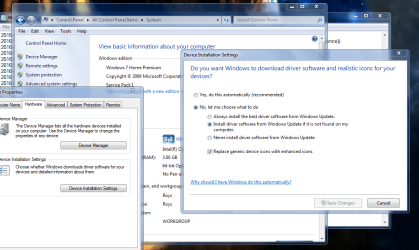
Can you turn OFF driver updates, (see screenshot).
Did you run KB971033 if not please do so and remove any proxy?

Re-enable windows Updates


REBOOT

Pick the oldest update and try it.

Roy
 

Attachments

  • nodrive.PNG
    nodrive.PNG
    85.4 KB · Views: 2

My Computer My Computer

At a glance

W7 home premium 32bit/W7HP 64bit/w10 tp insid...E5300 dual core3gbNvidia Geforce 7100 Nforce 630i
Computer type
PC/Desktop
Computer Manufacturer/Model Number
medionl/Aspire 6930G/acer x55a
OS
W7 home premium 32bit/W7HP 64bit/w10 tp insider ring
CPU
E5300 dual core
Motherboard
medion MS7366
Memory
3gb
Graphics Card(s)
Nvidia Geforce 7100 Nforce 630i
Monitor(s) Displays
avixc
Internet Speed
n (isp resticted to 72)
Antivirus
mse/pands
Browser
palemoon
Other Info
Belkin Fd7050 n USB using Railink RT2870 drivers, more upto date
Hi Roy,

No luck. What next?

I never used a proxy, so there was nothing (really nothing) to turn off (sorry, couldn't resist the allusion)

I installed KB971033 on 2/14/13, according to the hotfix.htm file I generated today.
(One I generated a few weeks ago showed the install date as 2/19/12. Does that matter?)

Services/windows update was set to start manually so I left it alone.

The control panel setting: "do you want windows to download device driver software?"
had been set to "never install from windows update." I changed it to "install from win update if not found on my computer."

I rebooted, turned off windows firewall, malwarebytes and bitdefender virus shield. (Do I need to turn all of these off when updating?)

Launched windows update. Clicked "check for updates." Checking for updates started at 10:29 p.m. Waited 17 minutes and closed windows update. (Have tried many times in the past, didn't record details of each try but checking for updates often produced a list.)

Tried to install KB2479943, which I downloaded with AutoPatcher. (File name: Windows6.1-KB2479943-x64.msu). It had the lowest number in the list of updates I got from AutoPatcher and is from 2011. To install, I double clicked it.

The "Searching for updates on this computer" window appeared at 10:51 p.m. and continued searching for 35 minutes, when I closed wusa.exe process, as hitting cancel in the "search" window did nothing.

I returned all services and settings to what they were before setting up this test.

Thanks so much for your continued help.

Ellen
 

My Computer My Computer

At a glance

Windows Pro 64 biti78gbnvidea
Computer Manufacturer/Model Number
Lenovo Thinkpad W520
OS
Windows Pro 64 bit
CPU
i7
Memory
8gb
Graphics Card(s)
nvidea
Hard Drives
500GB
Case
laptop
It's been a while since anyone answered this. I'm still stuck with an undated version of win7. I'd like to change that and wonder if there's anything else I can try to update my system, short of going to win10 or a clean install.
 

My Computer My Computer

At a glance

Windows Pro 64 biti78gbnvidea
Computer Manufacturer/Model Number
Lenovo Thinkpad W520
OS
Windows Pro 64 bit
CPU
i7
Memory
8gb
Graphics Card(s)
nvidea
Hard Drives
500GB
Case
laptop
Hi Ellen,
can you
Re-Register the Windows Update files


To do this, follow these steps:
  1. Open an administrative Command Prompt window.
  2. At the command prompt, type the following command:
  3. REGSVR32 WUPS2.DLL /S
  4. REGSVR32 WUPS.DLL /S
  5. REGSVR32 WUAUENG.DLL /S
  6. REGSVR32 WUAPI.DLL /S
  7. REGSVR32 WUCLTUX.DLL /S
  8. REGSVR32 WUWEBV.DLL /S
  9. REGSVR32 JSCRIPT.DLL /S
  10. REGSVR32 MSXML3.DLL /S


I believe one of the above is causing/missing from the WU agent.


Roy
 

My Computer My Computer

At a glance

W7 home premium 32bit/W7HP 64bit/w10 tp insid...E5300 dual core3gbNvidia Geforce 7100 Nforce 630i
Computer type
PC/Desktop
Computer Manufacturer/Model Number
medionl/Aspire 6930G/acer x55a
OS
W7 home premium 32bit/W7HP 64bit/w10 tp insider ring
CPU
E5300 dual core
Motherboard
medion MS7366
Memory
3gb
Graphics Card(s)
Nvidia Geforce 7100 Nforce 630i
Monitor(s) Displays
avixc
Internet Speed
n (isp resticted to 72)
Antivirus
mse/pands
Browser
palemoon
Other Info
Belkin Fd7050 n USB using Railink RT2870 drivers, more upto date
Hi Roy,

Thank you for your continued help. I'm finding this so tedious that I have put off working on it. I have many instances of the files you mentioned. Should I register them anyway? Here's what I have on the first four. (Long strings are all different.)
Thanks again for helping me out.

Ellen

WUPS2.DLL /S
not found in system32
5 instances with this path, long string varies
c:\Windows\winsxs\amd64_microsoft-windows-w..wsupdateclient-core….long string

WUPS.DLL /S -
1 instance in system32
1 instance in syswow65
10 instances in c:\Windows\winsxs\amd64_microsoft-windows-w..owsupdateclient-aux….long string

WUAUENG.DLL /S
not found in system32
5 instances in c:\Windows\winsxs\amd64_microsoft-windows-w..owsupdateclient-aux….long string
5 instances of wuaueng.dll.mui

WUAPI.DLL /S –
1 instance in system32
5 in c:\Windows\winsxs\amd64_
2 in c:\Windows\winsxs\x86_
5 in c: windows\winsxs\wow65
7 WUAPI.DLL.mui
 

My Computer My Computer

At a glance

Windows Pro 64 biti78gbnvidea
Computer Manufacturer/Model Number
Lenovo Thinkpad W520
OS
Windows Pro 64 bit
CPU
i7
Memory
8gb
Graphics Card(s)
nvidea
Hard Drives
500GB
Case
laptop

My Computer My Computer

At a glance

W7 home premium 32bit/W7HP 64bit/w10 tp insid...E5300 dual core3gbNvidia Geforce 7100 Nforce 630i
Computer type
PC/Desktop
Computer Manufacturer/Model Number
medionl/Aspire 6930G/acer x55a
OS
W7 home premium 32bit/W7HP 64bit/w10 tp insider ring
CPU
E5300 dual core
Motherboard
medion MS7366
Memory
3gb
Graphics Card(s)
Nvidia Geforce 7100 Nforce 630i
Monitor(s) Displays
avixc
Internet Speed
n (isp resticted to 72)
Antivirus
mse/pands
Browser
palemoon
Other Info
Belkin Fd7050 n USB using Railink RT2870 drivers, more upto date
Back
Top