
win32/Small.CA virus

Sorry to jump in, I know you've run AdwCleaner and RogueKiller. Each application has it's strengths.
Consider running the following malware scanners.

Run one at a time, reporting any findings and the resolution (quarantine, delete, ignore, unable), then run the next one, even if the previous one said it fixed it.

Good luck. I'll step out of the way and let Cottonball direct further actions.

Kaspersky: Anti-rootkit utility TDSSKiller
ESET: Online Scanner
Malwarebytes: Malwarebytes (Mbam)
   Note
When installing Malwarebytes, do NOT elect the free trial of the full version; you only want the free version.

If the on demand scanners report clean, consider running an offline scanner

Microsoft Defender (WDO)
.
 
Last edited:

My Computer

Computer type
Laptop
Computer Manufacturer/Model Number
HP Pavilion dv6-6c10us
OS
x64 (6.3.9600) Win8.1 Pro & soon dual boot x64 (6.1.7601) Win7_SP1 HomePrem
CPU
AMD A6-3420M APU with Radeon(tm) HD Graphics
Motherboard
Hewlett-Packard 1805
Memory
6.00 GB
Graphics Card(s)
AMD Radeon(TM) HD 6520G
Sound Card
(1) AMD High Definition Audio Device (2) IDT High Definiti
Monitor(s) Displays
HP W2072a 20" LCD (1600 x 900) @ 60 Hz
Screen Resolution
1366 x 768 x 32 bits (4294967296 colors) @ 60 Hz
Hard Drives
ST640LM0 00 HM641JI SATA Disk Device
Keyboard
Logitech k520 wireless KB
Mouse
Logitech m320 wireless mouse (bundled with KB)
Internet Speed
15/5 | 54 MB Wireless 'n'
Antivirus
Realtime: Defender or Avast | On-demand: Malwarebytes, ESET
Browser
IE 11 on Win8, IE 10 on win 7
Other Info
Media: [Gimp, Audacity, VLC] || Comm: [WEmail 2012, Skype] || Productivity: [OpenOffice,| Textpad] || Utils: [Sysinternals, cCleaner, Speccy, Defraggler]
JRT Log report

Junkware Removal Tool (JRT) by Thisisu
Version: 4.6.2 (02.02.2013:2)
OS: Windows 7 Home Premium x64
Ran by xxxxxx on 11/02/2013 at 20:12:27.07
~~~~~~~~~~~~~~~~~~~~~~~~~~~~~~~~~~~~~~~~~~~~~~~~~~~~~~~~~~~~~


~~~ Services

~~~ Registry Values
Successfully repaired: [Registry Value] hkey_local_machine\software\microsoft\internet explorer\main\\Start Page

~~~ Registry Keys

~~~ Files

~~~ Folders
Successfully deleted: [Folder] "C:\ProgramData\speedmaxpc"
Successfully deleted: [Folder] "C:\Users\xxxxxx\AppData\Roaming\drivercure"
Successfully deleted: [Folder] "C:\Users\xxxxxx\AppData\Roaming\speedmaxpc"
Successfully deleted: [Folder] "C:\Users\xxxxxx\appdata\locallow\datamngr"
Successfully deleted: [Folder] "C:\Users\xxxxxx\appdata\locallow\searchresultstb"

~~~ Event Viewer Logs were cleared


~~~~~~~~~~~~~~~~~~~~~~~~~~~~~~~~~~~~~~~~~~~~~~~~~~~~~~~~~~~~~
Scan was completed on 11/02/2013 at 20:20:42.49
End of JRT log
~~~~~~~~~~~~~~~~~~~~~~~~~~~~~~~~~~~~~~~~~~~~~~~~~~~~~~~~~~~~~

Cottonball: Ran TFC file and removed 396 files

HALLELUJAH - that nemesis seems to be (dare I say) gone!! The action center doesn't say remove win32/Small.CA virus.

At this point can I confidently feel that my PC is infection free?

To deal with Google Chrome & win. firewall questions, guess I should post to a different category.
Thank you so very much for all your help - it was much appreciated. Will send you more kudos! ;)
 
Last edited:

My Computer

Computer Manufacturer/Model Number
Compaq-Presario
OS
Windows 7 Home Premium 64 bit SP1
CPU
AMD Athlon(tm) II x2 215 Processor
Memory
4.00 GB
Graphics Card(s)
Nividia GeForce 6150SE nForce 430
Monitor(s) Displays
Acer 21.5" - H213H 1920x1080
Hard Drives
466 GB 2 processor cores
Other Info
Avast free|SAS|MBAM pro|Spywareblaster|Spybot|Windows Defender|Windows Firewall
As suggested by Slartybart , let's run the ESET Online Scanner

First, temporarily disable your Anti-Virus.
Info: How To Temporarily Disable Your Anti-virus, Firewall And Anti-malware Programs - BleepingComputer.com

If possible, use Internet Explorer for this scan.

Right-click on the IE icon in the Start Menu and select: Run as Administrator

Go here to run the Scan:
ESET Online Scanner

Accept the Terms of Use, then click on: Start
When prompted, allow the Add-On/Active X to install.

Under Scan Settings, make sure that the option Remove found threats is NOT checked, and the option Scan Archives is checked.

Click on Advanced Settings and select the following:
Scan for potentially unwanted applications
Scan for potentially unsafe applications
Enable Anti-Stealth Technology

Now, click on: Start
The virus signature database begins to download. (This make take some time.)

Next, the Online Scan begins automatically.
Please do not touch the Mouse or keyboard during the scan, otherwise it may stall.

When the scan completes, click: List Threats
Please copy and provide the informationpresented in your reply. (If no malware is found, a list is not presented.)
Click the Back button, and then click the Finish button.

Note: Make sure you re-enable your Anti-Virus!
 

My Computer

Computer type
PC/Desktop
Computer Manufacturer/Model Number
An ol' eMachines
OS
Windows 7 Home Premium
Internet Speed
Fine for me...I'm retired!
Cotton, you can run ESET & Mbam with real time protection active.

WDO boots from CD, so it doesn't come into play.

Just thought I'd make note of that, otherwise... very informative post
 

My Computer

Computer type
Laptop
Computer Manufacturer/Model Number
HP Pavilion dv6-6c10us
OS
x64 (6.3.9600) Win8.1 Pro & soon dual boot x64 (6.1.7601) Win7_SP1 HomePrem
CPU
AMD A6-3420M APU with Radeon(tm) HD Graphics
Motherboard
Hewlett-Packard 1805
Memory
6.00 GB
Graphics Card(s)
AMD Radeon(TM) HD 6520G
Sound Card
(1) AMD High Definition Audio Device (2) IDT High Definiti
Monitor(s) Displays
HP W2072a 20" LCD (1600 x 900) @ 60 Hz
Screen Resolution
1366 x 768 x 32 bits (4294967296 colors) @ 60 Hz
Hard Drives
ST640LM0 00 HM641JI SATA Disk Device
Keyboard
Logitech k520 wireless KB
Mouse
Logitech m320 wireless mouse (bundled with KB)
Internet Speed
15/5 | 54 MB Wireless 'n'
Antivirus
Realtime: Defender or Avast | On-demand: Malwarebytes, ESET
Browser
IE 11 on Win8, IE 10 on win 7
Other Info
Media: [Gimp, Audacity, VLC] || Comm: [WEmail 2012, Skype] || Productivity: [OpenOffice,| Textpad] || Utils: [Sysinternals, cCleaner, Speccy, Defraggler]
Slartybart,

...you can run ESET & Mbam with real time protection active

Seen it done both ways, and every now and then there is a glitch. Rather be safe than sorry...;)
Also, it may go faster.
 

My Computer

Computer type
PC/Desktop
Computer Manufacturer/Model Number
An ol' eMachines
OS
Windows 7 Home Premium
Internet Speed
Fine for me...I'm retired!
Cottonball: After finishing my last post, I never realized that you had another post below.
Being as how after posting that JRT Removal Tool log, and then finding that Action Center was cleared of the removal of win32/small.ca virus entry, guess there is no need to do the Eset scan you recommended now, right? Thanks.

Slartybart: Thank you for offering to help and suggestions to try.
Incidentally for your information, your links to Anti-rootkit utility TDSSKILLER and Malwarebytes (MBAM) also Defender (WDO) - when clicked came up as "Address is Invalid".
Thanks.
 

My Computer

Computer Manufacturer/Model Number
Compaq-Presario
OS
Windows 7 Home Premium 64 bit SP1
CPU
AMD Athlon(tm) II x2 215 Processor
Memory
4.00 GB
Graphics Card(s)
Nividia GeForce 6150SE nForce 430
Monitor(s) Displays
Acer 21.5" - H213H 1920x1080
Hard Drives
466 GB 2 processor cores
Other Info
Avast free|SAS|MBAM pro|Spywareblaster|Spybot|Windows Defender|Windows Firewall
veegee,

If I understand you correctly, the win32/small.ca Action Center reminder was gone after you ran JRT?
If so, there must have been some remnant hanging on, and JRT got rid of it. Good job!

On ESET, it would be a good idea to run it, and then let us know what its results are in: List Threats

It is best to get another confirmation that there is nothing in the system to be concerned about. Scanners have different definitions they look for, so, what one does not pick up, another one may...;)
 

My Computer

Computer type
PC/Desktop
Computer Manufacturer/Model Number
An ol' eMachines
OS
Windows 7 Home Premium
Internet Speed
Fine for me...I'm retired!
veegee, great news, thanks for posting back

if you're satisfied that this issue is fixed, please mark the thread as solved. You might wait a day or two

Kudos!

Fixed the links in my post, sorry folks.
- that's what ya get when you try something new (post templates, then edit)
 

My Computer

Computer type
Laptop
Computer Manufacturer/Model Number
HP Pavilion dv6-6c10us
OS
x64 (6.3.9600) Win8.1 Pro & soon dual boot x64 (6.1.7601) Win7_SP1 HomePrem
CPU
AMD A6-3420M APU with Radeon(tm) HD Graphics
Motherboard
Hewlett-Packard 1805
Memory
6.00 GB
Graphics Card(s)
AMD Radeon(TM) HD 6520G
Sound Card
(1) AMD High Definition Audio Device (2) IDT High Definiti
Monitor(s) Displays
HP W2072a 20" LCD (1600 x 900) @ 60 Hz
Screen Resolution
1366 x 768 x 32 bits (4294967296 colors) @ 60 Hz
Hard Drives
ST640LM0 00 HM641JI SATA Disk Device
Keyboard
Logitech k520 wireless KB
Mouse
Logitech m320 wireless mouse (bundled with KB)
Internet Speed
15/5 | 54 MB Wireless 'n'
Antivirus
Realtime: Defender or Avast | On-demand: Malwarebytes, ESET
Browser
IE 11 on Win8, IE 10 on win 7
Other Info
Media: [Gimp, Audacity, VLC] || Comm: [WEmail 2012, Skype] || Productivity: [OpenOffice,| Textpad] || Utils: [Sysinternals, cCleaner, Speccy, Defraggler]
Don't send veegee off yet!!

Need to run ESET...;)
 

My Computer

Computer type
PC/Desktop
Computer Manufacturer/Model Number
An ol' eMachines
OS
Windows 7 Home Premium
Internet Speed
Fine for me...I'm retired!
ok, thought you were done. this is your show cotton.

veegee, please continue to follow the advice and cousel of cottonball
 

My Computer

Computer type
Laptop
Computer Manufacturer/Model Number
HP Pavilion dv6-6c10us
OS
x64 (6.3.9600) Win8.1 Pro & soon dual boot x64 (6.1.7601) Win7_SP1 HomePrem
CPU
AMD A6-3420M APU with Radeon(tm) HD Graphics
Motherboard
Hewlett-Packard 1805
Memory
6.00 GB
Graphics Card(s)
AMD Radeon(TM) HD 6520G
Sound Card
(1) AMD High Definition Audio Device (2) IDT High Definiti
Monitor(s) Displays
HP W2072a 20" LCD (1600 x 900) @ 60 Hz
Screen Resolution
1366 x 768 x 32 bits (4294967296 colors) @ 60 Hz
Hard Drives
ST640LM0 00 HM641JI SATA Disk Device
Keyboard
Logitech k520 wireless KB
Mouse
Logitech m320 wireless mouse (bundled with KB)
Internet Speed
15/5 | 54 MB Wireless 'n'
Antivirus
Realtime: Defender or Avast | On-demand: Malwarebytes, ESET
Browser
IE 11 on Win8, IE 10 on win 7
Other Info
Media: [Gimp, Audacity, VLC] || Comm: [WEmail 2012, Skype] || Productivity: [OpenOffice,| Textpad] || Utils: [Sysinternals, cCleaner, Speccy, Defraggler]
Cottonball:
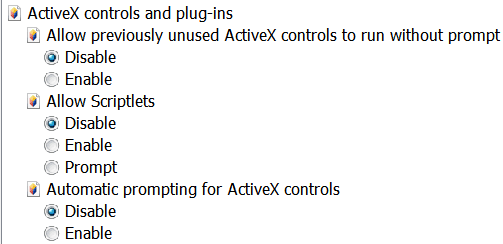
Eset wants Active x but I get no 'prompt' to let it on, just info on the info bar (when clicked on it).
Capture.PNG

Do I just enable the active-x here and when I'm done downloading Eset, then disable it again? Is this the proper location here to do this?
 

My Computer

Computer Manufacturer/Model Number
Compaq-Presario
OS
Windows 7 Home Premium 64 bit SP1
CPU
AMD Athlon(tm) II x2 215 Processor
Memory
4.00 GB
Graphics Card(s)
Nividia GeForce 6150SE nForce 430
Monitor(s) Displays
Acer 21.5" - H213H 1920x1080
Hard Drives
466 GB 2 processor cores
Other Info
Avast free|SAS|MBAM pro|Spywareblaster|Spybot|Windows Defender|Windows Firewall
Cottonball:

Ran the scan for Eset and results were: 0 infections

Checked into Action Center Archives and there was a date along side of win32/Small.Ca virus for Feb.5 which is also the date that I uninstalled Easy Burner, so maybe that's where I got the virus.

Would you mind answering a couple of questions for me please:
1. After running ADWcleaner, it had said to enable detection of PUPs in your antivirus. Is there a reason that Avast has it disabled by default or would it present a problem somehow to enable it?
2. Because of the problem with Google Chrome, should I be uninstalling and re-installing it?

Action Center no longer reports Win32/Small.ca -- I think that it was after the JRT scan.

Would you consider my PC clean and free of this infection now?

Thank you so much for your help - very much appreciated.
 

My Computer

Computer Manufacturer/Model Number
Compaq-Presario
OS
Windows 7 Home Premium 64 bit SP1
CPU
AMD Athlon(tm) II x2 215 Processor
Memory
4.00 GB
Graphics Card(s)
Nividia GeForce 6150SE nForce 430
Monitor(s) Displays
Acer 21.5" - H213H 1920x1080
Hard Drives
466 GB 2 processor cores
Other Info
Avast free|SAS|MBAM pro|Spywareblaster|Spybot|Windows Defender|Windows Firewall
The detection of PUPs is disabled in avast! by default, but, if you wish to enable it, that is fine.
If it becomes a nuisance, you can always disable it.

On Chrome, you can try uninstalling and re-installing, and see how it goes.
However, you may also want to post the issue in the Browsers & Mail - Windows 7 Support Forums
Someone with experience in troubleshooting Chrome may assist you there.
I have not used the Chrome browser very often, and don't want to mislead you.

ESET found no infections, we have checked this and that, and the win32/Small.Ca virus notice is gone, so, yes, we have a reasonable assurance that the computer is clean. If not, you can come back and...

...shoot me!!
 

My Computer

Computer type
PC/Desktop
Computer Manufacturer/Model Number
An ol' eMachines
OS
Windows 7 Home Premium
Internet Speed
Fine for me...I'm retired!
win32/small.ca

Cottonball:
Would never..ever do that!! :D Because I hope that if ever I have this misfortune again, you will be my helper.
Seriously, the way you outline your instructions in very understandable terms and your helpfulness is the greatest! Eases the stress of the whole process when explained so well, but it was an education and do sincerely thank you for your help. "Happy Problem Solving"
 

My Computer

Computer Manufacturer/Model Number
Compaq-Presario
OS
Windows 7 Home Premium 64 bit SP1
CPU
AMD Athlon(tm) II x2 215 Processor
Memory
4.00 GB
Graphics Card(s)
Nividia GeForce 6150SE nForce 430
Monitor(s) Displays
Acer 21.5" - H213H 1920x1080
Hard Drives
466 GB 2 processor cores
Other Info
Avast free|SAS|MBAM pro|Spywareblaster|Spybot|Windows Defender|Windows Firewall
Thanks for the kind words.

Take care!!
 

My Computer

Computer type
PC/Desktop
Computer Manufacturer/Model Number
An ol' eMachines
OS
Windows 7 Home Premium
Internet Speed
Fine for me...I'm retired!
You guys are the bomb! Had this same Malware and ran JRT and that removed it. That was it, just JRT. I had ran Malwarebytes and two other cleaners and they found nothing, JRT did the trick. No more white flag in the action center telling me I am infected with the win32/small.ca. Now if I could only figure out where it came from. This happen only a couple weeks after a clean install. I will have to backtrack my installs and see if I can figure it out. Again, Thank you so much to all of you!
 

My Computer

OS
Windows 7 64 Home
CPU
i5 2500k
Motherboard
Biostar TZ68A+
Memory
2 X 8 GB 2133
Graphics Card(s)
ATI HD 6570
Sound Card
ASUS Zonar DG
Monitor(s) Displays
Samsung 23"
Hard Drives
2 500 GB Seagate SATA 300 Raid 0
PSU
750 Watt Corsair
radman3d,

Now if I could only figure out where it came from.

When JRT is done, a report (JRT.txt) is saved on the Desktop.
If you post the contents of JRT.txt in your reply, we might find the source...
 

My Computer

Computer type
PC/Desktop
Computer Manufacturer/Model Number
An ol' eMachines
OS
Windows 7 Home Premium
Internet Speed
Fine for me...I'm retired!
Back
Top