
Win7 32-bit slow (what am I doing wrong?)?

scottls59901

New member
Member
VIP
Local time
11:42 AM
Messages
114
Please don't reply if you don't have 32-bit!-
I have a fast I5-6600 processor, Gigabyte MB, 100mbps cable internet, latest Samsung SSD, 4 gig of DDR4 memory (wish they made 2gb DDR4, so I could use dual channels!).


My usual startup/restart procedure-
I don't move my cursor until 11min after startup (on 1st cold startup it takes over 1hr to load, and IE11 browser... is unusable).
I then have to reboot 3 more times (1hr each, until SSD stops burping..., and system settles down).
So its after supper, until I can surf...


Win7 has been slow since Win10 came out, and I'm going to upgrade if I can't figure out a better way...!?
I have friends with Win10, and it's Much faster!
 

My Computer My Computer

Computer Manufacturer/Model Number
ZT Desktop
OS
Windows 7 Pro (32)
CPU
i7/2600
Motherboard
Intel
Memory
4gb
Graphics Card(s)
512mg (add on card was less buggy than Intel direct driver)
Sound Card
Internal
Monitor(s) Displays
19" DELL Ultra Sharp
Hard Drives
C:= WD Raptor Sata6 10k rpm
D:/E:= WD Black Sata 3.0
Case
ZT Full
Cooling
ZT
Internet Speed
8000kbps cable
Other Info
Free Outpost Pro Internet Security, and no other active anti-malware.
Free On-Demand- SpyWareBlaster, MBAM, Emsisoft-Kit, and Kaspersky Anti-rootkit utility TDSSKiller.
Something wrong there it could be anything is it the same in safe mode did you install it to ssd or copy it as 7 needs special settings for ssd. It's back to basic like running a full disk check checking for disk firmware update running sfc /scannow check what's running at start. With SSD you would expect startup to be 15-25 seconds
 

My Computer My Computer

Computer type
PC/Desktop
OS
win 8 32 bit
Hi Scott,

lets get IE11 outa the way for starters, (take it you use another browser)

Control panel >> Programs/Features >> Features (top left)
A small panel will open UNcheck IE11 >> Reboot.

any improvement??

AS it takes so long to get up and running, might as well slip in a couple of other repair jobs
Run SURT, KB947821 - considering you problems it could take a couple of hours
https://www.google.com/url?sa=t&rct...aspx?id=3132&usg=AOvVaw37L0snNUykOwvoLaaEBcoV

and set up a disk check. from a admin command prompt chkdsk /r
chkdsk, will run after reboot


Roy
 

My Computer My Computer

Computer type
PC/Desktop
Computer Manufacturer/Model Number
medionl/Aspire 6930G/acer x55a
OS
W7 home premium 32bit/W7HP 64bit/w10 tp insider ring
CPU
E5300 dual core
Motherboard
medion MS7366
Memory
3gb
Graphics Card(s)
Nvidia Geforce 7100 Nforce 630i
Monitor(s) Displays
avixc
Internet Speed
n (isp resticted to 72)
Antivirus
mse/pands
Browser
palemoon
Other Info
Belkin Fd7050 n USB using Railink RT2870 drivers, more upto date
Please don't reply if you don't have 32-bit!-
I have a fast I5-6600 processor, Gigabyte MB, 100mbps cable internet, latest Samsung SSD, 4 gig of DDR4 memory (wish they made 2gb DDR4, so I could use dual channels!).


what Gigabyte board do you have, scottls59901?
use Speccy to gather more accurate hardware specs as "latest Samsung SSD" seems vague
 

My Computer My Computer

Computer type
PC/Desktop
Computer Manufacturer/Model Number
Dell Inspiron 620
OS
Windows 7 SP1 Home Premium 64bit [x64]
CPU
Intel(R) Core(TM) i5-2310 CPU @ 2.90GHz
Memory
6 GB
Graphics Card(s)
Intel HD Graphics 2000
Sound Card
Conexant CX20641 HD Audio
Hard Drives
Western Digital 1TB (1024GB) WD10EALX-759BA1
Internet Speed
Spectrum Cable Internet up to 100Mbps
Have you tried a clean boot to try to pinpoint what's causing the problem?

For starters, run msconfig.exe. In the Startup tab, check the box to disable all. Reboot. Does that help?

If not, run msconfig.exe again and, in the Services tab, check the box to "hide all microsoft" and then the box to disable all. Reboot.
 

My Computer My Computer

Computer type
Laptop
Computer Manufacturer/Model Number
Dell M6500 Precision Work Station
OS
Windows 7 Pro SP1 64 bit
Memory
8 GB
Screen Resolution
1920x
Internet Speed
30 Mbps
Antivirus
Norton Security
Browser
IE 11
what Gigabyte board do you have, scottls59901?
use Speccy to gather more accurate hardware specs as "latest Samsung SSD" seems vague
Samsung 860EVO SSD


indexing/hibernate disabled
I've also run sfc/regular chkdsk
 

My Computer My Computer

Computer Manufacturer/Model Number
ZT Desktop
OS
Windows 7 Pro (32)
CPU
i7/2600
Motherboard
Intel
Memory
4gb
Graphics Card(s)
512mg (add on card was less buggy than Intel direct driver)
Sound Card
Internal
Monitor(s) Displays
19" DELL Ultra Sharp
Hard Drives
C:= WD Raptor Sata6 10k rpm
D:/E:= WD Black Sata 3.0
Case
ZT Full
Cooling
ZT
Internet Speed
8000kbps cable
Other Info
Free Outpost Pro Internet Security, and no other active anti-malware.
Free On-Demand- SpyWareBlaster, MBAM, Emsisoft-Kit, and Kaspersky Anti-rootkit utility TDSSKiller.
Have you run the samsung util to check for firmware update and to get settings right. What does th drive benchmark at
 

My Computer My Computer

Computer type
PC/Desktop
OS
win 8 32 bit
Just wanted to mention that the "latest" is the Samsung 960 EVO or 960 EVO Pro. Actually, I think the latest is the Samsung NVME which is supposed to perform as well as the Intel Optane but the price is exorbitant.

He didn't mention if he tried the clean boot efforts.
 
Last edited:

My Computer My Computer

Computer type
Laptop
Computer Manufacturer/Model Number
Dell M6500 Precision Work Station
OS
Windows 7 Pro SP1 64 bit
Memory
8 GB
Screen Resolution
1920x
Internet Speed
30 Mbps
Antivirus
Norton Security
Browser
IE 11
Hi Scott,

and set up a disk check. from a admin command prompt chkdsk /r
chkdsk, will run after reboot


Roy
Hey Roy:
Thanks for the info...!
Q?- Is chkdsk /r as admin, the same as regular chkdsk with the recover option (I've already run that)?
Scott
 

My Computer My Computer

Computer Manufacturer/Model Number
ZT Desktop
OS
Windows 7 Pro (32)
CPU
i7/2600
Motherboard
Intel
Memory
4gb
Graphics Card(s)
512mg (add on card was less buggy than Intel direct driver)
Sound Card
Internal
Monitor(s) Displays
19" DELL Ultra Sharp
Hard Drives
C:= WD Raptor Sata6 10k rpm
D:/E:= WD Black Sata 3.0
Case
ZT Full
Cooling
ZT
Internet Speed
8000kbps cable
Other Info
Free Outpost Pro Internet Security, and no other active anti-malware.
Free On-Demand- SpyWareBlaster, MBAM, Emsisoft-Kit, and Kaspersky Anti-rootkit utility TDSSKiller.
Hi Scott,

Yep it is,

Did the IE11 removal help??

Roy
 

My Computer My Computer

Computer type
PC/Desktop
Computer Manufacturer/Model Number
medionl/Aspire 6930G/acer x55a
OS
W7 home premium 32bit/W7HP 64bit/w10 tp insider ring
CPU
E5300 dual core
Motherboard
medion MS7366
Memory
3gb
Graphics Card(s)
Nvidia Geforce 7100 Nforce 630i
Monitor(s) Displays
avixc
Internet Speed
n (isp resticted to 72)
Antivirus
mse/pands
Browser
palemoon
Other Info
Belkin Fd7050 n USB using Railink RT2870 drivers, more upto date
Hi Scott,

Yep it is,

Did the IE11 removal help??

Roy
Hey Roy:
I only have IE11, so I can't remove it- I tried Opera (Awful!) & Firefox (Too many Security updates).
I will install Chrome after I get SURT to clean up my system...
I should have installed SURT Now from link, but I saved it to a desktop folder/installed later. It hasn't shown yet (maybe because Sat & Sun... ?), and I'm not sure about installing it from the link again (212mb)?
Scott
 

My Computer My Computer

Computer Manufacturer/Model Number
ZT Desktop
OS
Windows 7 Pro (32)
CPU
i7/2600
Motherboard
Intel
Memory
4gb
Graphics Card(s)
512mg (add on card was less buggy than Intel direct driver)
Sound Card
Internal
Monitor(s) Displays
19" DELL Ultra Sharp
Hard Drives
C:= WD Raptor Sata6 10k rpm
D:/E:= WD Black Sata 3.0
Case
ZT Full
Cooling
ZT
Internet Speed
8000kbps cable
Other Info
Free Outpost Pro Internet Security, and no other active anti-malware.
Free On-Demand- SpyWareBlaster, MBAM, Emsisoft-Kit, and Kaspersky Anti-rootkit utility TDSSKiller.
Hi Scott,

No need to download again, just run it.

I myself use Palemoon & Waterfox, both also available as 32 bit portable run on a USB.
Your going to need another browser after W7 goes EOL

Did sfc /scannow fix anything

Roy
 

My Computer My Computer

Computer type
PC/Desktop
Computer Manufacturer/Model Number
medionl/Aspire 6930G/acer x55a
OS
W7 home premium 32bit/W7HP 64bit/w10 tp insider ring
CPU
E5300 dual core
Motherboard
medion MS7366
Memory
3gb
Graphics Card(s)
Nvidia Geforce 7100 Nforce 630i
Monitor(s) Displays
avixc
Internet Speed
n (isp resticted to 72)
Antivirus
mse/pands
Browser
palemoon
Other Info
Belkin Fd7050 n USB using Railink RT2870 drivers, more upto date
Hi Scott,

No need to download again, just run it.

I myself use Palemoon & Waterfox, both also available as 32 bit portable run on a USB.
Your going to need another browser after W7 goes EOL

Did sfc /scannow fix anything

Roy

Hey Roy:
sfc /scannow didn't find anything, and SURT never did show up?
I'm wondering if it's my BD Internet Security that's slowing/goofing things up?- It's in the cloud (hate in the cloud!), I have 100mbps cable internet, but it's still slow to load...
I tried Norton IS, and Mcafee, but didn't like them!


I prefer a 2-way firewall!- Is there an IS that you recommend?
Scott
 

My Computer My Computer

Computer Manufacturer/Model Number
ZT Desktop
OS
Windows 7 Pro (32)
CPU
i7/2600
Motherboard
Intel
Memory
4gb
Graphics Card(s)
512mg (add on card was less buggy than Intel direct driver)
Sound Card
Internal
Monitor(s) Displays
19" DELL Ultra Sharp
Hard Drives
C:= WD Raptor Sata6 10k rpm
D:/E:= WD Black Sata 3.0
Case
ZT Full
Cooling
ZT
Internet Speed
8000kbps cable
Other Info
Free Outpost Pro Internet Security, and no other active anti-malware.
Free On-Demand- SpyWareBlaster, MBAM, Emsisoft-Kit, and Kaspersky Anti-rootkit utility TDSSKiller.
Hi Scott,

If you ran it there will be a log here

C >> Windows >> logs >> CBS .. checksur

copy/paste it if present.

Only use the standard MS firewall

If you think BD is causing a problem dissable it, does IE load any quicker.

IF NO please install another browser then uninstall IE11.


Roy
 

My Computer My Computer

Computer type
PC/Desktop
Computer Manufacturer/Model Number
medionl/Aspire 6930G/acer x55a
OS
W7 home premium 32bit/W7HP 64bit/w10 tp insider ring
CPU
E5300 dual core
Motherboard
medion MS7366
Memory
3gb
Graphics Card(s)
Nvidia Geforce 7100 Nforce 630i
Monitor(s) Displays
avixc
Internet Speed
n (isp resticted to 72)
Antivirus
mse/pands
Browser
palemoon
Other Info
Belkin Fd7050 n USB using Railink RT2870 drivers, more upto date
Hi Scott,

If you ran it there will be a log here

C >> Windows >> logs >> CBS .. checksur

copy/paste it if present.

Only use the standard MS firewall

If you think BD is causing a problem dissable it, does IE load any quicker.

IF NO please install another browser then uninstall IE11.


Roy
Hey Roy:
Re: Just run SURT (KB947821)- is a Windows update, when I ran/installed it from a desktop folder, it was supposed to appear in a later check for updates, but it never did? It wouldn't surprise me if MS disabled it to help force Win 10...?


RE: Only use the standard MS firewall- Prior to BD, I was using the useless MS AV, and somehow my IE11 Google browser got hacked/hijacked...? Installed BD, changed my PW, and browser is now secure.
Could also be that IE11 is a hackers delight? Chrome could be more secure?


I have been looking at Trend Micro AV that just uses the Win FW- It gets good reviews, other than many FP's, and deletes lots of suspicious programs/files. I have several old XP programs installed (my reason for 32-bit), that I feel it wouldn't recognize...!?
 

My Computer My Computer

Computer Manufacturer/Model Number
ZT Desktop
OS
Windows 7 Pro (32)
CPU
i7/2600
Motherboard
Intel
Memory
4gb
Graphics Card(s)
512mg (add on card was less buggy than Intel direct driver)
Sound Card
Internal
Monitor(s) Displays
19" DELL Ultra Sharp
Hard Drives
C:= WD Raptor Sata6 10k rpm
D:/E:= WD Black Sata 3.0
Case
ZT Full
Cooling
ZT
Internet Speed
8000kbps cable
Other Info
Free Outpost Pro Internet Security, and no other active anti-malware.
Free On-Demand- SpyWareBlaster, MBAM, Emsisoft-Kit, and Kaspersky Anti-rootkit utility TDSSKiller.
Hi Scott,

SURT does not appear in installed updates, its a run once application KB.
Can i see the log from it.

Install another Browser, remove IE11.
REBOOT and then run the prog below

Ah new info so you suspect you were infected, makes a lot of difference.
Are you sure its been totally removed!!!!
run this tool i'll give it a once over
POST BOTH LOGS
Downloading Farbar Recovery Scan Tool

After W7 EOL IE11 will become a hackers delight, it wont be updated.


Roy
 

My Computer My Computer

Computer type
PC/Desktop
Computer Manufacturer/Model Number
medionl/Aspire 6930G/acer x55a
OS
W7 home premium 32bit/W7HP 64bit/w10 tp insider ring
CPU
E5300 dual core
Motherboard
medion MS7366
Memory
3gb
Graphics Card(s)
Nvidia Geforce 7100 Nforce 630i
Monitor(s) Displays
avixc
Internet Speed
n (isp resticted to 72)
Antivirus
mse/pands
Browser
palemoon
Other Info
Belkin Fd7050 n USB using Railink RT2870 drivers, more upto date
Hi Scott,

SURT does not appear in installed updates, its a run once application KB.
Can i see the log from it.

Install another Browser, remove IE11.
REBOOT and then run the prog below

Ah new info so you suspect you were infected, makes a lot of difference.
Are you sure its been totally removed!!!!
run this tool i'll give it a once over
POST BOTH LOGS
Downloading Farbar Recovery Scan Tool

After W7 EOL IE11 will become a hackers delight, it wont be updated.


Roy
Hey Roy:
IE gave a warning message while "trying" to download Farbar- Saying it is not commonly downloaded, and may harm your computer- I'll pass as I have also run on-demand scans with MBAM&/Rootkit.


Here is checksur log-

=================================
Checking System Update Readiness.
Binary Version 6.1.7601.22471
Package Version 26.0
2019-07-26 20:13
Checking Windows Servicing Packages
Checking Package Manifests and Catalogs
Checking Package Watchlist
Checking Component Watchlist
Checking Packages
Checking Component Store
Summary:
Seconds executed: 59
No errors detected


-When installing Windows Updates, I no longer get an Updates were installed/View msg (check for update problems..., detected no errors).


-When I install Win updates, and it does a shutdown, how long should I wait before restarting (I usually wait 8min)?
 

My Computer My Computer

Computer Manufacturer/Model Number
ZT Desktop
OS
Windows 7 Pro (32)
CPU
i7/2600
Motherboard
Intel
Memory
4gb
Graphics Card(s)
512mg (add on card was less buggy than Intel direct driver)
Sound Card
Internal
Monitor(s) Displays
19" DELL Ultra Sharp
Hard Drives
C:= WD Raptor Sata6 10k rpm
D:/E:= WD Black Sata 3.0
Case
ZT Full
Cooling
ZT
Internet Speed
8000kbps cable
Other Info
Free Outpost Pro Internet Security, and no other active anti-malware.
Free On-Demand- SpyWareBlaster, MBAM, Emsisoft-Kit, and Kaspersky Anti-rootkit utility TDSSKiller.
Hi Scott,

That tool, Farbar, is the tool of choice for all the Security Analysts at BleepingComputers - have look:D:D.
Its been downloaded over 4 million times
The IE warning is a false positive

SURT results are good, which likely means a third party program problem is causing your issues or malware.
Ignore the warning and post the results.

As for the shutdown/restart time do it straight away processing is done either side of it.


Roy
 

My Computer My Computer

Computer type
PC/Desktop
Computer Manufacturer/Model Number
medionl/Aspire 6930G/acer x55a
OS
W7 home premium 32bit/W7HP 64bit/w10 tp insider ring
CPU
E5300 dual core
Motherboard
medion MS7366
Memory
3gb
Graphics Card(s)
Nvidia Geforce 7100 Nforce 630i
Monitor(s) Displays
avixc
Internet Speed
n (isp resticted to 72)
Antivirus
mse/pands
Browser
palemoon
Other Info
Belkin Fd7050 n USB using Railink RT2870 drivers, more upto date
Hi Scott,

That tool, Farbar, is the tool of choice for all the Security Analysts at BleepingComputers - have look:D:D.
Its been downloaded over 4 million times
The IE warning is a false positive

SURT results are good, which likely means a third party program problem is causing your issues or malware.
Ignore the warning and post the results.

As for the shutdown/restart time do it straight away processing is done either side of it.


Roy
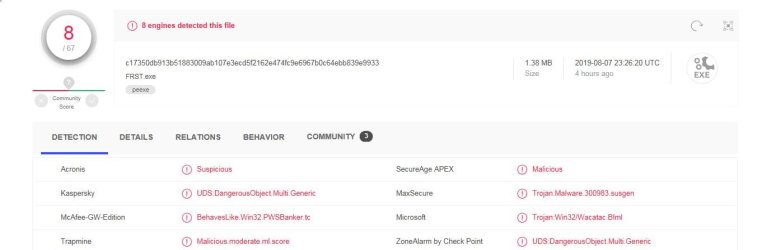
Hey Roy I downloaded Farbar, and scanned it with Virustotal.(see attached .jpg).
It may be OK, but I'll pass on running it?
 

Attachments

  • FarbarBad.JPG
    FarbarBad.JPG
    45 KB · Views: 2

My Computer My Computer

Computer Manufacturer/Model Number
ZT Desktop
OS
Windows 7 Pro (32)
CPU
i7/2600
Motherboard
Intel
Memory
4gb
Graphics Card(s)
512mg (add on card was less buggy than Intel direct driver)
Sound Card
Internal
Monitor(s) Displays
19" DELL Ultra Sharp
Hard Drives
C:= WD Raptor Sata6 10k rpm
D:/E:= WD Black Sata 3.0
Case
ZT Full
Cooling
ZT
Internet Speed
8000kbps cable
Other Info
Free Outpost Pro Internet Security, and no other active anti-malware.
Free On-Demand- SpyWareBlaster, MBAM, Emsisoft-Kit, and Kaspersky Anti-rootkit utility TDSSKiller.
Hi Scott,

Thats a shame, it really is SAFE.
The reason its flagged is that it uses the highest privilages.
As i said its the tool of choice - its even used on the Malwarebytes security forum - check it out.

Lets try a purely info tool - ignore the title it provides a great deal of info
Blue Screen of Death (BSOD) Posting Instructions


Can you confirm if your still only running IE.


Roy
 

My Computer My Computer

Computer type
PC/Desktop
Computer Manufacturer/Model Number
medionl/Aspire 6930G/acer x55a
OS
W7 home premium 32bit/W7HP 64bit/w10 tp insider ring
CPU
E5300 dual core
Motherboard
medion MS7366
Memory
3gb
Graphics Card(s)
Nvidia Geforce 7100 Nforce 630i
Monitor(s) Displays
avixc
Internet Speed
n (isp resticted to 72)
Antivirus
mse/pands
Browser
palemoon
Other Info
Belkin Fd7050 n USB using Railink RT2870 drivers, more upto date
Back
Top