
Hello everyone! Please let me tell you about the problem I've been having with my new PC.
Most tasks / applications eventually begin to “hang” or not respond. This usually begins happening less than ten minutes after booting. Sometimes, if I wait for awhile, the system will “catch up” when running lite-weight tasks such as Google Chrome, but for a more resource-intensive task such as running a Windows backup session, the task will hang indefinitely. Ctrl + Alt + Delete will usually not bring up the option to enable Task Manager, but if it does, Task Manager will generally not work to end the unstable processes.
It seems like this system is too powerful for these kind of problems, but I don’t know what to do to fix it. This is the first time that I’ve assembled a PC by myself, and I’m a novice at best when it comes to tuning / tweaking a Windows OS, adjusting BIOS settings, and general problem-solving on a powerful PC system. I need detailed help to isolate and diagnose the problem.
System Notes:
OS: Windows 7 Professional 64-bit SP1 OEM
Windows 7 settings:
Virus protection: Norton Internet Security 2013
CPU: Intel Core i7-3930K Sandy Bridge-E 3.2GHz
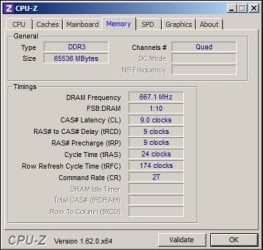
RAM: G.SKILL Ripjaws Z Series 64GB 2133 (PC3 17000)
MOBO: ASUS Sabertooth X79 LGA 2011 Intel X79
Graphics card: EVGA GEFORCE GTX 680 (4GB GDDR5 1084MHz)
OS Hard Drive: 120GB SSD Corsair Neutron Series GTX / SATA III
Most tasks / applications eventually begin to “hang” or not respond. This usually begins happening less than ten minutes after booting. Sometimes, if I wait for awhile, the system will “catch up” when running lite-weight tasks such as Google Chrome, but for a more resource-intensive task such as running a Windows backup session, the task will hang indefinitely. Ctrl + Alt + Delete will usually not bring up the option to enable Task Manager, but if it does, Task Manager will generally not work to end the unstable processes.
It seems like this system is too powerful for these kind of problems, but I don’t know what to do to fix it. This is the first time that I’ve assembled a PC by myself, and I’m a novice at best when it comes to tuning / tweaking a Windows OS, adjusting BIOS settings, and general problem-solving on a powerful PC system. I need detailed help to isolate and diagnose the problem.
System Notes:
OS: Windows 7 Professional 64-bit SP1 OEM
Update status: All updates & patches installed as of 5/26/2013Windows 7 settings:
-Turned off Hibernation to free up disk space on OS boot disk equal to the size of RAM
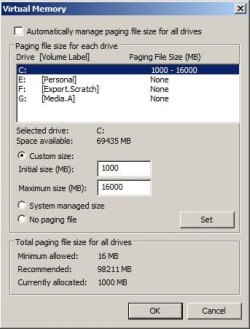
-Static pagefile of at least 1 GB, but no more than 16 GB
-I turned off certain Windows Features: (see attached screenshot)
-I turned off certain Windows Services: (see attached screenshot)Virus protection: Norton Internet Security 2013
Update status: Latest version installed and all virus definitions are up-to-date.CPU: Intel Core i7-3930K Sandy Bridge-E 3.2GHz
RAM: G.SKILL Ripjaws Z Series 64GB 2133 (PC3 17000)
MOBO: ASUS Sabertooth X79 LGA 2011 Intel X79
Graphics card: EVGA GEFORCE GTX 680 (4GB GDDR5 1084MHz)
OS Hard Drive: 120GB SSD Corsair Neutron Series GTX / SATA III
- Drive has had one install of Windows 7 previously. One day it started “hanging” indefinitely at the login screen
- I was not able to recover from the install disc. I used a HD disc docking station and a laptop running Windows XP 32-bit (Professional Ver 5.1 SP3) to run Disk Management to write “all 0s” to the SSD.
- I then re-installed Windows 7 to the SSD, and installed all patches and updates.
Attachments


My Computer
At a glance
Windows 7 Professional 64-bitIntel Core i7-3930K Sandy Bridge-E 3.2GHzG.SKILL Ripjaws Z Series 64GB 2133 (PC3 17000...EVGA GEFORCE GTX 680 / 4GB GDDR5
- Computer type
- PC/Desktop
- Computer Manufacturer/Model Number
- Custom build
- OS
- Windows 7 Professional 64-bit
- CPU
- Intel Core i7-3930K Sandy Bridge-E 3.2GHz
- Motherboard
- ASUS Sabertooth X79 LGA 2011 Intel X79
- Memory
- G.SKILL Ripjaws Z Series 64GB 2133 (PC3 17000) Model F3-1700
- Graphics Card(s)
- EVGA GEFORCE GTX 680 / 4GB GDDR5
- Monitor(s) Displays
- (2) 21.5" SAMSUNG B350 Series S22B350H LED monitors
- Screen Resolution
- 1920 x 1080
- Hard Drives
- O.S. & APPS: 120GB SSD Corsair Neutron Series GTX (CSSD-N120GBGTX-BK) 2.5" SATA III
VIDEO MEDIA: (4) 1TB drives in RAID 0 - 1TB Seagate Barracuda (ST1000DM003) 7200 RPM SATA 6.0Gb/s 3.5"
PERSONAL DRIVE: 1TB Seagate Barracuda (ST1000DM003) 72
- PSU
- CORSAIR Professional Series Gold AX1200 (CMPSU-1200AX)
- Case
- COOLER MASTER HAF X (RC-942-KKN1)
- Cooling
- CORSAIR Hydro series H100 High Performance CPU Cooler
- Keyboard
- Logitech K800
- Mouse
- Kensington K64325 trackball mouse
- Internet Speed
- 2.6 MBPS DL / .43 MBPS UL
- Antivirus
- Norton Internet Security 2013
- Browser
- Google Chrome Version 27.0.1453.94 m

 Let us know how it goes.