Win7 64 bit Wireless Drops - Rest of network fine

dwd84

New member
Local time
2:56 AM
Messages
2
Was wondering if anyone has an idea of what may be happening. Everything was working fine then this happened out of no where one day. I am on a Windows 7 64 bit machine using wireless. Linksys WRT350N Router all of the other computers on the network are working perfectly fine. I have tried 2 different wireless adapters.

The internet will stay for a few minutes then cutout for about a minute. I have been running ping tests side by side one going to the internet the other going to my router.
The router is constant connection no interruptions the internet cuts out as stated before.

Anyone have any suggestions? Thanks.
 

My Computer My Computer

At a glance

Windows 7 64-Bit
OS
Windows 7 64-Bit
Was wondering if anyone has an idea of what may be happening. Everything was working fine then this happened out of no where one day. I am on a Windows 7 64 bit machine using wireless. Linksys WRT350N Router all of the other computers on the network are working perfectly fine. I have tried 2 different wireless adapters.

The internet will stay for a few minutes then cutout for about a minute. I have been running ping tests side by side one going to the internet the other going to my router.
The router is constant connection no interruptions the internet cuts out as stated before.

Anyone have any suggestions? Thanks.

It could be a channel crossover problem or something else but this is difficult to just guess at because it can be many different problems.

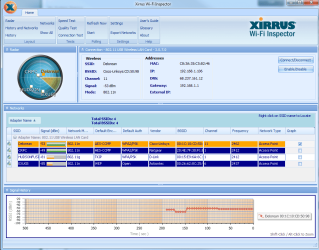
If you can download the Xirrus WiFi inspector and post a screen shot of the read out here it would be helpful. :)

xirrus wifi inspector - Bing
 

My Computer My Computer

At a glance

Windows 7 Ult, Windows 8.1 Pro,Q9650-4.275GHz, E8600 4.5GHz, E6750-3.8GHzG.Skill PC2 9600 1200Mhz 5 5 5 15 2TGTX480
Computer type
PC/Desktop
Computer Manufacturer/Model Number
Home built
OS
Windows 7 Ult, Windows 8.1 Pro,
CPU
Q9650-4.275GHz, E8600 4.5GHz, E6750-3.8GHz
Motherboard
Evga 780i FTW
Memory
G.Skill PC2 9600 1200Mhz 5 5 5 15 2T
Graphics Card(s)
GTX480
Sound Card
Asus Xonar D2
Monitor(s) Displays
HannsG
Screen Resolution
1680X1050
Hard Drives
GSkill Phoenix Pro 120GB SSD
PSU
ThermalTake Toughpower 1000Watt modular
Case
ThermalTake XaserV
Cooling
Xigmatek S1283
Keyboard
Logitech G15
Mouse
Logitech G9
Internet Speed
T1
Installed it but looks like it is only telling me what netowrk I am where is the option for a read out?
 

Attachments

  • Capture.PNG
    Capture.PNG
    54.6 KB · Views: 11

My Computer My Computer

At a glance

Windows 7 64-Bit
OS
Windows 7 64-Bit
It's showing the security and encryption and the wireless channel being used but there are no problems there from what I can see. You can try either resetting the router, reinstalling the driver or it may be worth resetting the network stack, flush the DNS, reset winsock, etc. using the file below.

To run the file save and unzip click on the file and let it run until your machine reboots itself.
 

Attachments

My Computer My Computer

At a glance

Windows 7 Ult, Windows 8.1 Pro,Q9650-4.275GHz, E8600 4.5GHz, E6750-3.8GHzG.Skill PC2 9600 1200Mhz 5 5 5 15 2TGTX480
Computer type
PC/Desktop
Computer Manufacturer/Model Number
Home built
OS
Windows 7 Ult, Windows 8.1 Pro,
CPU
Q9650-4.275GHz, E8600 4.5GHz, E6750-3.8GHz
Motherboard
Evga 780i FTW
Memory
G.Skill PC2 9600 1200Mhz 5 5 5 15 2T
Graphics Card(s)
GTX480
Sound Card
Asus Xonar D2
Monitor(s) Displays
HannsG
Screen Resolution
1680X1050
Hard Drives
GSkill Phoenix Pro 120GB SSD
PSU
ThermalTake Toughpower 1000Watt modular
Case
ThermalTake XaserV
Cooling
Xigmatek S1283
Keyboard
Logitech G15
Mouse
Logitech G9
Internet Speed
T1
Back
Top