Solved Win7 64 Cannot start Windows Time service

Innomen

New member
Local time
2:29 AM
Messages
14
I type:

Code:
w32tm /register

I get:

Code:
The following error occurred: The instance name passed was not recognized as val
id by a WMI data provider. (0x80071069)

I ran WMI diagnostic and I get:

Code:
30916 23:34:55 (2) !! WARNING: WMI DCOM components registration is missing for the following EXE/DLLs: .................................... 2 WARNING(S)!
30917 23:34:55 (0) ** - C:\WINDOWS\SYSTEM32\WBEM\IPMIPRV.DLL (\CLSID\{FD209E2E-813B-41C0-8646-4C3E9C917511}\InProcServer32)
30918 23:34:55 (0) ** - C:\WINDOWS\SYSTEM32\WBEM\SERVERCOMPPROV.DLL (\CLSID\{9042E1B1-8FD4-4008-89FE-4040CC74575A}\InProcServer32)
30919 23:34:55 (0) ** => WMI System components are not properly registered as COM objects, which could make WMI to
30920 23:34:55 (0) **    fail depending on the operation requested.

Can't edit my time server, I get:
Code:
[Window Title]
Date and Time

[Main Instruction]
Unable to continue

[Content]
You do not have permission to perform this task. Please contact your computer administrator for help.

[OK]

...

I am my administrator XD

I'm just trying to get my clock to sync.

Thanks for your time. (Pun unavoidable XD)
 

My Computer

OS
Windows 7 x64 Ultimate
Type each one of the command below and press enter.
net stop w32time
w32tm /unregister
w32tm /register
net start w32time
w32tm /resync
Reboot and monitor time.
This stops the Time Clock Service, restarts and resync's it, hopefully this will solve the issue.

OR

When I had similar problems I tried this but it did not work! However, even though I am not an expert and when none of the solutions offered on the net seemed to work.
By logic I used a combination from different solutions and it worked for me.
Could this be a problem for ones when solution above did not work?
At the elevated command prompt (with administrator privileges), type the following command
1. Type "w32tm /debug /disable" and press 'Enter' (net stop w32time gave an Error 5 Access denied response!)
2. Type "w32tm /unregister" and press 'Enter' (without using the first command the second did not work!) you should get the response " W32Time successfully unregistered"
3. Type "w32tm /register" and press 'Enter' you should get the response "W32Time successfully registered"
4. Type "net start w32time" and press 'Enter' you should get the response "The windows Time Service is starting. The windows time service was started successfully"
 

My Computer

Computer type
PC/Desktop
Computer Manufacturer/Model Number
Owner Builder
OS
Windows 7 Ultimate x64 SP1 OEM
CPU
Intel i7 3930K
Motherboard
Asus X79 Deluxe
Memory
Kingston Genesis KHX2133C11D3K4/32G
Graphics Card(s)
Asus RTX 2070 Ti Turbo fan series
Sound Card
Creative Sound Blaster ZXR
Monitor(s) Displays
Samsung U32J39 UHD
Screen Resolution
3840 x 2160
Hard Drives
Samsung 860 Pro 256 GB
OCZ Vertex 4 512GB
Western Digital Black 4TB
PSU
Corsair AX850
Case
Gigabyte
Cooling
Push - Pull 120 mm Noctua PWM, Scythe Big Shuriken 2 Rev. B
Keyboard
Logitech K800 Backlit
Mouse
Logitech MX2 Master
Internet Speed
NBN 25 Mbps
Antivirus
Kaspersky Internet Security
Browser
Mozilla FireFox
Other Info
TP-Link Archer VR600v
Sennheiser TR220 WiFi Head Phones.
Firstly, thank you for your attempt to help me, it is appreciated, merry xmas :)

Secondly, at step 3 I get:

Code:
w32tm /register

The following error occurred: The instance name passed was not recognized as val
id by a WMI data provider. (0x80071069)

Also:

Code:
net start w32time
The Windows Time service is starting.
The Windows Time service could not be started.

A system error has occurred.

System error 2 has occurred.

The system cannot find the file specified.
 

My Computer

OS
Windows 7 x64 Ultimate
Could be an incorrect registry entry.

Maybe searching for w32time in System via regedit will reveal something.
 

My Computers

System One System Two

  • Computer type
    PC/Desktop
    OS
    7 X64
    CPU
    i5 8400
    Motherboard
    gigabyte b365m ds3h
    Memory
    2x8gb 3200mhz
    Hard Drives
    various
    PSU
    pure power 11 400w cm
    Case
    Coolermaster
    Cooling
    cryorig m9i
  • Computer type
    PC/Desktop
    OS
    7x64
    CPU
    g5400
    Motherboard
    ga b365m ds3h
    Memory
    8gb ddr4 2400
    PSU
    xfx pro 450w
Can you recommend a registry repair tool? I ask because I have no idea what I'm looking for.

Merry xmas :)
 

My Computer

OS
Windows 7 x64 Ultimate
I will see what I can find.

Meanwhile have you run SFC ?

You will find no one to recommend a Reg repair tool here.
They are dangerous and not needed.
Ccleaner as a Reg cleaner is about ad far as you will get.
 

My Computer

Computer type
PC/Desktop
Computer Manufacturer/Model Number
Owner Builder
OS
Windows 7 Ultimate x64 SP1 OEM
CPU
Intel i7 3930K
Motherboard
Asus X79 Deluxe
Memory
Kingston Genesis KHX2133C11D3K4/32G
Graphics Card(s)
Asus RTX 2070 Ti Turbo fan series
Sound Card
Creative Sound Blaster ZXR
Monitor(s) Displays
Samsung U32J39 UHD
Screen Resolution
3840 x 2160
Hard Drives
Samsung 860 Pro 256 GB
OCZ Vertex 4 512GB
Western Digital Black 4TB
PSU
Corsair AX850
Case
Gigabyte
Cooling
Push - Pull 120 mm Noctua PWM, Scythe Big Shuriken 2 Rev. B
Keyboard
Logitech K800 Backlit
Mouse
Logitech MX2 Master
Internet Speed
NBN 25 Mbps
Antivirus
Kaspersky Internet Security
Browser
Mozilla FireFox
Other Info
TP-Link Archer VR600v
Sennheiser TR220 WiFi Head Phones.
I maybe hashing over old ground for you but please look at post #12 here.
 

My Computer

Computer type
PC/Desktop
Computer Manufacturer/Model Number
Owner Builder
OS
Windows 7 Ultimate x64 SP1 OEM
CPU
Intel i7 3930K
Motherboard
Asus X79 Deluxe
Memory
Kingston Genesis KHX2133C11D3K4/32G
Graphics Card(s)
Asus RTX 2070 Ti Turbo fan series
Sound Card
Creative Sound Blaster ZXR
Monitor(s) Displays
Samsung U32J39 UHD
Screen Resolution
3840 x 2160
Hard Drives
Samsung 860 Pro 256 GB
OCZ Vertex 4 512GB
Western Digital Black 4TB
PSU
Corsair AX850
Case
Gigabyte
Cooling
Push - Pull 120 mm Noctua PWM, Scythe Big Shuriken 2 Rev. B
Keyboard
Logitech K800 Backlit
Mouse
Logitech MX2 Master
Internet Speed
NBN 25 Mbps
Antivirus
Kaspersky Internet Security
Browser
Mozilla FireFox
Other Info
TP-Link Archer VR600v
Sennheiser TR220 WiFi Head Phones.
First lets copy the Registry for just in case we stuff it.
You can create a restore point or my preferred way.
Click on the Windows start Orb and type regedit.
Regedit.exe will appear up on the top.
Right click on it and select Run as Administrator.
Select File select Export and save the Reg to a place of your likening.
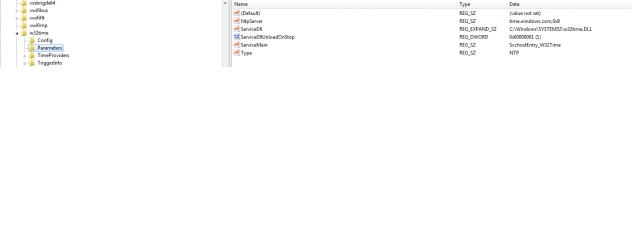
Here is the path to the win32time.

HKEY_LOCAL_MACHINE\SYSTEM\CurrentControlSet\Services\W32Time\Parameters

You expand the tree by selecting the triangles down the left hand side.
When you get to Parameters it is what appears in the right hand pane you are interested in.

Here is mine.
My Reg.png

You can Import your saved Registry the same way you Exported if you need to after you make any changes.
 

My Computer

Computer type
PC/Desktop
Computer Manufacturer/Model Number
Owner Builder
OS
Windows 7 Ultimate x64 SP1 OEM
CPU
Intel i7 3930K
Motherboard
Asus X79 Deluxe
Memory
Kingston Genesis KHX2133C11D3K4/32G
Graphics Card(s)
Asus RTX 2070 Ti Turbo fan series
Sound Card
Creative Sound Blaster ZXR
Monitor(s) Displays
Samsung U32J39 UHD
Screen Resolution
3840 x 2160
Hard Drives
Samsung 860 Pro 256 GB
OCZ Vertex 4 512GB
Western Digital Black 4TB
PSU
Corsair AX850
Case
Gigabyte
Cooling
Push - Pull 120 mm Noctua PWM, Scythe Big Shuriken 2 Rev. B
Keyboard
Logitech K800 Backlit
Mouse
Logitech MX2 Master
Internet Speed
NBN 25 Mbps
Antivirus
Kaspersky Internet Security
Browser
Mozilla FireFox
Other Info
TP-Link Archer VR600v
Sennheiser TR220 WiFi Head Phones.
I will see what I can find.

Meanwhile have you run SFC ?

Ran sfc, no errors.

You will find no one to recommend a Reg repair tool here.
They are dangerous and not needed.
Then I guess if it's a registry error I'll never know.

I maybe hashing over old ground for you but please look at post #12 here.
I have now cloned those settings. Let's hope it helps.

I still get the same errors on trying to start the service or register or launch the options panel under the internet time tab.

Thanks again and merry xmas all :)

Update: (I missed your most recent reply)

First lets copy the Registry for just in case we stuff it.
You can create a restore point or my preferred way.
Click on the Windows start Orb and type regedit.
Regedit.exe will appear up on the top.
Right click on it and select Run as Administrator.
Select File select Export and save the Reg to a place of your likening.
Here is the path to the win32time.

HKEY_LOCAL_MACHINE\SYSTEM\CurrentControlSet\Services\W32Time\Parameters

You expand the tree by selecting the triangles down the left hand side.
When you get to Parameters it is what appears in the right hand pane you are interested in.

Here is mine.
View attachment 378590

You can Import your saved Registry the same way you Exported if you need to after you make any changes.

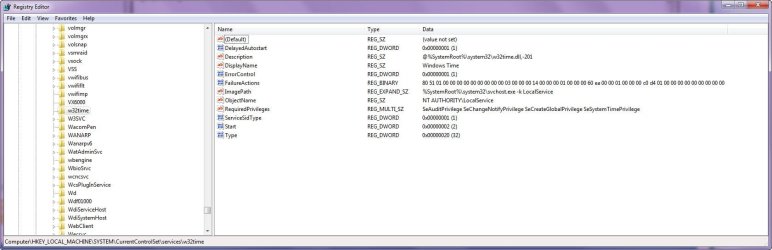
My registry entry here looks radically different: (See attached screenshot.)
 

Attachments

  • 2015-12-25_185036.jpg
    2015-12-25_185036.jpg
    195.7 KB · Views: 11

My Computer

OS
Windows 7 x64 Ultimate
You are not in the right area.
W32time should expand down and you click on to highlight "Parameters"
Look at my image I attached.

What version of Windows are you running?
 

My Computer

Computer type
PC/Desktop
Computer Manufacturer/Model Number
Owner Builder
OS
Windows 7 Ultimate x64 SP1 OEM
CPU
Intel i7 3930K
Motherboard
Asus X79 Deluxe
Memory
Kingston Genesis KHX2133C11D3K4/32G
Graphics Card(s)
Asus RTX 2070 Ti Turbo fan series
Sound Card
Creative Sound Blaster ZXR
Monitor(s) Displays
Samsung U32J39 UHD
Screen Resolution
3840 x 2160
Hard Drives
Samsung 860 Pro 256 GB
OCZ Vertex 4 512GB
Western Digital Black 4TB
PSU
Corsair AX850
Case
Gigabyte
Cooling
Push - Pull 120 mm Noctua PWM, Scythe Big Shuriken 2 Rev. B
Keyboard
Logitech K800 Backlit
Mouse
Logitech MX2 Master
Internet Speed
NBN 25 Mbps
Antivirus
Kaspersky Internet Security
Browser
Mozilla FireFox
Other Info
TP-Link Archer VR600v
Sennheiser TR220 WiFi Head Phones.
Microsoft Windows 7 Ultimate
6.1.7601 Service Pack 1 Build 7601

And I am in the area you gave me:

HKEY_LOCAL_MACHINE\SYSTEM\CurrentControlSet\Services\W32Time\Parameters

I did look at your image.
 

Attachments

  • 2015-12-25_220805.jpg
    2015-12-25_220805.jpg
    154.4 KB · Views: 4

My Computer

OS
Windows 7 x64 Ultimate
In the 1st image you posted in post #9 you have the "win32time" highlighted.
In my image I have the "win32time" expanded and I have highlighted "parameters"
I am one step ahead of you. Do you have the ability to expand "win32time" ?
That is why I asked what version you are running which is the same as mine.

I can not see in your second image what is highlighted as your image does not show low enough.
I would guess and suggest it is still highlighted "win32time".
 

My Computer

Computer type
PC/Desktop
Computer Manufacturer/Model Number
Owner Builder
OS
Windows 7 Ultimate x64 SP1 OEM
CPU
Intel i7 3930K
Motherboard
Asus X79 Deluxe
Memory
Kingston Genesis KHX2133C11D3K4/32G
Graphics Card(s)
Asus RTX 2070 Ti Turbo fan series
Sound Card
Creative Sound Blaster ZXR
Monitor(s) Displays
Samsung U32J39 UHD
Screen Resolution
3840 x 2160
Hard Drives
Samsung 860 Pro 256 GB
OCZ Vertex 4 512GB
Western Digital Black 4TB
PSU
Corsair AX850
Case
Gigabyte
Cooling
Push - Pull 120 mm Noctua PWM, Scythe Big Shuriken 2 Rev. B
Keyboard
Logitech K800 Backlit
Mouse
Logitech MX2 Master
Internet Speed
NBN 25 Mbps
Antivirus
Kaspersky Internet Security
Browser
Mozilla FireFox
Other Info
TP-Link Archer VR600v
Sennheiser TR220 WiFi Head Phones.
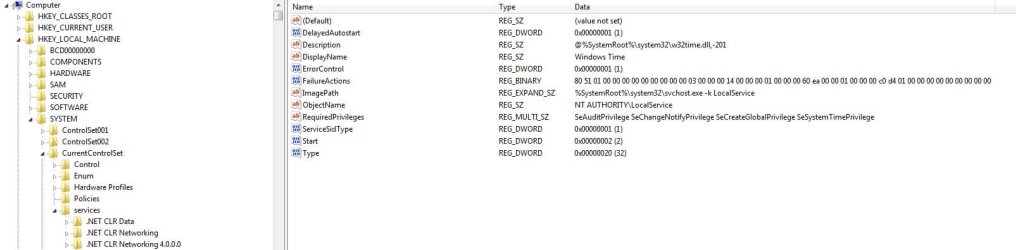
The second image I shared is the same as the first just with the tree view on the left scrolled up to show that I have the right area. I can see why you'd think I'm in the wrong one given how radically different my entry is.

Mine lacks sub-folders entirely and the root entries are different.

If you click the picture I originally gave, the full sized image, and you'll see there is no little arrow on the left.

Clearly this is the root of my problem heh. I'm curious how this happened but more interested in fixing it. It's almost like they changed the entire approach to the entry during an update or something at some point and I didn't get it or it didn't apply fully.

Edit: As you can see, expand is greyed out.
 

Attachments

  • 2015-12-25_225523.jpg
    2015-12-25_225523.jpg
    53.7 KB · Views: 19

My Computer

OS
Windows 7 x64 Ultimate
Yes I see we are both on the same page now.
I can only now suggest to keep looking for your answer or perform a windows repair.
Do you have a Win Ultimate disk ?
 

My Computer

Computer type
PC/Desktop
Computer Manufacturer/Model Number
Owner Builder
OS
Windows 7 Ultimate x64 SP1 OEM
CPU
Intel i7 3930K
Motherboard
Asus X79 Deluxe
Memory
Kingston Genesis KHX2133C11D3K4/32G
Graphics Card(s)
Asus RTX 2070 Ti Turbo fan series
Sound Card
Creative Sound Blaster ZXR
Monitor(s) Displays
Samsung U32J39 UHD
Screen Resolution
3840 x 2160
Hard Drives
Samsung 860 Pro 256 GB
OCZ Vertex 4 512GB
Western Digital Black 4TB
PSU
Corsair AX850
Case
Gigabyte
Cooling
Push - Pull 120 mm Noctua PWM, Scythe Big Shuriken 2 Rev. B
Keyboard
Logitech K800 Backlit
Mouse
Logitech MX2 Master
Internet Speed
NBN 25 Mbps
Antivirus
Kaspersky Internet Security
Browser
Mozilla FireFox
Other Info
TP-Link Archer VR600v
Sennheiser TR220 WiFi Head Phones.
Hmm. Thank for helping me narrow down the issue. I almost want to make a new thread because this is just weird.

I've got a restore point made, what would happen if you exported your w32time entry and I deleted mine and imported yours?

If we have the same version and yours works it seems like that should solve my problem.

And yeah I've got the disc around somewhere, but it would require a lengthy search I bet finding it XD
 

My Computer

OS
Windows 7 x64 Ultimate
Ok, I am now on a new page.
I think that the reason you do not have the expansion on win32time is because it has been unregistered.
If it is registered the required configuration is loaded.

I am here.

Without me reading through what you have already said, were you able to register with command W32tm /register
 

My Computer

Computer type
PC/Desktop
Computer Manufacturer/Model Number
Owner Builder
OS
Windows 7 Ultimate x64 SP1 OEM
CPU
Intel i7 3930K
Motherboard
Asus X79 Deluxe
Memory
Kingston Genesis KHX2133C11D3K4/32G
Graphics Card(s)
Asus RTX 2070 Ti Turbo fan series
Sound Card
Creative Sound Blaster ZXR
Monitor(s) Displays
Samsung U32J39 UHD
Screen Resolution
3840 x 2160
Hard Drives
Samsung 860 Pro 256 GB
OCZ Vertex 4 512GB
Western Digital Black 4TB
PSU
Corsair AX850
Case
Gigabyte
Cooling
Push - Pull 120 mm Noctua PWM, Scythe Big Shuriken 2 Rev. B
Keyboard
Logitech K800 Backlit
Mouse
Logitech MX2 Master
Internet Speed
NBN 25 Mbps
Antivirus
Kaspersky Internet Security
Browser
Mozilla FireFox
Other Info
TP-Link Archer VR600v
Sennheiser TR220 WiFi Head Phones.
Sorry to jump around please try
W32time /register if no success.
or
w32tm.exe /register
or
w32time.exe /register
 
Last edited:

My Computer

Computer type
PC/Desktop
Computer Manufacturer/Model Number
Owner Builder
OS
Windows 7 Ultimate x64 SP1 OEM
CPU
Intel i7 3930K
Motherboard
Asus X79 Deluxe
Memory
Kingston Genesis KHX2133C11D3K4/32G
Graphics Card(s)
Asus RTX 2070 Ti Turbo fan series
Sound Card
Creative Sound Blaster ZXR
Monitor(s) Displays
Samsung U32J39 UHD
Screen Resolution
3840 x 2160
Hard Drives
Samsung 860 Pro 256 GB
OCZ Vertex 4 512GB
Western Digital Black 4TB
PSU
Corsair AX850
Case
Gigabyte
Cooling
Push - Pull 120 mm Noctua PWM, Scythe Big Shuriken 2 Rev. B
Keyboard
Logitech K800 Backlit
Mouse
Logitech MX2 Master
Internet Speed
NBN 25 Mbps
Antivirus
Kaspersky Internet Security
Browser
Mozilla FireFox
Other Info
TP-Link Archer VR600v
Sennheiser TR220 WiFi Head Phones.
That makes sense, but that takes us back to an earlier phase of this repair attempt:

w32tm.exe /register

The following error occurred: The instance name passed was not recognized as valid by a WMI data provider. (0x80071069)

The other two just said not recognized.
 

My Computer

OS
Windows 7 x64 Ultimate
Ok, I have the win32time zipped and waiting to be sent if that is the path you want to try next.
Just PM me with an email address and I'll send it.
 

My Computer

Computer type
PC/Desktop
Computer Manufacturer/Model Number
Owner Builder
OS
Windows 7 Ultimate x64 SP1 OEM
CPU
Intel i7 3930K
Motherboard
Asus X79 Deluxe
Memory
Kingston Genesis KHX2133C11D3K4/32G
Graphics Card(s)
Asus RTX 2070 Ti Turbo fan series
Sound Card
Creative Sound Blaster ZXR
Monitor(s) Displays
Samsung U32J39 UHD
Screen Resolution
3840 x 2160
Hard Drives
Samsung 860 Pro 256 GB
OCZ Vertex 4 512GB
Western Digital Black 4TB
PSU
Corsair AX850
Case
Gigabyte
Cooling
Push - Pull 120 mm Noctua PWM, Scythe Big Shuriken 2 Rev. B
Keyboard
Logitech K800 Backlit
Mouse
Logitech MX2 Master
Internet Speed
NBN 25 Mbps
Antivirus
Kaspersky Internet Security
Browser
Mozilla FireFox
Other Info
TP-Link Archer VR600v
Sennheiser TR220 WiFi Head Phones.
I just found this on another post.

command window and run "net stop w32time" followed by "w32tm /unregister", "w32tm /register" and "net start w32time" and then
"w32tm /resync".
 

My Computer

Computer type
PC/Desktop
Computer Manufacturer/Model Number
Owner Builder
OS
Windows 7 Ultimate x64 SP1 OEM
CPU
Intel i7 3930K
Motherboard
Asus X79 Deluxe
Memory
Kingston Genesis KHX2133C11D3K4/32G
Graphics Card(s)
Asus RTX 2070 Ti Turbo fan series
Sound Card
Creative Sound Blaster ZXR
Monitor(s) Displays
Samsung U32J39 UHD
Screen Resolution
3840 x 2160
Hard Drives
Samsung 860 Pro 256 GB
OCZ Vertex 4 512GB
Western Digital Black 4TB
PSU
Corsair AX850
Case
Gigabyte
Cooling
Push - Pull 120 mm Noctua PWM, Scythe Big Shuriken 2 Rev. B
Keyboard
Logitech K800 Backlit
Mouse
Logitech MX2 Master
Internet Speed
NBN 25 Mbps
Antivirus
Kaspersky Internet Security
Browser
Mozilla FireFox
Other Info
TP-Link Archer VR600v
Sennheiser TR220 WiFi Head Phones.
Back
Top