Win7 64Bit Wont Boot. Restarts after balls morph into windows logo.

The link in my last post shows how to clone using the included AOMEI backupper software. It has plenty of screenshots to illustrate.

You will notice the cloning software counts the disks starting from 0.

So you will want to clone disk0 to whatever your new disk shows up as - disk2.
It will be obvious when you look at it.
 

My Computers My Computers

  • At a glance

    7 X64i5 84002x8gb 3200mhz
    Computer type
    PC/Desktop
    OS
    7 X64
    CPU
    i5 8400
    Motherboard
    gigabyte b365m ds3h
    Memory
    2x8gb 3200mhz
    Hard Drives
    various
    PSU
    pure power 11 400w cm
    Case
    Coolermaster
    Cooling
    cryorig m9i
  • At a glance

    7x64g54008gb ddr4 2400
    Computer type
    PC/Desktop
    OS
    7x64
    CPU
    g5400
    Motherboard
    ga b365m ds3h
    Memory
    8gb ddr4 2400
    PSU
    xfx pro 450w
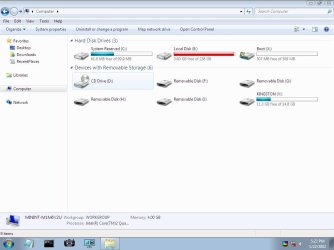
Hi, Just back from home and did look at the cloning software and it does indeed seem straightforward. However I am wondering how this will solve the issue ? Wont it just replicate the same problem from the existing drive onto the new one ? In the mean time i backed up some more files onto my removable USB Drive and made an additional 20 or so GB free. I'm almost 30gb free now. Not quite the 20-30% but adequate for it to boot at least i think. ? Anyway after freeing up the space its still not booting :/ What can we do to actually make the drive bootable again ? Oh I've also disconnected all the drives and tried to boot but still just resets on the swirling color dots/balls just after they form the window logo during 'Starting Windows' boot cycle
 

Attachments

  • Seperate partitions or...jpg
    Seperate partitions or...jpg
    55.4 KB · Views: 0
  • SmallSpace.jpg
    SmallSpace.jpg
    66.4 KB · Views: 0

My Computer My Computer

At a glance

Win 7 64 BitIntel Q66004GbR9 270
Computer type
PC/Desktop
Computer Manufacturer/Model Number
Custom Build
OS
Win 7 64 Bit
CPU
Intel Q6600
Motherboard
Asus P5Q-E
Memory
4Gb
Graphics Card(s)
R9 270
Hard Drives
250 Gb Sata SSD
500Gb Sata SSD
xxx Gb HD
Usually the suggestion would be to try system restore.

Alternatively do a clean fresh install onto that 500gb disk you had yesterday.

Or, if you have disk images on your seagate backup plus , restore one of those - preferably to the 500gb disk.
 

My Computers My Computers

  • At a glance

    7 X64i5 84002x8gb 3200mhz
    Computer type
    PC/Desktop
    OS
    7 X64
    CPU
    i5 8400
    Motherboard
    gigabyte b365m ds3h
    Memory
    2x8gb 3200mhz
    Hard Drives
    various
    PSU
    pure power 11 400w cm
    Case
    Coolermaster
    Cooling
    cryorig m9i
  • At a glance

    7x64g54008gb ddr4 2400
    Computer type
    PC/Desktop
    OS
    7x64
    CPU
    g5400
    Motherboard
    ga b365m ds3h
    Memory
    8gb ddr4 2400
    PSU
    xfx pro 450w
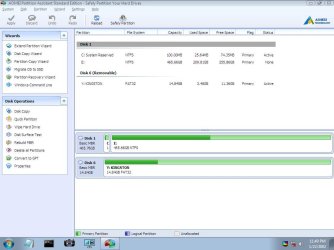
Unfortunately none of those options you mentioned are available to me :/ Bad Housekeeping i'm afraid. However there must be tools to fix the OS. Surely ? /bootfix etc. This is why i got the USB stick as i thought it opened up more tools to fix the OS. There just HAS to be a fix for such a common problem. Please re-read my first post as we have gone to some effort to get the USB Software installed and working and now i have all I've done is move some files when i could have easily done this in CMD prompt. I was under the impression the USB software, which does provide a nice GUI and can clone my HD in its entirety could fix the problem but now its suggested to just give up and install a fresh copy of windows ? We haven't even tried to fix the problem yet! What gives ? I'm hoping that we can find out why the /bootfix issue didn't work, as i'm new to that issue i thought someone here would have experienced it and know how to do it correctly ? From my own research into the issue i know there's other options and Im hoping we can work together to give these a try as I need some expert guidance. Please I need to restore this OS so it can boot correctly.

UPDATE: I've cloned the drive onto the 500GB SSD. Still wont boot however ! I get to the Starting Windows with the red,yellow,blue and green paint ball animation then it disappears and i get the familiar No DVI Signal displayed by the Asus Monitor. Could this be a graphics card malfunction ? I don't have a spare card or rig to test in mt current rig or my card in another rig so cant say for certain if this could be a problem or not. Why does it shut of just before getting to a higher resolution though ?

UPDATE #2 : Still waiting for your assistance guys. Thread seems to have gone dead. Sorry if i come across as impatient or ungrateful. I realize you all have lives to live and there are many other threads to respond to so.. Yea. Meanwhile i'm wondering if it could be virus or malware that's causing the issue? can ccleaner or avg etc be run from the USB or from the dos cmd prompt maybe ?

 

Attachments

  • CloneDrive.jpg
    CloneDrive.jpg
    69.2 KB · Views: 0
Last edited:

My Computer My Computer

At a glance

Win 7 64 BitIntel Q66004GbR9 270
Computer type
PC/Desktop
Computer Manufacturer/Model Number
Custom Build
OS
Win 7 64 Bit
CPU
Intel Q6600
Motherboard
Asus P5Q-E
Memory
4Gb
Graphics Card(s)
R9 270
Hard Drives
250 Gb Sata SSD
500Gb Sata SSD
xxx Gb HD
Back
Top