win7 background tasks

TractorMan

New member
Local time
5:28 PM
Messages
7
i recently began using win 7 64 ultimate sp1 from win xp sp3 and one of the first things i noticed is that if i don't move the mouse for about 1-2 minutes the red led on my computer flashes all the time! and there's sound like the harddisks are being used.. even now as i write it's doing this annoying thing. i ran the task manager but all processes showed 0% cpu usage. however there are much more many services in win7 compared to xp. and i can't see how much cpu they use. all i can see is if they're currently running or not but since the list is so long i can't google each one and see what they do. so can you help me please? is windows trying to index all my files or something? for quick searches? because it's been doing that for 2 weeks now
 

My Computer

Computer type
PC/Desktop
Computer Manufacturer/Model Number
unknown
OS
win 7 ultimate x64 sp1
CPU
i5 3450 quad core 3.1 gh
Motherboard
asus
Memory
8 gb ddr3
Graphics Card(s)
geforce nvidia 250 gts
Hard Drives
200 gb
1 tb
Antivirus
malware antibytes
Browser
firefox
There are a number of possibilities for this behavior.
First, did you do the OEM CLEAN install procedure that is available here on the Forums? Next-Did you use the latest factory Drivers for your motherboard? This could be the issue in that an incorrect or corrupted Driver can cause all sorts of problems.
Example: I service machines and have one that had a driver that used 30% CPU and caused the temps to be quite high compared to other machines. Problem fixed with install of latest driver.
Yes, there are a lot of processes and services in Windows 7. Some can be turned off without any negative effects.

Next thing: Your Specs indicate that you are only using Malwarebytes. This is a very good program BUT is NOT an Anti-Virus program. You can use Windows Defender, Avast Free or another AV program to do this task and then run Malwarebytes to be sure that the malware is removed.
To check the Processes that at running for one that is using a lot of CPU cycles - download and run the Free Microsoft Process Explorer from the Microsoft site.

Good luck
 

My Computer

Computer type
PC/Desktop
Computer Manufacturer/Model Number
Custom Desktop (2 alike) Dell inspiron 13" W10 Laptop Dell Inspiron 17 5759
OS
Windows 7 Enterprise 64bit Desktops; Windows 7 Professional 64Bit 17"Laptop
CPU
AMD Athlon 2 X3; I5-6200 6th gen (Dell)
Motherboard
Gigabyte GA 78LMT-USB3 (2 Desktops)
Memory
8 Gig Desktop, 8Gig Laptop, 16Gig Laptop
Graphics Card(s)
Radeon R5450 1Gig
Sound Card
Creative SB X-Fi Titanium Extreme Audio Desktop 1
Monitor(s) Displays
Dell 2419
Screen Resolution
1920x1080
Hard Drives
Crucial M500 500GB SSD Desktop 1 and Laptops
Samsung 850EVO 250GB - Desktop 2
PSU
Thermaltake 600watt
Case
Rosewill
Cooling
Scythe Typhoon 120mm
Keyboard
Kensington
Mouse
Logitech M310
Internet Speed
50/50
Antivirus
Avast
Browser
Firefox 68
no OEM clean install - i don't know what that is. it would be bad if i had to reinstall windows again.

i have motherboard drivers on a cd and it writes "windows 7 ready" so i guess they're good enough?

but why is not malwarebytes antivirus? it can scan, it can be used as firewall and it also blocks dangerous websites. i know windows says i don't have an antivirus installed but i was thinking malwarebytes hides itself on purpose to defend itself from virus... :(

ok thanks i downloaded and ran process explorer but right now the problems don't happen. so what do i do - just wait until it happens then screenshot? also most processes show in pink color but sometimes a red process appears like wmiprvse.exe then it quickly dissapears? what does that mean? also i have blue rundll32.exe constantly running - that happened in win xp too.
 

My Computer

Computer type
PC/Desktop
Computer Manufacturer/Model Number
unknown
OS
win 7 ultimate x64 sp1
CPU
i5 3450 quad core 3.1 gh
Motherboard
asus
Memory
8 gb ddr3
Graphics Card(s)
geforce nvidia 250 gts
Hard Drives
200 gb
1 tb
Antivirus
malware antibytes
Browser
firefox
but why is not malwarebytes antivirus? it can scan, it can be used as firewall and it also blocks dangerous websites. i know windows says i don't have an antivirus installed but i was thinking malwarebytes hides itself on purpose to defend itself from virus... :(

MalwareBytes is not an Anti Virus (or firewall)
Read more here: Does Malwarebytes Anti-Malware replace antivirus software?

You should install an AV such as MS Security Essentials, Avast, ... there are many to choose from, free and paid
 

My Computer

Computer type
PC/Desktop
Computer Manufacturer/Model Number
home built
OS
Multi-Boot W7_Pro_x64 W8.1_Pro_x64 W10_Pro_x64 +Linux_VMs +Chromium_VM
CPU
AMD Athlon II x4 620
Motherboard
Gigabyte GA-MA785G-UD3H
Memory
6GB GSkill DDR2 800
Graphics Card(s)
AMD 4670 GPU + AMD 4200 IGP
Sound Card
on board Realtek ALC889A
Monitor(s) Displays
RCA 40" LCD TV, Insignia 32" LCD TV, HP 15" LCD monitor
Screen Resolution
1680 x 1050
Hard Drives
OCZ Vertex 3 120GB,
Samsung F3 1TB (3),
Several others - WD, Seagate, Hitachi, ...
PSU
Corsair 500 W
Case
Rosewill mid tower
Cooling
CM 90mm rifle
Keyboard
Gyration wireless, Logitech wireless, Dell USB wired
Mouse
Gyration wireless, Logitech wireless, V7 USB wired
Internet Speed
Spectrum - 100Mbps D / 10Mbps U
Antivirus
Avast, MBAM3, EMET, WinPatrol
Browser
Pale Moon, Firefox, IE
Other Info
2 multi-boot PC's
Mainly HTPC/Office/Gen purpose (no gaming).
Trendnet USB KVM.
LG DVD burner/Blue Ray Player.
Tray system for removable SATA backup drives.

Not currently OCd, under-volted.
I use Hybrid sleep, rarely re-boot or shutdown.

Hauppauge HD-PVR, Avermedia PCIe TV Tuner, Hauppauge PCI TV Tuner.
Regarding Malwarebytes it can't for example detect older viruses. Malwarebytes made the product that way on purpose since it's only meant to be a complement to an anti-virus product. Malwarebytes focus is more on newer threats, primarily what's called Zero-day and Zero-hour threats. So if you only have Malwarebytes you do not have a good protection.

As for Process Explorer I included a color explanation in this Tutorial:
http://www.sevenforums.com/tutorial...r-virustotal-check-all-processes-50-av-s.html
 

My Computer

Computer type
Laptop
Computer Manufacturer/Model Number
HP Elitebook 8540p
OS
Windows 7 Pro 32
CPU
Intel(R) Core(TM) i5 CPU M 540 @ 2.53GHz
Motherboard
Hewlett-Packard 1521
Memory
4,00 GB (Usable 2,98)
Graphics Card(s)
NVIDIA NVS 5100M
Sound Card
NVIDIA High Definition Audio
Screen Resolution
1600x900
Hard Drives
INTEL SSDSA2CW120G3
Antivirus
F-Secure Internet Security
Browser
IE, Firefox, Opera
Other Info
Sandboxie,
SRP (Software Restriction Policy),
EMET (Enhanced Mitigation Experience Toolkit),
WFC (Windows Firewall Control by BiniSoft),
Malwarebytes Premium
Regarding Malwarebytes it can't for example detect older viruses. Malwarebytes made the product that way on purpose since it's only meant to be a complement to an anti-virus product. Malwarebytes focus is more on newer threats, primarily what's called Zero-day and Zero-hour threats. So if you only have Malwarebytes you do not have a good protection.

As for Process Explorer I included a color explanation in this Tutorial:
http://www.sevenforums.com/tutorial...r-virustotal-check-all-processes-50-av-s.html

thanks i read tutorial and now i'm using virus total too. the only suspicious file is daemon tools and i get a 1/55 to it - there was some demo program that was installed with it but i removed it... :( and now how do i stop computer to make the annoying background tasks?
 

My Computer

Computer type
PC/Desktop
Computer Manufacturer/Model Number
unknown
OS
win 7 ultimate x64 sp1
CPU
i5 3450 quad core 3.1 gh
Motherboard
asus
Memory
8 gb ddr3
Graphics Card(s)
geforce nvidia 250 gts
Hard Drives
200 gb
1 tb
Antivirus
malware antibytes
Browser
firefox
A Windows computer will always do background tasks to work properly. If you suspect disk usage rather than CPU you could try starting Resource Monitor and go to the Disk tab and look at Disk Activity. Maybe you can find out if a specific event is causing this, for example it could be write/read to the pagefile.

In Process Explorer you could also try to add more columns, for example CPU time and columns related to disk activity.
View menu - Select Columns. There you'll see a lot of tabs and in each tab you can add different columns.
 

My Computer

Computer type
Laptop
Computer Manufacturer/Model Number
HP Elitebook 8540p
OS
Windows 7 Pro 32
CPU
Intel(R) Core(TM) i5 CPU M 540 @ 2.53GHz
Motherboard
Hewlett-Packard 1521
Memory
4,00 GB (Usable 2,98)
Graphics Card(s)
NVIDIA NVS 5100M
Sound Card
NVIDIA High Definition Audio
Screen Resolution
1600x900
Hard Drives
INTEL SSDSA2CW120G3
Antivirus
F-Secure Internet Security
Browser
IE, Firefox, Opera
Other Info
Sandboxie,
SRP (Software Restriction Policy),
EMET (Enhanced Mitigation Experience Toolkit),
WFC (Windows Firewall Control by BiniSoft),
Malwarebytes Premium
Regarding Malwarebytes it can't for example detect older viruses. Malwarebytes made the product that way on purpose since it's only meant to be a complement to an anti-virus product. Malwarebytes focus is more on newer threats, primarily what's called Zero-day and Zero-hour threats. So if you only have Malwarebytes you do not have a good protection.

As for Process Explorer I included a color explanation in this Tutorial:
http://www.sevenforums.com/tutorial...r-virustotal-check-all-processes-50-av-s.html

Agreed. A very good anti virus program can not replace malwarebytes or other similar programs as that will not catch viruses per say like a anti virus program will. Being without a anti virus programs is just asking for your system to catch a virus which can wreck havoc on your system to the point you may need to reinstall the o.s. if it happens. Trust me i would know. That happened to me on my previous windows xp system and i had to completely reinstall the o.s.
 

My Computer

Computer type
PC/Desktop
Computer Manufacturer/Model Number
custom built
OS
Windows 7 ultimate 64-bit
CPU
Intel I7 2600K 3.4ghz
Motherboard
Asus Evo P8P67
Memory
Corsair 16gb ddr3 1600mhz
Graphics Card(s)
Nvidia Geforce gt 430
Sound Card
Sound Blaster Titanium x-fi pci express
Monitor(s) Displays
Dell E198WFP
Hard Drives
1 western digital 2TB drive.
PSU
Antec 1200 watt
Case
Inwin Dragon Rider
Cooling
6 case supplied cooling fans
Keyboard
logitech mk700
Mouse
logitech m705
Internet Speed
25-50mbps download; 10mbps upload(i think)
Antivirus
avg free 2014
Browser
mozilla firefox
Other Info
Also have a pretty bad speaker setup which is a klipsch promedia 5.1 surround speaker setup with huge subwoofer and lg blu ray player/writer. Also a hp officejet pro 8600 plus wireless all in one and a logitech s7500 webcam.
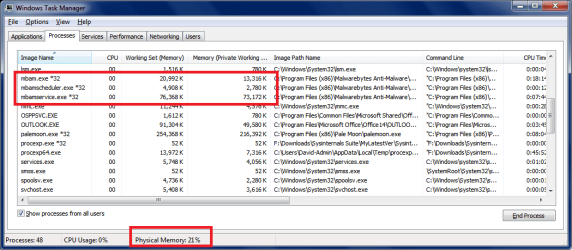
i found the cause of the problem - it's mbamservice.exe from malware bytes. right now it's taking 194 mb of memory and sometimes even 10% cpu. i looked at other posts from people who have the same problem but i never found a solution. i understand that mbamservice is responsible for "real time protection" so i don't want to disable that.

HOW DO I FIX THIS!
 

My Computer

Computer type
PC/Desktop
Computer Manufacturer/Model Number
unknown
OS
win 7 ultimate x64 sp1
CPU
i5 3450 quad core 3.1 gh
Motherboard
asus
Memory
8 gb ddr3
Graphics Card(s)
geforce nvidia 250 gts
Hard Drives
200 gb
1 tb
Antivirus
malware antibytes
Browser
firefox

My Computer

Computer type
Laptop
Computer Manufacturer/Model Number
HP Elitebook 8540p
OS
Windows 7 Pro 32
CPU
Intel(R) Core(TM) i5 CPU M 540 @ 2.53GHz
Motherboard
Hewlett-Packard 1521
Memory
4,00 GB (Usable 2,98)
Graphics Card(s)
NVIDIA NVS 5100M
Sound Card
NVIDIA High Definition Audio
Screen Resolution
1600x900
Hard Drives
INTEL SSDSA2CW120G3
Antivirus
F-Secure Internet Security
Browser
IE, Firefox, Opera
Other Info
Sandboxie,
SRP (Software Restriction Policy),
EMET (Enhanced Mitigation Experience Toolkit),
WFC (Windows Firewall Control by BiniSoft),
Malwarebytes Premium

My Computer

Computer type
PC/Desktop
Computer Manufacturer/Model Number
unknown
OS
win 7 ultimate x64 sp1
CPU
i5 3450 quad core 3.1 gh
Motherboard
asus
Memory
8 gb ddr3
Graphics Card(s)
geforce nvidia 250 gts
Hard Drives
200 gb
1 tb
Antivirus
malware antibytes
Browser
firefox
What are you saying :confused:
I see mbamservice uses "a lot" of CPU when I boot or wake a system...
For me, high CPU usage ends after a minute or so - MEH - no big deal ...

The system is still responsive and usable ...
As long as the system is responsive, works, ... I don't care if this service uses 10+ % "when and as needed" ...

Below is a screen print of Malwarebytes Ver 2.0 real-time Task Manager ...
Do you see something totally different ?

Can you post a screen print of what you see causing your issue ?
http://www.sevenforums.com/tutorials/9733-screenshots-files-upload-post-seven-forums.html

MBAMSP01.PNG
 

My Computer

Computer type
PC/Desktop
Computer Manufacturer/Model Number
home built
OS
Multi-Boot W7_Pro_x64 W8.1_Pro_x64 W10_Pro_x64 +Linux_VMs +Chromium_VM
CPU
AMD Athlon II x4 620
Motherboard
Gigabyte GA-MA785G-UD3H
Memory
6GB GSkill DDR2 800
Graphics Card(s)
AMD 4670 GPU + AMD 4200 IGP
Sound Card
on board Realtek ALC889A
Monitor(s) Displays
RCA 40" LCD TV, Insignia 32" LCD TV, HP 15" LCD monitor
Screen Resolution
1680 x 1050
Hard Drives
OCZ Vertex 3 120GB,
Samsung F3 1TB (3),
Several others - WD, Seagate, Hitachi, ...
PSU
Corsair 500 W
Case
Rosewill mid tower
Cooling
CM 90mm rifle
Keyboard
Gyration wireless, Logitech wireless, Dell USB wired
Mouse
Gyration wireless, Logitech wireless, V7 USB wired
Internet Speed
Spectrum - 100Mbps D / 10Mbps U
Antivirus
Avast, MBAM3, EMET, WinPatrol
Browser
Pale Moon, Firefox, IE
Other Info
2 multi-boot PC's
Mainly HTPC/Office/Gen purpose (no gaming).
Trendnet USB KVM.
LG DVD burner/Blue Ray Player.
Tray system for removable SATA backup drives.

Not currently OCd, under-volted.
I use Hybrid sleep, rarely re-boot or shutdown.

Hauppauge HD-PVR, Avermedia PCIe TV Tuner, Hauppauge PCI TV Tuner.
ok then i'll leave mbam to do its thing. mbamservice.exe starts using the processor to 10% only after i'm afk for a minute or 2. the only difference in my screenshot is that 10% nothing else. here is ss

Untitled.jpg

bp0in02pr
 

My Computer

Computer type
PC/Desktop
Computer Manufacturer/Model Number
unknown
OS
win 7 ultimate x64 sp1
CPU
i5 3450 quad core 3.1 gh
Motherboard
asus
Memory
8 gb ddr3
Graphics Card(s)
geforce nvidia 250 gts
Hard Drives
200 gb
1 tb
Antivirus
malware antibytes
Browser
firefox
Back
Top