
Windows start up screen / background etc advice

ipbr21054

New member
Member
VIP
Local time
8:52 PM
Messages
128
Hi,
In the last two weeks ive installed 2 x SSD
One with Windows 7 & the other with Windows 10
Both working fine / fast with the help of some members here,thanks.


A question if i may.
In the Bios i have Windows 7 as my main drive.

So when i switch on the Pc i see a black screen with the option of me either selecting Win 7 or Win 10
If i do nothing Windows 7 loads but should i need to load Win 10 then i must select the Win 10 option.

I swapped the order around in the Bios so Windows 10 was my main drive.

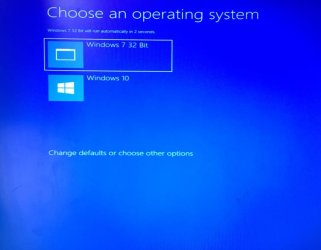
I switch on the Pc & now see a nice blue background with a much better presentation on what to selection as supposed to the old dos looking black screen.

This makes me want to have the nice blue screen but for the Windows 7 as my main drive.

Now i ask how to change this as in the week without me changing anything i switched on the Pc and seen the nice blue screen,i watched it without doing anything and expecting it to load Win 10 BUT it actually loaded Win 7

Did i miss something or not select something somewhere when i installed the two SSd ?

Thanks please advise & have a nice day.
 

My Computer

Computer type
Laptop
Computer Manufacturer/Model Number
Dell Inspiron P07T & Pc Windows 32 / 64 bit
OS
Microsoft Windows 7 Professional 64-bit 7601 Multiprocessor Free Service Pack 1
CPU
AMD Athlon(tm) II Neo K345 Dual-Core Processor
Motherboard
Dell Inc.
Memory
8.00 GB
Graphics Card(s)
ATI Mobility Radeon HD 4200 Series
Sound Card
(1) AMD High Definition Audio Device (2) High Definition A
Monitor(s) Displays
Generic PnP Monitor
Screen Resolution
1366 x 768 x 32 bits (4294967296 colors) @ 59 Hz
Hard Drives
(1) WDC WD3200BEKT-75PVMT0 ATA Device (2) Generic- Multi-Card USB Device
PSU
Dell 65w ac adapter model no LA65NS0-00
Keyboard
Standard Ps2 keyboard
Mouse
Ps2 compatible mouse
Internet Speed
Download 38.9Mbps Upload 18.1Mbps
Antivirus
Avg internet security 19.7.3103 (build 19.7.4674.524)
Browser
Google Chrome Version 76.0.3809.132 (Official Build) (64-bit
Hello ipbr21054

The Black 'Text' Bootloader is standard with Windows 7, and the Blue 'Graphical' Bootloader became available on Windows 8 and 10.

I am surprised to hear that switching the Boot Priority over, gave you a different Bootloader. Suggests to me that you have two bootloaders - one on each disk.

The type of boot menu is set by the bootmenupolicy parameter of bcdedit. That parameter only exists in Win 10 and Win 8 versions of the boot manager.

From an elevated command prompt, type either
bcdedit /set {default} bootmenupolicy standard
or
bcdedit /set {default} bootmenupolicy legacy

to toggle between the two menu types. It does not seem possible to query the BCD store and find which boot policy the computer is using, so you would have to attempt one of the two commands (above) to see if they will accept.
 

My Computer

Computer type
PC/Desktop
OS
Windows 7 x64, Vista x64, 8.1 smartphone
CPU
Intel E8400 65W 64-bit
Motherboard
Gigabyte EP45-UD3LR
Memory
DDR2 2 x 2GB, 1GB x 2
Graphics Card(s)
XFX Radeon HD5750
Sound Card
AMD High Definition Audio; Realtek High Definition Audio
Monitor(s) Displays
iiyama prolite X2377HDS
Screen Resolution
1920 x 1080
Hard Drives
500GB 7200 rpm Seagate ST3500413AS 16MB, 500GB 5400 rpm Toshiba MQ02ABF050H 32MB, 200GB 7200 rpm Seagate ST3200820AS 8MB, 2TB 7200 rpm Western Digital WD20EZRX 64MB
PSU
Enermax Liberty Modular
Case
Antec P193 Midi Tower
Keyboard
Mionix ZIBAL 60
Mouse
Razer USB 2.0 Diamondback Mouse or Huion Graphics Tablet
Browser
Internet Explorer, Lunascape, Firefox, Opera, Avast Safezone
Hi,
Just to be sure of what im doing.

Run cmd as admin then type the first code ?
Should pc then restart & i take note of its look.

Followed by doing the same with the second code ?

Please advise thanks
 

My Computer

Computer type
Laptop
Computer Manufacturer/Model Number
Dell Inspiron P07T & Pc Windows 32 / 64 bit
OS
Microsoft Windows 7 Professional 64-bit 7601 Multiprocessor Free Service Pack 1
CPU
AMD Athlon(tm) II Neo K345 Dual-Core Processor
Motherboard
Dell Inc.
Memory
8.00 GB
Graphics Card(s)
ATI Mobility Radeon HD 4200 Series
Sound Card
(1) AMD High Definition Audio Device (2) High Definition A
Monitor(s) Displays
Generic PnP Monitor
Screen Resolution
1366 x 768 x 32 bits (4294967296 colors) @ 59 Hz
Hard Drives
(1) WDC WD3200BEKT-75PVMT0 ATA Device (2) Generic- Multi-Card USB Device
PSU
Dell 65w ac adapter model no LA65NS0-00
Keyboard
Standard Ps2 keyboard
Mouse
Ps2 compatible mouse
Internet Speed
Download 38.9Mbps Upload 18.1Mbps
Antivirus
Avg internet security 19.7.3103 (build 19.7.4674.524)
Browser
Google Chrome Version 76.0.3809.132 (Official Build) (64-bit
First question, yes that is what I envisaged.

Second question - keep the second code if something goes wrong with executing first code, that is all.
 

My Computer

Computer type
PC/Desktop
OS
Windows 7 x64, Vista x64, 8.1 smartphone
CPU
Intel E8400 65W 64-bit
Motherboard
Gigabyte EP45-UD3LR
Memory
DDR2 2 x 2GB, 1GB x 2
Graphics Card(s)
XFX Radeon HD5750
Sound Card
AMD High Definition Audio; Realtek High Definition Audio
Monitor(s) Displays
iiyama prolite X2377HDS
Screen Resolution
1920 x 1080
Hard Drives
500GB 7200 rpm Seagate ST3500413AS 16MB, 500GB 5400 rpm Toshiba MQ02ABF050H 32MB, 200GB 7200 rpm Seagate ST3200820AS 8MB, 2TB 7200 rpm Western Digital WD20EZRX 64MB
PSU
Enermax Liberty Modular
Case
Antec P193 Midi Tower
Keyboard
Mionix ZIBAL 60
Mouse
Razer USB 2.0 Diamondback Mouse or Huion Graphics Tablet
Browser
Internet Explorer, Lunascape, Firefox, Opera, Avast Safezone
Hi,
I will do that shortly.

I was using Win 10 just now & thought i had then selected restart but the pc shutdown so i assume that i did select shutdown.

Anyway i restarted the pc to see this boot.
I didnt touch anything & it loaded into Win 7,just for your information if that also helps point to anything.
 

Attachments

  • 158.jpg
    158.jpg
    89.4 KB · Views: 0

My Computer

Computer type
Laptop
Computer Manufacturer/Model Number
Dell Inspiron P07T & Pc Windows 32 / 64 bit
OS
Microsoft Windows 7 Professional 64-bit 7601 Multiprocessor Free Service Pack 1
CPU
AMD Athlon(tm) II Neo K345 Dual-Core Processor
Motherboard
Dell Inc.
Memory
8.00 GB
Graphics Card(s)
ATI Mobility Radeon HD 4200 Series
Sound Card
(1) AMD High Definition Audio Device (2) High Definition A
Monitor(s) Displays
Generic PnP Monitor
Screen Resolution
1366 x 768 x 32 bits (4294967296 colors) @ 59 Hz
Hard Drives
(1) WDC WD3200BEKT-75PVMT0 ATA Device (2) Generic- Multi-Card USB Device
PSU
Dell 65w ac adapter model no LA65NS0-00
Keyboard
Standard Ps2 keyboard
Mouse
Ps2 compatible mouse
Internet Speed
Download 38.9Mbps Upload 18.1Mbps
Antivirus
Avg internet security 19.7.3103 (build 19.7.4674.524)
Browser
Google Chrome Version 76.0.3809.132 (Official Build) (64-bit
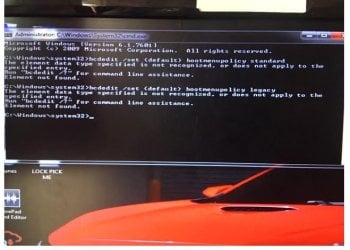
Nothing happened with either,
See screenshot
 

Attachments

  • 160.jpg
    160.jpg
    76.8 KB · Views: 6

My Computer

Computer type
Laptop
Computer Manufacturer/Model Number
Dell Inspiron P07T & Pc Windows 32 / 64 bit
OS
Microsoft Windows 7 Professional 64-bit 7601 Multiprocessor Free Service Pack 1
CPU
AMD Athlon(tm) II Neo K345 Dual-Core Processor
Motherboard
Dell Inc.
Memory
8.00 GB
Graphics Card(s)
ATI Mobility Radeon HD 4200 Series
Sound Card
(1) AMD High Definition Audio Device (2) High Definition A
Monitor(s) Displays
Generic PnP Monitor
Screen Resolution
1366 x 768 x 32 bits (4294967296 colors) @ 59 Hz
Hard Drives
(1) WDC WD3200BEKT-75PVMT0 ATA Device (2) Generic- Multi-Card USB Device
PSU
Dell 65w ac adapter model no LA65NS0-00
Keyboard
Standard Ps2 keyboard
Mouse
Ps2 compatible mouse
Internet Speed
Download 38.9Mbps Upload 18.1Mbps
Antivirus
Avg internet security 19.7.3103 (build 19.7.4674.524)
Browser
Google Chrome Version 76.0.3809.132 (Official Build) (64-bit
Also forgot to show this should it help you.

Thanks
 

Attachments

  • 161.jpg
    161.jpg
    106.6 KB · Views: 7

My Computer

Computer type
Laptop
Computer Manufacturer/Model Number
Dell Inspiron P07T & Pc Windows 32 / 64 bit
OS
Microsoft Windows 7 Professional 64-bit 7601 Multiprocessor Free Service Pack 1
CPU
AMD Athlon(tm) II Neo K345 Dual-Core Processor
Motherboard
Dell Inc.
Memory
8.00 GB
Graphics Card(s)
ATI Mobility Radeon HD 4200 Series
Sound Card
(1) AMD High Definition Audio Device (2) High Definition A
Monitor(s) Displays
Generic PnP Monitor
Screen Resolution
1366 x 768 x 32 bits (4294967296 colors) @ 59 Hz
Hard Drives
(1) WDC WD3200BEKT-75PVMT0 ATA Device (2) Generic- Multi-Card USB Device
PSU
Dell 65w ac adapter model no LA65NS0-00
Keyboard
Standard Ps2 keyboard
Mouse
Ps2 compatible mouse
Internet Speed
Download 38.9Mbps Upload 18.1Mbps
Antivirus
Avg internet security 19.7.3103 (build 19.7.4674.524)
Browser
Google Chrome Version 76.0.3809.132 (Official Build) (64-bit
First boot is system 7 default. In two install systems.

Predefined 7 next windows 10. My work in systems.
 

My Computer

Computer type
Laptop
Computer Manufacturer/Model Number
HP
OS
Windows 7 Ultimate x64
CPU
AMD E-450 APU with Raedon(tm) HD Graphics (2 CPUs), ~1.6GHz
Motherboard
Hewlett-Packard
Memory
6 GB
Graphics Card(s)
AMD Raedon HD 6320 Graphics
Sound Card
High Definition Audio
Monitor(s) Displays
Monitor PnP Generic
Screen Resolution
1024 x 728 (32 bit) (60Hz)
Keyboard
HP Key
Mouse
Perfect Choice
Internet Speed
1 MB/S
Antivirus
Windows Defender
Browser
Google Chrome
First boot is system 7 default. In two install systems.

Predefined 7 next windows 10. My work in systems.

Swap the disks data cables and reboot. Does the dual-boot menu change from graphic to text?
 

My Computer

Computer type
PC/Desktop
OS
Windows 7 x64, Vista x64, 8.1 smartphone
CPU
Intel E8400 65W 64-bit
Motherboard
Gigabyte EP45-UD3LR
Memory
DDR2 2 x 2GB, 1GB x 2
Graphics Card(s)
XFX Radeon HD5750
Sound Card
AMD High Definition Audio; Realtek High Definition Audio
Monitor(s) Displays
iiyama prolite X2377HDS
Screen Resolution
1920 x 1080
Hard Drives
500GB 7200 rpm Seagate ST3500413AS 16MB, 500GB 5400 rpm Toshiba MQ02ABF050H 32MB, 200GB 7200 rpm Seagate ST3200820AS 8MB, 2TB 7200 rpm Western Digital WD20EZRX 64MB
PSU
Enermax Liberty Modular
Case
Antec P193 Midi Tower
Keyboard
Mionix ZIBAL 60
Mouse
Razer USB 2.0 Diamondback Mouse or Huion Graphics Tablet
Browser
Internet Explorer, Lunascape, Firefox, Opera, Avast Safezone
Hi,
I will do that shortly.

I was using Win 10 just now & thought i had then selected restart but the pc shutdown so i assume that i did select shutdown.

Anyway i restarted the pc to see this boot.
I didnt touch anything & it loaded into Win 7,just for your information if that also helps point to anything.

Did the Menu stick, on next Power start?
 

My Computer

Computer type
PC/Desktop
OS
Windows 7 x64, Vista x64, 8.1 smartphone
CPU
Intel E8400 65W 64-bit
Motherboard
Gigabyte EP45-UD3LR
Memory
DDR2 2 x 2GB, 1GB x 2
Graphics Card(s)
XFX Radeon HD5750
Sound Card
AMD High Definition Audio; Realtek High Definition Audio
Monitor(s) Displays
iiyama prolite X2377HDS
Screen Resolution
1920 x 1080
Hard Drives
500GB 7200 rpm Seagate ST3500413AS 16MB, 500GB 5400 rpm Toshiba MQ02ABF050H 32MB, 200GB 7200 rpm Seagate ST3200820AS 8MB, 2TB 7200 rpm Western Digital WD20EZRX 64MB
PSU
Enermax Liberty Modular
Case
Antec P193 Midi Tower
Keyboard
Mionix ZIBAL 60
Mouse
Razer USB 2.0 Diamondback Mouse or Huion Graphics Tablet
Browser
Internet Explorer, Lunascape, Firefox, Opera, Avast Safezone
Also forgot to show this should it help you.

Thanks

Swap the cables over again, so that you get the graphical (blue) menu, then do a screenshot of BCDEDIT, and upload to Forum.
 

My Computer

Computer type
PC/Desktop
OS
Windows 7 x64, Vista x64, 8.1 smartphone
CPU
Intel E8400 65W 64-bit
Motherboard
Gigabyte EP45-UD3LR
Memory
DDR2 2 x 2GB, 1GB x 2
Graphics Card(s)
XFX Radeon HD5750
Sound Card
AMD High Definition Audio; Realtek High Definition Audio
Monitor(s) Displays
iiyama prolite X2377HDS
Screen Resolution
1920 x 1080
Hard Drives
500GB 7200 rpm Seagate ST3500413AS 16MB, 500GB 5400 rpm Toshiba MQ02ABF050H 32MB, 200GB 7200 rpm Seagate ST3200820AS 8MB, 2TB 7200 rpm Western Digital WD20EZRX 64MB
PSU
Enermax Liberty Modular
Case
Antec P193 Midi Tower
Keyboard
Mionix ZIBAL 60
Mouse
Razer USB 2.0 Diamondback Mouse or Huion Graphics Tablet
Browser
Internet Explorer, Lunascape, Firefox, Opera, Avast Safezone
I’m just going to swap over the small red SATA cables to SSD to see if any change.

When you say Did the menu stick I assume you mean after that what was the boot screen like ?

It’s reverted back to black dos looking screen.

Report back in ten minutes after SATA cable swap.
 

My Computer

Computer type
Laptop
Computer Manufacturer/Model Number
Dell Inspiron P07T & Pc Windows 32 / 64 bit
OS
Microsoft Windows 7 Professional 64-bit 7601 Multiprocessor Free Service Pack 1
CPU
AMD Athlon(tm) II Neo K345 Dual-Core Processor
Motherboard
Dell Inc.
Memory
8.00 GB
Graphics Card(s)
ATI Mobility Radeon HD 4200 Series
Sound Card
(1) AMD High Definition Audio Device (2) High Definition A
Monitor(s) Displays
Generic PnP Monitor
Screen Resolution
1366 x 768 x 32 bits (4294967296 colors) @ 59 Hz
Hard Drives
(1) WDC WD3200BEKT-75PVMT0 ATA Device (2) Generic- Multi-Card USB Device
PSU
Dell 65w ac adapter model no LA65NS0-00
Keyboard
Standard Ps2 keyboard
Mouse
Ps2 compatible mouse
Internet Speed
Download 38.9Mbps Upload 18.1Mbps
Antivirus
Avg internet security 19.7.3103 (build 19.7.4674.524)
Browser
Google Chrome Version 76.0.3809.132 (Official Build) (64-bit
Hi,
I have now swapped over the two sata cables.
I restarted the pc so i now see the blue screen with a windows logo.
The pc loads Windows 10
I then did CMD as Admin & typed bcdedit /set {default} bootmenupolicy standard
I received a message along the lines of updated / successful etc.

So the stage i am at now is each time i switch on the pc or with the pc on & selecting restart etc i load straight into Windows 10

No mention at all of Windows 7 or even a choice screen of should i load Win 7 or Win 10
 

My Computer

Computer type
Laptop
Computer Manufacturer/Model Number
Dell Inspiron P07T & Pc Windows 32 / 64 bit
OS
Microsoft Windows 7 Professional 64-bit 7601 Multiprocessor Free Service Pack 1
CPU
AMD Athlon(tm) II Neo K345 Dual-Core Processor
Motherboard
Dell Inc.
Memory
8.00 GB
Graphics Card(s)
ATI Mobility Radeon HD 4200 Series
Sound Card
(1) AMD High Definition Audio Device (2) High Definition A
Monitor(s) Displays
Generic PnP Monitor
Screen Resolution
1366 x 768 x 32 bits (4294967296 colors) @ 59 Hz
Hard Drives
(1) WDC WD3200BEKT-75PVMT0 ATA Device (2) Generic- Multi-Card USB Device
PSU
Dell 65w ac adapter model no LA65NS0-00
Keyboard
Standard Ps2 keyboard
Mouse
Ps2 compatible mouse
Internet Speed
Download 38.9Mbps Upload 18.1Mbps
Antivirus
Avg internet security 19.7.3103 (build 19.7.4674.524)
Browser
Google Chrome Version 76.0.3809.132 (Official Build) (64-bit
So the stage i am at now is each time i switch on the pc or with the pc on & selecting restart etc i load straight into Windows 10

No mention at all of Windows 7 or even a choice screen of should i load Win 7 or Win 10

Is that expected behaviour, or were you expecting to see an options menu?
 

My Computer

Computer type
PC/Desktop
OS
Windows 7 x64, Vista x64, 8.1 smartphone
CPU
Intel E8400 65W 64-bit
Motherboard
Gigabyte EP45-UD3LR
Memory
DDR2 2 x 2GB, 1GB x 2
Graphics Card(s)
XFX Radeon HD5750
Sound Card
AMD High Definition Audio; Realtek High Definition Audio
Monitor(s) Displays
iiyama prolite X2377HDS
Screen Resolution
1920 x 1080
Hard Drives
500GB 7200 rpm Seagate ST3500413AS 16MB, 500GB 5400 rpm Toshiba MQ02ABF050H 32MB, 200GB 7200 rpm Seagate ST3200820AS 8MB, 2TB 7200 rpm Western Digital WD20EZRX 64MB
PSU
Enermax Liberty Modular
Case
Antec P193 Midi Tower
Keyboard
Mionix ZIBAL 60
Mouse
Razer USB 2.0 Diamondback Mouse or Huion Graphics Tablet
Browser
Internet Explorer, Lunascape, Firefox, Opera, Avast Safezone
I was expecting a menu to select win 7 or win 10 with the blue graphical screen.

As it is at present i am unable to even use Win 7 as i dont get any kind of option to select it to then boot to it.

I switch on pc & windows 10 loads up.

This pc has 2 x SSD

one for 99% of my use the other only for 1 piece of software that i use now and then.

So at present i cant use pc as i cant load Win 7
 

My Computer

Computer type
Laptop
Computer Manufacturer/Model Number
Dell Inspiron P07T & Pc Windows 32 / 64 bit
OS
Microsoft Windows 7 Professional 64-bit 7601 Multiprocessor Free Service Pack 1
CPU
AMD Athlon(tm) II Neo K345 Dual-Core Processor
Motherboard
Dell Inc.
Memory
8.00 GB
Graphics Card(s)
ATI Mobility Radeon HD 4200 Series
Sound Card
(1) AMD High Definition Audio Device (2) High Definition A
Monitor(s) Displays
Generic PnP Monitor
Screen Resolution
1366 x 768 x 32 bits (4294967296 colors) @ 59 Hz
Hard Drives
(1) WDC WD3200BEKT-75PVMT0 ATA Device (2) Generic- Multi-Card USB Device
PSU
Dell 65w ac adapter model no LA65NS0-00
Keyboard
Standard Ps2 keyboard
Mouse
Ps2 compatible mouse
Internet Speed
Download 38.9Mbps Upload 18.1Mbps
Antivirus
Avg internet security 19.7.3103 (build 19.7.4674.524)
Browser
Google Chrome Version 76.0.3809.132 (Official Build) (64-bit
What do you advise to see the menu option where if nothing is selected Win 7 loads but should i wish to use Win 10 then i must select it at the start up option screen.

Im stuck at present not being able to work with no Win 7 possible
 

My Computer

Computer type
Laptop
Computer Manufacturer/Model Number
Dell Inspiron P07T & Pc Windows 32 / 64 bit
OS
Microsoft Windows 7 Professional 64-bit 7601 Multiprocessor Free Service Pack 1
CPU
AMD Athlon(tm) II Neo K345 Dual-Core Processor
Motherboard
Dell Inc.
Memory
8.00 GB
Graphics Card(s)
ATI Mobility Radeon HD 4200 Series
Sound Card
(1) AMD High Definition Audio Device (2) High Definition A
Monitor(s) Displays
Generic PnP Monitor
Screen Resolution
1366 x 768 x 32 bits (4294967296 colors) @ 59 Hz
Hard Drives
(1) WDC WD3200BEKT-75PVMT0 ATA Device (2) Generic- Multi-Card USB Device
PSU
Dell 65w ac adapter model no LA65NS0-00
Keyboard
Standard Ps2 keyboard
Mouse
Ps2 compatible mouse
Internet Speed
Download 38.9Mbps Upload 18.1Mbps
Antivirus
Avg internet security 19.7.3103 (build 19.7.4674.524)
Browser
Google Chrome Version 76.0.3809.132 (Official Build) (64-bit
To add Windows 7 to your Boot Menu, open an Elevated Command Prompt, and type:

bcdboot F:\windows
change drive letter F to the location of your installation of Win 7.
 

My Computer

Computer type
PC/Desktop
OS
Windows 7 x64, Vista x64, 8.1 smartphone
CPU
Intel E8400 65W 64-bit
Motherboard
Gigabyte EP45-UD3LR
Memory
DDR2 2 x 2GB, 1GB x 2
Graphics Card(s)
XFX Radeon HD5750
Sound Card
AMD High Definition Audio; Realtek High Definition Audio
Monitor(s) Displays
iiyama prolite X2377HDS
Screen Resolution
1920 x 1080
Hard Drives
500GB 7200 rpm Seagate ST3500413AS 16MB, 500GB 5400 rpm Toshiba MQ02ABF050H 32MB, 200GB 7200 rpm Seagate ST3200820AS 8MB, 2TB 7200 rpm Western Digital WD20EZRX 64MB
PSU
Enermax Liberty Modular
Case
Antec P193 Midi Tower
Keyboard
Mionix ZIBAL 60
Mouse
Razer USB 2.0 Diamondback Mouse or Huion Graphics Tablet
Browser
Internet Explorer, Lunascape, Firefox, Opera, Avast Safezone
Can you answer these questions please.

When i do the step in post #17 will
1,The screen be the blue style ?
2,Without me touching anything will Win 7 or Win 10 then continue to boot up ?

Thanks
 

My Computer

Computer type
Laptop
Computer Manufacturer/Model Number
Dell Inspiron P07T & Pc Windows 32 / 64 bit
OS
Microsoft Windows 7 Professional 64-bit 7601 Multiprocessor Free Service Pack 1
CPU
AMD Athlon(tm) II Neo K345 Dual-Core Processor
Motherboard
Dell Inc.
Memory
8.00 GB
Graphics Card(s)
ATI Mobility Radeon HD 4200 Series
Sound Card
(1) AMD High Definition Audio Device (2) High Definition A
Monitor(s) Displays
Generic PnP Monitor
Screen Resolution
1366 x 768 x 32 bits (4294967296 colors) @ 59 Hz
Hard Drives
(1) WDC WD3200BEKT-75PVMT0 ATA Device (2) Generic- Multi-Card USB Device
PSU
Dell 65w ac adapter model no LA65NS0-00
Keyboard
Standard Ps2 keyboard
Mouse
Ps2 compatible mouse
Internet Speed
Download 38.9Mbps Upload 18.1Mbps
Antivirus
Avg internet security 19.7.3103 (build 19.7.4674.524)
Browser
Google Chrome Version 76.0.3809.132 (Official Build) (64-bit
Hi,

When you do the code in post #17,
1) The execution of the code wont change the bootmenupolicy , so the screen will be the same as before you executed code.
If you want to change the screen to blue, then you execute bcdedit /set {default} bootmenupolicy standard instead (see post #2).

2) The code, if executed properly, should give you another menu option of an additional OS to boot into.
 

My Computer

Computer type
PC/Desktop
OS
Windows 7 x64, Vista x64, 8.1 smartphone
CPU
Intel E8400 65W 64-bit
Motherboard
Gigabyte EP45-UD3LR
Memory
DDR2 2 x 2GB, 1GB x 2
Graphics Card(s)
XFX Radeon HD5750
Sound Card
AMD High Definition Audio; Realtek High Definition Audio
Monitor(s) Displays
iiyama prolite X2377HDS
Screen Resolution
1920 x 1080
Hard Drives
500GB 7200 rpm Seagate ST3500413AS 16MB, 500GB 5400 rpm Toshiba MQ02ABF050H 32MB, 200GB 7200 rpm Seagate ST3200820AS 8MB, 2TB 7200 rpm Western Digital WD20EZRX 64MB
PSU
Enermax Liberty Modular
Case
Antec P193 Midi Tower
Keyboard
Mionix ZIBAL 60
Mouse
Razer USB 2.0 Diamondback Mouse or Huion Graphics Tablet
Browser
Internet Explorer, Lunascape, Firefox, Opera, Avast Safezone
Sorry this has now been abandoned as I needed to work and couldn’t wait.

Sorry but I had to work out how to put it and and continue
 

My Computer

Computer type
Laptop
Computer Manufacturer/Model Number
Dell Inspiron P07T & Pc Windows 32 / 64 bit
OS
Microsoft Windows 7 Professional 64-bit 7601 Multiprocessor Free Service Pack 1
CPU
AMD Athlon(tm) II Neo K345 Dual-Core Processor
Motherboard
Dell Inc.
Memory
8.00 GB
Graphics Card(s)
ATI Mobility Radeon HD 4200 Series
Sound Card
(1) AMD High Definition Audio Device (2) High Definition A
Monitor(s) Displays
Generic PnP Monitor
Screen Resolution
1366 x 768 x 32 bits (4294967296 colors) @ 59 Hz
Hard Drives
(1) WDC WD3200BEKT-75PVMT0 ATA Device (2) Generic- Multi-Card USB Device
PSU
Dell 65w ac adapter model no LA65NS0-00
Keyboard
Standard Ps2 keyboard
Mouse
Ps2 compatible mouse
Internet Speed
Download 38.9Mbps Upload 18.1Mbps
Antivirus
Avg internet security 19.7.3103 (build 19.7.4674.524)
Browser
Google Chrome Version 76.0.3809.132 (Official Build) (64-bit
Back
Top