Floridafan86
New member
- Local time
- 1:57 AM
- Messages
- 5
I have a Lenovo X220 with a samsung msata ssd installed as the main drive. This drive has Win7 installed on it.
I was "trying" Ubuntu on a USB drive and apparently I screwed up my Win7 install because now Win7 will no longer boot(sticks at the starting windows screen). I used the boot-repair in Ubuntu(no idea why I did this) and this may have been the culprit(not positive though).
I have tried doing system repair with an installation disk and a repair disk made from another win7 x64 OS and I always get an error message saying: This version of system recovery options is not compatible with the version of windows you are trying to repair...."
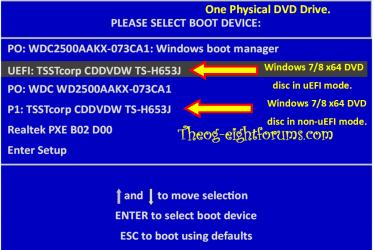
I'm fairly certain my broken win7 is EFI and the other is not, so maybe that is the reason? Is there somewhere I can find a EFI repair disk?
I have accessed all of my files through Ubuntu, but I would prefer not re-installing everything if there is a way to fix this Win7 install.
If anyone could offer any advice I would greatly appreciate it!
I was "trying" Ubuntu on a USB drive and apparently I screwed up my Win7 install because now Win7 will no longer boot(sticks at the starting windows screen). I used the boot-repair in Ubuntu(no idea why I did this) and this may have been the culprit(not positive though).
I have tried doing system repair with an installation disk and a repair disk made from another win7 x64 OS and I always get an error message saying: This version of system recovery options is not compatible with the version of windows you are trying to repair...."
I'm fairly certain my broken win7 is EFI and the other is not, so maybe that is the reason? Is there somewhere I can find a EFI repair disk?
I have accessed all of my files through Ubuntu, but I would prefer not re-installing everything if there is a way to fix this Win7 install.
If anyone could offer any advice I would greatly appreciate it!
My Computer
- Computer Manufacturer/Model Number
- Lenovo x220
- OS
- Windows 7 Home Premium 64 bit
- CPU
- i7-2620M
- Memory
- 4GB
- Graphics Card(s)
- HD3000
- Monitor(s) Displays
- Samsung BX2331