Solved Win7 CTRL+SHIFT+S creates strange red intersecting line angle?

Zoandar

New member
Local time
8:29 AM
Messages
33
Windows 7x64 produces a "corner" made of two red intersecting lines, with the mouse pointer nested into the corner when I press CTRL+SHIFT+S. This can then be moved anywhere on my displays, no matter if a program window is open or only the desktop is showing. Also, this is happening on THREE completely different Win7 PCs, which have different programs installed on them. See attached, but the mouse pointer doesn't get copied with the screen save I used to capture the red corner.

Oddly, I used this CTRL+SHIFT+S hotkey combination for over a decade to trigger a Quickeys macro on 2 of the PCs, when logging things in an OpenOffice Writer document, and it worked fine to print the defined text for the macro. In fact I used it many times a day. Only recently has this alternative action begun to take place. I had to re-define the macro hotkeys so I can still use that macro.

Anyone have any idea what that is, and how I might go about turning it off? If I press ESC when it appears, it will go away. Aside from that, I have no clue what it is for or how I might use it for anything useful. I am not able to find any info on what this might be.
 

Attachments

  • Mystery Red Angle.png
    Mystery Red Angle.png
    9.1 KB · Views: 30

My Computer

Computer type
PC/Desktop
Computer Manufacturer/Model Number
Self Built
OS
Windows 7 x64 bit Home Premium
CPU
AND FX8150
Motherboard
Asus Crosshair V Formula/Thunderbolt
Memory
16GB DDR3
Graphics Card(s)
GeForce GTX 1070
Monitor(s) Displays
Asus VK228 , LG34UM66, Asus VS228
Screen Resolution
6000 x 2560
Hard Drives
A great many. 3 are SSD, including the Win7 OS Drive, and one for FSX. All SATA
PSU
Cooler Master Silent Pro M 1000W
Case
Cooler Master Cosmos II Ultra Tower
Cooling
Corsair Hydro H100 Extreme Performance Liquid Cooling
Keyboard
Logitech G510s
Mouse
Logitech Trackball M571
Internet Speed
Spectrum Broadband
Antivirus
ME Security Essentials, Malwarebytes AntiMalware
Browser
Chrome
Other Info
Ableconn 10 port SATA PSI Card. Of these 10 and the 6 SATA Ports on the mobo, 14 of them are in use.
If you haven't then install latest version of your computer graphic card driver you can found the graphic card driver at your computer manufacturer website and graphic card manufacturer website. Also install latest version of all the device drivers for your computer.

Test to see pressing Ctrl + Shift + S keys while OpenOffice Writer and Quickeys programs are not started and if issue not produced you will know this issue cause by one of the programs.


Also boot your computer into Safe Mode and if the issue resolves within Safe Mode perform a clean boot state instructions are below.


How to perform a Clean Boot.

Warning: Disabling items in Services or Startup may leave your antivirus disabled until the process is ended. For this reason I would suggest that you perform this process off line.

Press the
7W6b39o.png
keys to open Run, then type msconfig in the search box. This will open System Configuration.

If you are prompted for an administrator password or for confirmation, you should enter the password or provide confirmation.

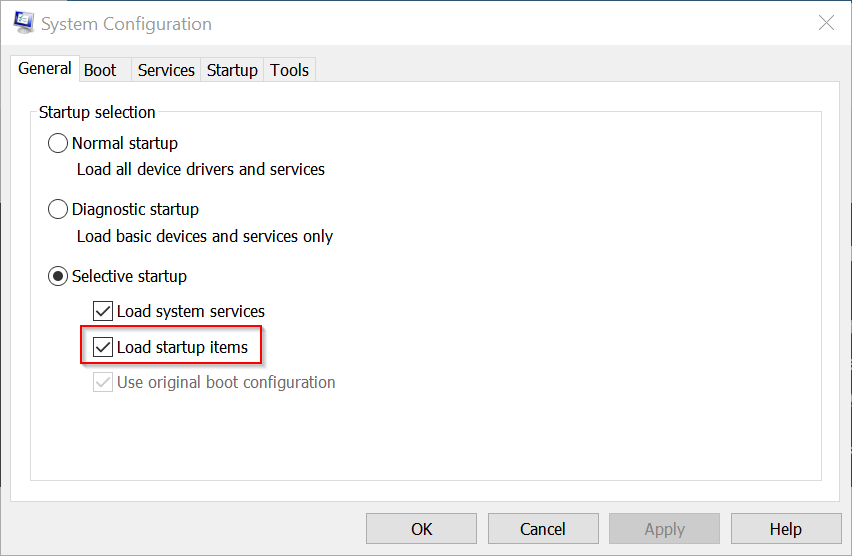
(1) Click/tap on the General tab.

(2) Click/tap on the Selective startup option.

(3) Remove the check mark in the Load startup items check box.

0JgaJnG.png


4. Click on the Services tab.

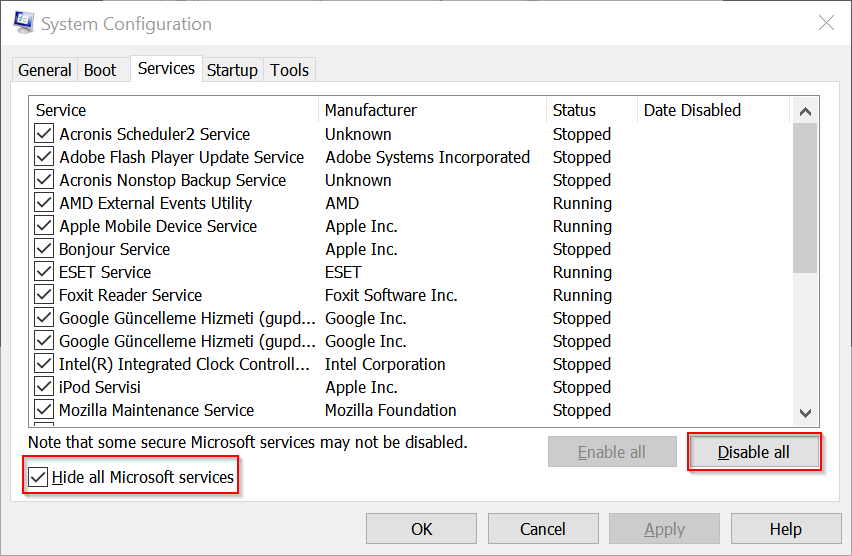
5. Place a check mark in the Hide all Microsoft services check box, this will remove the Microsoft Services from the list but will still be running.

6. Click Disable all, this will remove all of the check marks in the Services list.

yIKrmLs.png


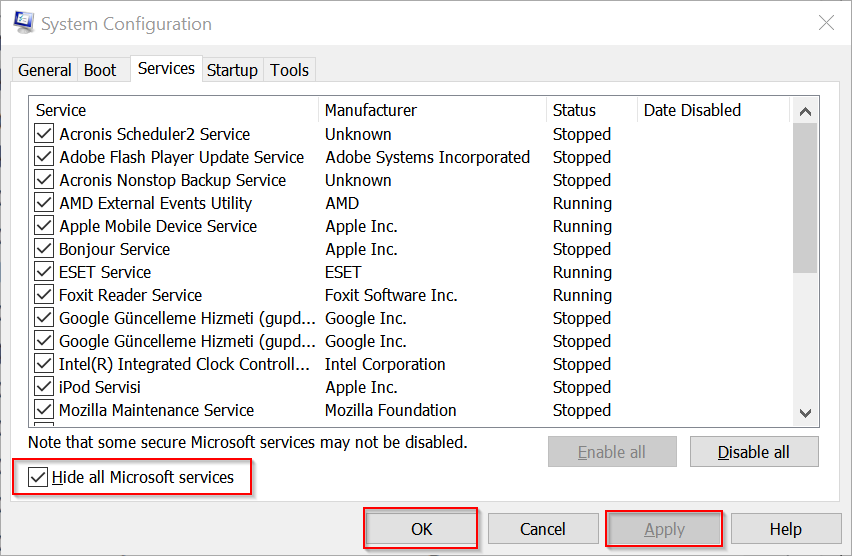
7. Click on Apply then OK

ljHR4ZW.png


Click on Restart in the window that opens.

When the computer is restarted it will boot normally.

If the problem does not continue after the restart please do the following.

8. Divide the number of these startup services and programs by two and you place checks in the first half of these, then restart the computer.

9. If the problem doesn't return in those services and programs remove the checks and place checks in the remaining services and programs and restart the computer.

10. When you find which half the service or program is in go on to the next step.

11. The half which has the service causing this problem remove half of the checks as you did previously to see which half has this service. Do the same for the programs. Restart the computer.

12. If it isn't in the first half of these services and programs, do the same with the last half of the services and programs.

13. Once you have narrowed it down to the last three or four services and programs remove the checks one at a time till you find the service or program at fault.

Once you have found the service or program post it in your topic. Do not take any action until I suggest the next step.
 

My Computer

Computer type
PC/Desktop
Computer Manufacturer/Model Number
Custom Build
OS
Windows 10 Pro x64
CPU
Intel Core i5 6600
Motherboard
Gigabyte Technology Z170M-D3H-CF (U3E1)
Memory
Corsair Vengeance LPX 16GB 2666MHz DDR4
Graphics Card(s)
AMD Radeon R9 380 Series
Hard Drives
SSD
HDD
Antivirus
Eset Smart Security
Browser
Mozila Firefox
I suspect that some installed software is causing this.

This may have been caused by a new feature added to an existing program via an update.

Just recently I tried Macrium Reflect v7.
It hijacked "Ctrl + Alt + M", which I was using in GIMP.

You could look in "Programs and Features" to see if there were any software installations that occurred around the time you first noticed this issue.
 
Last edited:

My Computer

Computer type
PC/Desktop
Computer Manufacturer/Model Number
n/a
OS
W7 Ultimate SP1, LM19.2 MATE, W10 Home 1703, W10 Pro 1703 VM, #All 64 bit
CPU
AMD Phenom II x6 1100T, 3.3 GHz
Motherboard
ASUS M4A88T-M/USB3 (AM3)
Memory
12GB DDR3 1333 G-Skill (4GB x 2), G-Skill (2GB x 2)
Graphics Card(s)
NVIDIA GeForce GTX 660
Sound Card
Realtek?
Monitor(s) Displays
Samsung S23B350
Screen Resolution
1920x1080
Hard Drives
WD Green 2TB (SATA), WD Green 3TB (SATA), WD Blue 4TB (SATA), WD Blue 6TB (SATA)
PSU
Cooler Master
Case
Antec GX300 Tower
Cooling
3x Antec TRICOOL 120mm Fans
Mouse
Wired Optical
Internet Speed
DSL
Antivirus
Avast
Browser
Pale Moon (64 bit)
Other Info
2018-12-27 Upgraded HDDs
2015-12-10 Upgraded case, graphics card, storage
2015-08-15 Upgraded motherboard & RAM
2015-07-15 Upgraded LM17.1 to LM17.2
Solved

Thanks guys. I do have some additional information. I have not yet tried the very detailed debugging procedure offered above, but it sure looks like that could pinpoint something. :)

2 things I learned today.

On my wife's Windows 7 PC, which I built as well as building 2 of my 3 computers (one is a Thinkpad Notebook) I asked her to try CTRL+SHIFT+S today and watched while nothing at all happened.

During my research I ran across discussion of the Snipping Tool offered in Windows 7. Although mine does NOT have a shortcut key sequence set (I'd never heard of this rather nifty tool before yesterday), I got to wondering if what I am seeing might be something similar to that. So, when I pressed CTRL+SHIFT+S on my main PC just now, and the red "corner" appeared, I tried right-clicking and it disappeared. I tried it again and this time left-clicked and dragged a "box" area of the wallpaper on one of my 3 displays. The red box disappeared when I released the mouse. No indication of anything having happened. But, in Paperport 11 I use to work with documents, I "pasted" and it produced a copy of that area of my desktop. So this is some kind of Screen Clipping feature. But I still don't know where it comes from or how I might be able to re-assign or disable it's hotkey setting. Whatever it is coming from is NOT installed on my wife's PC, but we use a computer for many different purposes, so our installed software is widely different.

Quikeys is only installed on 1 of my PCs and the notebook. (I only have a 2-seat license for that retail program). So that can't be it, as this mystery feature runs on my 3rd PC too. It has to be something that I use across all 3 of them, such as OpenOffice, but I am not aware of this being an OpenOffice feature.

SOLVED! :)

Having just installed a VERY cool utility from Microsoft, called Mouse Without Borders (lets you move your mouse pointer AND your keyboard input (!) across up to 4 completely different computers) I just remembered this would be the last program I had jointly installed on all my computers. It pretty much makes KVM hardware obsolete. A quick Google search (I am still learning about all its features) revealed that CTRL+SHIFT+S is it's hotkey for "Selective Screen Capture". It is mentioned on this page:

Mouse Without Borders mousewithoutborders, - Microsoft Community

Thanks for your help, guys! Now I just looked into whether I can change that hotkey assignment and indeed I can! It is set to a default of CTRL+SHIFT+a key you can select, but they set that to S when installed.

:cool:
 

My Computer

Computer type
PC/Desktop
Computer Manufacturer/Model Number
Self Built
OS
Windows 7 x64 bit Home Premium
CPU
AND FX8150
Motherboard
Asus Crosshair V Formula/Thunderbolt
Memory
16GB DDR3
Graphics Card(s)
GeForce GTX 1070
Monitor(s) Displays
Asus VK228 , LG34UM66, Asus VS228
Screen Resolution
6000 x 2560
Hard Drives
A great many. 3 are SSD, including the Win7 OS Drive, and one for FSX. All SATA
PSU
Cooler Master Silent Pro M 1000W
Case
Cooler Master Cosmos II Ultra Tower
Cooling
Corsair Hydro H100 Extreme Performance Liquid Cooling
Keyboard
Logitech G510s
Mouse
Logitech Trackball M571
Internet Speed
Spectrum Broadband
Antivirus
ME Security Essentials, Malwarebytes AntiMalware
Browser
Chrome
Other Info
Ableconn 10 port SATA PSI Card. Of these 10 and the 6 SATA Ports on the mobo, 14 of them are in use.
We are glad to hear your issue has been resolved, thank you for letting us know that all is now well!
 

My Computer

Computer type
PC/Desktop
Computer Manufacturer/Model Number
Custom Build
OS
Windows 10 Pro x64
CPU
Intel Core i5 6600
Motherboard
Gigabyte Technology Z170M-D3H-CF (U3E1)
Memory
Corsair Vengeance LPX 16GB 2666MHz DDR4
Graphics Card(s)
AMD Radeon R9 380 Series
Hard Drives
SSD
HDD
Antivirus
Eset Smart Security
Browser
Mozila Firefox
You're welcome! And thanks again for the help. I never did find any reference to the red lines online, even with a Google image search. So hopefully this thread will help anyone else who stumbles into this feature, not realizing its origin.
 

My Computer

Computer type
PC/Desktop
Computer Manufacturer/Model Number
Self Built
OS
Windows 7 x64 bit Home Premium
CPU
AND FX8150
Motherboard
Asus Crosshair V Formula/Thunderbolt
Memory
16GB DDR3
Graphics Card(s)
GeForce GTX 1070
Monitor(s) Displays
Asus VK228 , LG34UM66, Asus VS228
Screen Resolution
6000 x 2560
Hard Drives
A great many. 3 are SSD, including the Win7 OS Drive, and one for FSX. All SATA
PSU
Cooler Master Silent Pro M 1000W
Case
Cooler Master Cosmos II Ultra Tower
Cooling
Corsair Hydro H100 Extreme Performance Liquid Cooling
Keyboard
Logitech G510s
Mouse
Logitech Trackball M571
Internet Speed
Spectrum Broadband
Antivirus
ME Security Essentials, Malwarebytes AntiMalware
Browser
Chrome
Other Info
Ableconn 10 port SATA PSI Card. Of these 10 and the 6 SATA Ports on the mobo, 14 of them are in use.
Back
Top