win7 desktop icon problem

anon125

Banned
Local time
3:34 PM
Messages
34
for some reason - only MS know - one of the desktop icons wont show the correct picture.
Photoshop elements 5.
it used to but not now.
i can find a png pic of the icon picture.
how do i get the icon pic back. maybe from that
properties change icon HAS the right pic - but select it and get something like a book page.
thanks
64bit
 

My Computer

OS
7

My Computer

Computer type
PC/Desktop
Computer Manufacturer/Model Number
Assembled Desktop PC
OS
Microsoft Windows 7 Home Premium SP1 64-bit Build 7600
CPU
AMD Athlon 64 X2 5200+ Dual Core CPU @ 2.7 Ghz (Brisbane)
Motherboard
PCChips A13G+ v3.0
Memory
2x2 GB DDR2 PC-5300 (667 Mhz) Kingston ValueRAM
Graphics Card(s)
XFX ATI Radeon HD 4350 GPU (512 MB + 512 MB HM)
Sound Card
Realtek High Definition Audio Driver ALC660 @ MCP61S
Monitor(s) Displays
HP S2031 20" LED HD Widescreen Display Monitor
Screen Resolution
1600 x 900 px
Hard Drives
Maxtor Diamond Max 10 (160 GB, 7200 RPM, SATA-II Hard Disk)
Western Digital Scorpion Blue (250 GB, 5400 RPM, SATA-II External Hard Disk - Personal Data)
Toshiba MQ01ABD050 (500 GB, 5400 RPM, SATA-II External Hard Disk - Software & ISOs)
PSU
Pixxo Transformer 850W 80+ Certification PSU
Case
Compaq 5BW353 Case
Cooling
Many solutions, see other info...
Keyboard
Green Leaf (Mitzu) Standard Keyboard
Mouse
Microsoft USB Lasser Pointing Device
Internet Speed
10 MB
Antivirus
Avast Antivirus Free
Browser
Firefox, Chrome, Internet Explorer
Other Info
Windows Experience Index Result: 3.8 of 7.9.

Cooling solutions:
- AVC @ 2000/5000 RPM Copper Heatpipes (For Athlon 64 X2 6000+ CPU used in an Athlon 64 X2 5200+)
- Rear Fan 80 mm @ 2700 RPM for heat extraction
- Manhatan Chipset Cooler @ 4700/7200 RPM (For nVidia Chipset in MoBo)
- Foxconn @ 2500 RPM (Old Pentium III heatsink fan) in XFX ATI Radeon HD 4350
Try this, works like a charm for me whenever Everest icon goes nuts (not too often BTW)
http://www.sevenforums.com/graphic-cards/21558-icon-went-missing-windows-7-heres-fix.html

See ya!!! :D
Thanks
a bit too much keying in dos - mistake prone!
maybe this works How to Rebuild the Icon Cache in Windows Vista and Windows 7 - The Winhelponline Blog

or less keying http://www.sevenforums.com/tutorials/49819-icon-cache-rebuild.html

http://www.sevenforums.com/tutorials/49819-icon-cache-rebuild.htmlhttp://www.sevenforums.com/tutorials/49819-icon-cache-rebuild.html
CD /d %userprofile%\AppData\Local
DEL IconCache.db /a
EXIT
did NOT work on 64bit
 
Last edited:

My Computer

OS
7
for some reason - only MS know - one of the desktop icons wont show the correct picture.
Photoshop elements 5.
it used to but not now.
i can find a png pic of the icon picture.
how do i get the icon pic back. maybe from that
properties change icon HAS the right pic - but select it and get something like a book page.
thanks
64bit

Save the icon in a folder in your documents, for instance. Then do the right click, properties, change icon, and choose the icon you saved. A Guy
 

My Computer

Computer type
PC/Desktop
OS
Windows 10 Home x64
CPU
INTEL Core i5-750 Quad-Core 3.37GHz
Motherboard
ASUS P7P55D
Memory
HyperX Fury Black Series 8GB (2 x 4GB) 1866Mhz
Graphics Card(s)
EVGA GeForce GTX 750 Superclocked 1GB 128-Bit GDDR5
Monitor(s) Displays
LG 32MA68HY 32" IPS
Screen Resolution
1920 x 1080
Hard Drives
Samsung 840 Evo 120GB, SEAGATE 500GB Barracuda® 7200.12, SATA 3 Gb/s, 7200 RPM, 16MB cache
PSU
ANTEC TruePower New TP-550, 80 PLUS, 550W
Case
ANTEC Three Hundred Illusion
Cooling
COOLER MASTER Hyper 212 Plus, 4 x 120mm 1 x 140mm Noctua's
Internet Speed
85 + Mbps
Antivirus
Avast
Browser
Vivaldi
for some reason - only MS know - one of the desktop icons wont show the correct picture.
Photoshop elements 5.
it used to but not now.
i can find a png pic of the icon picture.
how do i get the icon pic back. maybe from that
properties change icon HAS the right pic - but select it and get something like a book page.
thanks
64bit

Save the icon in a folder in your documents, for instance. Then do the right click, properties, change icon, and choose the icon you saved. A Guy

thanks
did not recognise the pic as an icon - wasn't an ico file i guess.
 

My Computer

OS
7

My Computer

Computer Manufacturer/Model Number
Hewlett packard/p6512uk
OS
Microsoft Windows 7 Home Premium 64-bit 7600
CPU
IIx4 amd athelon 635 processor
Motherboard
FOXCONN 2AA9
Memory
2x2gb
Graphics Card(s)
ati radeon HD 5450
Sound Card
(1) Realtek High Definition Audio (2) AMD High Definition
Monitor(s) Displays
samsung lcd tv 32"
Screen Resolution
1360x 768
Hard Drives
(1) WDC WD10 01FAES-60Z2A0 SATA Disk Device (2) Maxtor OneTouch USB Device (3) ST310003 33AS USB Device (4) WD My Book 1111 USB Device
PSU
?
Cooling
air!
Keyboard
wireless hp
Mouse
wireless Hp,optical
Internet Speed
1.10mb/s
Antivirus
MSE
Browser
Firefox
works fine with win 7 x64. google it if prob with link . link is fine my end :)
 

My Computer

Computer Manufacturer/Model Number
Hewlett packard/p6512uk
OS
Microsoft Windows 7 Home Premium 64-bit 7600
CPU
IIx4 amd athelon 635 processor
Motherboard
FOXCONN 2AA9
Memory
2x2gb
Graphics Card(s)
ati radeon HD 5450
Sound Card
(1) Realtek High Definition Audio (2) AMD High Definition
Monitor(s) Displays
samsung lcd tv 32"
Screen Resolution
1360x 768
Hard Drives
(1) WDC WD10 01FAES-60Z2A0 SATA Disk Device (2) Maxtor OneTouch USB Device (3) ST310003 33AS USB Device (4) WD My Book 1111 USB Device
PSU
?
Cooling
air!
Keyboard
wireless hp
Mouse
wireless Hp,optical
Internet Speed
1.10mb/s
Antivirus
MSE
Browser
Firefox

My Computer

Computer type
PC/Desktop
OS
Windows 10 Home x64
CPU
INTEL Core i5-750 Quad-Core 3.37GHz
Motherboard
ASUS P7P55D
Memory
HyperX Fury Black Series 8GB (2 x 4GB) 1866Mhz
Graphics Card(s)
EVGA GeForce GTX 750 Superclocked 1GB 128-Bit GDDR5
Monitor(s) Displays
LG 32MA68HY 32" IPS
Screen Resolution
1920 x 1080
Hard Drives
Samsung 840 Evo 120GB, SEAGATE 500GB Barracuda® 7200.12, SATA 3 Gb/s, 7200 RPM, 16MB cache
PSU
ANTEC TruePower New TP-550, 80 PLUS, 550W
Case
ANTEC Three Hundred Illusion
Cooling
COOLER MASTER Hyper 212 Plus, 4 x 120mm 1 x 140mm Noctua's
Internet Speed
85 + Mbps
Antivirus
Avast
Browser
Vivaldi
I never tried the "drag" method you mention when I used IcoFX (since bought Icon Workshop) but if you don't have the "full" set of icon sizes in your icon I can see problems.

By full set I mean 256sq, 64sq, 48sq, 32sq, 24sq and 16sq. What sizes are in your icon when you drag it to the desktop?
 

My Computer

OS
Win7 HP 64bit
I never tried the "drag" method you mention when I used IcoFX (since bought Icon Workshop) but if you don't have the "full" set of icon sizes in your icon I can see problems.

By full set I mean 256sq, 64sq, 48sq, 32sq, 24sq and 16sq. What sizes are in your icon when you drag it to the desktop?

not knowing enough to answer your question i uploaded the png file.
sorry its the best i can do!
thanks
PS the icon neede to be twice as wide and twice as tall
 

Attachments

  • PSE_icon.png
    PSE_icon.png
    6.1 KB · Views: 193
  • iconFXoptions.jpg
    iconFXoptions.jpg
    20 KB · Views: 9

My Computer

OS
7
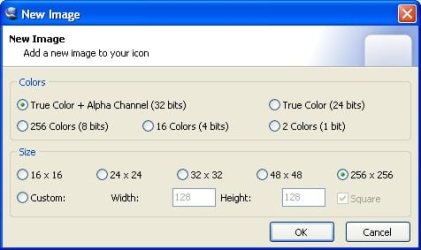
OK, that png file is 128 x 128 so it does indeed need to "double" in size. In your first picture (from IcoFX?) you want to make all the sizes under the "size" window and in the custom window set it to 64 x 64. And don't bother with any other image type apart from the Alpha transparency you have ticked.
 

My Computer

OS
Win7 HP 64bit
This is what the window should look like in your icon editor of choice.

IconWorkshop.png


And this is your png re-sized to 256 x 256 (and sharpened along the way).
PSE256.png
 

My Computer

OS
Win7 HP 64bit
OK, that png file is 128 x 128 so it does indeed need to "double" in size. In your first picture (from IcoFX?) you want to make all the sizes under the "size" window and in the custom window set it to 64 x 64. And don't bother with any other image type apart from the Alpha transparency you have ticked.
set it to 64 x 64? i don't see that in the choices i posted!
yes it is from the IcoFX
thanks

UPDATE: i doubled the size of the png file - now it is fine
thanks
 

My Computer

OS
7
Back
Top