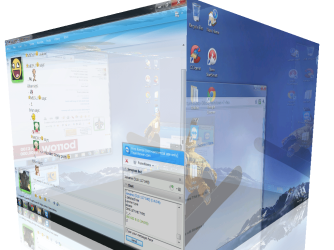
I can't remember right now how I accidentally stumbled into something very similar (but not cubed, like this screenshot) on my system which has a Logitech MX-Revolution wireless mouse.
I think I may have unwittingly pushed one of the seven buttons on the mouse in an an unusual way (or combination), and this caused all of the open windows on my desktop to suddenly twist into a 3D-shaped fashion, with the left window edges "driven into the background" and the right window edges "projecting into the foreground". I think I may even have been able to twist the 3D nature of the presentation back and forth.
I forget how I got out of it, but again it was probably just another push of a button (or combination), or maybe just click on the desktop or something... can't recall.
I certainly do not have this DeskCube software on my machine. So I thought my own 3D-like "twist" was either a function provided by Logitech in its mouse software, or just some standard feature of Win7 and Aero that Logitech had invoked with some wheel or button default assignment function that I just wasn't aware of.
I cannot get (and have never seen) this same "3D-twist" accident on my other system, which has an old wired mouse. Only on the system with the Logitech mouse and software have I seen it... which is why I really think it's somehow tied to Logitech.
I'll have to investigate this further, to see if a wheel/button is simply triggering some new Win7/Aero 3D-twist capability.
AHA... "
Aero Flip 3D", new with Vista.
I do not have a keyboard that has a Windows key, so I believe it must be some built-in assignment of one of the MX-Revolution's buttons to the Windows key by the Logitech software which was responsible for my experience. And I just didn't realize it.

 .
.

 Thanks for letting us know.
