Win7 Desktop Problem

Semper

New member
Local time
11:24 AM
Messages
4
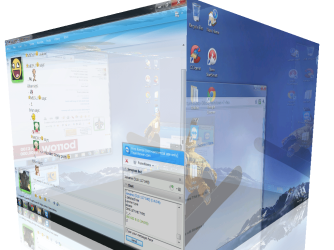
I am wondering how to turn this off, I really don't need this feature to be honest. it annoys me aswell. -How it is activated, whenever I move a window it starts doing that cube effect. Please, how to I turn this off?
 

Attachments

  • Untitled.png
    Untitled.png
    242.9 KB · Views: 20

My Computer

OS
Windows 7 Ultimate x64
That is most definitely not a Windows feature. What 3rd party shell components/software have you installed? That would be where you turn it off ;).
 

My Computer

Computer type
PC/Desktop
Computer Manufacturer/Model Number
Custom
OS
Windows 10 Pro x64
CPU
Intel Core i7 4790K @ 4.5GHz
Motherboard
Asus Maximus Hero VII
Memory
32GB DDR3
Graphics Card(s)
Nvidia GeForce GTX970
Sound Card
Realtek HD Audio
Screen Resolution
1920x1200
Hard Drives
1x Samsung 250GB SSD
4x WD RE 2TB (RAIDZ)
PSU
Corsair AX760i
Case
Fractal Design Define R4
Cooling
Noctua NH-D15
Nothing, i have searched it and i think this is virtual desktop, I just want to know how to turn it off.
 

My Computer

OS
Windows 7 Ultimate x64
As already mentioned by Cluberti, this is not a feature that comes bundled with Windows 7. I would strongly suggest that you download and run a FULL scan with Malwarebytes -Malware Scanner. You can get the free version at the link I have provided below. Make sure you run the UPDATE tab before you start the scan.
Let us know how you make out.
Download Malwarebytes Anti-Malware 1.50.1 - FileHippo.com

Regards
JohnnyA
 

My Computer

Computer Manufacturer/Model Number
Toshiba C650
OS
Windows Home Premium 64bit
CPU
T61-- 2.0ghz
Motherboard
Toshiba
Memory
4 GB
Graphics Card(s)
On board
Sound Card
On board
Monitor(s) Displays
15.6"
Hard Drives
500 GB
It has to be something because Windows does not have that feature look for something like CubeDesktop, DeskSpace, YODM 3D, Desktop to turn off.
It looks similar to Compiz in linux are you using linux?
Jerry
 

My Computer

Computer type
Laptop
Computer Manufacturer/Model Number
Sager NP9170
OS
Win 7 Pro x64 / Win 10 Pro
CPU
Intel(R) Core(TM) i7-3630QM CPU @ 2.40GHz
Motherboard
CLEVO P170EM
Memory
12 GB
Graphics Card(s)
(1) Intel(R) HD Graphics 4000 (2) NVIDIA GeForce GTX 675M
Sound Card
(1) Realtek High Definition Audio (2) Intel(R) Display Aud
Monitor(s) Displays
17.3
Screen Resolution
1920x1080
Hard Drives
(1) Samsung 860 EVO 500GB(OS) (1) Samsung 860 EVO 500GB(Data)
Keyboard
Backlite
Antivirus
MSE, Malwarebytes Pro
Browser
Firefox
Other Info
DESKTOP: Custom-built.
OS: Win 10 Pro x64.
CASE: Rosewill R5.
CPU: Intel I5 4670K CPU @ 3.40GHz.
CPU COOLER: Cool Master Hyper 212 EVO.
MOTHERBOARD: Asus Z87-A.
MEMORY: Kingston HyperX 2x4 GB.
GPU: Nvidia Geforce 650 TI.
PSU: Corsair TX750.
DRIVES: (1) Samsung 840 120 GB SSD (2) Western Digital blue 500 GB 7200 RPM.
No.... i am using windows 7 as listed below my name.
 

My Computer

OS
Windows 7 Ultimate x64
I think Bongo has nailed it. If you Google CubeDesktop or DeskSpace for will actually find videos showing this exact product. Somehow it is INSTALLED on your system. You can go into ADD/REMOVE programs and completely uninstall it if you do not want it.
JohnnyA
 

My Computer

Computer Manufacturer/Model Number
Toshiba C650
OS
Windows Home Premium 64bit
CPU
T61-- 2.0ghz
Motherboard
Toshiba
Memory
4 GB
Graphics Card(s)
On board
Sound Card
On board
Monitor(s) Displays
15.6"
Hard Drives
500 GB
Turns out it was installed on my computer, I don't know how but it was. Thanks guys for helping i have removed and ended the process in which it was being such a pain. :)
 

My Computer

OS
Windows 7 Ultimate x64
Turns out it was installed on my computer, I don't know how but it was. Thanks guys for helping i have removed and ended the process in which it was being such a pain. :)
:cool: Thanks for letting us know.
Jerry
 

My Computer

Computer type
Laptop
Computer Manufacturer/Model Number
Sager NP9170
OS
Win 7 Pro x64 / Win 10 Pro
CPU
Intel(R) Core(TM) i7-3630QM CPU @ 2.40GHz
Motherboard
CLEVO P170EM
Memory
12 GB
Graphics Card(s)
(1) Intel(R) HD Graphics 4000 (2) NVIDIA GeForce GTX 675M
Sound Card
(1) Realtek High Definition Audio (2) Intel(R) Display Aud
Monitor(s) Displays
17.3
Screen Resolution
1920x1080
Hard Drives
(1) Samsung 860 EVO 500GB(OS) (1) Samsung 860 EVO 500GB(Data)
Keyboard
Backlite
Antivirus
MSE, Malwarebytes Pro
Browser
Firefox
Other Info
DESKTOP: Custom-built.
OS: Win 10 Pro x64.
CASE: Rosewill R5.
CPU: Intel I5 4670K CPU @ 3.40GHz.
CPU COOLER: Cool Master Hyper 212 EVO.
MOTHERBOARD: Asus Z87-A.
MEMORY: Kingston HyperX 2x4 GB.
GPU: Nvidia Geforce 650 TI.
PSU: Corsair TX750.
DRIVES: (1) Samsung 840 120 GB SSD (2) Western Digital blue 500 GB 7200 RPM.
Good for you Semper. Great call Bongo.
Regards
JohnnyA
 

My Computer

Computer Manufacturer/Model Number
Toshiba C650
OS
Windows Home Premium 64bit
CPU
T61-- 2.0ghz
Motherboard
Toshiba
Memory
4 GB
Graphics Card(s)
On board
Sound Card
On board
Monitor(s) Displays
15.6"
Hard Drives
500 GB
I can't remember right now how I accidentally stumbled into something very similar (but not cubed, like this screenshot) on my system which has a Logitech MX-Revolution wireless mouse.

I think I may have unwittingly pushed one of the seven buttons on the mouse in an an unusual way (or combination), and this caused all of the open windows on my desktop to suddenly twist into a 3D-shaped fashion, with the left window edges "driven into the background" and the right window edges "projecting into the foreground". I think I may even have been able to twist the 3D nature of the presentation back and forth.

I forget how I got out of it, but again it was probably just another push of a button (or combination), or maybe just click on the desktop or something... can't recall.

I certainly do not have this DeskCube software on my machine. So I thought my own 3D-like "twist" was either a function provided by Logitech in its mouse software, or just some standard feature of Win7 and Aero that Logitech had invoked with some wheel or button default assignment function that I just wasn't aware of.


I cannot get (and have never seen) this same "3D-twist" accident on my other system, which has an old wired mouse. Only on the system with the Logitech mouse and software have I seen it... which is why I really think it's somehow tied to Logitech.

I'll have to investigate this further, to see if a wheel/button is simply triggering some new Win7/Aero 3D-twist capability.


AHA... "Aero Flip 3D", new with Vista.

I do not have a keyboard that has a Windows key, so I believe it must be some built-in assignment of one of the MX-Revolution's buttons to the Windows key by the Logitech software which was responsible for my experience. And I just didn't realize it.
 

My Computer

Computer type
PC/Desktop
Computer Manufacturer/Model Number
Home-built, two systems (1) and (2)
OS
Windows 7 Pro x64 (1), Win7 Pro X64 (2)
CPU
i5-3350p 3.1Ghz/6MB-cache (1); E8400 3.0Ghz/6MB-cache (2)
Motherboard
ASUS P8Z77-V Pro (1); ASUS P5Q3 (2)
Memory
8GB PC3-12800 DDR3 (1); 4GB PC3-10600 DDR3 (2)
Graphics Card(s)
ATI HD7750 (1), (see TV cards); ATI R7 250 (2)
Sound Card
Realtek ALC892 HD Audio (1); Realtek ALC1200 HD Audio (2)
Monitor(s) Displays
Eizo HD2441W LCD, Eizo S2433W (1); Eizo 24" S2433W (2)
Screen Resolution
1920x1200, 1920x1200 (1); 1920x1200 (2)
Hard Drives
(1) 1TB SATA-II (7200RPM), 2x2TB SATA-III (7200RPM), 250GB SATA-III (10000RPM) for OS; 2x2TB external USB 3.0

(2) 320GB SATA-II (7200RPM), 750GB SATA-II (7200RPM), 150GB SATA-II (10000RPM) for OS; 2TB external USB 3.0
PSU
Nesteq ECS-6001 600W (1); Nesteq ECS-5001 500W (2)
Case
Acousti-Case 360 (1) and (2)
Cooling
Noctua NH-U12P SE2 for CPU, 2x120mm case fans (1) and (2)
Keyboard
IBM PS/2 (1) and (2)
Mouse
Logitech MX Revolution wireless (1); Microsoft wired (2)
Internet Speed
100mbps down / 10mbps up
Antivirus
Microsoft Security Essentials; Malwarebyte Anti-Malware Pro
Browser
Firefox
Other Info
Ceton InfiniTV 4-tuner cablecard-enabled TV card as well as Hauppauge HVR-2250 OTA/ATSC 2-tuner TV card in (1), running under Win7 WMC
Back
Top
