
Solved Win7 doesn't start: shows error 0xc000000f

ArnoJ

New member
Local time
5:44 PM
Messages
14
Hi,

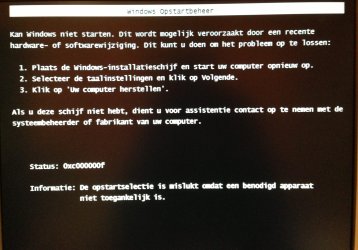
When I turn on my friend's computer, a screen pops up where I can choose to start Windows normally, or use boot repair (don't know if I translated that correctly though). When I choose the repair option, windows shows the error code 0xc000000f. I made a photo (OS is in Dutch).

Things I've tried:
-boot from ubuntu USB: stuck on the ubuntu loading screen
-reset BIOS
-manually reset BIOS (pulling out the battery)
-boot from windows 7 CD: when I click on "repair" the prog starts searching for Windows installations. This takes ages, (ran it for more than 3 hours) so I shut the computer down.

Thanks in advance for your help!
 

Attachments
  • image.jpg
    image.jpg
    237.2 KB · Views: 3

My Computer

Computer type
PC/Desktop
OS
Windows 7 ultimate 32bit
Have you tried a System Restore to a date before you had the problem?
 

My Computer

Computer type
PC/Desktop
Computer Manufacturer/Model Number
Custom Build
OS
Windows 7 Home Premium 32-Bit - Build 7600 SP1
CPU
Intel Core i3-2120 3.30Ghz
Motherboard
Asus P8Z68-V LX Intel Z68 Socket H2 ATX
Memory
Kingston 4 GB DDR3 1333 mhz
Graphics Card(s)
AMD Radeon HD6670
Sound Card
Sound Blaster Audigy SE 24-Bit
Monitor(s) Displays
Asus VE228
Screen Resolution
1440 X 900
Hard Drives
OCZ Vertex 3 120 GB Sata 3 SSD ==
Kingston SH103/S3 120 G Hyper X 120 GB SSD ==
Western Digital 500 GB Caviar Green 7200 RPM ==
PSU
Corsair CX600M == 600 Watt
Case
NZXT Apollo - Silver with Clear Side Panel
Cooling
Three 120 mm Fans
Keyboard
Microsoft Natural 4000
Mouse
Microsoft Custom Optical 3000
Internet Speed
AT&T Fiber Optic Wireless Network
Antivirus
Microsoft Security Essentials
Browser
Chrome
Other Info
120 mm Blue LED Fan -- Three Blue LED Lazer Light Sticks
Thanks for responding.
I can't perform a system restore: the program keeps "searching for Windows installations" without any outcome.
 

My Computer

Computer type
PC/Desktop
OS
Windows 7 ultimate 32bit
If automatic repair from Windows DVD does not work, then boot using that DVD, when you reach the setup wizard screen, press Shift+F10 to launch cmd.

Now enter the following commands one by one and hit Enter after each:

:ar: bootrec /fixboot
:ar: bootrec /fixmbr
:ar: bootrec /rebuildbcd

Do this atleast 3 times (yes, by booting using DVD again and again).

See if this helps.
 

My Computer

Computer type
PC/Desktop
OS
Windows 7 Home Premium x64
Roboticarm,
Thanks for responding. I forgot to mention the boot-up from the CD is extremely slow. It took the comp 13 minutes to show the language screen. Is that relevant?
Anyway, I am running your commands right now. I'll keep you posted.

EDIT: Still haven't finished first command. Is it normal for it to take this long?
 

My Computer

Computer type
PC/Desktop
OS
Windows 7 ultimate 32bit
It took the comp 13 minutes to show the language screen. Is that relevant?
The boot manager is corrupt, so you need to perform the steps to repair it.
 

My Computer

Computer type
PC/Desktop
Computer Manufacturer/Model Number
Bruce ... somewhere in his 40's
OS
Windows 7 Ultimate 32bit SP1
CPU
Intel(R) Core(TM)2 Quad CPU @ 2.40GHz, 2400 MHz
Motherboard
INTEL/D975XBX2
Memory
4 GB
Graphics Card(s)
ATI Radeon HD 2600 Pro
Monitor(s) Displays
Samsung SyncMaster 914v
Screen Resolution
1280 x 1024
Hard Drives
2/500GB each ... ST3500630AS ATA Device.
One is not connected
PSU
Rocketfish 700 W
Case
G.Skill Gigabyte Chassis
Keyboard
Standard PS/2 Keyboard
Mouse
Microsoft PS/2 Mouse
Internet Speed
DSL
Antivirus
Avira Internet Security
Browser
IE 11
Other Info
ATI HDMI Audio
Oh I see. Thanks for your reply.
 

My Computer

Computer type
PC/Desktop
OS
Windows 7 ultimate 32bit
Roboticarm,
Thanks for responding. I forgot to mention the boot-up from the CD is extremely slow. It took the comp 13 minutes to show the language screen. Is that relevant?
Anyway, I am running your commands right now. I'll keep you posted.

EDIT: Still haven't finished first command. Is it normal for it to take this long?

No. Those commands take just an instant. Jacee is right. Anyway see what happens after you complete all 3 commands. Also, 13 minutes to boot using DVD is abnormal. Something's wrong with some hardware I think.
 

My Computer

Computer type
PC/Desktop
OS
Windows 7 Home Premium x64
I completed all three commands. However, the third command came out with this text (translated):
"Search for windows installations on all disks
This can take a couple of minutes. A moment please...
Total found windows installations: 0
Command completed"
I am rebooting now.
 

My Computer

Computer type
PC/Desktop
OS
Windows 7 ultimate 32bit
I'm sorry for the delay. When I rebooted, the computer got past the "starting windows" screen, but now the screen is black (though I have a moveable cursor). These commands sure did help, but the problem isn't completely solved yet.

EDIT: I left the computer running, and after one hour or so, I was logged in and could see my desktop! But, whenever I try to open a directory, windows gives the following message (translated):
"Could not start the server process because the configured identity is not correct. Check the username and password." Running SFC /scannow at the moment.
 
Last edited:

My Computer

Computer type
PC/Desktop
OS
Windows 7 ultimate 32bit
I'm sorry for the delay. When I rebooted, the computer got past the "starting windows" screen, but now the screen is black (though I have a moveable cursor). These commands sure did help, but the problem isn't completely solved yet.

EDIT: I left the computer running, and after one hour or so, I was logged in and could see my desktop! But, whenever I try to open a directory, windows gives the following message (translated):
"Could not start the server process because the configured identity is not correct. Check the username and password." Running SFC /scannow at the moment.

Glad to know you were able to reach the desktop! :D

One of my friends had an exact similar problem like that of yours - things taking ages. It turned out to be the hard disk - the LED would keep on glowing constantly and it took around 2 hours to install Windows. He had to get the hard disk replaced.

What about the hard disk indicator in your case?
 

My Computer

Computer type
PC/Desktop
OS
Windows 7 Home Premium x64
The LED light is indeed glowing (almost) non-stop! Is there some kind of test I can perform to be sure the HDD is broken?
Thanks again for your help!!
 

My Computer

Computer type
PC/Desktop
OS
Windows 7 ultimate 32bit
I would backup what you NEED ASAP.

How old is the drive and brand/model? If it's 5+ years old, I would replace once a backup is done, and toss it.

Put Computer Management in the Windows 7 search box off a START button click and go to Storage | Disk Management to see it once the Computer Management tool loads in say 10 mins ;)

There are performance tools you can use to check HDs but this one is acting up, and I never want to recommend continuing with one misbehaving like this, especially if it's aged.

You can reformat and play with it later, like install a version of Linux on it, which will in effect wipe it, too, but for now BACK UP!
 

My Computer

Computer type
PC/Desktop
Computer Manufacturer/Model Number
Self Built Custom
OS
Windows 7 Ultimate Retail Box (64-bit installed) + Service Pack 1
CPU
AMD FX-8350 CPU v1.15 (or 1.0F) BIOS was required!
Motherboard
MSI 890FXA-GD70
Memory
8G CAS-7 G-Skill DDR3 @1333 (2 fours) [mobo nonOC max rec'd]
Graphics Card(s)
Radeon HD 7950 [3 gigs of GDDR5] MSI Twin Frozr model
Sound Card
Realtek High Definition Audio (onboard mobo, ALC-889 chip)
Monitor(s) Displays
2 WS LED Monitors: One LG One Viewsonic
Screen Resolution
1920 by 1080
Hard Drives
SSD for OS: Samsung 840 Pro
SSD for VM and utilities: Adata SX900
7200 RPM SATA HDs for the rest: Hitachi and Seagate
PSU
Corsair TX850 - 850W max, in service since August 2010.
Case
Thermaltake Armor A90
Cooling
Thermaltake Spin Q CPU Cooler, in service since August 2010
Keyboard
Logitech G11
Mouse
Logitech M310 Wireless
Internet Speed
100 Megabit broadband supposedly upgraded from 50 (Cable)
Antivirus
Bitdefender Internet Security 2014 suite
Browser
Pale Moon 64-bit main, also IceDragon, Opera, and Maxthon.
Other Info
CompTIA A+ certified (220-800 series) in July 2013.
Computer management tool is loading, so I'll get back to you in a while ;)
The only way to back-up right now is to connect the HD to another computer. (I have no access to any kind of files)
I'll do that once I checked the HD's specifics.
 

My Computer

Computer type
PC/Desktop
OS
Windows 7 ultimate 32bit
Computer Management says it can't connect to the Virtual Disk Service.. Anyway, I'm going to back-up everything using an ATA to USB device, I knew that would come in handy one day :)
 

My Computer

Computer type
PC/Desktop
OS
Windows 7 ultimate 32bit
Try temporary hard disk replacement (borrow one) and install Windows on it if its not already there and see if things go fast and then report back. The culprit can be some other hardware as well.
 

My Computer

Computer type
PC/Desktop
OS
Windows 7 Home Premium x64
Is it possible to use a bootable ubuntu USB stick as "hard drive"? Also, the data copy from the HD is extremely slow (10-200kb/s) so that makes me think the HD is indeed the problem.
 

My Computer

Computer type
PC/Desktop
OS
Windows 7 ultimate 32bit

My Computer

Computer type
PC/Desktop
Computer Manufacturer/Model Number
Bruce ... somewhere in his 40's
OS
Windows 7 Ultimate 32bit SP1
CPU
Intel(R) Core(TM)2 Quad CPU @ 2.40GHz, 2400 MHz
Motherboard
INTEL/D975XBX2
Memory
4 GB
Graphics Card(s)
ATI Radeon HD 2600 Pro
Monitor(s) Displays
Samsung SyncMaster 914v
Screen Resolution
1280 x 1024
Hard Drives
2/500GB each ... ST3500630AS ATA Device.
One is not connected
PSU
Rocketfish 700 W
Case
G.Skill Gigabyte Chassis
Keyboard
Standard PS/2 Keyboard
Mouse
Microsoft PS/2 Mouse
Internet Speed
DSL
Antivirus
Avira Internet Security
Browser
IE 11
Other Info
ATI HDMI Audio
Is it possible to use a bootable ubuntu USB stick as "hard drive"? Also, the data copy from the HD is extremely slow (10-200kb/s) so that makes me think the HD is indeed the problem.

Disconnect your HD totally and boot using Ubuntu. How is your system performing?

It might not necessarily be the HD, it could even be the cables, etc, so just put your hard disk out to see if things improve.
 

My Computer

Computer type
PC/Desktop
OS
Windows 7 Home Premium x64
Back
Top