Win7 doesn't want to generate any thumbnails

praeambulus

New member
Member
Local time
8:48 PM
Messages
91
Hi

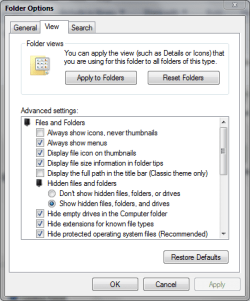
It suddenly happened..all the thumbnails, even on my desktop disappeared..I tried to check "show icons" in the folder options restart and uncheck..did not help

I deleted icon cache manually and with disk cleanup..doesn't help

I don't know what's happening...

any help is appreciated
 

My Computer My Computer

At a glance

Windows 7Intel Core2 Quad 2.664GBGTX 560Ti
OS
Windows 7
CPU
Intel Core2 Quad 2.66
Memory
4GB
Graphics Card(s)
GTX 560Ti
Monitor(s) Displays
HPL2208w
Case
Gigabyte Sumo

My Computer My Computer

At a glance

Windows 7 Home Premium x64 SP1intel(R)core(TM)2 duo CPU T6600 @ 2.20GHz3 gb ddr3ati radeon hd4570/512mb
Computer Manufacturer/Model Number
acer aspire 5935g
OS
Windows 7 Home Premium x64 SP1
CPU
intel(R)core(TM)2 duo CPU T6600 @ 2.20GHz
Motherboard
intel gm45/gm47 revision 07
Memory
3 gb ddr3
Graphics Card(s)
ati radeon hd4570/512mb
Monitor(s) Displays
lop156wh2-tle1 15.3 flat
Screen Resolution
1366x768
Hard Drives
OCZ-Agility3 60gig ssd
320gig external hdd
500gig external hdd
Mouse
Optical
Internet Speed
30Mbps Down/30Mbps Up
I did all three..did not help
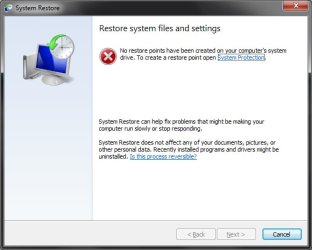
and I don't have any restore points to revert to :/
 

My Computer My Computer

At a glance

Windows 7Intel Core2 Quad 2.664GBGTX 560Ti
OS
Windows 7
CPU
Intel Core2 Quad 2.66
Memory
4GB
Graphics Card(s)
GTX 560Ti
Monitor(s) Displays
HPL2208w
Case
Gigabyte Sumo
Ok what was the result of the SFC /SCANNOW file check. Can you post a screenshot of what the icons look like at present. Also please check "Always show icons, never thumbnails is unchecked under folder options/view. You could also try resetting to default aw-sell also under the view tab
Capture.PNG
 

My Computer My Computer

At a glance

Windows 7 Home Premium x64 SP1intel(R)core(TM)2 duo CPU T6600 @ 2.20GHz3 gb ddr3ati radeon hd4570/512mb
Computer Manufacturer/Model Number
acer aspire 5935g
OS
Windows 7 Home Premium x64 SP1
CPU
intel(R)core(TM)2 duo CPU T6600 @ 2.20GHz
Motherboard
intel gm45/gm47 revision 07
Memory
3 gb ddr3
Graphics Card(s)
ati radeon hd4570/512mb
Monitor(s) Displays
lop156wh2-tle1 15.3 flat
Screen Resolution
1366x768
Hard Drives
OCZ-Agility3 60gig ssd
320gig external hdd
500gig external hdd
Mouse
Optical
Internet Speed
30Mbps Down/30Mbps Up

My Computer My Computer

At a glance

Originally Win 7 Hm Prem x64 Ver 6.1.7600 Bui...Intel i3 530 2.93GHz, 2933MHz 2 Cores 4 Logic...6GB of 1,333MHz DDR3 SDRAM32MB Intel Graphics Media Accelerator HD IGChip
Computer type
PC/Desktop
Computer Manufacturer/Model Number
Gateway DX4831-01e (Mid-Tower Desktop)
OS
Originally Win 7 Hm Prem x64 Ver 6.1.7600 Build 7601-SP1 | Upgraded to Windows 10 December 14, 2019
CPU
Intel i3 530 2.93GHz, 2933MHz 2 Cores 4 Logical Processors
Motherboard
Gateway H57M01 133 megahertz
Memory
6GB of 1,333MHz DDR3 SDRAM
Graphics Card(s)
32MB Intel Graphics Media Accelerator HD IGChip
Sound Card
Realtek High Definition Audio
Monitor(s) Displays
Gateway HX2000 20inch TFT active matrix TN
Screen Resolution
1600 x 900 x 59 hertz
Hard Drives
WDC WD10EADS-00M2B0 [HDD] (1000.20 GB) -- drive 0,
HL-DT-ST DVDRAM GH41N [CD-ROM dr]
Four card readers, and Four USB 2.0
PSU
300watts.
Case
Mid-Tower Desktop
Cooling
Stock from Gateway
Keyboard
Natural Ergonomic Keyboard 4000, see Other Info
Mouse
Orig. Gateway wore out now using Insignia USB wired optical
Internet Speed
Vz FIOS 10ms png 57.64Mbps down 65.53Mbps up Speedtest.org
Antivirus
Zamana Anti-logger with Anti-malware, MSE, Windows Firewall,
Browser
IE11.0.9600.19399-Upd ver11.0.135, Firefox 68.0.1 x64
Other Info
System Specs by Belarc.

BIOS: American Megatrends Inc. P01-A0 11/17/2009

Replaced the MS 'Natural' Standard PS/2 Enhanced 101-102 Keyboard with a new Natural Ergonomic Keyboard 4000 on August 1st 2014.

Canon Pixma MG3222 Printer.

Updated to IE11 on 12102015 | Fios Quantum Router g1100

Additional AV: SpywareBlaster, manual Mbam, SAS
yes.I already unchecked /checked that..doesn't help..the scan didn't find any problems..here are the log and a screenshot..notice that folders also dont get thumbnails

View attachment 259641

iconprb.jpg
 
Last edited:

My Computer My Computer

At a glance

Windows 7Intel Core2 Quad 2.664GBGTX 560Ti
OS
Windows 7
CPU
Intel Core2 Quad 2.66
Memory
4GB
Graphics Card(s)
GTX 560Ti
Monitor(s) Displays
HPL2208w
Case
Gigabyte Sumo
so?
 

My Computer My Computer

At a glance

Windows 7Intel Core2 Quad 2.664GBGTX 560Ti
OS
Windows 7
CPU
Intel Core2 Quad 2.66
Memory
4GB
Graphics Card(s)
GTX 560Ti
Monitor(s) Displays
HPL2208w
Case
Gigabyte Sumo
So, your CBS log didn't show any abnormalities. When you checked System restore did you have the "Show more restore points" checked? its the little check box in the lower left corner.

Did you install or uninstall anything before you noticed "It suddenly happened"?
 

My Computer My Computer

At a glance

Originally Win 7 Hm Prem x64 Ver 6.1.7600 Bui...Intel i3 530 2.93GHz, 2933MHz 2 Cores 4 Logic...6GB of 1,333MHz DDR3 SDRAM32MB Intel Graphics Media Accelerator HD IGChip
Computer type
PC/Desktop
Computer Manufacturer/Model Number
Gateway DX4831-01e (Mid-Tower Desktop)
OS
Originally Win 7 Hm Prem x64 Ver 6.1.7600 Build 7601-SP1 | Upgraded to Windows 10 December 14, 2019
CPU
Intel i3 530 2.93GHz, 2933MHz 2 Cores 4 Logical Processors
Motherboard
Gateway H57M01 133 megahertz
Memory
6GB of 1,333MHz DDR3 SDRAM
Graphics Card(s)
32MB Intel Graphics Media Accelerator HD IGChip
Sound Card
Realtek High Definition Audio
Monitor(s) Displays
Gateway HX2000 20inch TFT active matrix TN
Screen Resolution
1600 x 900 x 59 hertz
Hard Drives
WDC WD10EADS-00M2B0 [HDD] (1000.20 GB) -- drive 0,
HL-DT-ST DVDRAM GH41N [CD-ROM dr]
Four card readers, and Four USB 2.0
PSU
300watts.
Case
Mid-Tower Desktop
Cooling
Stock from Gateway
Keyboard
Natural Ergonomic Keyboard 4000, see Other Info
Mouse
Orig. Gateway wore out now using Insignia USB wired optical
Internet Speed
Vz FIOS 10ms png 57.64Mbps down 65.53Mbps up Speedtest.org
Antivirus
Zamana Anti-logger with Anti-malware, MSE, Windows Firewall,
Browser
IE11.0.9600.19399-Upd ver11.0.135, Firefox 68.0.1 x64
Other Info
System Specs by Belarc.

BIOS: American Megatrends Inc. P01-A0 11/17/2009

Replaced the MS 'Natural' Standard PS/2 Enhanced 101-102 Keyboard with a new Natural Ergonomic Keyboard 4000 on August 1st 2014.

Canon Pixma MG3222 Printer.

Updated to IE11 on 12102015 | Fios Quantum Router g1100

Additional AV: SpywareBlaster, manual Mbam, SAS
this is a scrrenshot of the SR window
d.jpg
well I had installed SageThumbs..a week before.so I don't think it's that..plus, SageThumbs is for image files but all my thumbs are missing , also I tried to disable it to check.didn't help...I don't exactly remember how this happened..I opened something..it was uTorrent or NOD32 ,don't exactly remember, and I return to the desktop see this..but this is all normal..I do this everyday..
now if I open DiskCleanup..Thumbnails are only 3.29KB...so Windows doesn't generate them..and also SageThumbs cache is also 1.5MB whereas it was ~14MB before the problem occured

thanx
 

My Computer My Computer

At a glance

Windows 7Intel Core2 Quad 2.664GBGTX 560Ti
OS
Windows 7
CPU
Intel Core2 Quad 2.66
Memory
4GB
Graphics Card(s)
GTX 560Ti
Monitor(s) Displays
HPL2208w
Case
Gigabyte Sumo

My Computer My Computer

At a glance

Windows 10 Home 64BitIntel Core i5 10400 @ 2.90GHz8.00GB Single-Channel Unknown @ 1329MHz (16-2...
Computer type
PC/Desktop
Computer Manufacturer/Model Number
Self assembled
OS
Windows 10 Home 64Bit
CPU
Intel Core i5 10400 @ 2.90GHz
Motherboard
Intel Corporation DG41WV (PROCESSOR)
Memory
8.00GB Single-Channel Unknown @ 1329MHz (16-20-20-38)
Sound Card
Realtek High Definition Audio
Monitor(s) Displays
DELL E170S
Screen Resolution
1280x1024 pixels
Hard Drives
931GB TOSHIBA DT01ACA100 (SATA)
238GB TEAM TM8PS7256G (SATA SSD)
Case
Nothing Fancy
Cooling
Fans
Keyboard
A4 Tech Co LTD
Mouse
A4 Tech Co Ltd/Logitech
Internet Speed
25 Mbps
lol..I don't know how...it just fixed itself :| i didn't do anything
 

My Computer My Computer

At a glance

Windows 7Intel Core2 Quad 2.664GBGTX 560Ti
OS
Windows 7
CPU
Intel Core2 Quad 2.66
Memory
4GB
Graphics Card(s)
GTX 560Ti
Monitor(s) Displays
HPL2208w
Case
Gigabyte Sumo
the only thing I can tell...I was trying to install Warface a few days ago..I didn't install it fully then..only 30% then I interrupted the download...today I resumed the download and installed the game...maybe, just maybe somehow this has to do something with the problem I was having
 

My Computer My Computer

At a glance

Windows 7Intel Core2 Quad 2.664GBGTX 560Ti
OS
Windows 7
CPU
Intel Core2 Quad 2.66
Memory
4GB
Graphics Card(s)
GTX 560Ti
Monitor(s) Displays
HPL2208w
Case
Gigabyte Sumo
That is good news. You might want to try looking in Event Viewer to see if you can find anything. There is also the Reliability Monitor that might offer a clue.

I'm thinking your anti-malware program had something to do with it or some type of scan, maybe a toolbar.
When was the last time you checked for malware?


Did you install or uninstall anything before you noticed "It suddenly happened"?
 

My Computer My Computer

At a glance

Originally Win 7 Hm Prem x64 Ver 6.1.7600 Bui...Intel i3 530 2.93GHz, 2933MHz 2 Cores 4 Logic...6GB of 1,333MHz DDR3 SDRAM32MB Intel Graphics Media Accelerator HD IGChip
Computer type
PC/Desktop
Computer Manufacturer/Model Number
Gateway DX4831-01e (Mid-Tower Desktop)
OS
Originally Win 7 Hm Prem x64 Ver 6.1.7600 Build 7601-SP1 | Upgraded to Windows 10 December 14, 2019
CPU
Intel i3 530 2.93GHz, 2933MHz 2 Cores 4 Logical Processors
Motherboard
Gateway H57M01 133 megahertz
Memory
6GB of 1,333MHz DDR3 SDRAM
Graphics Card(s)
32MB Intel Graphics Media Accelerator HD IGChip
Sound Card
Realtek High Definition Audio
Monitor(s) Displays
Gateway HX2000 20inch TFT active matrix TN
Screen Resolution
1600 x 900 x 59 hertz
Hard Drives
WDC WD10EADS-00M2B0 [HDD] (1000.20 GB) -- drive 0,
HL-DT-ST DVDRAM GH41N [CD-ROM dr]
Four card readers, and Four USB 2.0
PSU
300watts.
Case
Mid-Tower Desktop
Cooling
Stock from Gateway
Keyboard
Natural Ergonomic Keyboard 4000, see Other Info
Mouse
Orig. Gateway wore out now using Insignia USB wired optical
Internet Speed
Vz FIOS 10ms png 57.64Mbps down 65.53Mbps up Speedtest.org
Antivirus
Zamana Anti-logger with Anti-malware, MSE, Windows Firewall,
Browser
IE11.0.9600.19399-Upd ver11.0.135, Firefox 68.0.1 x64
Other Info
System Specs by Belarc.

BIOS: American Megatrends Inc. P01-A0 11/17/2009

Replaced the MS 'Natural' Standard PS/2 Enhanced 101-102 Keyboard with a new Natural Ergonomic Keyboard 4000 on August 1st 2014.

Canon Pixma MG3222 Printer.

Updated to IE11 on 12102015 | Fios Quantum Router g1100

Additional AV: SpywareBlaster, manual Mbam, SAS
what exactly do I wanto look at in the Event Viewer? I haven't checked for malware..and if it was a malware thing how did it fix itself? I never install toolbars and/or other additional software

the only thing I can tell...I was trying to install Warface a few days ago..I didn't install it fully then..only 30% then I interrupted the download...today I resumed the download and installed the game...maybe, just maybe somehow this has to do something with the problem I was having
 

My Computer My Computer

At a glance

Windows 7Intel Core2 Quad 2.664GBGTX 560Ti
OS
Windows 7
CPU
Intel Core2 Quad 2.66
Memory
4GB
Graphics Card(s)
GTX 560Ti
Monitor(s) Displays
HPL2208w
Case
Gigabyte Sumo
Read, and follow the tutorial.
Open event viewer as shown under Here's How.
When it opens look under Windows Logs\Applications.

The reliability Monitor isn't as technical, you may like that better.
Read, follow the tutorial to open.
Then follow step #4, to see any of the problems for a more detailed report.
You may find warface there.

As for malware I would need to know what program(s) you have installed to help you with that.

Please don't be bashful about information, the more you can relate to us, the better we can help you. Even details you may think as unimportant can be of great significance.
 

My Computer My Computer

At a glance

Originally Win 7 Hm Prem x64 Ver 6.1.7600 Bui...Intel i3 530 2.93GHz, 2933MHz 2 Cores 4 Logic...6GB of 1,333MHz DDR3 SDRAM32MB Intel Graphics Media Accelerator HD IGChip
Computer type
PC/Desktop
Computer Manufacturer/Model Number
Gateway DX4831-01e (Mid-Tower Desktop)
OS
Originally Win 7 Hm Prem x64 Ver 6.1.7600 Build 7601-SP1 | Upgraded to Windows 10 December 14, 2019
CPU
Intel i3 530 2.93GHz, 2933MHz 2 Cores 4 Logical Processors
Motherboard
Gateway H57M01 133 megahertz
Memory
6GB of 1,333MHz DDR3 SDRAM
Graphics Card(s)
32MB Intel Graphics Media Accelerator HD IGChip
Sound Card
Realtek High Definition Audio
Monitor(s) Displays
Gateway HX2000 20inch TFT active matrix TN
Screen Resolution
1600 x 900 x 59 hertz
Hard Drives
WDC WD10EADS-00M2B0 [HDD] (1000.20 GB) -- drive 0,
HL-DT-ST DVDRAM GH41N [CD-ROM dr]
Four card readers, and Four USB 2.0
PSU
300watts.
Case
Mid-Tower Desktop
Cooling
Stock from Gateway
Keyboard
Natural Ergonomic Keyboard 4000, see Other Info
Mouse
Orig. Gateway wore out now using Insignia USB wired optical
Internet Speed
Vz FIOS 10ms png 57.64Mbps down 65.53Mbps up Speedtest.org
Antivirus
Zamana Anti-logger with Anti-malware, MSE, Windows Firewall,
Browser
IE11.0.9600.19399-Upd ver11.0.135, Firefox 68.0.1 x64
Other Info
System Specs by Belarc.

BIOS: American Megatrends Inc. P01-A0 11/17/2009

Replaced the MS 'Natural' Standard PS/2 Enhanced 101-102 Keyboard with a new Natural Ergonomic Keyboard 4000 on August 1st 2014.

Canon Pixma MG3222 Printer.

Updated to IE11 on 12102015 | Fios Quantum Router g1100

Additional AV: SpywareBlaster, manual Mbam, SAS
there was another problem..it still persists. I can't install COmpany of Heroes because of this error

Faulting application name: gameInst.exe, version: 2.5.0.32, time stamp: 0x2a425e19
Faulting module name: gameInst.exe, version: 2.5.0.32, time stamp: 0x2a425e19
Exception code: 0xc0000005
Fault offset: 0x001db284
Faulting process id: 0x1fc0
Faulting application start time: 0x01ce24aa6ac1d2b7
Faulting application path: E:\TEMP\b1aad35916e2430fb226fd2735f0053c\gameInst.exe
Faulting module path: E:\TEMP\b1aad35916e2430fb226fd2735f0053c\gameInst.exe
Report Id: aafd10f6-909d-11e2-b9ac-001fd0a5921f

View attachment events.zip
I saved some events...I'm not sure if the problem occured on 15th or 16th of march...I saved events with errors for both..there are not so many..look at them please

thanx
 

My Computer My Computer

At a glance

Windows 7Intel Core2 Quad 2.664GBGTX 560Ti
OS
Windows 7
CPU
Intel Core2 Quad 2.66
Memory
4GB
Graphics Card(s)
GTX 560Ti
Monitor(s) Displays
HPL2208w
Case
Gigabyte Sumo
coherr.jpg
 

My Computer My Computer

At a glance

Windows 7Intel Core2 Quad 2.664GBGTX 560Ti
OS
Windows 7
CPU
Intel Core2 Quad 2.66
Memory
4GB
Graphics Card(s)
GTX 560Ti
Monitor(s) Displays
HPL2208w
Case
Gigabyte Sumo
gameInst.exe is related to Company of Heroes (COH), and the Exception code: 0xc0000005 relates to a possible memory problem you should run memtest+86 to rule out memory problems, and Faulting process id: 0x1fc0 relates to the problem you had with installing COH.

Sometimes, depending on a users machine setup, game installation, and or running the game can cause problems. You may have to remove all games, steam, origins if you run any EA games, anything to do with them and start the installation process over.

But, you should make sure your machine is stable first by following this tutorial: http://www.sevenforums.com/tutorials/220165-troubleshooting-steps-windows-7-a.html, and then reinstalling the games and their helpers.

I can foresee your problems will get out of hand quickly and even though you haven't gotten any BSOD's yet, you would get better help if you posted in BSOD Help and Support - Windows 7 Help Forums If you do, make sure you run the tool and post the results, and you can link back to this thread for background.

And remember:
Please don't be bashful about information, the more you can relate to us, the better we can help you. Even details you may think as unimportant can be of great significance.
 

My Computer My Computer

At a glance

Originally Win 7 Hm Prem x64 Ver 6.1.7600 Bui...Intel i3 530 2.93GHz, 2933MHz 2 Cores 4 Logic...6GB of 1,333MHz DDR3 SDRAM32MB Intel Graphics Media Accelerator HD IGChip
Computer type
PC/Desktop
Computer Manufacturer/Model Number
Gateway DX4831-01e (Mid-Tower Desktop)
OS
Originally Win 7 Hm Prem x64 Ver 6.1.7600 Build 7601-SP1 | Upgraded to Windows 10 December 14, 2019
CPU
Intel i3 530 2.93GHz, 2933MHz 2 Cores 4 Logical Processors
Motherboard
Gateway H57M01 133 megahertz
Memory
6GB of 1,333MHz DDR3 SDRAM
Graphics Card(s)
32MB Intel Graphics Media Accelerator HD IGChip
Sound Card
Realtek High Definition Audio
Monitor(s) Displays
Gateway HX2000 20inch TFT active matrix TN
Screen Resolution
1600 x 900 x 59 hertz
Hard Drives
WDC WD10EADS-00M2B0 [HDD] (1000.20 GB) -- drive 0,
HL-DT-ST DVDRAM GH41N [CD-ROM dr]
Four card readers, and Four USB 2.0
PSU
300watts.
Case
Mid-Tower Desktop
Cooling
Stock from Gateway
Keyboard
Natural Ergonomic Keyboard 4000, see Other Info
Mouse
Orig. Gateway wore out now using Insignia USB wired optical
Internet Speed
Vz FIOS 10ms png 57.64Mbps down 65.53Mbps up Speedtest.org
Antivirus
Zamana Anti-logger with Anti-malware, MSE, Windows Firewall,
Browser
IE11.0.9600.19399-Upd ver11.0.135, Firefox 68.0.1 x64
Other Info
System Specs by Belarc.

BIOS: American Megatrends Inc. P01-A0 11/17/2009

Replaced the MS 'Natural' Standard PS/2 Enhanced 101-102 Keyboard with a new Natural Ergonomic Keyboard 4000 on August 1st 2014.

Canon Pixma MG3222 Printer.

Updated to IE11 on 12102015 | Fios Quantum Router g1100

Additional AV: SpywareBlaster, manual Mbam, SAS
ok, thanx..I'll try to run memtest tonight and will post the results
 

My Computer My Computer

At a glance

Windows 7Intel Core2 Quad 2.664GBGTX 560Ti
OS
Windows 7
CPU
Intel Core2 Quad 2.66
Memory
4GB
Graphics Card(s)
GTX 560Ti
Monitor(s) Displays
HPL2208w
Case
Gigabyte Sumo
Just so we are clear, the tool I mentioned is the diagnostic tool on the BSOD forum, and when you run memtest:

Part 2: Testing

3. Let it run until at least 7 passes are completed, or errors are found (whichever comes first). The longer you run it, the better.

Source at: http://www.sevenforums.com/tutorials/105647-ram-test-memtest86.html
Some users will run memtest overnight because it can take so long.

If you are going to create a thread over at the BSOD forum post the tool and memtest results.
Post a link here so I know where your thread is.
 

My Computer My Computer

At a glance

Originally Win 7 Hm Prem x64 Ver 6.1.7600 Bui...Intel i3 530 2.93GHz, 2933MHz 2 Cores 4 Logic...6GB of 1,333MHz DDR3 SDRAM32MB Intel Graphics Media Accelerator HD IGChip
Computer type
PC/Desktop
Computer Manufacturer/Model Number
Gateway DX4831-01e (Mid-Tower Desktop)
OS
Originally Win 7 Hm Prem x64 Ver 6.1.7600 Build 7601-SP1 | Upgraded to Windows 10 December 14, 2019
CPU
Intel i3 530 2.93GHz, 2933MHz 2 Cores 4 Logical Processors
Motherboard
Gateway H57M01 133 megahertz
Memory
6GB of 1,333MHz DDR3 SDRAM
Graphics Card(s)
32MB Intel Graphics Media Accelerator HD IGChip
Sound Card
Realtek High Definition Audio
Monitor(s) Displays
Gateway HX2000 20inch TFT active matrix TN
Screen Resolution
1600 x 900 x 59 hertz
Hard Drives
WDC WD10EADS-00M2B0 [HDD] (1000.20 GB) -- drive 0,
HL-DT-ST DVDRAM GH41N [CD-ROM dr]
Four card readers, and Four USB 2.0
PSU
300watts.
Case
Mid-Tower Desktop
Cooling
Stock from Gateway
Keyboard
Natural Ergonomic Keyboard 4000, see Other Info
Mouse
Orig. Gateway wore out now using Insignia USB wired optical
Internet Speed
Vz FIOS 10ms png 57.64Mbps down 65.53Mbps up Speedtest.org
Antivirus
Zamana Anti-logger with Anti-malware, MSE, Windows Firewall,
Browser
IE11.0.9600.19399-Upd ver11.0.135, Firefox 68.0.1 x64
Other Info
System Specs by Belarc.

BIOS: American Megatrends Inc. P01-A0 11/17/2009

Replaced the MS 'Natural' Standard PS/2 Enhanced 101-102 Keyboard with a new Natural Ergonomic Keyboard 4000 on August 1st 2014.

Canon Pixma MG3222 Printer.

Updated to IE11 on 12102015 | Fios Quantum Router g1100

Additional AV: SpywareBlaster, manual Mbam, SAS
Back
Top