
Solved Win7, Explorer, Keeps Opening on Same Directory

dw85745

New member
Member
VIP
Local time
11:01 PM
Messages
199
When I open Explorer is Window 7, it always opens with the Drive letter, one directory (folder) and points to a sub-directory (folder) within that one directory.

No matter where I navigate using Explorer, or what directory I'm on when I close Explorer I always end up back at the same location when I reopen Explorer.

Is there some setting I can toggle to have Explorer open either on the last directory viewed -- or--
open at the root directory (drive letter)?
 

My Computer

Computer type
PC/Desktop
Computer Manufacturer/Model Number
build -
OS
Win 7 Pro x32
CPU
Intel I5-4690K
Motherboard
ASUS H-97Plus
Memory
8 GB
Graphics Card(s)
On Board
Sound Card
On Board
Other Info
ASUS MOBO Issues never resolved even by ASUS:
1) MOBO will NOT boot from other than the Default HDD drive.
2) MOBO will NOT boot Most DOS based CDs
By Default my Windows Explorer will open in Libraries but I have created shortcuts on the Taskbar to open in other Folders with C: being one of them. Right-click on a Folder and dragging it to the Windows Explorer icon on the Taskbar will allow pinning it to that icon then right-clicking the icon gives list for me to choose which I want. Right-clicking that icon also gives me a list of frequent things such as Folders and drives I've opened.
 

My Computer

Computer type
PC/Desktop
Computer Manufacturer/Model Number
Customs, Dell, Gateway, HP, Toshiba, Acer, ASUS
OS
Windows 7 Ultimate 64-bit, Windows 8.1 64-bit, Mac OS X 10.10, Linux Mint 17, Windows 10 Pro TP
Keyboard
Microsoft
Mouse
Microsoft
How are you opening Windows Explorer (what are you clicking on)?

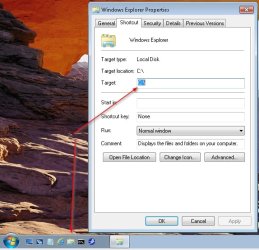
I pinned Windows Explorer to the Taskbar (Quick Launch bar actually) then changed the Target to C:\. Now when I open Windows Explorer it opens to the root of the C: drive.

WEOpenToC.jpg
 

My Computer

Computer type
PC/Desktop
Computer Manufacturer/Model Number
Lenovo IdeaCenter 450
OS
Windows 10 Pro X64
CPU
Intel Quad Core i7-4770 @ 3.4Ghz
Memory
16.0GB PC3-12800 DDR3 SDRAM 1600 MHz
Graphics Card(s)
Intel Integrated HD Graphics
Sound Card
Realtek HD Audio
Monitor(s) Displays
HP 22" LCD
Screen Resolution
1680 x 1050
Hard Drives
250GB Samsung EVO SATA-3 SSD
2TB Seagate ST2000DM001 SATA-2
1.5TB Seagate ST3150041AS SATA
Keyboard
Dell USB
Mouse
Lenovo USB
Internet Speed
Cable via Road Runner 3MB Upload, 30MB Download
Antivirus
Windows Defender, MBAM Pro, MBAE
Browser
Seamonkey
Other Info
UEFI/GPT
PLDS DVD-RW DH16AERSH
Thanks for responses.
I run in Classic Mode. Normally I right click Start and then select Explorer.
I also have Explorer on the taskbar. I believe(??) Win7 did this during install as don't recall putting it on taskbar.
Never really use the taskbar icon. Just tried it and ended up in Libraries.
Then tried Start right click, Explorer, and ended up in same place (libraries).
So don't know what happened to correct it.

Ztruker:
Thanks. Changed it.
Would be nice it had ability to go to last used directory - or - default (c:\)

Interesting, the Explorer Taskbar Icon and Properties Target is INDEPENDENT of starting Explorer from Start and using right click. With change in Taskbar targer to "C:\" I end up there. With right click on Start I end up in Libraries.
 

My Computer

Computer type
PC/Desktop
Computer Manufacturer/Model Number
build -
OS
Win 7 Pro x32
CPU
Intel I5-4690K
Motherboard
ASUS H-97Plus
Memory
8 GB
Graphics Card(s)
On Board
Sound Card
On Board
Other Info
ASUS MOBO Issues never resolved even by ASUS:
1) MOBO will NOT boot from other than the Default HDD drive.
2) MOBO will NOT boot Most DOS based CDs
also have Explorer on the taskbar. I believe(??) Win7 did this during install as don't recall putting it on taskbar.
Yes, that is what happens with a default/new install of Win7 but it can be removed, right-click and Unpin.
 

My Computer

Computer type
PC/Desktop
Computer Manufacturer/Model Number
Customs, Dell, Gateway, HP, Toshiba, Acer, ASUS
OS
Windows 7 Ultimate 64-bit, Windows 8.1 64-bit, Mac OS X 10.10, Linux Mint 17, Windows 10 Pro TP
Keyboard
Microsoft
Mouse
Microsoft
Back
Top