Boyyyyyyyyyyy you have always rocked! I come to you soooooo beaten down, trying absolutely everything.
Have spent months on this.......
Uncertain where it came from or when but in my TEMP folder is fxsapidebuglog.txt just SITS THERE and never clears.. Have restarted explorer.
I have tried unlockers, I have tried safemode,admin. Nope. Have looked for regedit disabler-reg files. NOPE
It just sits there. Made a dir and moved it to it, rmdir never clears it. All Admin/unlockers say its gone, but its still there.
**You know how we ALL obsess of something silly and little. Wellllll for me on the internet and computers of 30 years, THIS IS IT
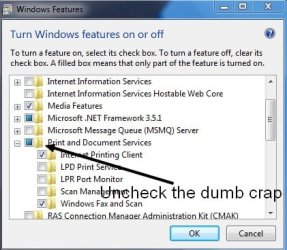
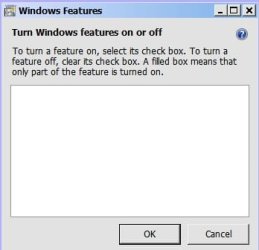
Have gone to Windows features, nothing ever comes up to enable/uninstall or disable. Always blank. UGHHHHHHH
Have reinstalled-to-uninstall, never works. Have turned off sysrestore and tried everything again. Have tried reg cleaners I have depended on for years. NOPE.
I can pull it up with wfs.exe, no way to disable .........
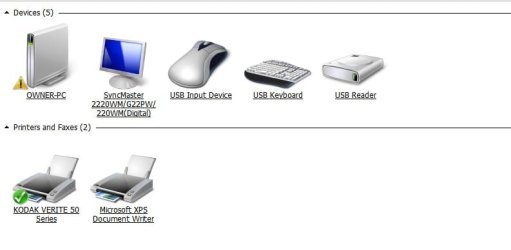
Have tried Device manager.
I must say FAXES are a thing of the past......no one in my large city even does them anymore more.
BUT that is stilllllllllllllllll there, always looking me in the face.
thank you thank you for my future sanity!
ps just tried my always-great technique of admin/7zip, make an archive, delete original file. NOPE
win7 professional 32bit
Have spent months on this.......
Uncertain where it came from or when but in my TEMP folder is fxsapidebuglog.txt just SITS THERE and never clears.. Have restarted explorer.
I have tried unlockers, I have tried safemode,admin. Nope. Have looked for regedit disabler-reg files. NOPE
It just sits there. Made a dir and moved it to it, rmdir never clears it. All Admin/unlockers say its gone, but its still there.
**You know how we ALL obsess of something silly and little. Wellllll for me on the internet and computers of 30 years, THIS IS IT
Have gone to Windows features, nothing ever comes up to enable/uninstall or disable. Always blank. UGHHHHHHH
Have reinstalled-to-uninstall, never works. Have turned off sysrestore and tried everything again. Have tried reg cleaners I have depended on for years. NOPE.
I can pull it up with wfs.exe, no way to disable .........
Have tried Device manager.
I must say FAXES are a thing of the past......no one in my large city even does them anymore more.
BUT that is stilllllllllllllllll there, always looking me in the face.
thank you thank you for my future sanity!
ps just tried my always-great technique of admin/7zip, make an archive, delete original file. NOPE
win7 professional 32bit
Last edited:
My Computer
- OS
- XP Pro-Hm