Solved Win7 included 'Codecs'

Roderunner

Exterminator
Guru
Gold Member
VIP
Local time
12:05 AM
Messages
2,362
Location
Scotland
Hi, how do I find what 'Codecs' are included in Home Prem 32bit OS?
 

My Computer

Computer Manufacturer/Model Number
Look in my Signature.
OS
Win7 H.Prem. 32bit+SP1
Loads of information here: Codecs: frequently asked questions

Included in the link is this snippet:


If you need to see a list of the Windows Media Player components and codecs installed on your computer, do the following:
  1. On the Help menu, click About Windows Media Player.
    If the Help menu is not visible, click Organize, point to Layout, and then select Show menu bar.
  2. On the About Windows Media Player dialog box, click Technical Support Information.
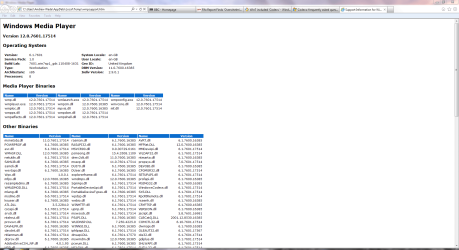
    Your web browser will open a page that includes information about the related binary files, codecs, filters, plug-ins, and services installed on your computer. A technical support person might be able to use this detailed information to help you troubleshoot problems on your computer.
WMP Codecs.PNG
 
Last edited:

My Computer

Computer Manufacturer/Model Number
HP Pavilion Elite 495UK
OS
Windows 7 Ultimate SP1 64-Bit
CPU
Intel Core i7 870 @ 2.93GHz
Motherboard
MSI 2A9C (CPU1)
Memory
8Gb Dual-Channel DDR3 @ 664MHz
Graphics Card(s)
nVidia GeForce GTX 460 1024MB dedicated RAM
Sound Card
Realtek HD Audio
Monitor(s) Displays
HP2310i
Screen Resolution
1920 x 1080
Hard Drives
1x1954GB Hitachi HDS22020ALA 330 (RAID), 1x1954GB Hitachi External for backup and storage
PSU
460W
Case
HP Elite
Cooling
Air cooled
Keyboard
Logitech K750 solar-powered keyboard
Mouse
Logitech Wireless M180 mouse
Internet Speed
2Mb
Other Info
Pure Avanti Flow Internet Radio with iPod Dock, 64Gb iPod, HP USB Speakers, Sony MDR-V500 Headphones, Sony Vaio F-Series Laptop
In the control panel, put: Control Panel\All Control Panel Items\Performance Information and Tools\Advanced Tools, in the address bar. Select "View advanced system details in System Information. In there, hit the + by Components. Hit the + by Multimedia. There you can view your video or audio codecs.

 

My Computer

Computer Manufacturer/Model Number
Sager Midern Computer, Inc.
OS
Microsoft Windows 7 Home Premium x64
CPU
intel core i5 M560 @2.67 GHz
Memory
8192MB RAM
Graphics Card(s)
GeForce GT 425M (1024MB DDR3 RAM)
Sound Card
Creative Go!
Screen Resolution
1920 x 1080
Hard Drives
Hitachi
476939MB
Case
Laptop
Keyboard
It's got a number pad, not every laptop has that.
Mouse
HP laser mouse
In the control panel, put: Control Panel\All Control Panel Items\Performance Information and Tools\Advanced Tools, in the address bar. Select "View advanced system details in System Information. In there, hit the + by Components. Hit the + by Multimedia. There you can view your video or audio codecs.
Thank You.gif
You have just taught an old dog a new trick.
 

My Computer

Computer Manufacturer/Model Number
Look in my Signature.
OS
Win7 H.Prem. 32bit+SP1
You're very welcome. Pleased we could help you.
 

My Computer

Computer Manufacturer/Model Number
HP Pavilion Elite 495UK
OS
Windows 7 Ultimate SP1 64-Bit
CPU
Intel Core i7 870 @ 2.93GHz
Motherboard
MSI 2A9C (CPU1)
Memory
8Gb Dual-Channel DDR3 @ 664MHz
Graphics Card(s)
nVidia GeForce GTX 460 1024MB dedicated RAM
Sound Card
Realtek HD Audio
Monitor(s) Displays
HP2310i
Screen Resolution
1920 x 1080
Hard Drives
1x1954GB Hitachi HDS22020ALA 330 (RAID), 1x1954GB Hitachi External for backup and storage
PSU
460W
Case
HP Elite
Cooling
Air cooled
Keyboard
Logitech K750 solar-powered keyboard
Mouse
Logitech Wireless M180 mouse
Internet Speed
2Mb
Other Info
Pure Avanti Flow Internet Radio with iPod Dock, 64Gb iPod, HP USB Speakers, Sony MDR-V500 Headphones, Sony Vaio F-Series Laptop
Back
Top