
Win7 Partition depends on Vista's one

Muzzy

New member
Local time
4:21 PM
Messages
4
Location
Poland
Hi,

I've instaled Win 7 as a second system next to My Vista (both x64). Now I'm emotionally ready to get rid of Vista for number of reasons. Of course Win7 become fully operational and "personalized" system so I don't wont to reinstal Win7...just remove Vista. But my Win7 needs Vista's partition. In magazine I have following description:
"Vista name" D:
(size)
healthy (System, Active, Primary)

"Win7 name" C:
(size)
healthy (Boot, Pagefile, backup, primary)

How can I move "required stuff" to C: to be able to delete D: partition?

thanks
Muzzy
 

My Computer My Computer

At a glance

Windows 7 x64 UltimateIntel Q66004x2GBGF 8800GT
OS
Windows 7 x64 Ultimate
CPU
Intel Q6600
Motherboard
ASUS P5K PRO
Memory
4x2GB
Graphics Card(s)
GF 8800GT
Sound Card
HDA on MB + SB X-Fi Xtreme
Monitor(s) Displays
1x19", 1x17", 1x32"
Screen Resolution
2x 1280x1024 + 1x1366x768
Hard Drives
2x250 RAID0 + 1x 1,5TB
Hello Muzzy, welcome to Seven Forums!


Before we make any specific recommendations will you please post a snip/screen-shot of the entire disk management drive map with a full description as to which drive/partition is which, so we can see what you have going on as there may be a fairly simple way to resolve the situation.

In the Windows start menu right click computer and click manage, in the left pane of the "Computer Management" window that opens click disk management and post a snip of that.


How to Upload and Post a Screenshot and File in Seven Forums
 

My Computer My Computer

At a glance

W 7 64-bit UltimateIntel Q9550 Yorkfield8GB Dominator 8500C5DATI : XFX 5870
Computer Manufacturer/Model Number
* BFK Customs *
OS
W 7 64-bit Ultimate
CPU
Intel Q9550 Yorkfield
Motherboard
ASUS P5Q Pro
Memory
8GB Dominator 8500C5D
Graphics Card(s)
ATI : XFX 5870
Sound Card
Realtek HD Audio 7-1
Monitor(s) Displays
1x 47" LCD HDMI & 3x 26" LCD HDMI
Screen Resolution
1920x1080P & 1920x1200
Hard Drives
1x 80GB Intel X25-M G2 SSD : 1x 500GB & 1x 640GB WD Caviar Black(s)
PSU
Corsair 620HX
Case
Cooler Master RC-690
Cooling
Tuniq Tower 120, 2x 140mm and 3x 120mm case fans
Keyboard
Microsoft 500
Mouse
Razer Diamondback 3G
Internet Speed
14 Mb/s
Other Info
1x Koutech 3Gb/s SATA HDD Hot Swap Rack
First, thanks for warm welcome
Second, for quick response

If it comes to the drives map the previous description was taken from disk management. I just skip the screenshot cause I wanted to save you from reading polish :) (btw your nick is Bosy Dzieciak). But if you insist...
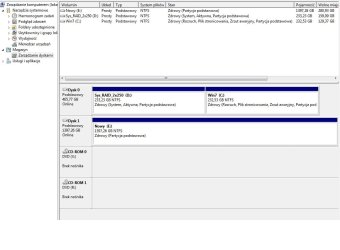
Hope this clarified the case. Just to make sure, what I want do is to get rid of partition C: called "Sys_RAID_2x250" (this partiton and the Win7 are on the RAID0 disk as you may conclude from the name:)).


Thanks and regards
Muzzy
 

My Computer My Computer

At a glance

Windows 7 x64 UltimateIntel Q66004x2GBGF 8800GT
OS
Windows 7 x64 Ultimate
CPU
Intel Q6600
Motherboard
ASUS P5K PRO
Memory
4x2GB
Graphics Card(s)
GF 8800GT
Sound Card
HDA on MB + SB X-Fi Xtreme
Monitor(s) Displays
1x19", 1x17", 1x32"
Screen Resolution
2x 1280x1024 + 1x1366x768
Hard Drives
2x250 RAID0 + 1x 1,5TB
..and the screen :)
 

Attachments

  • Disks map.jpg
    Disks map.jpg
    62.3 KB · Views: 19

My Computer My Computer

At a glance

Windows 7 x64 UltimateIntel Q66004x2GBGF 8800GT
OS
Windows 7 x64 Ultimate
CPU
Intel Q6600
Motherboard
ASUS P5K PRO
Memory
4x2GB
Graphics Card(s)
GF 8800GT
Sound Card
HDA on MB + SB X-Fi Xtreme
Monitor(s) Displays
1x19", 1x17", 1x32"
Screen Resolution
2x 1280x1024 + 1x1366x768
Hard Drives
2x250 RAID0 + 1x 1,5TB
I just wanted to make sure, this tutorial at the link below is what to do and how to do it; have a look and be sure to post back with any questions you may have and to keep us informed.

It would be better/safer if you are able to disconnect the Disk 1 E: before you start and when finished and Windows 7 is booting good all on its own, power down the PC and reconnect that HDD.


Partition : Recover Space Used by an Older OS
 

My Computer My Computer

At a glance

W 7 64-bit UltimateIntel Q9550 Yorkfield8GB Dominator 8500C5DATI : XFX 5870
Computer Manufacturer/Model Number
* BFK Customs *
OS
W 7 64-bit Ultimate
CPU
Intel Q9550 Yorkfield
Motherboard
ASUS P5Q Pro
Memory
8GB Dominator 8500C5D
Graphics Card(s)
ATI : XFX 5870
Sound Card
Realtek HD Audio 7-1
Monitor(s) Displays
1x 47" LCD HDMI & 3x 26" LCD HDMI
Screen Resolution
1920x1080P & 1920x1200
Hard Drives
1x 80GB Intel X25-M G2 SSD : 1x 500GB & 1x 640GB WD Caviar Black(s)
PSU
Corsair 620HX
Case
Cooler Master RC-690
Cooling
Tuniq Tower 120, 2x 140mm and 3x 120mm case fans
Keyboard
Microsoft 500
Mouse
Razer Diamondback 3G
Internet Speed
14 Mb/s
Other Info
1x Koutech 3Gb/s SATA HDD Hot Swap Rack
Hi Bare Foot Kod,

First of all thanks for help. Can't say I solved the problem the way I wanted but it's temporary. I needed my PC back alive asap so I used let's say half a solution. But your help let me understand the boot related actions and within few days I'll be able to fix it.

Second thing is I have one comment to your tutorials. You have your help organized with set of tutorials encapsulated one in another. In one of them you suggest to use PW Bootable CD. If I were you I'd extended it with info that PWBC do not support RAID. As a result wiping the partition causes the raid matrix is crashed after such operation. It's better to use dd command directly (e.g. dd if=\dev\zero of=\dev\sdXY) but I wouldn't recommend zeroing any of disk/partition while having RAID.
After that you won't be also able to manage partition properly with PWBC. EASEUS is also useless (bootable one only, cause the standard one can support RAID).
I'd recommend to use GParted as a tool you can work with RAID


If I'll come up with some other conclusions from my fight with boot migration I'll add it.

Regards
Muzzy
 

My Computer My Computer

At a glance

Windows 7 x64 UltimateIntel Q66004x2GBGF 8800GT
OS
Windows 7 x64 Ultimate
CPU
Intel Q6600
Motherboard
ASUS P5K PRO
Memory
4x2GB
Graphics Card(s)
GF 8800GT
Sound Card
HDA on MB + SB X-Fi Xtreme
Monitor(s) Displays
1x19", 1x17", 1x32"
Screen Resolution
2x 1280x1024 + 1x1366x768
Hard Drives
2x250 RAID0 + 1x 1,5TB
Glad you found a solution though it may be temporary and thanks for the info.
 

My Computer My Computer

At a glance

W 7 64-bit UltimateIntel Q9550 Yorkfield8GB Dominator 8500C5DATI : XFX 5870
Computer Manufacturer/Model Number
* BFK Customs *
OS
W 7 64-bit Ultimate
CPU
Intel Q9550 Yorkfield
Motherboard
ASUS P5Q Pro
Memory
8GB Dominator 8500C5D
Graphics Card(s)
ATI : XFX 5870
Sound Card
Realtek HD Audio 7-1
Monitor(s) Displays
1x 47" LCD HDMI & 3x 26" LCD HDMI
Screen Resolution
1920x1080P & 1920x1200
Hard Drives
1x 80GB Intel X25-M G2 SSD : 1x 500GB & 1x 640GB WD Caviar Black(s)
PSU
Corsair 620HX
Case
Cooler Master RC-690
Cooling
Tuniq Tower 120, 2x 140mm and 3x 120mm case fans
Keyboard
Microsoft 500
Mouse
Razer Diamondback 3G
Internet Speed
14 Mb/s
Other Info
1x Koutech 3Gb/s SATA HDD Hot Swap Rack
Back
Top