

- Local time
- 8:39 PM
- Messages
- 603
Ok I have tried everything mentioned in this thread with no results http://www.sevenforums.com/general-discussion/27326-no-autorun.html
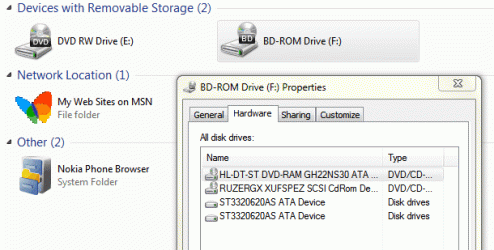
What I have also noticed is that my DVD shows up as two drives see attached. The other thing is what I found below
The above one I could not find to I did a search of my registry and found this **del.NoDriveTypeAutoRun in the HKEY_CURRENT_USER\Software\Microsoft\Windows\CurrentVersion\Policies\Explorer . Not sure what to do about this if anything
What I have also noticed is that my DVD shows up as two drives see attached. The other thing is what I found below
Open regedit and navigate to:
HKEY_LOCAL_MACHINE\Software\Microsoft\Windows\CurrentVersion\Policies\Explorer
and then,
HKEY_CURRENT_USER\Software\Microsoft\Windows\CurrentVersion\Policies\Explorer
Here you will find a key called "NoDriveTypeAutoRun" and probably set to 255. THATS THE PROBLEM.
The above one I could not find to I did a search of my registry and found this **del.NoDriveTypeAutoRun in the HKEY_CURRENT_USER\Software\Microsoft\Windows\CurrentVersion\Policies\Explorer . Not sure what to do about this if anything
Attachments
My Computer
At a glance
Windows 7 Pro 64 bitIntel(R) Core(TM) i7 CPU 870 @ 2.93GHz4GBNVIDIA GeForce GTX 470
- Computer Manufacturer/Model Number
- Proline
- OS
- Windows 7 Pro 64 bit
- CPU
- Intel(R) Core(TM) i7 CPU 870 @ 2.93GHz
- Motherboard
- H55-G43(MS-7638)
- Memory
- 4GB
- Graphics Card(s)
- NVIDIA GeForce GTX 470
- Sound Card
- Onboard
- Monitor(s) Displays
- Proline LCD 19 inch
- Screen Resolution
- 1280 x 1024
- Hard Drives
- 2 x SATA 250 Gig 1 x External 2TB
- PSU
- RX 730 SS
- Case
- Proline
- Cooling
- Standard
- Keyboard
- PS2
- Mouse
- PS2
- Internet Speed
- To embarrassed to tell lol


