Solved Win7 Pro Boot Time dropped (5sec to 40sec)

flano77

New member
Local time
8:20 AM
Messages
16
Hi All,

Now I'm just talking 'Windows'. So from when Windows splash screen 'very first' appears until I see desktop. Fresh install of Win 7 Pro 64 bit with updates, etc on my new system (inc SSD) meant that the dots only barely got formed to Win Logo then I'd get desktop. :D Great!! But then without actually having done much since it is now out to 40 sec. I know this is still considered OK but different to 5 sec right. :sarc:

Any thoughts? If I find the answer I will repost - I may try new fresh install again & check after each step/update/install. At 5 seconds I would have never used Sleep mode again. :cool:

Cheers,
Flano..
 

My Computer My Computer

At a glance

Win7 Pro 64 SP1 (& Win7 Home Pr 64 SP1)Intel i7-3770 (& Intel i7-920)16GB Dual DDR3 (& 9GB Tri DDR3)2GB Radeon HD 7770 (& 1GB GeForce GT220)
Computer Manufacturer/Model Number
Dell XPS 8500 (& XPS435MT)
OS
Win7 Pro 64 SP1 (& Win7 Home Pr 64 SP1)
CPU
Intel i7-3770 (& Intel i7-920)
Memory
16GB Dual DDR3 (& 9GB Tri DDR3)
Graphics Card(s)
2GB Radeon HD 7770 (& 1GB GeForce GT220)
Sound Card
Integrated 7.1 (both)
Monitor(s) Displays
Dell ST2310 23"W (both)
Screen Resolution
1920 x 1080 (both)
Hard Drives
C:\ 256GB OCZ SSD (& 120GB OCA SSD)
E:\ 3TB WD30EZRX (& 2TB WD20EARS)
Internet Speed
NBN 100MB
flano,

Install CCleaner:
CCleaner - PC Optimization and Cleaning - Free Download

list of STARTUP PROGRAMS

CCleaner | Tools
icon | Startup button | Windows tab |
click on Save to text file button (bottom right side) |
accept Startup.txt as file name | SAVE button

list of SCHEDULED TASKS

CCleaner | Tools
icon | Startup button | Scheduled Tasks tab |
click on Save to text file button (bottom right side) |
enter Scheduled Tasks as File name | Save button

List of INSTALLED PROGRAMS

CCleaner | Tools
icon | Uninstall button |
click on Save to text file button (bottom right side) |
accept install.txt as File name | Save button


UPLOAD, as an attachment, the startup.txt file
UPLOAD, as an attachment, the Scheduled Tasks.txt file
UPLOAD, as an attachment, the install.txt file.

HOW TO UPLOAD
Post a File or Screenshot in Seven Forums
 

My Computer My Computer

At a glance

MS Windows 7 Ultimate SP1 64-bitAMD A10-4600M6.00 GB Dual-Channel DDR3 @ 798MHz (11-11-12-28)AMD Radeon HD 7660G
Computer Manufacturer/Model Number
Toshiba Satellite S875D-S7239 laptop
OS
MS Windows 7 Ultimate SP1 64-bit
CPU
AMD A10-4600M
Motherboard
AMD Pumori (Socket FT1)
Memory
6.00 GB Dual-Channel DDR3 @ 798MHz (11-11-12-28)
Graphics Card(s)
AMD Radeon HD 7660G
Sound Card
High Definition Audio Device
Monitor(s) Displays
Generic PnP Monitor (1600x900@60Hz)
Screen Resolution
1600x900@60Hz
Hard Drives
SSD 119GB Corsair CSSD-V128GB2 ATA Device
Keyboard
Standard PS/2 Keyboard
Mouse
HP Wireless Optical Mobile Mouse Model FHA-3410
Internet Speed
What the local pub, local coffee shop offers.
Other Info
Optical Drive:MATSHITA BD-CMB UJ160B ATA Device


Also have an Asus ha1002xp netbook with Win 7 Ultimate installed.

My Computer My Computer

At a glance

Win7 Pro 64 SP1 (& Win7 Home Pr 64 SP1)Intel i7-3770 (& Intel i7-920)16GB Dual DDR3 (& 9GB Tri DDR3)2GB Radeon HD 7770 (& 1GB GeForce GT220)
Computer Manufacturer/Model Number
Dell XPS 8500 (& XPS435MT)
OS
Win7 Pro 64 SP1 (& Win7 Home Pr 64 SP1)
CPU
Intel i7-3770 (& Intel i7-920)
Memory
16GB Dual DDR3 (& 9GB Tri DDR3)
Graphics Card(s)
2GB Radeon HD 7770 (& 1GB GeForce GT220)
Sound Card
Integrated 7.1 (both)
Monitor(s) Displays
Dell ST2310 23"W (both)
Screen Resolution
1920 x 1080 (both)
Hard Drives
C:\ 256GB OCZ SSD (& 120GB OCA SSD)
E:\ 3TB WD30EZRX (& 2TB WD20EARS)
Internet Speed
NBN 100MB
WIN | type MSCONFIG | ENTER | STARTUP tab
uncheck ALL except for:
Code:
MSC    "c:\Program Files\Microsoft Security Client\msseces.exe" -hide -runkey

REBOOT!

don't worry. You've not deleted anything, but simply told win 7 not to run those others at startup time. They'll still be run when needed.

========================================================

Please carry out following:
PHP:
# ************************************************************
# list of installed software based upon software\microsoft\windows\currentversion\uninstall
# Places InstalledPgms.TXT on your DESKTOP
#
# Start copying with very next line; Copy thru 2nd EXIT; Paste into PowerShell using right-click
$array = @()
$computername = $env:computername
$UninstallKey="SOFTWARE\\Microsoft\\Windows\\CurrentVersion\\Uninstall" 
$reg=[microsoft.win32.registrykey]::OpenRemoteBaseKey('LocalMachine',$computername) 
$regkey=$reg.OpenSubKey($UninstallKey) 
#Retrieve an array of string that contain all the subkey names
$subkeys=$regkey.GetSubKeyNames() 
foreach($key in $subkeys){
   $thisKey=$UninstallKey+"\\"+$key 
   $thisSubKey=$reg.OpenSubKey($thisKey) 
   $obj = New-Object PSObject
   $obj | Add-Member -MemberType NoteProperty -Name "DisplayName" -Value $($thisSubKey.GetValue("DisplayName"))
   $obj | Add-Member -MemberType NoteProperty -Name "DisplayVersion" -Value $($thisSubKey.GetValue("DisplayVersion"))
#  $obj | Add-Member -MemberType NoteProperty -Name "Version" -Value $($thisSubKey.GetValue("Version"))
#  $obj | Add-Member -MemberType NoteProperty -Name "InstallDate" -Value $($thisSubKey.GetValue("InstallDate"))
   $obj | Add-Member -MemberType NoteProperty -Name "Publisher" -Value $($thisSubKey.GetValue("Publisher"))
#  $obj | Add-Member -MemberType NoteProperty -Name "InstallLocation" -Value $($thisSubKey.GetValue("InstallLocation"))
   $array += $obj
   } 
$array | Where-Object { $_.DisplayName } | 
select DisplayName, DisplayVersion, Publisher | 
ft -auto -wrap  > $env:userprofile\desktop\installedpgms.txt

EXIT
EXIT

# ************************************************************
# list of installed software based upon software\microsoft\windows\currentversion\uninstall
# Places InstalledPgms.TXT on your DESKTOP
# **********************INSTRUCTIONS**************************
# STEP 1 *****************************************************
# RUN PowerShell as administrator
# START ORB | type POWERSHELL | CTRL+SHIFT+ENTER key combo | ALT+Y keycombo
# ************************************************************
# STEP 2 *****************************************************
# COPY, using CTRL+C, every line down thru both EXIT statements 
# PASTE into Powershell == Right-Click at the PowerShell Prompt
#  (Ctrl+V does not work)
# ************************************************************
# ***************** NOTE - POWERSHELL VERSION*****************
# if you receive this error msg:
#  Get-WinEvent: The system can not find the path specified
# you need to update your PowerShell
# you must be using Powershell 2.0 or later.
#
# To determine your Powershell version:
#   Run PowerShell
#   enter $host.version
#   you should see at least:
# Major  Minor  Build  Revision
# -----  -----  -----  --------
# 2      0      -1     -1
#
# If you do not see the above, update your Vista/Win 7.
# ************************************************************
# *************** NOTE - EXECUTION POLICY*********************
# If you haven't set the execution policy, you may need to:
#   Run PowerShell
#   enter Set-ExecutionPolicy -executionpolicy remotesigned
#
# ************************************************************

upload the installpgms.txt file that shows up on your desktop.
thanks,
 

My Computer My Computer

At a glance

MS Windows 7 Ultimate SP1 64-bitAMD A10-4600M6.00 GB Dual-Channel DDR3 @ 798MHz (11-11-12-28)AMD Radeon HD 7660G
Computer Manufacturer/Model Number
Toshiba Satellite S875D-S7239 laptop
OS
MS Windows 7 Ultimate SP1 64-bit
CPU
AMD A10-4600M
Motherboard
AMD Pumori (Socket FT1)
Memory
6.00 GB Dual-Channel DDR3 @ 798MHz (11-11-12-28)
Graphics Card(s)
AMD Radeon HD 7660G
Sound Card
High Definition Audio Device
Monitor(s) Displays
Generic PnP Monitor (1600x900@60Hz)
Screen Resolution
1600x900@60Hz
Hard Drives
SSD 119GB Corsair CSSD-V128GB2 ATA Device
Keyboard
Standard PS/2 Keyboard
Mouse
HP Wireless Optical Mobile Mouse Model FHA-3410
Internet Speed
What the local pub, local coffee shop offers.
Other Info
Optical Drive:MATSHITA BD-CMB UJ160B ATA Device


Also have an Asus ha1002xp netbook with Win 7 Ultimate installed.

My Computer My Computer

At a glance

Win7 Pro 64 SP1 (& Win7 Home Pr 64 SP1)Intel i7-3770 (& Intel i7-920)16GB Dual DDR3 (& 9GB Tri DDR3)2GB Radeon HD 7770 (& 1GB GeForce GT220)
Computer Manufacturer/Model Number
Dell XPS 8500 (& XPS435MT)
OS
Win7 Pro 64 SP1 (& Win7 Home Pr 64 SP1)
CPU
Intel i7-3770 (& Intel i7-920)
Memory
16GB Dual DDR3 (& 9GB Tri DDR3)
Graphics Card(s)
2GB Radeon HD 7770 (& 1GB GeForce GT220)
Sound Card
Integrated 7.1 (both)
Monitor(s) Displays
Dell ST2310 23"W (both)
Screen Resolution
1920 x 1080 (both)
Hard Drives
C:\ 256GB OCZ SSD (& 120GB OCA SSD)
E:\ 3TB WD30EZRX (& 2TB WD20EARS)
Internet Speed
NBN 100MB
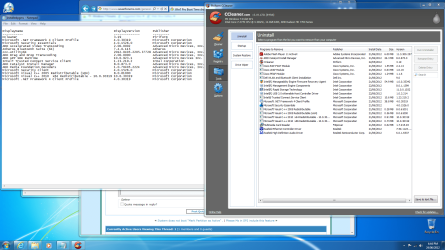
You do realize that those two install lists don't agree.
I hope that you are now satisfied with the performance of your system. May you enjoy your system.
 

My Computer My Computer

At a glance

MS Windows 7 Ultimate SP1 64-bitAMD A10-4600M6.00 GB Dual-Channel DDR3 @ 798MHz (11-11-12-28)AMD Radeon HD 7660G
Computer Manufacturer/Model Number
Toshiba Satellite S875D-S7239 laptop
OS
MS Windows 7 Ultimate SP1 64-bit
CPU
AMD A10-4600M
Motherboard
AMD Pumori (Socket FT1)
Memory
6.00 GB Dual-Channel DDR3 @ 798MHz (11-11-12-28)
Graphics Card(s)
AMD Radeon HD 7660G
Sound Card
High Definition Audio Device
Monitor(s) Displays
Generic PnP Monitor (1600x900@60Hz)
Screen Resolution
1600x900@60Hz
Hard Drives
SSD 119GB Corsair CSSD-V128GB2 ATA Device
Keyboard
Standard PS/2 Keyboard
Mouse
HP Wireless Optical Mobile Mouse Model FHA-3410
Internet Speed
What the local pub, local coffee shop offers.
Other Info
Optical Drive:MATSHITA BD-CMB UJ160B ATA Device


Also have an Asus ha1002xp netbook with Win 7 Ultimate installed.
??? They were done 5 minutes apart - what do you mean different? 1 was from CCleaner & 1 from Powershell - should they have been identical? Disabling those startup items made no difference.
Cheers,
Flano..

EDIT: See below screen shot off both run again (on same PC)
Untitled.png

EDIT: OK - just did fresh install & it was still slow until......... I disconnected the 3TB WD HDD. This drive is 'spare' only used for incremental System Images during install. But as soon as I disconnect it & boot 'windows' loads in 4-5 seconds (from when Windows splash screen 'very first' appears until I see desktop).

So is this normal? Or is it to do with advformat (which I know nothing about yet)? I read the advformat page from WD but presumed as I have Windows 7 I did not need to prep anything. Or could it be some other HDD related setting, etc?

The only thing I can think of is SSD (with OS) is on 6Gb/s SATA port but 3TB HDD is on 3Gb/s port. But all Windows is on SSD..

All help as always greatly appreciated.
Cheers,
Flano..
 
Last edited:

My Computer My Computer

At a glance

Win7 Pro 64 SP1 (& Win7 Home Pr 64 SP1)Intel i7-3770 (& Intel i7-920)16GB Dual DDR3 (& 9GB Tri DDR3)2GB Radeon HD 7770 (& 1GB GeForce GT220)
Computer Manufacturer/Model Number
Dell XPS 8500 (& XPS435MT)
OS
Win7 Pro 64 SP1 (& Win7 Home Pr 64 SP1)
CPU
Intel i7-3770 (& Intel i7-920)
Memory
16GB Dual DDR3 (& 9GB Tri DDR3)
Graphics Card(s)
2GB Radeon HD 7770 (& 1GB GeForce GT220)
Sound Card
Integrated 7.1 (both)
Monitor(s) Displays
Dell ST2310 23"W (both)
Screen Resolution
1920 x 1080 (both)
Hard Drives
C:\ 256GB OCZ SSD (& 120GB OCA SSD)
E:\ 3TB WD30EZRX (& 2TB WD20EARS)
Internet Speed
NBN 100MB
OK - found the issue I think. So for those who look at this post later my new machine was a Dell XPS 8500 with SRT off the M-SATA. Once I disabled the Accelerattion in Intel Rapid Storage Technology then the boot time reverted back to 4-5 seconds. Surprisingly when I enabled it again the boot time was still OK. So seems something went odd/wrong with the SRT & turning off/on refreshed things & all is OK at present with everything on for Startup, etc as normal.
Cheers,
Flano..

EDIT: So all was good until last week when BAM it jumped back to 40+ seconds boot time again. Well this time resetting SRT in RST did not fix it. But if I disconnect the HDD it was fine again. After a bit of stuffing around & decided to reformat the HDD & then it was all OK again at 5 sec boot time. Not sure for how long for but I know how to fix it now. I wish I could just afford extra big SSD. :)
 
Last edited:

My Computer My Computer

At a glance

Win7 Pro 64 SP1 (& Win7 Home Pr 64 SP1)Intel i7-3770 (& Intel i7-920)16GB Dual DDR3 (& 9GB Tri DDR3)2GB Radeon HD 7770 (& 1GB GeForce GT220)
Computer Manufacturer/Model Number
Dell XPS 8500 (& XPS435MT)
OS
Win7 Pro 64 SP1 (& Win7 Home Pr 64 SP1)
CPU
Intel i7-3770 (& Intel i7-920)
Memory
16GB Dual DDR3 (& 9GB Tri DDR3)
Graphics Card(s)
2GB Radeon HD 7770 (& 1GB GeForce GT220)
Sound Card
Integrated 7.1 (both)
Monitor(s) Displays
Dell ST2310 23"W (both)
Screen Resolution
1920 x 1080 (both)
Hard Drives
C:\ 256GB OCZ SSD (& 120GB OCA SSD)
E:\ 3TB WD30EZRX (& 2TB WD20EARS)
Internet Speed
NBN 100MB
Back
Top